In this article, we will show you how to perform two design patterns mainly used in business intelligence projects.
As we saw in the previous article the definition of,
Full Load
With a full load, the entire target dataset is loaded, and is then completely replaced with the latest version. No additional information, such as technical timestamps for insertion, is required.
Delta Load
The delta load is generally used to describe an addition in stages, little by little, in order to be certain that each added value brings an improvement without creating a malfunction.
What is needed?
Parameters and configurations
We created 2 global connection managers,
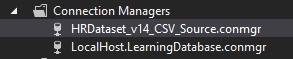
- The first one is pointing to the CSV file loaded from Kaggle.
- The second one is pointing to the SQL Server staging database.
Under the LearningDatabase database, we created the following schema and table,
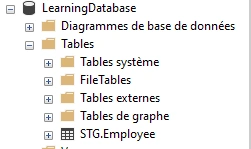
CREATE SCHEMA STG;
CREATE TABLE STG.Employee (
    [Employee_Name] varchar(50),
    [EmpID] varchar(50),
    [MarriedID] varchar(50),
    [MaritalStatusID] varchar(50),
    [GenderID] varchar(50),
    [EmpStatusID] varchar(50),
    [DeptID] varchar(50),
    [PerfScoreID] varchar(50),
    [FromDiversityJobFairID] varchar(50),
    [Salary] varchar(50),
    [Termd] varchar(50),
    [PositionID] varchar(50),
    [Position] varchar(50),
    [State] varchar(50),
    [Zip] varchar(50),
    [DOB] varchar(50),
    [Sex] varchar(50),
    [MaritalDesc] varchar(50),
    [CitizenDesc] varchar(50),
    [HispanicLatino] varchar(50),
    [RaceDesc] varchar(50),
    [DateofHire] varchar(50),
    [DateofTermination] varchar(50),
    [TermReason] varchar(50),
    [EmploymentStatus] varchar(50),
    [Department] varchar(50),
    [ManagerName] varchar(50),
    [ManagerID] varchar(50),
    [RecruitmentSource] varchar(50),
    [PerformanceScore] varchar(50),
    [EngagementSurvey] varchar(50),
    [EmpSatisfaction] varchar(50),
    [SpecialProjectsCount] varchar(50),
    [LastPerformanceReview_Date] varchar(50),
    [DaysLateLast30] varchar(50),
    [Absences] varchar(50),
	[InsertionDate] DATETIME,
	[UpdateDate] DATETIME,
	[DeletionDate] DATETIME)
1. Full Load implementation using SSIS
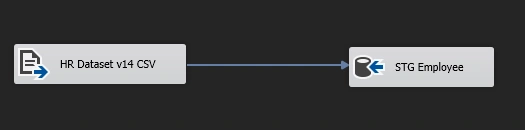
The implementation of the full load pattern is easy and simple when it comes to components.
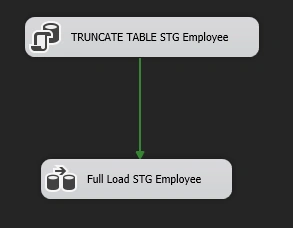
In the above Control Flow, we used,
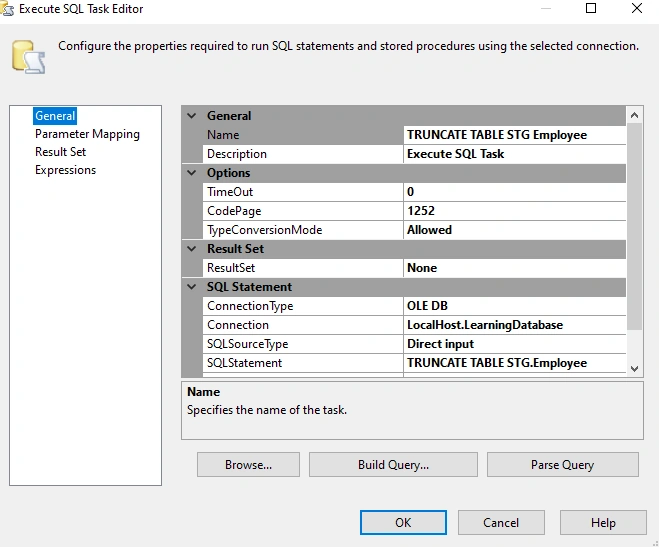
- A Data Flow task where we used a Flat File Source and OLE DB Destination.
2. Delta Load implementation using SSIS
SSIS Incremental Load means comparing the target table against the source data based on technical columns InsertionDate, UpdateDate, and DeletionDate.
The logic is like below,
- If there are any New records in Source data, then we have to insert those records in the target table.
- If there are any updated values in Source data, then we have to update those records in the target table.
- If there are any deleted values in Source data, it is recommended to keep them in the target table and precise the deletion date.
In this article, we will implement the incremental Load using the MERGE Component. In the future articles we will see other ways to implement the same pattern and we will discuss the performance of each solution.
In a separate package, we created a Control flow like below,
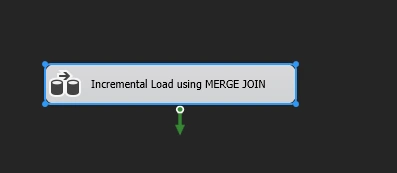
The used components in the above control flow,
- An OLE DB source getting data from the STG.Employee table in the Learning database.
- A Flat file source getting data from the CSV file.
- The MERGE JOIN component: We use the SSIS Merge Join component to make a join and merge two or more data sources. In other words, the SSIS Merge Join component allows you to merge different heterogeneous sources into one, for example, flat files, Excel files, SQL tables.
To connect the two data sources to the MERGE join, you need to sort them,
- Use a sort component
- Or, you can configure the sort in the source directly in the advanced editor
- Or, using the ORDER BY clause in the query in the OLE DB Source for the table HR.Employee
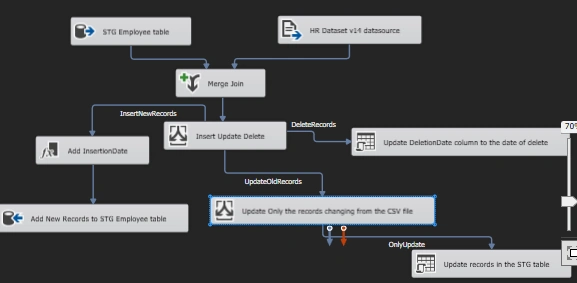
After the Merge Join, we used the Conditional Split Component to treat these 3 conditions.
- InsertNewRecords: ISNULL(EmpIDSTG) && !ISNULL(EmpIDSRC)
- UpdateOldRecords: !ISNULL(EmpIDSTG) && !ISNULL(EmpIDSRC)
- DeleteRecords: !ISNULL(EmpIDSTG) && ISNULL(EmpIDSRC)
For the insertion, we used a Derived Column to add the needed technical columns.

For the updates, we added a new condition using a Conditional Split component using with the following expression.
(Employee_NameSRC != Employee_NameSTG) && (EmpIDSRC != EmpIDSTG) && (MarriedIDSRC != MarriedIDSTG) && (MaritalStatusIDSRC != MaritalStatusIDSTG) && (GenderIDSRC != GenderIDSTG) && (EmpStatusIDSRC != EmpStatusIDSTG) && (DeptIDSRC != DeptIDSTG) && (PerfScoreIDSRC != PerfScoreIDSTG) && (FromDiversityJobFairIDSRC != FromDiversityJobFairIDSTG) && (SalarySRC != SalarySTG) && (TermdSRC != TermdSTG) && (PositionIDSRC != PositionIDSTG) &&([PositionSRC] != [PositionSTG])&& ([StateSRC] != [StateSTG] ) &&([ZipSRC] != [ZipSTG])&&([DOBSRC] != [DOBSTG])&& ([SexSRC] != [SexSTG]) &&([MaritalDescSRC] != [MaritalDescSTG]) &&([CitizenDescSRC] != [CitizenDescSTG]) &&([HispanicLatinoSRC] != [HispanicLatinoSTG]) &&([RaceDescSRC] != [RaceDescSTG]) &&([DateofHireSRC] != [DateofHireSTG]) &&([DateofTerminationSRC] != [DateofTerminationSTG]) &&([TermReasonSRC] != [TermReasonSTG]) &&([EmploymentStatusSRC] != [EmploymentStatusSTG]) &&([DepartmentSRC] != [DepartmentSTG]) &&([ManagerNameSRC] != [ManagerNameSTG]) &&([ManagerIDSRC] != [ManagerIDSTG]) &&([RecruitmentSourceSRC] != [RecruitmentSourceSTG]) &&([PerformanceScoreSRC] != [PerformanceScoreSTG]) &&([EngagementSurveySRC] != [EngagementSurveySTG]) &&([EmpSatisfactionSRC] != [EmpSatisfactionSTG]) &&([SpecialProjectsCountSRC] != [SpecialProjectsCountSTG]) &&([LastPerformanceReview_DateSRC] != [LastPerformanceReview_DateSTG]) &&([DaysLateLast30SRC] != [DaysLateLast30STG]) &&([AbsencesSRC] != [AbsencesSTG])
Then we used an OLE DB Command to insert the UPDATE query and map the input and output columns.
UPDATE [STG].[Employee]
   SET [Employee_Name] = ?
      ,[MarriedID] = ?
      ,[MaritalStatusID] = ?
      ,[GenderID] = ?
      ,[EmpStatusID] = ?
      ,[DeptID] = ?
      ,[PerfScoreID] = ?
      ,[FromDiversityJobFairID] = ?
      ,[Salary] = ?
      ,[Termd] = ?
      ,[PositionID] = ?
      ,[Position] = ?
      ,[State] = ?
      ,[Zip] = ?
      ,[DOB] = ?
      ,[Sex] = ?
      ,[MaritalDesc] = ?
      ,[CitizenDesc] = ?
      ,[HispanicLatino] = ?
      ,[RaceDesc] = ?
      ,[DateofHire] = ?
      ,[DateofTermination] = ?
      ,[TermReason] = ?
      ,[EmploymentStatus] = ?
      ,[Department] = ?
      ,[ManagerName] = ?
      ,[ManagerID] = ?
      ,[RecruitmentSource] = ?
      ,[PerformanceScore] = ?
      ,[EngagementSurvey] = ?
      ,[EmpSatisfaction] = ?
      ,[SpecialProjectsCount] = ?
      ,[LastPerformanceReview_Date] = ?
      ,[DaysLateLast30] = ?
      ,[Absences] = ?
      ,[UpdateDate] = GETUTCDATE()
 WHERE [EmpID] = ?
For the deleted records which won’t be existing in the source anymore, we decide to keep them in the staging table and add a technical update that will take the date of the delete action.
UPDATE [STG].[Employee]

SET DeletionDate = GETUTCDATE()

WHERE [EmpID] = ?
We have therefore seen two methods for making changes in the context of SSIS: one quite simple with the full load, the other more complex with the incremental, but more efficient. It must indeed be kept in mind that a tool like Microsoft SSIS is very effective in helping with the development of ETLs, but must not harm performance, which sometimes involves making the flow a little more complex.
You can find the repository here. Enjoy ! :D


Mahesh ChandPosted Feb 20, 2022, 5:31 PM
Welcome to C# Corner! Great article. Thank you!