


After struggling with this issue, the solution I used thought to share the solution with the developer community.
Solution: The reason for the issue is, by default response from SharePoint REST is in XML and the SharePoint designer workflow is not able to parse the XML and needs a JSON response. To resolve this issue we need to pass Accept and Content-Type as application/json;odata=verbose to request the headers. This way we will get a JSON response. To resolve this use the following procedure.
- Go to SharePoint 2013 designer.
- Build a Dictionary variable named "WSHearder".
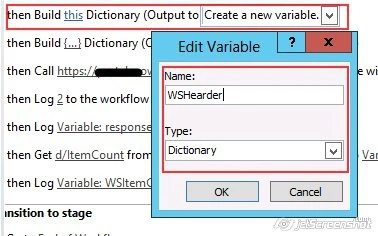
- Add two values in the newly created dictionary.
Accept = application/json;odata=verbose
Content =Type = application/json;odata=verbose
- Now select a "Call HTTP web service" action and select Properties.

- Select the newly created dictionary variable as value for "".

- Press OK and publish the workflow.
Harish KumarPosted May 24, 2019, 4:01 AM
Thanks prasad
Rupali ShindePosted Sep 28, 2015, 2:56 AM
thanks for post
Vijay SPosted Mar 25, 2015, 2:41 AM
Nice
Karthik Muthu KaruppanPosted Mar 24, 2015, 10:57 AM
useful