

Step 1: Open Expression Blend 4 -> Select Silverlight Application + Web -> Change Name and Location accordingly -> hit OK, a Blank Window appears on Artboard, Fill Background with Gradient Brush.
Step 2: Controls : Controls consists of 29 controls. We are going to discuss 5 controls; they are TextBlock Control, TextBox Control, CheckBox Control, PasswordBox Control and Button Control.
Step 3: Select Controls located to the Left-Side of Workspace or Located in the ToolBox as shown below:


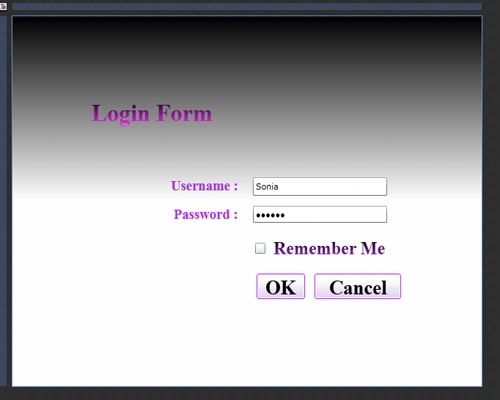
Step 4: Select TextBlock Controls and Draw a TextBlock Control on the Artboard and give it the name (Login Form) and manage the Color using Solid Color Brush or Gradient Brush as shown below:


Step 5: Again by following Step 4, Draw 2 more TextBlock Controls and Name them Username and Password as shown below:

Note: When we use TextBlock Control only Text is Visible and Block is Invisible as compared to TextBox.
Step 6: Select TextBox Control and Draw a TextBox for the Username Field and manage the Color using the Solid Color Brush or Gradient Brush as shown below:


Join the conversation! Your thoughts help the community grow.