

Please go through the previous parts
designing-and-implementing-a-data-warehouse-part-1
designing-and-implementing-a-data-warehouse-part-2
Introduction
Business Intelligence has become a buzzword in recent years as a support to decision-making. Today we can find several database systems, which include data warehousing, online analytical processing (OLAP), and data mining technologies. Data warehousing provides efficient storage, maintenance, and retrieval of data. OLAP is a service that provides a way to create ad hoc queries against the data warehouse in order to answer important business questions. Data mining is a disciple comprising several algorithms for discovering knowledge in a large bulk of data.
In order to build a data warehouse solution, we need to model a consistent architecture where the operational data will fit well in an integrated and enterprise-wide view as well as to take into consideration a handful of implementation strategies to provide a high-quality application. The design and implementation of a data warehouse solution sometimes is a very complex challenge in theory and practice. In this article, I will cover the main principles and techniques to design and implement a data warehouse, providing my own experience in such an overwhelming challenge.
This is the third article of a series of articles that I want to write in order to share my knowledge and experience in this subject matter. In this part and the next one, we will see how to implement the technical solution for a data warehouse.
Implementing the technical solution
In this section, we'll build the relational tables which support the dimensional data model that we have designed in the previous section. Then we'll see how to load these relational tables with data from the AdventureWorks database as the main data source, and finally, we're going to build the Analysis Services cubes to present the information to end-users.
Let's talk about the implementation strategies of the dimensional data model. Open the SQL Server Management Studio and create a new database; then specify a name, such as TestDW, and click OK to create it.
In order to create the dimensions and the fact tables, run the following SQL DDL statements (see Listing 1). We have added a unique key constraint for each table's business key as a clustered index in order to improve the performance when we need to fetch the dimension records based on a business key which is a very common operation in the data warehouse. The clustered indexes enable us to physically arrange the data in the dimensions table based on the values of the business key.
CREATE TABLE ProductDim (
    ProductDim_ID int IDENTITY(1, 1) NOT NULL,
    ProductBusinessID int NOT NULL,
    ProductName nvarchar(50) NOT NULL,
    Color nvarchar(15) NULL,
    SubcategoryName nvarchar(50) NOT NULL,
    CONSTRAINT PK_ProductDim PRIMARY KEY NONCLUSTERED (ProductDim_ID)
);

CREATE UNIQUE CLUSTERED INDEX ProductDim_ProductBusinessID ON ProductDim (ProductBusinessID);

CREATE TABLE CustomerDim (
    CustomerDim_ID int IDENTITY(1, 1) NOT NULL,
    CustomerBusinessId int NOT NULL,
    CustomerType char(10) NULL,
    CONSTRAINT PK_CustomerDim PRIMARY KEY NONCLUSTERED (CustomerDim_ID)
);

CREATE UNIQUE CLUSTERED INDEX CustomerDim_CustomerBusinessID ON CustomerDim (CustomerBusinessId);

CREATE TABLE RegionDim (
    RegionDim_ID int IDENTITY(1, 1) NOT NULL,
    RegionBusinessID int NOT NULL,
    RegionName nvarchar(50) NOT NULL,
    CONSTRAINT PK_RegionDim PRIMARY KEY NONCLUSTERED (RegionDim_ID)
);

CREATE UNIQUE CLUSTERED INDEX RegionDim_RegionBusinessID ON RegionDim (RegionBusinessID);

CREATE TABLE TimePeriodDim (
    TimePeriodDim_ID int IDENTITY(1, 1) NOT NULL,
    Calendar_Date datetime NOT NULL,
    Calendar_Year int NOT NULL,
    Calendar_Month int NOT NULL,
    Calendar_Quarter int NOT NULL,
    Calendar_Week int NOT NULL,
    CONSTRAINT PK_TimePeriodDim PRIMARY KEY NONCLUSTERED (TimePeriodDim_ID)
);

CREATE UNIQUE CLUSTERED INDEX TimePeriodDim_Calendar_Date ON TimePeriodDim (Calendar_Date);

CREATE TABLE SalesFact (
    SalesFact_ID int IDENTITY(1, 1) NOT NULL,
    ProductDim_ID int NOT NULL,
    CustomerDim_ID int NOT NULL,
    RegionDim_ID int NOT NULL,
    TimePeriodDim_ID int NOT NULL,
    SalesVolumes money NOT NULL,
    ShippedUnits int NOT NULL,
    CONSTRAINT PK_SalesFact PRIMARY KEY NONCLUSTERED (SalesFact_ID),
    CONSTRAINT Ref_ProductDim FOREIGN KEY (ProductDim_ID) REFERENCES ProductDim (ProductDim_ID),
    CONSTRAINT Ref_CustomerDim FOREIGN KEY (CustomerDim_ID) REFERENCES CustomerDim (CustomerDim_ID),
    CONSTRAINT Ref_RegionDim FOREIGN KEY (RegionDim_ID) REFERENCES RegionDim (RegionDim_ID),
    CONSTRAINT Ref_TimePeriodDim FOREIGN KEY (TimePeriodDim_ID) REFERENCES TimePeriodDim (TimePeriodDim_ID)
);

CREATE INDEX SalesFact_SalesFact_ID ON SalesFact (ProductDim_ID, CustomerDim_ID, RegionDim_ID, TimePeriodDim_ID);
Listing 1
Now it's time to load the tables with data from the data sources. Although in the real world, we can find multiple source systems and different ways of representing information within most businesses, such as spreadsheets, text files, and relational databases, we're going to use the AdventureWorks database shipped with SQL Server 2005 as our only data source for the data warehouse. This objective is achieved by an extract, transform, and load (ETL) process using several technologies, such as Data Transformation Services (DTS) packages in SQL Server 2000 and Integration Services in Microsoft SQL 2005 (SSIS).
In this case, we're going to populate the dimensions and fact tables using SELECT SQL statements.
The first steps are to load the data into the dimension tables from the Sales.Customer, Sales.SalesTerritory, Production.Product and Production.ProductSubcategory tables in the AdventureWorks database (see Listing 2).
INSERT INTO dbo.CustomerDim (CustomerBusinessId, CustomerType)
SELECT CustomerID AS CustomerBusinessID, CustomerType
FROM AdventureWorks.Sales.Customer;
GO

INSERT INTO dbo.RegionDim (RegionBusinessID, RegionName)
SELECT TerritoryID AS RegionBusinessID, [Name] + '-' + CountryRegionCode AS RegionName
FROM AdventureWorks.Sales.SalesTerritory;
GO

INSERT INTO dbo.ProductDim (ProductBusinessID, ProductName, Color, SubcategoryName)
SELECT p.ProductID AS ProductBusinessID, p.[Name] AS ProductName, p.Color, s.[Name] AS SubcategoryName
FROM AdventureWorks.Production.Product p
INNER JOIN AdventureWorks.Production.ProductSubcategory s
ON p.ProductSubcategoryID = s.ProductSubcategoryID;
GO

DECLARE @dtStartDate datetime;
DECLARE @dtEndDate datetime;
SET @dtStartDate = '2000-01-01';
SET @dtEndDate = '2012-01-01';

WHILE(@dtStartDate <= @dtEndDate)
BEGIN
  INSERT INTO dbo.TimePeriodDim (Calendar_Date, Calendar_Year, Calendar_Month, Calendar_Quarter, Calendar_Week)
  SELECT @dtStartDate,
         DATEPART(YEAR, @dtStartDate) AS Calendar_Year,
         DATEPART(MONTH, @dtStartDate) AS Calendar_Month,
         DATEPART(QUARTER, @dtStartDate) AS Calendar_Quarter,
         DATEPART(WEEK, @dtStartDate) AS Calendar_Week;
  SET @dtStartDate = DATEADD(DAY, 1, @dtStartDate);
END;
GO
Listing 2
The next step is to load the data into the fact table. One important point to analyze is that dimension tables use surrogate keys, and these keys are only specific to the data warehouse; thus, when we're loading data into the fact tables, a lookup step is always required to map business keys into surrogate keys.
In our case, we're integrating data within the same database system. Thus, we're going to map business keys to surrogate keys by using inner join operations as well as extract the sales-related data from the Sales.SalesOrderHeader and Sales.SalesOrderDetail tables in the AdventureWorks database. The SELECT SQL statement to load the fact table SalesFact is shown in Listing 3.
INSERT INTO SalesFactProductDim_ID, CustomerDim_ID, RegionDim_ID, TimePeriodDim_ID, SalesVolumes, ShippedUnits)
SELECT p.ProductDim_ID AS ProductDim_ID,
       c.CustomerDim_ID AS CustomerDim_ID,
       r.RegionDim_ID AS RegionDim_ID,
       t.TimePeriodDim_ID AS TimePeriodDim_ID,
       TotalDue AS SalesVolumes,
       sum(OrderQty) AS ShippedUnits
FROM AdventureWorks.Sales.SalesOrderHeader sh
INNER JOIN AdventureWorks.Sales.SalesOrderDetail sd ON sh.SalesOrderID = sd.SalesOrderID
INNER JOIN dbo.CustomerDim c ON sh.CustomerID = c.CustomerBusinessId
INNER JOIN dbo.RegionDim r ON sh.TerritoryID = r.RegionBusinessID
INNER JOIN dbo.ProductDim p ON sd.ProductID = p.ProductBusinessID
INNER JOIN dbo.TimePeriodDim t ON sh.OrderDate = t.Calendar_Date
GROUP BY p.ProductDim_ID, c.CustomerDim_ID, r.RegionDim_ID, t.TimePeriodDim_ID, TotalDue;
GO
Listing 3
Now that we have built the data warehouse and loaded the required data through the integration process, then we need to add the final component of the architecture: the multidimensional database. The relational data warehouse consolidates the underlying data sources, but the end-users need a flexible analytical capability easy to use. The solution is to build an Analysis Services database from the relational data warehouse. Next, we'll adjust the dimensional model created before to better support cubes.
Let's start the solution by using the BI Development Studio in order to create a new Analysis Services project (see Figure 1). This will create a new local working directory that contains the definition of the underlying objects. Later when we have finished designing the objects, we can deploy the project to a server running an Analysis Services instance.
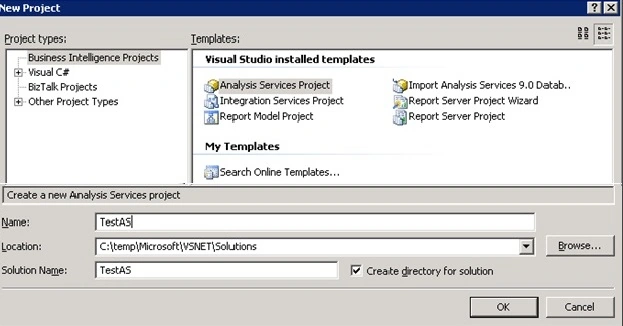
Figure 1
The first step is to add a data source and specify the type of database and connection information. In the Solution Explorer window, navigate to the Data Sources node in the tree, then right-click and select the New Data Source option in order to launch the Data Source Wizard. In the Select how to define the connection page, click on the New button, and the Connection Manager window appears. Set the server name and select the data warehouse database and click on the OK button (see Figure 2).

Figure 2
Next, in the Data Source Wizard, click on the Next button, and in the Impersonation Wizard page, select the Use the credentials of the current user option. Click on the Next button and finish the wizard (see Figure 3).

Figure 3
Now we'll select the parts of the data source to be analyzed by defining a logical view called a data source view (DSV). Using data source views, you can also define relationships between the objects as well as add calculated columns. This is an abstraction layer between the dimensional database and the data source when you're building the cubes.
Let's define five data source views to select the dimensions and fact tables from the data source. In the Solution Explorer window, navigate to the Data Source Views node in the tree, then right-click and select the New Data Source View option in order to launch the Data Source View Wizard. Click on the Next button in the Select Data Source page, choose the previously created data source, and click on the Next button, and the Select Tables and Views page appears. You select all the tables from the data source by clicking on the >> button (see Figure 4).
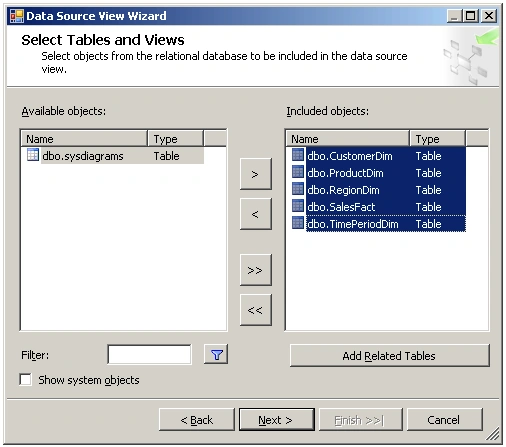
Figure 4
Then click on the Next and Finish buttons. You can see in the data source view (see Figure 5) that we don't need to create relationships between objects because the wizard detects these relationships based on the primary key and any referential integrity constraints. In this case, we need more relationships; it's very simple in the creation process. You drag and drop a foreign key column from the source table to the corresponding primary key in the destination table.

Figure 5
Now it's time for the creation of the cube. In the Solution Explorer window, navigate to the Cubes node in the tree, then right-click and select the New Cube option in order to launch the Cube Wizard. Click on the Next button in the Select Build Method page, select the Build the cube using a data source option and click on the Next button (see Figure 6).
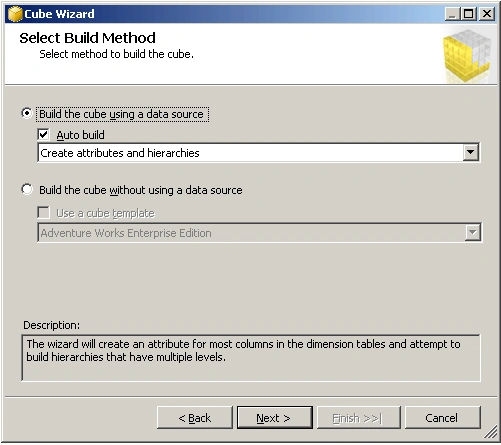
Figure 6
In the Select Data Source View page, select the previously defined data source view and click on the Next button. The next two pages will allow you to choose a data source view and analyze it in order to identify potential dimensions and facts tables. Click on the Next button and the Identify Fact and Dimension Tables page; you can see that the wizard detects the CustomerDim, ProductDim, RegionDim, and TimePeriodDim as the dimension tables as well as the SalesFact and TimePeriodDim as the fact tables. You must uncheck the fact option for the TimePeriodDim table. You must also configure manually the TimePeriodDim table as a time dimension (see Figure 7).

Figure 7
Click on the Next button, and the Select Time Periods page will appear, which enables a map of the property names of the time dimension in the cube with the property names of the time dimension table (see Figure 8).
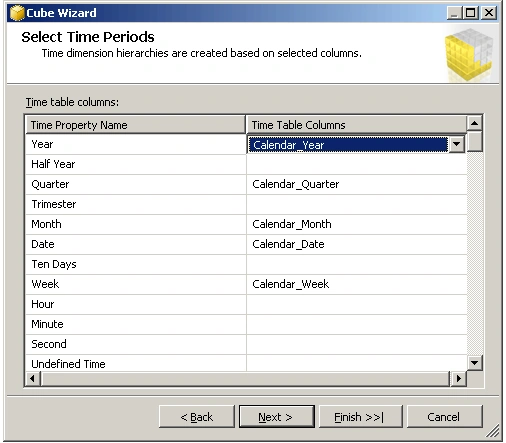
Figure 8
Conclusion
In this article, I've started to show how to build the data warehouse using Microsoft technologies. In next article, I will finish on the solution.
Gowtham RajamanickamPosted Apr 25, 2015, 6:37 AM
good
Michael SmitPosted May 13, 2013, 4:39 PM
This was a great article. Would really like to see part 4. Was it ever done?