Today I am going to write something about how we can add CRUD views to our site along with a picture, and show them at views. Here I will go step by step. I am using VS2015 MVC 5.
- Open your Visual studio and create a new project. Please take care of the picture and watch it carefully.
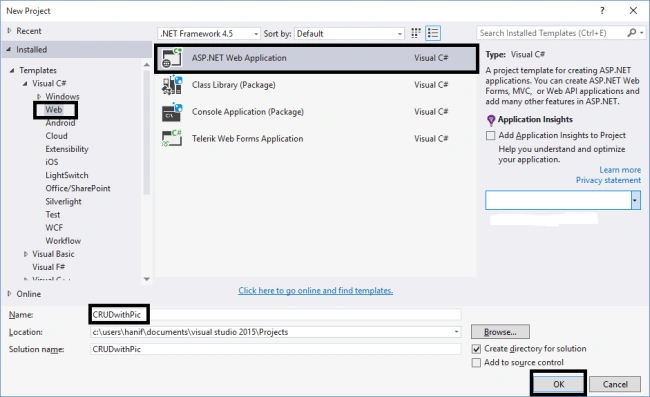
Next follow this picture.
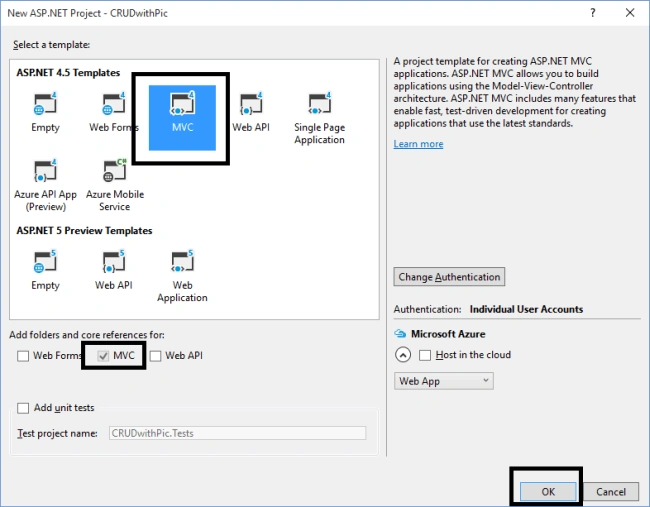
Now click on the Models folder and add a new class, name it File (for our pictures purpose). Paste the following code in it.
- public class File
- {
- public int FileId { get; set; }
- [StringLength(255)]
- public string FileName { get; set; }
- [StringLength(100)]
- public string ContentType { get; set; }
- public byte[] Content { get; set; }
- public FileType FileType { get; set; }
- public int UserId { get; set; }
- public virtual User User { get; set; }
- }
Click again on models folder and add another class, name it FileType.cs, paste this code on it.
- public enum FileType
- {
- Avatar = 1, Photo
- }
Now add another class to the models folder, name it User.cs (Image) and paste the following code on it.
Note: this is the class in which we define our data context.
- public class User
- {
-
- public int ID { get; set; }
- [Required]
- public string Name { get; set; }
- public string LastName { get; set; }
- public string Province { get; set; }
- public string District { get; set; }
- public byte[] Photo { get; set; }
- [Required]
- public string Group{ get; set; }
- [Required]
- public string RH { get; set; }
- [Required]
- public string Location { get; set; }
- [Required]
- public string Mobile { get; set; }
- public virtual ICollection<File> Files { get; set; }
- }
-
- public class UserDBContext : DbContext
- {
- public DbSet<User> Users { get; set; }
- public DbSet<File> Files { get; set; }
- }
Yes! that was our modeling. Now go to the controllers folder and a new controller with views. Add this code on it. P
lease remember that if something went wrong with the code change your database connection string name and database name can be found in web.config file.
- public class UsersController : Controller
- {
- private UserDBContext db = new UserDBContext();
-
-
- public ActionResult Index()
- {
- return View(users);
- }
-
-
- public ActionResult Details(int? id)
- {
- if (id == null)
- {
- return new HttpStatusCodeResult(HttpStatusCode.BadRequest);
- }
- User user = db.Users.Include(s => s.Files).SingleOrDefault(s => s.ID == id);
-
- if (user == null)
- {
- return HttpNotFound();
- }
- return View(user);
- }
-
-
- public ActionResult Create()
- {
- return View();
- }
-
-
- [Authorize]
- [HttpPost]
- [ValidateAntiForgeryToken]
- public ActionResult Create([Bind(Include = "ID,Name,LastName,Province,District,Photo,Group,RH,Location,Mobile")] User user, HttpPostedFileBase upload)
- {
- if (ModelState.IsValid)
- {
- if (upload != null && upload.ContentLength > 0)
- {
- var avatar = new File
- {
- FileName = System.IO.Path.GetFileName(upload.FileName),
- FileType = FileType.Avatar,
- ContentType = upload.ContentType
- };
- using (var reader = new System.IO.BinaryReader(upload.InputStream))
- {
- avatar.Content = reader.ReadBytes(upload.ContentLength);
- }
- user.Files = new List<File> { avatar };
- }
- db.Users.Add(user);
- db.SaveChanges();
- return RedirectToAction("Index");
- }
-
- return View(user);
- }
-
-
- public ActionResult Edit(int? id)
- {
- if (id == null)
- {
- return new HttpStatusCodeResult(HttpStatusCode.BadRequest);
- }
- User user = db.Users.Find(id);
- if (user == null)
- {
- return HttpNotFound();
- }
- return View(user);
- }
-
-
- [HttpPost]
- [ValidateAntiForgeryToken]
- public ActionResult Edit([Bind(Include = "ID,Name,LastName,Province,District,Photo,Group,RH,Location,Mobile")] User user)
- {
- if (ModelState.IsValid)
- {
- db.Entry(user).State = EntityState.Modified;
- db.SaveChanges();
- return RedirectToAction("Index");
- }
- return View(user);
- }
-
-
- public ActionResult Delete(int? id)
- {
- if (id == null)
- {
- return new HttpStatusCodeResult(HttpStatusCode.BadRequest);
- }
- User user = db.Users.Find(id);
- if (user == null)
- {
- return HttpNotFound();
- }
- return View(user);
- }
-
-
- [HttpPost, ActionName("Delete")]
- [ValidateAntiForgeryToken]
- public ActionResult DeleteConfirmed(int id)
- {
- User user = db.Users.Find(id);
- db.Users.Remove(user);
- db.SaveChanges();
- return RedirectToAction("Index");
- }
-
- protected override void Dispose(bool disposing)
- {
- if (disposing)
- {
- db.Dispose();
- }
- base.Dispose(disposing);
- }
-
- }
That was our controlling part. It was simple, right? Now we will go to our views section.
Note: If something went wrong adding the controller, then build your solution before adding the controller. Run your project and add some users you can see the photo is unable to be added. Now open your Create.chtml located in the users subfolder of views folder. and add the following code,
- @model CRUDwithPic.Models.User
-
- @{
- ViewBag.Title = "Create A New Profile";
- }
-
- <h2>Manage Your Profile</h2>
-
-
- @using (Html.BeginForm("Create", "Users", null, FormMethod.Post, new { enctype = "multipart/form-data" }))
- {
- @Html.AntiForgeryToken()
-
- <div class="form-horizontal">
-
- <hr />
- @Html.ValidationSummary(true, "", new { @class = "text-danger" })
- <div class="form-group">
- @Html.LabelFor(model => model.Name, htmlAttributes: new { @class = "control-label col-md-2" })
- <div class="col-md-10">
- @Html.EditorFor(model => model.Name, new { htmlAttributes = new { @class = "form-control" } })
- @Html.ValidationMessageFor(model => model.Name, "", new { @class = "text-danger" })
- </div>
- </div>
-
- <div class="form-group">
- @Html.LabelFor(model => model.LastName, htmlAttributes: new { @class = "control-label col-md-2" })
- <div class="col-md-10">
- @Html.EditorFor(model => model.LastName, new { htmlAttributes = new { @class = "form-control" } })
- @Html.ValidationMessageFor(model => model.LastName, "", new { @class = "text-danger" })
- </div>
- </div>
-
- <div class="form-group">
- @Html.LabelFor(model => model.Province, htmlAttributes: new { @class = "control-label col-md-2" })
- <div class="col-md-10">
- @Html.EditorFor(model => model.Province, new { htmlAttributes = new { @class = "form-control" } })
- @Html.ValidationMessageFor(model => model.Province, "", new { @class = "text-danger" })
- </div>
- </div>
-
- <div class="form-group">
- @Html.LabelFor(model => model.District, htmlAttributes: new { @class = "control-label col-md-2" })
- <div class="col-md-10">
- @Html.EditorFor(model => model.District, new { htmlAttributes = new { @class = "form-control" } })
- @Html.ValidationMessageFor(model => model.District, "", new { @class = "text-danger" })
- </div>
- </div>
-
- <div class="form-group">
- @Html.Label("Avatar", new { @class = "control-label col-md-2" })
- <div class="col-md-10">
- <input type="file" id="Avatar" name="upload" />
- </div>
-
-
- </div>
-
- <div class="form-group">
- @Html.LabelFor(model => model.Group, htmlAttributes: new { @class = "control-label col-md-2" })
- <div class="col-md-10">
- @Html.EditorFor(model => model.Group, new { htmlAttributes = new { @class = "form-control" } })
- @Html.ValidationMessageFor(model => model.Group, "", new { @class = "text-danger" })
- </div>
- </div>
-
- <div class="form-group">
- @Html.LabelFor(model => model.RH, htmlAttributes: new { @class = "control-label col-md-2" })
- <div class="col-md-10">
- @Html.EditorFor(model => model.RH, new { htmlAttributes = new { @class = "form-control" } })
- @Html.ValidationMessageFor(model => model.RH, "", new { @class = "text-danger" })
- </div>
- </div>
-
- <div class="form-group">
- @Html.LabelFor(model => model.Location, htmlAttributes: new { @class = "control-label col-md-2" })
- <div class="col-md-10">
- @Html.EditorFor(model => model.Location, new { htmlAttributes = new { @class = "form-control" } })
- @Html.ValidationMessageFor(model => model.Location, "", new { @class = "text-danger" })
- </div>
- </div>
-
- <div class="form-group">
- @Html.LabelFor(model => model.Mobile, htmlAttributes: new { @class = "control-label col-md-2" })
- <div class="col-md-10">
- @Html.EditorFor(model => model.Mobile, new { htmlAttributes = new { @class = "form-control" } })
- @Html.ValidationMessageFor(model => model.Mobile, "", new { @class = "text-danger" })
- </div>
- </div>
-
- <div class="form-group">
- <div class="col-md-offset-2 col-md-10">
- <input type="submit" value="Create" class="btn btn-default" />
- </div>
- </div>
- </div>
- }
-
- <div>
- @Html.ActionLink("Back to List", "Index")
- </div>
-
- @section Scripts {
- @Scripts.Render("~/bundles/jqueryval")
- }
Run your application and see the result. Wow! You can add a photo now. But wait -- it does not appear on the details, what should we do? Don't worry, we will do that with two steps.
Step 1: Just replace your Details.chtml code with this one.
- @model CRUDwithPic.Models.User
-
- @{
- ViewBag.Title = "Details";
- }
-
- <h2>Details</h2>
- <link rel="stylesheet" type="text/css" href="~/Content/Site.css" />
- <div>
- <h4>User</h4>
- <hr />
- <div class="container">
-
-
- <dl class="dl-horizontal">
-
- @if (Model.Files.Any(f => f.FileType == CRUDwithPic.Models.FileType.Avatar))
- {
-
- <dt>
- User Profile Picture
- </dt>
- <dd>
- <img src="~/[email protected](f => f.FileType == CRUDwithPic.Models.FileType.Avatar).FileId" alt="avatar" class="img-circle" height="100" width="100" />
- </dd>
- }
- <dt>
- @Html.DisplayNameFor(model => model.Name)
- </dt>
-
- <dd>
- @Html.DisplayFor(model => model.Name)
- </dd>
-
- <dt>
- @Html.DisplayNameFor(model => model.LastName)
- </dt>
-
- <dd>
- @Html.DisplayFor(model => model.LastName)
- </dd>
-
- <dt>
- @Html.DisplayNameFor(model => model.Province)
- </dt>
-
- <dd>
- @Html.DisplayFor(model => model.Province)
- </dd>
-
- <dt>
- @Html.DisplayNameFor(model => model.District)
- </dt>
-
- <dd>
- @Html.DisplayFor(model => model.District)
- </dd>
- <dt>
- @Html.DisplayNameFor(model => model.Group)
- </dt>
-
- <dd>
- @Html.DisplayFor(model => model.Group)
- </dd>
-
- <dt>
- @Html.DisplayNameFor(model => model.RH)
- </dt>
-
- <dd>
- @Html.DisplayFor(model => model.RH)
- </dd>
-
- <dt>
- @Html.DisplayNameFor(model => model.Location)
- </dt>
-
- <dd>
- @Html.DisplayFor(model => model.Location)
- </dd>
-
- <dt>
- @Html.DisplayNameFor(model => model.Mobile)
- </dt>
-
- <dd>
- @Html.DisplayFor(model => model.Mobile)
- </dd>
-
- </dl>
- </div>
- </div>
- <br />
- <p>
- @Html.ActionLink("Edit", "Edit", new { id = Model.ID }) |
- @Html.ActionLink("Back to List", "Index")
- </p>
Add a file controller!!! (We need to add an empty controller to the controllers folders and name it FileController) Here is the code.
- using System;
- using System.Collections.Generic;
- using System.Linq;
- using System.Web;
- using System.Web.Mvc;
- using CRUDwithPic.Models;
-
- namespace CRUDwithPic.Controllers
- {
- public class FileController : Controller
- {
- private UserDBContext db = new UserDBContext();
-
-
- public ActionResult Index(int id)
- {
- var fileToRetrieve = db.Files.Find(id);
- return File(fileToRetrieve.Content, fileToRetrieve.ContentType);
- }
- }
- }
Note: If something went wrong then add this piece of code to the views web.config file, otherwise enjoy your application.
- <add namespace="CRUDwithPic.Models" />
Test the result now. Hope that helped you. Stay tuned for the next Article (Customizing Details view and searching) . Don't hesitate to ask questions in the comments.


Mark TaborPosted Aug 25, 2019, 2:08 AM
Can someone respond on this https://www.c-sharpcorner.com/forums/image-is-not-appearing-in-mvc-razor-view
Hanif HefazPosted Aug 24, 2016, 9:15 AM
Thank you guys
Humayun Kabir MamunPosted Aug 24, 2016, 3:02 AM
Nice share...
Vignesh ManiPosted Aug 23, 2016, 9:13 AM
Nice
Prasanna MuraliPosted Aug 22, 2016, 10:18 AM
Nice one..
Yal DaPosted Aug 22, 2016, 9:40 AM
Thank You
Ramesh PalaniappanPosted Aug 22, 2016, 1:46 AM
Good One