

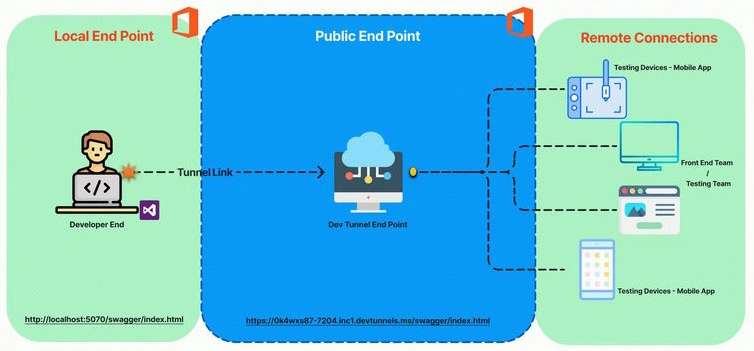
Dev Tunnel is a feature introduced in Visual Studio 2022 that simplifies remote debugging and collaboration for developers. It creates a secure tunnel between our local machine and a remote environment, allowing you to access your local applications remotely as if they were running on the remote machine.
This is useful for,
- Remote debugging: You can set breakpoints, inspect variables, and step through your code as if you were working locally.
- Collaboration: You can share your local applications with team members or clients, even if they don't have direct access to your development environment.
- Testing on different devices: You can test your applications on various devices.
(e.g., mobile devices, IoT devices) without requiring them to be on the same network as your development machine.
To use Dev Tunnel
- Make sure you have Visual Studio 2022 installed with the necessary workloads.
- In Visual Studio, create a new tunnel by selecting Debug > Dev Tunnels > Create A Tunnel.
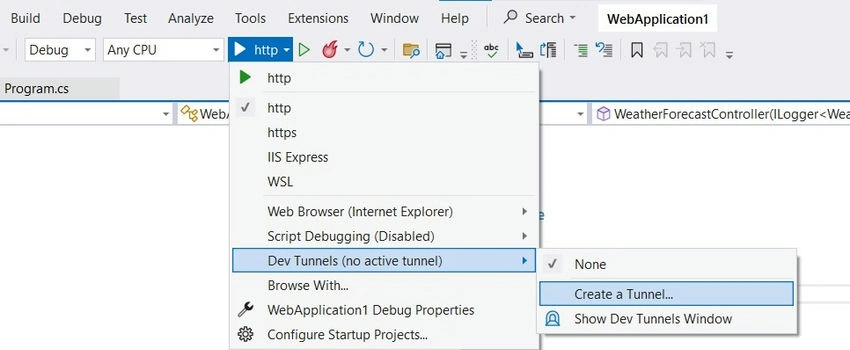
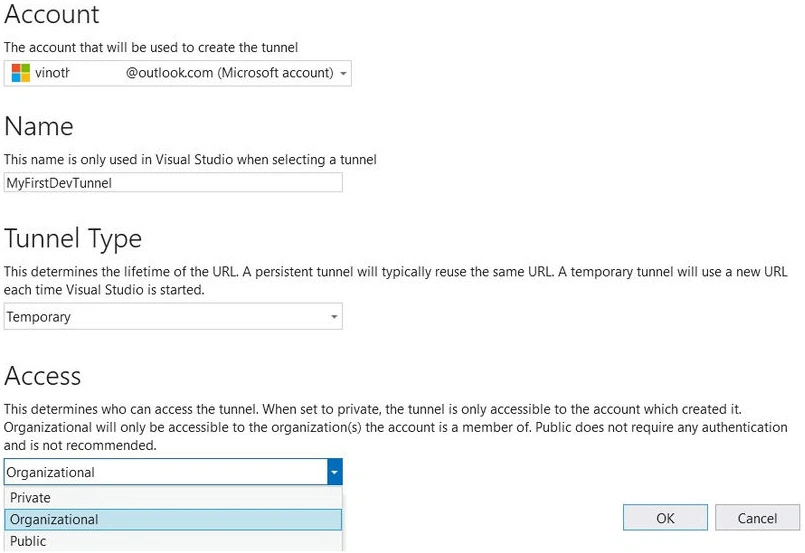
- Choose the appropriate settings, such as the tunnel type (persistent or temporary) and the authentication method.
- Start debugging: Start your application in debug mode, and the tunnel URL will be displayed in the Output window.
- Access the application remotely: Use the tunnel URL to access your application from any device with an internet connection.
Dev Tunnel Types
Dev Tunnels come in two primary types, they are,
- Temporary Tunnels
- Created on-demand and exists only for the duration of a debugging session.
- A new URL is generated each time you start a debugging session.
- Ideal for quick testing and sharing without long-term access needs.
- Persistent Tunnels
- Remain active even after you close Visual Studio.
- Maintain the same URL across multiple debugging sessions.
- Suitable for scenarios where you need consistent access to your application, such as remote collaboration or continuous testing.
Different Types of Access
Dev Tunnels offer flexible access control options as follows,
- Private
- Only the creator of the tunnel can access it.
- Ideal for personal projects or sensitive applications.
- Organization
- Members of the same organization as the creator can access the tunnel.
- Useful for team collaboration within an organization.
- Public
- Anyone with the tunnel URL can access it.
Questions & Answers
Is a Microsoft account strictly necessary for accessing dev tunnels?
Yes, we do need a Microsoft account to use Dev Tunnels. This account is used for authentication and authorization purposes to ensure secure access to your local development environment.
Here are the reasons why a Microsoft account is required.
- Security: By using a Microsoft account, you can control who has access to your Dev Tunnel and protect your sensitive data.
- Authentication: The Microsoft account verifies your identity and grants you permission to create and use Dev Tunnels.
- Account Management: Your Microsoft account allows you to manage your Dev Tunnels, including deleting them or modifying their settings.
To use Dev Tunnels, you can sign in with your Microsoft account, Microsoft Entra ID, or GitHub account. Once you're signed in, you can create and manage your Dev Tunnels.
Will the URL change if we close Visual Studio or stop debugging?
Yes, the Dev Tunnel URL will change if you close Visual Studio or stop debugging your application. This is because Dev Tunnels are typically temporary, meaning they are created on-demand and destroyed when the connection is closed.
However, you can create persistent tunnels that will maintain the same URL even after you close Visual Studio.
In conclusion, Dev Tunnel is a powerful tool that can significantly improve your development workflow by making remote debugging and collaboration easier and more efficient. If you're working with remote teams or need to test your applications on different devices, Dev Tunnel is definitely worth considering.
Reference
Join the conversation! Your thoughts help the community grow.