

In this article, we will know when we are choosing a selected country from DropDownList its related state appears in another dropdown and after selecting the state its related city list appears in other DropDownList, without refreshing the webpage. Here we need three-DropDownList , three label controls, Script Manager and Update Panel from the toolbox.
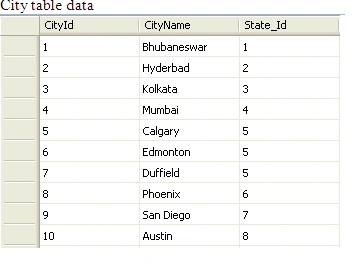
Table Creation
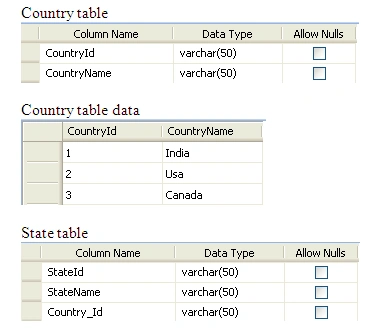
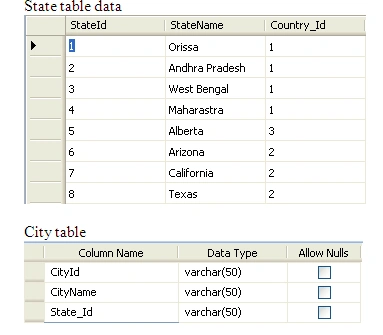
City table data
<%@ Page Language="VB" AutoEventWireup="false" CodeFile="Default.aspx.vb" Inherits="_Default"%>
<!DOCTYPE html PUBLIC "-//W3C//DTD XHTML 1.0 Transitional//EN""http://www.w3.org/TR/xhtml1/DTD/xhtml1-transitional.dtd">
<html xmlns="http://www.w3.org/1999/xhtml"><head runat="server">
<title>Untitled Page</title>
</head>
<body>
<form id="form1" runat="server">

     <div>
   <asp:ScriptManager ID="ScriptManager1" runat="server">
    </asp:ScriptManager>
           <asp:UpdatePanel ID="countrypanel" runat="server">
           <ContentTemplate >
           <asp:Label ID="Label1" runat="server" Text="Choose Country" BackColor="#FFFF99"


                   ForeColor="Red" Width="100px"></asp:Label>
              <asp:DropDownList ID="ddlcountry" AutoPostBack ="true"
                   AppendDataBoundItems="true"  runat="server" Height="20px" Width="156px"
                   onselectedindexchanged="ddlcountry_SelectedIndexChanged" Font-Bold="True"
                   ForeColor="#FF9900">
            </asp:DropDownList>
        </ContentTemplate>
      <Triggers>
       <asp:AsyncPostBackTrigger ControlID ="ddlcountry" />
      </Triggers>
   </asp:UpdatePanel>
        <br />

  <asp:UpdatePanel ID="statepanel" runat="server">
     <ContentTemplate >
     <asp:Label ID="Label2" runat="server" Text="Choose State" BackColor="#FFFF66"
             ForeColor="Red" Width="100px"></asp:Label>
       <asp:DropDownList ID="ddlstate" AutoPostBack ="true"
             AppendDataBoundItems ="true"  runat="server" Height="20px"
Width="155px" onselectedindexchanged="ddlstate_SelectedIndexChanged" Font-Bold="True"
             ForeColor="#993300">
       </asp:DropDownList>
     </ContentTemplate>
     <Triggers >
        <asp:AsyncPostBackTrigger ControlID ="ddlstate" />
        </Triggers>
     </asp:UpdatePanel>
        <br />
<asp:UpdatePanel ID="citypanel" runat="server">
    <ContentTemplate >
    <asp:Label ID="Label3" runat="server" Text="Choose City" BackColor="#FFFF99"
            ForeColor="Red" Width="100px"></asp:Label>
      <asp:DropDownList ID="ddlcity"  AutoPostBack ="true" AppendDataBoundItems ="true"
            runat="server" Height="20px" Width="155px" Font-Bold="True" ForeColor="#CCCC00">
      </asp:DropDownList>
   </ContentTemplate>
   <Triggers >
     <asp:AsyncPostBackTrigger  ControlID ="ddlcity" /></Triggers>
  </asp:UpdatePanel>
</div>
    </form>
</body>
</html>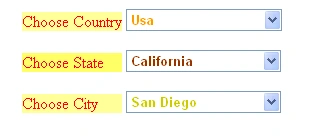
Prabhakar GuntamukkuPosted Aug 1, 2022, 6:29 AM
I have created a table where country Id, StateId and cityId is saved to sql server. CountryId: 1, StateId: 4 and cityId: 4. How do I fetch data to combobox in such a way so that on form load India, maharashtra and Mumbai should appear on combobox.