

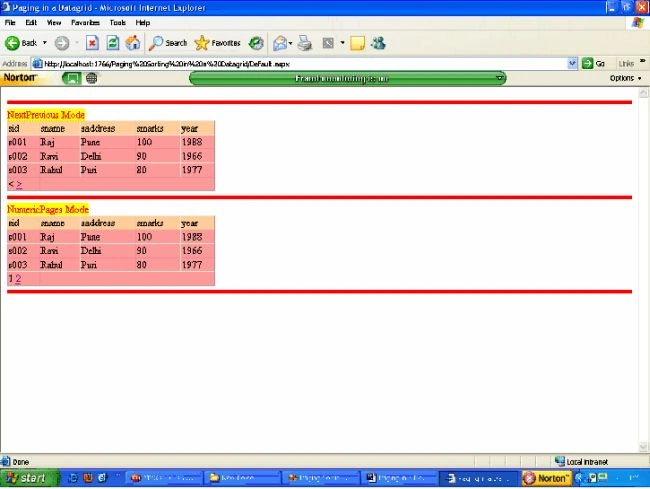
In this article we will learn to do Paging in a DataGrid in two different modes.
- NextPrevious Mode
- NumericPages Mode
Program
Default.aspx code
<%@ Page Language="VB" AutoEventWireup="false" CodeFile="Default.aspx.vb" Inherits="_Default"%>
<!DOCTYPE html PUBLIC "-//W3C//DTD
XHTML 1.0 Transitional//EN""http://www.w3.org/TR/xhtml1/DTD/xhtml1-transitional.dtd">
<html xmlns="http://www.w3.org/1999/xhtml">
<head runat="server">
<title>Paging
in a Datagrid</title>
<style type="text/css">
.hr1
{
color: #f00;
background-color: #f00;
height: 5px;
}
</style>
</head>
<body>
<form id="form1" runat="server">
<div>
<hr class="hr1" />
<asp:Label ID="lb1" Text="NextPrevious
Mode" BackColor="Yellow" ForeColor="Red"runat="server"></asp:Label>
<asp:DataGrid id="DataGrid1" BackColor="#FF9999" AllowPaging="True" PageSize="3"OnPageIndexChanged="datagrid1_pageindexchanged" PagerStyle-Mode="NextPrev" runat="server"Width="328px">
<HeaderStyle BackColor="#FFCC99" />
</asp:DataGrid>
<hr class="hr1" />
<asp:Label ID="Label1" Text="NumericPages
Mode" BackColor="Yellow" ForeColor="Red"runat="server"></asp:Label>
<asp:DataGrid id="DataGrid2" BackColor="#FF9999" AllowPaging="True" PageSize="3" OnPageIndexChanged="datagrid2_pageindexchanged" PagerStyle-Mode="NumericPages"runat="server" Width="328px">
<HeaderStyle BackColor="#FFCC99" />
</asp:DataGrid>
<hr class="hr1" />
</div>
</form>
</body>
</html>
Join the conversation! Your thoughts help the community grow.