

When enterprises first deploy Retrieval-Augmented Generation (RAG), they are often thrilled by the "magic" of chatting with their internal data. But as they scale from a proof-of-concept to production, the illusion shatters. Users complain that the AI is hallucinating, ignoring specific policies, or returning completely irrelevant documents.
The root cause is almost never the LLM itself; it is poor retrieval relevance. If you feed an LLM garbage context, it will generate garbage answers.
In this end-to-end guide, we will dissect the main causes of poor retrieval relevance in enterprise RAG, explore a real-world financial services use case, and build a resilient, self-correcting RAG pipeline using LangGraph.
Part 1: The 5 Main Causes of Poor Retrieval Relevance
Before we can fix retrieval, we must understand why it fails. In enterprise environments, relevance degrades due to five primary bottlenecks:
1. The "Chunking Trap" (Loss of Semantic Context)
Naive RAG splits documents by fixed token counts (e.g., 500 tokens). If a paragraph explaining a complex compliance rule is split in half, neither chunk makes sense to the embedding model. The vector database will fail to retrieve them because their semantic meaning has been fractured.
2. The Semantic vs. Lexical Gap
Vector databases excel at semantic similarity (e.g., "car" matches "automobile"). However, enterprise search heavily relies on exact lexical matches (e.g., Error Code ERR-9021, specific product names like Project Phoenix, or employee IDs). Pure vector search will often miss these critical exact matches.
3. Naive Query Formulation
Users are notoriously bad at searching. They ask vague questions ("How do I fix the login issue?") or use colloquialisms that don't match the formal language of enterprise documentation. If the retrieval system doesn't understand or rewrite the query, it will fetch irrelevant chunks.
4. The "Top-K" Dilution Effect
Standard RAG blindly fetches the "Top 5" or "Top 10" chunks. If only 2 of those chunks are actually relevant to the query, the other 8 act as noise. This not only dilutes the LLM's attention (causing the "Lost in the Middle" phenomenon) but also wastes tokens and increases latency.
5. Ignoring Metadata and Access Controls
Enterprise data is highly structured. A document from 2019 might be semantically identical to a document from 2024, but the 2019 policy is obsolete. Furthermore, retrieving HR documents for a software engineering query is a massive relevance failure. Ignoring metadata filtering guarantees poor relevance.
Part 2: Real-World Use Case – "FinCorp Global" IT & Compliance
The Scenario:
FinCorp Global is a multinational bank. They deploy a RAG system for their internal IT and Compliance Helpdesk.
The Problem:
An employee in the London office asks:
"What is the protocol for reporting a suspected phishing email on my mobile device, and who do I contact if I accidentally clicked the link?"
The Naive RAG Failure:
A standard RAG system retrieves:
Global Phishing Policy (Generic, doesn't mention mobile).
Mobile Device Management (MDM) Setup Guide (Irrelevant to phishing).
US Region Incident Response Plan (Wrong geography).
Result: The LLM generates a confusing, hallucinated answer mixing US protocols with generic MDM steps.
The LangGraph Solution:
We need an Agentic RAG system that can:
Rewrite the query to be more specific.
Use metadata filtering (Region: EMEA, Category: Security).
Grade the retrieved documents for relevance before passing them to the LLM.
If the documents are irrelevant, loop back and try a different search strategy.
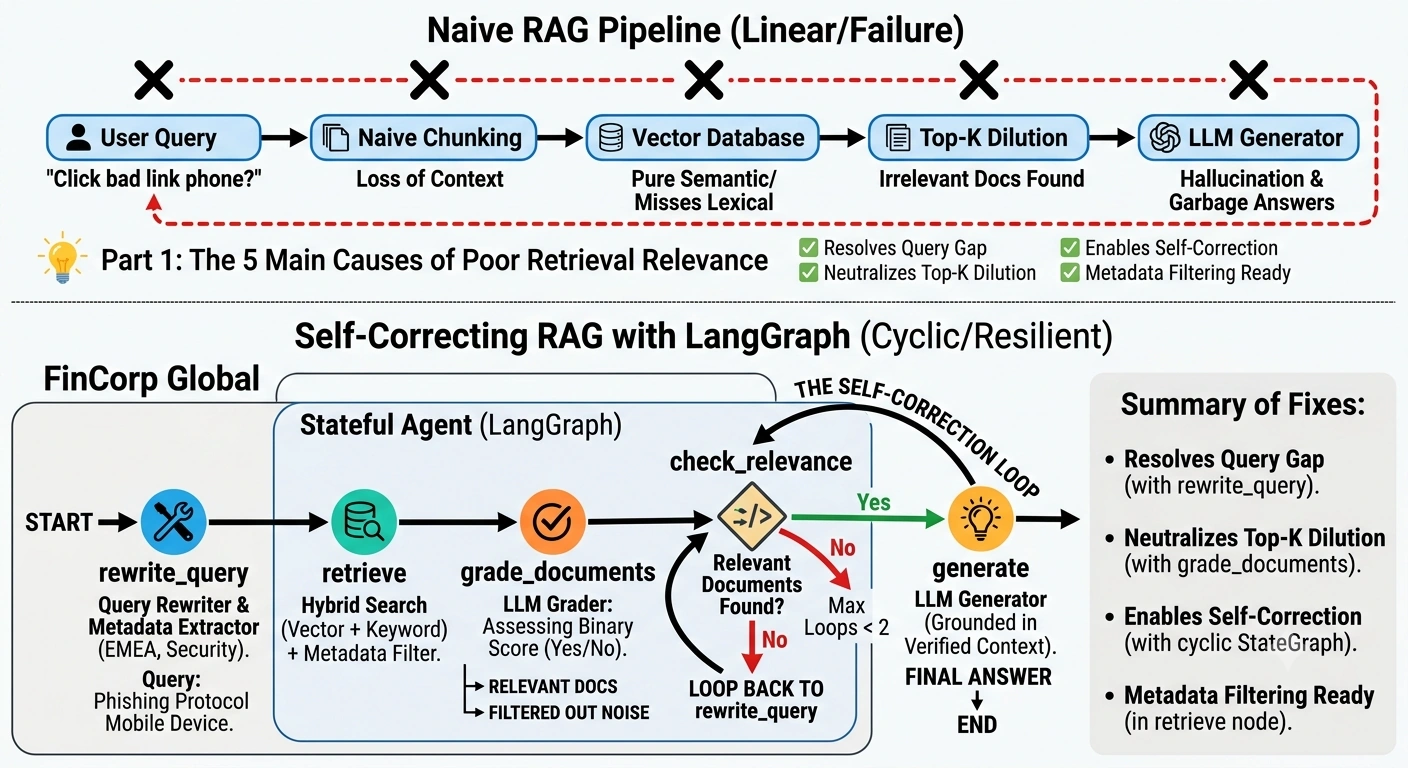
Part 3: Building the Solution with LangGraph
Why LangGraph? Standard LangChain chains are linear (DAGs). They cannot loop. LangGraph introduces cycles and statefulness, allowing us to build agents that can evaluate their own retrieval, realize it's bad, and self-correct before generating an answer.
The Architecture
Our LangGraph workflow will consist of the following nodes:
rewrite_query: Transforms the user's vague query into an optimized search query and extracts metadata.retrieve: Fetches documents using Hybrid Search (Vector + Keyword) and Metadata filtering.grade_documents: An LLM acts as a grader, evaluating if each retrieved document is actually relevant to the query.check_relevance: A conditional router. If no documents are relevant, it loops back torewrite_query. If relevant docs exist, it moves to generation.generate: The LLM generates the final answer using only the graded, relevant context.
End-to-End Python Implementation
Prerequisites: pip install langgraph langchain langchain-openai langchain-core
import operator
from typing import Annotated, Sequence, TypedDict, Literal
from langchain_core.prompts import ChatPromptTemplate
from langchain_core.pydantic_v1 import BaseModel, Field
from langchain_core.messages import BaseMessage, HumanMessage, AIMessage
from langchain_openai import ChatOpenAI
from langgraph.graph import StateGraph, END

# ==========================================
# 1. Define the Graph State
# ==========================================
class GraphState(TypedDict):
    """
    Represents the state of our RAG graph.
    """
    query: str               # The current search query
    generation: str          # The LLM generation
    documents: list          # The retrieved documents
    iterations: int          # Track loops to prevent infinite cycles

# ==========================================
# 2. Initialize LLMs
# ==========================================
llm = ChatOpenAI(model="gpt-4o", temperature=0)

# ==========================================
# 3. Define the Nodes
# ==========================================

def rewrite_query(state: GraphState):
    """
    Node 1: Rewrites the user query to improve retrieval relevance.
    """
    print("---REWRITING QUERY---")
    query = state["query"]
    iterations = state.get("iterations", 0)

    # Prompt to make the query more specific for enterprise search
    rewriter_prompt = ChatPromptTemplate.from_template(
        "You are an expert enterprise search query rewriter. "
        "Rewrite the following user query to be more precise and optimized for vector search. "
        "Focus on extracting key technical terms and intent.\n\n"
        "Original Query: {query}\n"
        "Rewritten Query:"
    )

    chain = rewriter_prompt | llm
    rewritten_query = chain.invoke({"query": query}).content

    return {"query": rewritten_query, "iterations": iterations + 1}

def retrieve(state: GraphState):
    """
    Node 2: Retrieves documents.
    (Simulated here. In production, use a VectorDB with Hybrid Search & Metadata filtering).
    """
    print("---RETRIEVING DOCUMENTS---")
    query = state["query"]

    # SIMULATION: Imagine this is a call to Pinecone/Weaviate/Chroma
    # In a real app, you would apply metadata filters here (e.g., region="EMEA")
    if "mobile" in query.lower() and "phishing" in query.lower():
        # Good retrieval
        docs = [
            "EMEA Mobile Security Protocol: If a phishing email is opened on a mobile device...",
            "Global Incident Response: Contact the regional SOC team immediately if a link is clicked..."
        ]
    else:
        # Bad retrieval (simulating a naive first attempt)
        docs = [
            "How to reset your Windows password.",
            "Guide to using the corporate cafeteria app."
        ]

    return {"documents": docs}

class GradeDocument(BaseModel):
    """Binary score for relevance check on retrieved documents."""
    binary_score: str = Field(description="Documents are relevant to the question, 'yes' or 'no'")

def grade_documents(state: GraphState):
    """
    Node 3: Grades retrieved documents for relevance. Filters out irrelevant ones.
    """
    print("---GRADING DOCUMENTS---")
    query = state["query"]
    documents = state["documents"]

    structured_llm_grader = llm.with_structured_output(GradeDocument)

    grader_prompt = ChatPromptTemplate.from_template(
        "You are a grader assessing relevance of a retrieved document to a user question.\n"
        "Retrieved document:\n\n{document}\n\n"
        "User question: {query}\n\n"
        "If the document contains keywords or semantic meaning related to the user question, grade it as relevant. "
        "Give a binary score 'yes' or 'no' score to indicate whether the document is relevant to the question."
    )

    relevant_docs = []
    for doc in documents:
        result = structured_llm_grader.invoke(
            grader_prompt.format(document=doc, query=query)
        )
        if result.binary_score == "yes":
            print(f"  -> Document RELEVANT: {doc[:50]}...")
            relevant_docs.append(doc)
        else:
            print(f"  -> Document IRRELEVANT: {doc[:50]}...")

    return {"documents": relevant_docs}

def check_relevance(state: GraphState) -> Literal["generate", "rewrite"]:
    """
    Conditional Edge: Decides whether to generate an answer or rewrite the query and try again.
    """
    print("---CHECKING RELEVANCE---")
    documents = state["documents"]
    iterations = state.get("iterations", 0)

    # If we have relevant docs, proceed to generation
    if len(documents) > 0:
        print("  -> Relevant documents found. Routing to GENERATE.")
        return "generate"

    # If no relevant docs, but we haven't looped too many times, rewrite query
    if iterations < 2:
        print("  -> No relevant documents. Routing to REWRITE QUERY.")
        return "rewrite"

    # Fallback: prevent infinite loops, just generate with what we have (or state no info)
    print("  -> Max iterations reached. Routing to GENERATE with fallback.")
    return "generate"

def generate(state: GraphState):
    """
    Node 4: Generates an answer based on the filtered, relevant context.
    """
    print("---GENERATING ANSWER---")
    query = state["query"]
    documents = state["documents"]

    context = "\n\n".join(documents) if documents else "No relevant context found."

    gen_prompt = ChatPromptTemplate.from_template(
        "You are an enterprise IT assistant. Answer the user's question based ONLY on the provided context.\n"
        "Context:\n{context}\n\n"
        "Question: {query}\n"
        "Answer:"
    )

    chain = gen_prompt | llm
    generation = chain.invoke({"context": context, "query": query}).content

    return {"generation": generation}

# ==========================================
# 4. Build the LangGraph
# ==========================================

workflow = StateGraph(GraphState)

# Add nodes
workflow.add_node("rewrite_query", rewrite_query)
workflow.add_node("retrieve", retrieve)
workflow.add_node("grade_documents", grade_documents)
workflow.add_node("generate", generate)

# Define edges
workflow.set_entry_point("rewrite_query")
workflow.add_edge("rewrite_query", "retrieve")
workflow.add_edge("retrieve", "grade_documents")

# Add conditional edge: The core of LangGraph's self-correction
workflow.add_conditional_edges(
    "grade_documents",
    check_relevance,
    {
        "rewrite": "rewrite_query",  # Loop back!
        "generate": "generate",      # Move forward
    },
)

workflow.add_edge("generate", END)

# Compile the graph
app = workflow.compile()

# ==========================================
# 5. Run the Graph
# ==========================================
if __name__ == "__main__":
    # The problematic user query
    initial_query = "What do I do if I click a bad link on my phone?"

    print(f"\n🚀 Starting RAG pipeline for query: '{initial_query}'\n")

    inputs = {
        "query": initial_query,
        "documents": [],
        "iterations": 0
    }

    # Execute the graph
    for output in app.stream(inputs):
        for key, value in output.items():
            print(f"Node '{key}':")
            if key == "generate":
                print(f"Final Answer: {value['generation']}\n")
            else:
                print(f"State updated: {list(value.keys())}\n")
Part 4: Why this Architecture Fixes Relevance
By implementing this LangGraph pipeline, we directly neutralize the 5 causes of poor relevance:
Solves the Query Gap: The
rewrite_querynode ensures that "bad link on my phone" is translated into "phishing email mobile device incident response" before it ever hits the vector database.Solves Top-K Dilution: The
grade_documentsnode acts as a semantic filter. It doesn't just take the top 5; it takes the top 5 and throws away the ones that aren't actually relevant. The LLM only sees high-signal context.Enables Self-Correction: This is the magic of LangGraph. If the first retrieval fails (e.g., the vector DB returned cafeteria docs), the
check_relevanceconditional edge routes the graph back torewrite_query. The agent tries a completely different semantic angle until it finds the right documents.Metadata Ready: While simulated in the code, the
retrievenode is the exact place you would inject metadata filters (e.g.,filter={"region": "EMEA", "department": "IT"}) before the vector search executes.
Conclusion
Building a RAG system is easy; building a reliable enterprise RAG system is hard. The difference lies in how you handle retrieval failures.
By moving away from linear, "fire-and-forget" chains and adopting a cyclic, stateful architecture with LangGraph, you give your RAG system the ability to evaluate its own work, filter out noise, and self-correct. This transforms your AI from a hallucination-prone toy into a robust, enterprise-grade knowledge engine.
Join the conversation! Your thoughts help the community grow.