

In this article, we will see how to perform diagnostic logging as reporting in SharePoint 2013 Central Admin.
These reports are very important for logging controls the severity of events captured in the Windows event log and the trace logs. These traces are recorded and are very helpful for the admins to get the logs and resolve issues or to know the behavior of the database.
How to log?
Let’s open Central Admin of SharePoint on your machine. On your Windows desktop screen, click Start >> Administrative Tools >> SharePoint 2013 Central Administration.

- Run it as an administrator to have elevated privileges.
- You will see the screenshot given below.

- Central Admin is configured under the categories given above.
- Click on "Monitoring".
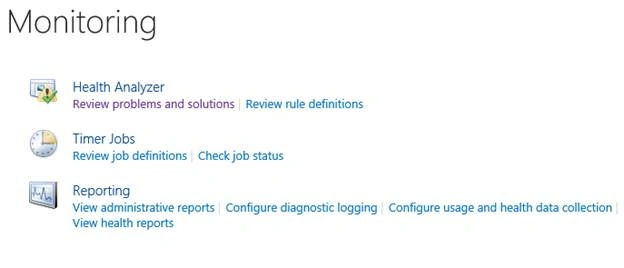
- Go to "Monitoring".

- Click on “Configure diagnostic logging” under Reporting.
- You will see the screen below.
Configure


- Event Throttling

Choose a category whose events you want to log. All these categories have modules divided which will allow you to choose distinguished services you want to trace as we can see from the screen above.
- Least critical event to report to the event log
You can choose a priority of events you want to log.

- Least critical event to report to the trace log
similarly you can choose a priority of trace you want to log.

- Event Log Flood Protection
If you choose this option, it allows detection of repeating events in the Windows event log and suppresses them to one if they are similar. - Trace Log
Here you can provide a path where you want to store the log files. You can provide a number of days to store the data and delete them after a certain period of time. You can also restrict the space usage in the server to a defined size for storing the logs.
Once the configuration is done, click on OK. The log files will start saving to the defined paths with all the services you want to capture on the Central Administration. This is very important for all the admins on SharePoint and an important phase in resolving the issues.
In this article, we saw how to perform diagnostic logging as Reporting in SharePoint 2013 Central Admin. There are more articles to come on Central Administration. Until then, keep reading and keep learning!
Humayun Kabir MamunPosted Feb 19, 2017, 11:54 PM
Thanks Manpreet for this nice article...