

What is a dialog in Bot framework?
Basically dialog is a class, which allows Bot developer to logically separate various areas of Bot functionality and guide conversational flow.
As in a Website or an app, we used single or multiple screens to exchange the information with the user, which is called UI (user interface), we can say the screens are user interfaces. Similarly Bot has UI but it is made up of dialogs.
Important point
Basically dialog is a class, which allows Bot developer to logically separate various areas of Bot functionality and guide conversational flow.
As in a Website or an app, we used single or multiple screens to exchange the information with the user, which is called UI (user interface), we can say the screens are user interfaces. Similarly Bot has UI but it is made up of dialogs.
Important point
- They may be in the form of text, button, speech based or other elements.
- Thay may or may not have graphical interfaces.
- They are used to invoke other dialogs or processing user input. In Bot, everything begins with the root dialog.
Why we use dialog?
- Bot and user can have conversations through dialog. Thease dialogs are component classes of the logical pieces.
- Break up conversations into smaller pieces.
- It means they are more portable.
Use the namespace to access the relevent class of dialog.
- using Microsoft.Bot.Builder.Dialogs;
- using System;
- using System.Threading.Tasks;
- using Microsoft.Bot.Builder.Dialogs;
- using Microsoft.Bot.Connector;
- namespace BotDialogsSample.Dialogs
- {
- [Serializable]
- public class RootDialog : IDialog<object>
- {
- public Task StartAsync(IDialogContext context)
- {
- // Root dialog initiates and waits for the next message from the user.
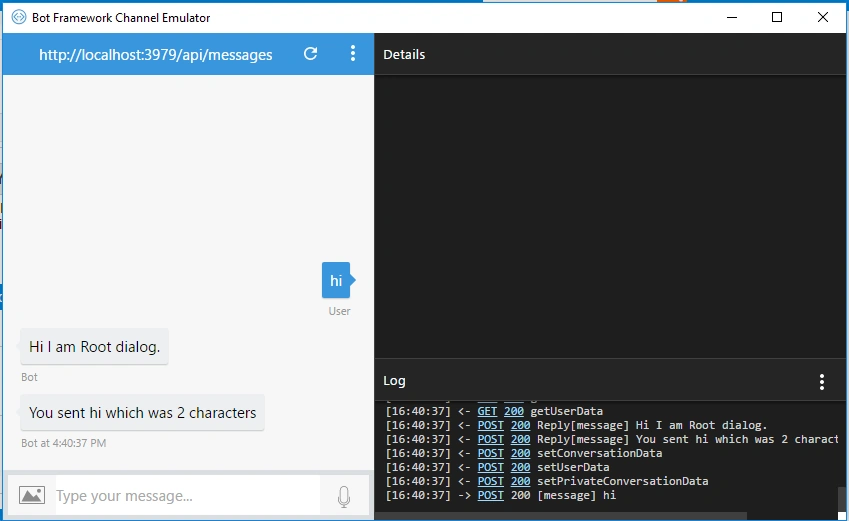
- context.PostAsync("Hi I am Root dialog.");
- context.Wait(MessageReceivedAsync);
- return Task.CompletedTask;
- }
- private async Task MessageReceivedAsync(IDialogContext context, IAwaitable<object> result)
- {
- var activity = await result as Activity;
- // calculate something for us to return
- int length = (activity.Text ?? string.Empty).Length;
- // return our reply to the user
- await context.PostAsync($"You sent {activity.Text} which was {length} characters");
- context.Wait(MessageReceivedAsync);
- }
- }
- }
The IDialog Interface
- Lives in Microsoft.Bot.Builder.Dialogs namespace.
- Must use the serializeable attribute.
- Has one method StartAsync.
- Utilizes Async and Await.
- Remember a Bot is really a Web Service.
- If you want to build a Bot dialog, you can see IDialog interface
In Bot example given below, you can see how we use dialogs to exchange messages with the user and Bot. Invoke the root dialog. Here, you can see how root dialog is invoked when post method invokes into messageController of Bot.
MessagesController
MessagesController
- using System.Net;
- using System.Net.Http;
- using System.Threading.Tasks;
- using System.Web.Http;
- using Microsoft.Bot.Builder.Dialogs;
- using Microsoft.Bot.Connector;
- using BotDialogsSample.Dialogs;
- namespace BotDialogsSample
- {
- [BotAuthentication]
- public class MessagesController : ApiController
- {
- /// <summary>
- /// POST: api/Messages
- /// Receive a message from a user and reply to it
- /// </summary>
- public async Task<HttpResponseMessage> Post([FromBody]Activity activity)
- {
- if (activity.Type == ActivityTypes.Message)
- {
- await Conversation.SendAsync(activity, () => new Dialogs.RootDialog());
- }
- else
- {
- // HandleSystemMessage(activity);
- }
- var response = Request.CreateResponse(HttpStatusCode.OK);
- return response;
- }
- }
- }
Now, create new dialog as MyDialog, as shown below.
- using Microsoft.Bot.Builder.Dialogs;
- using System;
- using System.Collections.Generic;
- using System.Linq;
- using System.Web;
- using System.Threading.Tasks;
- using Microsoft.Bot.Connector;
- namespace BotDialogsSample.Dialogs
- {
- [Serializable]
- public class MyDialog : IDialog
- {
- public async Task StartAsync(IDialogContext context)
- {
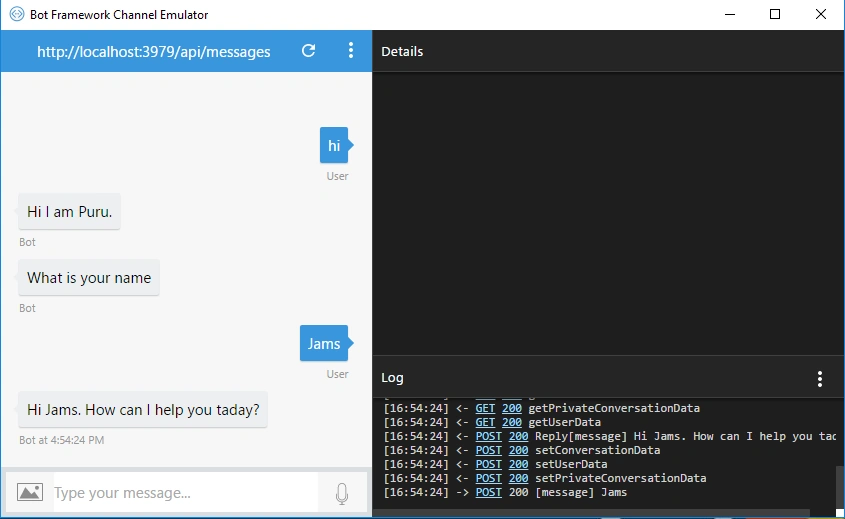
- await context.PostAsync("Hi I am Puru.");
- context.Wait(MessageReceivedAnync);
- }
- public virtual async Task MessageReceivedAnync(IDialogContext context, IAwaitable<IMessageActivity> result)
- {
- var message = await result;
- var userName = String.Empty;
- //
- var getName = false;
- context.UserData.TryGetValue<string>("Name", out userName);
- context.UserData.TryGetValue<bool>("GetName", out getName);
- if (getName)
- {
- userName = message.Text;
- context.UserData.SetValue<string>("Name", userName);
- context.UserData.SetValue<bool>("GetName", false);
- }
- if (string.IsNullOrEmpty(userName))
- {
- await context.PostAsync("What is your name");
- context.UserData.SetValue<bool>("GetName", true);
- }
- else
- {
- await context.PostAsync(String.Format("Hi {0}. How can I help you taday?", userName));
- }
- context.Wait(MessageReceivedAnync);
- }
- }
- }
Now, invoke MyDialog when post method invokes into messageController of Bot.
- using System.Net;
- using System.Net.Http;
- using System.Threading.Tasks;
- using System.Web.Http;
- using Microsoft.Bot.Builder.Dialogs;
- using Microsoft.Bot.Connector;
- using BotDialogsSample.Dialogs;
- namespace BotDialogsSample
- {
- [BotAuthentication]
- public class MessagesController : ApiController
- {
- /// <summary>
- /// POST: api/Messages
- /// Receive a message from a user and reply to it
- /// </summary>
- public async Task<HttpResponseMessage> Post([FromBody]Activity activity)
- {
- if (activity.Type == ActivityTypes.Message)
- {
- await Conversation.SendAsync(activity, () => new MyDialog());
- }
- else
- {
- //HandleSystemMessage(activity);
- }
- var response = Request.CreateResponse(HttpStatusCode.OK);
- return response;
- }
- }
- }
Output A - Output comes when RootDialog is invoked
Please follow step 6 to 10 of my previous article for which link is given below.
Now, type your message and see how rootmessage is invoked.
Output B
Output comes when MyDialog is invoked.
Stay tuned for the next article. Thanks.
Output B
Output comes when MyDialog is invoked.
Stay tuned for the next article. Thanks.
Mohamed ElqassasPosted May 25, 2017, 1:45 PM
Great, Thanks for sharing!
Thiruppathi RPosted May 24, 2017, 10:37 PM
NIce article.Thanks for sharing..