

Introduction
In this article, you will learn how to show when a post was posted, as you see on Facebook. In Facebook, you can see the time of the status, comments and so on as "Just Now", "1 day ago", "2 months ago and so on".
For doing this we will first store the post text and its time in a database. Later, while displaying, we will determine the difference between the present time and post time and display it accordingly.
Step 1
Create a new layout file.
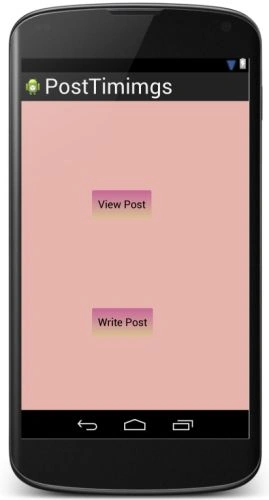
Right-click on layout then select "New" -> "Layout resource file". Name it "first_layout" and add the following code to it:
- <LinearLayout xmlns:android="http://schemas.android.com/apk/res/android"
- android:orientation="vertical"
- android:layout_width="match_parent"
- android:layout_height="match_parent"
- android:background="#e6b4ac">
- <Button
- android:layout_width="wrap_content"
- android:layout_height="wrap_content"
- android:layout_marginTop="150dp"
- android:layout_marginLeft="120dp"
- android:text="View Post"
- android:id="@+id/view"
- android:background="@drawable/button_lay"
- android:paddingRight="10dp"
- android:paddingLeft="10dp"/>
- <Button
- android:layout_width="wrap_content"
- android:layout_height="wrap_content"
- android:layout_marginTop="150dp"
- android:layout_marginLeft="120dp"
- android:text="Write Post"
- android:id="@+id/write"
- android:background="@drawable/button_lay"
- android:paddingRight="10dp"
- android:paddingLeft="10dp"/>
- </LinearLayout>
The layout looks like:
Step 2
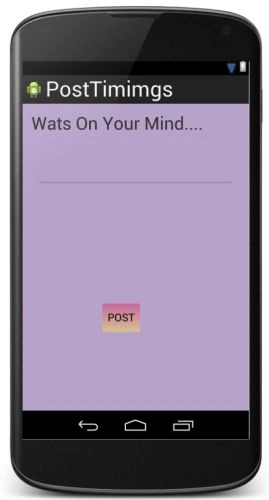
Open "activity_main" and add the following code to it:
- <LinearLayout xmlns:android="http://schemas.android.com/apk/res/android"
- xmlns:tools="http://schemas.android.com/tools"
- android:layout_width="match_parent"
- android:layout_height="match_parent"
- android:paddingLeft="@dimen/activity_horizontal_margin"
- android:paddingRight="@dimen/activity_horizontal_margin"
- android:paddingTop="@dimen/activity_vertical_margin"
- android:paddingBottom="@dimen/activity_vertical_margin"
- tools:context=".MainActivity"
- android:background="#b7a3ca"
- android:orientation="vertical">
- <TextView
- android:layout_width="wrap_content"
- android:layout_height="wrap_content"
- android:text="@string/wats"
- android:textSize="30dp"
- />
- <EditText
- android:layout_height="wrap_content"
- android:layout_width="fill_parent"
- android:layout_marginLeft="10dp"
- android:layout_marginTop="50dp"
- android:layout_marginRight="10dp"
- android:scrollbars="vertical"
- android:id="@+id/postTxt"
- />
- <Button
- android:layout_width="wrap_content"
- android:layout_height="wrap_content"
- android:layout_marginTop="200dp"
- android:layout_marginLeft="120dp"
- android:text="POST"
- android:background="@drawable/button_lay"
- android:id="@+id/submit"
- />
- </LinearLayout>
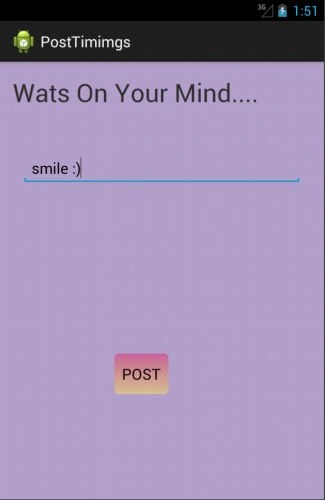
The layout looks like:
Step 3
Create a new layout file for viewing the thoughts/posts.
Right-click on layout then select "New" -> "Layout resource file". Name it as "view_layout2" and add the following code to it:
- <?xml version="1.0" encoding="utf-8"?>
- <TextView xmlns:android="http://schemas.android.com/apk/res/android"
- android:layout_width="fill_parent"
- android:layout_height="wrap_content"
- android:padding="10dp"
- android:textSize="20sp"
- android:background="#459890"
- >
- </TextView>
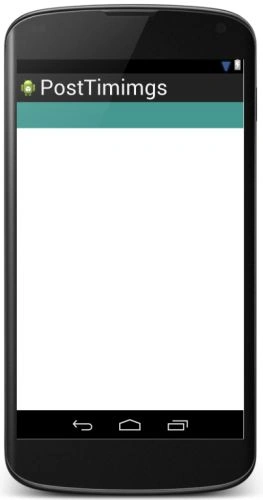
The layout looks like:
Step 4
Open "MainActivity" and add the following code to it:
- package com.chhavi.posttimimgs;
- import android.content.Context;
- import android.content.Intent;
- import android.os.Bundle;
- import android.app.Activity;
- import android.util.Log;
- import android.view.Menu;
- import android.view.View;
- import android.widget.Button;
- import java.sql.Date;
- import java.text.SimpleDateFormat;
- import java.util.Calendar;
- public class MainActivity extends Activity {
- Button view;
- Button write;
- final Context context=this;
- @Override
- protected void onCreate(Bundle savedInstanceState) {
- super.onCreate(savedInstanceState);
- setContentView(R.layout.first_layout);
- view=(Button)findViewById(R.id.view);
- write=(Button)findViewById(R.id.write);
- view.setOnClickListener(new View.OnClickListener() {
- @Override
- public void onClick(View v) {
- Intent i=new Intent(context,ViewPost.class);
- startActivity(i);
- }
- });
- write.setOnClickListener(new View.OnClickListener() {
- @Override
- public void onClick(View v) {
- Intent i=new Intent(context,WritePost.class);
- startActivity(i);
- }
- });
- }
- @Override
- public boolean onCreateOptionsMenu(Menu menu) {
- // Inflate the menu; this adds items to the action bar if it is present.
- getMenuInflater().inflate(R.menu.main, menu);
- return true;
- }
- }
Step 5
Create a new Java file.
Right-click on the same package then select "New" -> "Java class". Name this "WritePost" and add the following code to it:
- package com.chhavi.posttimimgs;
- import android.app.Activity;
- import android.content.ContentValues;
- import android.database.sqlite.SQLiteDatabase;
- import android.os.Bundle;
- import android.util.Log;
- import android.view.View;
- import android.widget.Button;
- import android.widget.EditText;
- import android.widget.Toast;
- import java.util.Calendar;
- public class WritePost extends Activity {
- Button submit;
- EditText txt;
- static int count=1;
- private ThoughtsDataSource dataSource;
- @Override
- protected void onCreate(Bundle savedInstanceState) {
- super.onCreate(savedInstanceState);
- setContentView(R.layout.activity_main);
- txt=(EditText)findViewById(R.id.postTxt);
- submit=(Button)findViewById(R.id.submit);
- dataSource = new ThoughtsDataSource(WritePost.this);
- submit.setOnClickListener(new View.OnClickListener() {
- @Override
- public void onClick(View v) {
- try{
- dataSource.open();
- Calendar cal=Calendar.getInstance();
- ThoughtData data = new ThoughtData();
- data.setThought(txt.getText().toString());
- data.setDateTimeString(cal.getTime().toString());
- int date= Calendar.DAY_OF_MONTH;
- int hr=Calendar.HOUR_OF_DAY;
- int amPm=Calendar.AM_PM;
- int day=Calendar.DAY_OF_WEEK;
- if(dataSource.createThought(data)>0)
- {
- Toast.makeText(WritePost.this, "Thought posted successfully", 1000).show();
- finish();
- }
- }
- catch(Exception e)
- {
- Log.i("exception in creating.........",e+"");
- }
- }
- });
- }
- }
Step 6
Right-click on the same package then select "New" -> "Java class". Name this "SQLiteHelper" and add the following code to it:
- package com.chhavi.posttimimgs;
- import android.content.Context;
- import android.database.sqlite.SQLiteDatabase;
- import android.database.sqlite.SQLiteDatabase.CursorFactory;
- import android.database.sqlite.SQLiteOpenHelper;
- public class SQLiteHelper extends SQLiteOpenHelper {
- public static final String TABLE_TIMING = "timing";
- public static final String COLUMN_ID = "_id";
- public static final String COLUMN_THOUGHT = "thought";
- public static final String COLUMN_DATETIME = "dateTime";
- private static final String DATABASE_NAME = "timingDB.db";
- private static final int DATABASE_VERSION = 1;
- private static final String DATABASE_CREATE = "create table "
- + TABLE_TIMING + "(" + COLUMN_ID
- + " integer primary key AUTOINCREMENT NOT NULL , " + COLUMN_THOUGHT
- + " text not null, " + COLUMN_DATETIME
- + " text not null);";
- public SQLiteHelper(Context context, String name, CursorFactory factory, int version) {
- super(context, name, factory, version);
- // TODO Auto-generated constructor stub
- }
- public SQLiteHelper(Context context) {
- super(context, DATABASE_NAME, null, DATABASE_VERSION);
- }
- @Override
- public void onCreate(SQLiteDatabase db) {
- // TODO Auto-generated method stub
- db.execSQL(DATABASE_CREATE);
- }
- @Override
- public void onUpgrade(SQLiteDatabase db, int oldVersion, int newVersion) {
- // TODO Auto-generated method stub
- db.execSQL("DROP TABLE IF EXISTS " + TABLE_TIMING);
- onCreate(db);
- }
- }
Step 7
Right-click on the same package then select "New" -> "Java class". Name this "ThoughtData" and add the following code to it:
- package com.chhavi.posttimimgs;
- public class ThoughtData {
- String thought;
- String dateTimeString;
- public String getThought() {
- return thought;
- }
- public void setThought(String thought) {
- this.thought = thought;
- }
- public String getDateTimeString() {
- return dateTimeString;
- }
- public void setDateTimeString(String dateTimeString) {
- this.dateTimeString = dateTimeString;
- }
- }
Step 8
Right-click on the same package then select "New" -> "Java class". Name this "ThoughtDataSource" and add the following code to it:
- package com.chhavi.posttimimgs;
- import java.io.IOException;
- import java.util.ArrayList;
- import android.content.ContentValues;
- import android.content.Context;
- import android.database.Cursor;
- import android.database.SQLException;
- import android.database.sqlite.SQLiteDatabase;
- public class ThoughtsDataSource {
- private SQLiteDatabase database;
- private SQLiteHelper dbHelper;
- private String[] allColumns = { SQLiteHelper.COLUMN_ID,
- SQLiteHelper.COLUMN_THOUGHT, SQLiteHelper.COLUMN_DATETIME };
- public ThoughtsDataSource(Context context) {
- dbHelper = new SQLiteHelper(context);
- }
- public void open() throws SQLException {
- database = dbHelper.getWritableDatabase();
- }
- public void close() {
- dbHelper.close();
- }
- public long createThought(ThoughtData data) {
- ContentValues values = new ContentValues();
- values.put(SQLiteHelper.COLUMN_THOUGHT, data.getThought());
- values.put(SQLiteHelper.COLUMN_DATETIME, data.getDateTimeString());
- long insertId = database.insert(SQLiteHelper.TABLE_TIMING, null,
- values);
- return insertId;
- }
- public void deleteThought(long id) {
- database.delete(SQLiteHelper.TABLE_TIMING, SQLiteHelper.COLUMN_ID
- + " = " + id, null);
- }
- public void deleteAllThoughts() {
- database.delete(SQLiteHelper.TABLE_TIMING, "", null);
- }
- public ArrayList<ThoughtData> getAllResources() {
- ArrayList<ThoughtData> resources = new ArrayList<ThoughtData>();
- Cursor cursor = database.query(SQLiteHelper.TABLE_TIMING,allColumns, null, null, null, null, null);
- cursor.moveToFirst();
- while (!cursor.isAfterLast()) {
- try {
- ThoughtData data;
- data = cursorToResourceData(cursor);
- resources.add(data);
- } catch (Exception e) {
- // TODO Auto-generated catch block
- e.printStackTrace();
- }
- cursor.moveToNext();
- }
- cursor.close();
- return resources;
- }
- private ThoughtData cursorToResourceData(Cursor cursor) throws Exception {
- ThoughtData resourceData = new ThoughtData();
- resourceData.setThought(cursor.getString(1));
- resourceData.setDateTimeString(cursor.getString(2));
- return resourceData;
- }
- }
Step 9
Right-click on the same package then select "New" -> "Java class". Name this "ViewPost" and add the following code to it:
- package com.chhavi.posttimimgs;
- import android.app.Activity;
- import android.app.ListActivity;
- import android.content.Context;
- import android.database.Cursor;
- import android.database.sqlite.SQLiteDatabase;
- import android.os.Bundle;
- import android.util.Log;
- import android.view.View;
- import android.widget.AdapterView;
- import android.widget.ArrayAdapter;
- import android.widget.ListAdapter;
- import android.widget.ListView;
- import android.widget.SimpleAdapter;
- import java.text.DateFormat;
- import java.text.SimpleDateFormat;
- import java.util.ArrayList;
- import java.util.Calendar;
- import java.util.Date;
- import java.util.GregorianCalendar;
- import java.util.HashMap;
- import java.util.Locale;
- import java.util.concurrent.TimeUnit;
- public class ViewPost extends ListActivity
- {
- final Context context=this;
- ListView lv ;
- ArrayList<String> allPost= new ArrayList<String>();
- private ThoughtsDataSource dataSource;
- @Override
- protected void onCreate(Bundle savedInstanceState) {
- super.onCreate(savedInstanceState);
- Calendar cal=Calendar.getInstance();
- Date now=cal.getTime();
- dataSource = new ThoughtsDataSource(ViewPost.this);
- try{
- dataSource.open();
- ArrayList<ThoughtData> allData = new ArrayList<ThoughtData>();
- allData = dataSource.getAllResources();
- ThoughtData data;
- for (int i = 0; i < allData.size(); i++) {
- data = allData.get(i);
- Log.i("Value of i......",i+"");
- String time=data.getDateTimeString();
- Log.i("time.............",time);
- DateFormat df=new SimpleDateFormat("E MMM d HH:mm:ss Z yyyy");// M d HH:mm:ssZ yyyy
- Date postTime=df.parse(time);
- Log.i("Only date.........****...", postTime + "");
- //system time
- Log.i("System time........",now.toString());
- long diff=(now.getTime()-postTime.getTime())/1000;
- Log.i("difference in sec...........", diff+"");
- Log.i("time only for now.........",now.getTime()+"");
- Log.i("time only for postTime.........",postTime.getTime()+"");
- //for months
- Calendar calObj = Calendar.getInstance();
- calObj.setTime(postTime);
- int m=calObj.get(Calendar.MONTH);
- Log.i("post time month............", m+"");
- Calendar calObjNow = Calendar.getInstance();
- calObj.setTime(now);
- int mNow=calObj.get(Calendar.MONTH);
- Log.i("now month............", mNow+"");
- String disTime="";
- if(diff<15)
- {
- disTime="\nJust Now";
- }
- else if(diff<60)
- {
- disTime="\n"+diff+" seconds ago";
- }
- else if(diff<3600) // until 1 hr
- {
- long temp=diff/60;
- if(temp==1)
- disTime="\n"+temp+" min ago";
- else
- disTime="\n"+temp+" mins ago";
- }
- else if(diff<(24*3600)) // until 24 hrs
- {
- long temp=diff/3600;
- if(temp==1)
- disTime="\n"+temp+" hr ago";
- else
- disTime="\n"+temp+" hrs ago";
- }
- else if(diff<(24*3600*7)) //until 7 days
- {
- long temp=diff/(3600*24);
- if (temp==1)
- disTime="\nyesterday";
- else
- disTime="\n"+temp+" days ago";
- }
- else if(diff<((24*3600*365))) // no. of months.. until 1 yr
- {
- //long temp=diff/(3600*24;
- if(diff<=1)
- {
- if(diff<1)
- {
- long weeks=diff/7;
- if(weeks<1)
- disTime="last week";
- else
- disTime=weeks+" weeks ago";
- }
- else
- disTime="1 month ago";
- }
- else
- {
- int diffMonth=mNow-m;
- disTime="\n"+diffMonth+" months ago";
- }
- }
- else
- {
- disTime="\n"+data.dateTimeString;
- }
- allPost.add(data.thought + "\n" + disTime);
- }
- setListAdapter(new ArrayAdapter<String>(this, R.layout.view_layout2,allPost));
- ListView listView = getListView();
- listView.setTextFilterEnabled(true);
- listView.setOnItemClickListener(new AdapterView.OnItemClickListener() {
- @Override
- public void onItemClick(AdapterView<?> parent, View view, int position, long id) {
- }
- });
- }
- catch(Exception e)
- {
- e.printStackTrace();
- // Log.i("Exception in db....", e + "");
- }
- }
- }
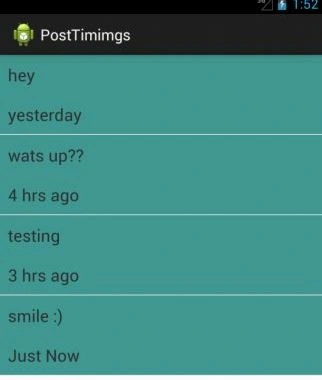
In the code above, "diff" is the difference between the two dates (the date on which the thought was posted and current date) in seconds. "disTime" gives the time that will be displayed, for example: "Just Now" will be displayed for thought posted "15 sec ago", time in seconds will be displayed for thought posted less than a minute ago and so on.
Step 10
Do the following changes in "AndroidManifest.xml":
- <?xml version="1.0" encoding="utf-8"?>
- <manifest xmlns:android="http://schemas.android.com/apk/res/android"
- package="com.chhavi.posttimimgs"
- android:versionCode="1"
- android:versionName="1.0" >
- <uses-sdk
- android:minSdkVersion="8"
- android:targetSdkVersion="17" />
- <application
- android:allowBackup="true"
- android:icon="@drawable/ic_launcher"
- android:label="@string/app_name"
- android:theme="@style/AppTheme" >
- <activity
- android:name="com.chhavi.posttimimgs.MainActivity"
- android:label="@string/app_name" >
- <intent-filter>
- <action android:name="android.intent.action.MAIN" />
- <category android:name="android.intent.category.LAUNCHER" />
- </intent-filter>
- </activity>
- <activity
- android:name="com.chhavi.posttimimgs.ViewPost"
- android:label="@string/app_name" >
- </activity>
- <activity
- android:name="com.chhavi.posttimimgs.WritePost"
- android:label="@string/app_name" >
- </activity>
- </application>
- </manifest>
Output snapshots:
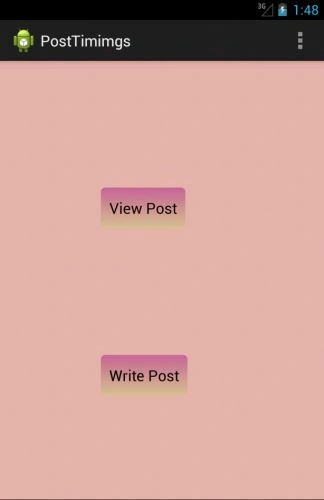
Selecting "Write Post" will give you:
Selecting "View Post" will give you:
Join the conversation! Your thoughts help the community grow.