

Microsoft Graph is a protected web API for accessing data in Microsoft cloud services like Microsoft Entra ID and Microsoft 365.
The method that an app uses to authenticate with the Microsoft identity platform depends on how you want the app to access the data.
- Delegated access, is an app acting on behalf of a signed-in user.
- App-only access, an app acting with its own identity.
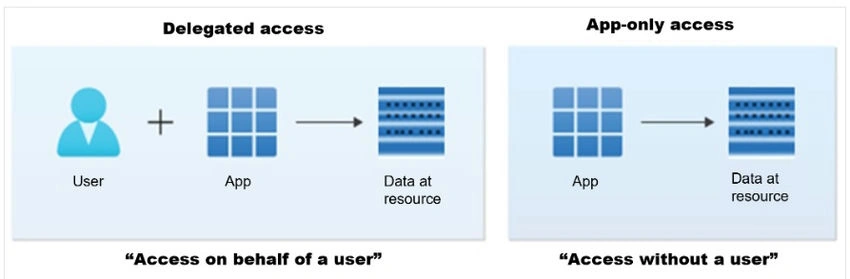
Let's see the difference between the two.
Delegated access (access on behalf of a user)
Delegated access requires delegated permissions, also referred to as scopes.
Scopes are permissions that are exposed by a given resource and they represent the operations that an app can perform on behalf of a user.
Because both the app and the user must be authorized to make the request, the resource grants the client app the delegated permissions, for the client app to access data on behalf of the specified user. The actions that the user can perform on the resource rely on the permissions that they have to access the resource.
For example, the user might be the owner of the resource, or they might be assigned a particular role through a role-based access control system (RBAC) such as Microsoft Entra RBAC.
- Use Case: Often used in applications where user actions trigger requests, such as a user accessing their OneDrive files through a third-party app.
- Permissions: The app inherits permissions based on the user’s access rights, effectively operating under the user’s authority.
- Authentication: The user must authenticate, usually with OAuth 2.0, and explicitly grant the app permission to access their data.
- Examples
- An email client app accessing a user’s emails with the user logged in.
- A document management app accessing files the user has permission for.
Note. Endpoints and APIs with the /me alias operate on the signed-in user only and are therefore called in delegated access scenarios.
App-only access (access without a user)
In this access scenario, the application can interact with data on its own, without a signed-in user. App-only access is used in scenarios such as automation and backup and is mostly used by apps that run as background services or daemons. It's suitable when it's undesirable to have a user signed in, or when the data required can't be scoped to a single user.
Apps get privileges to call Microsoft Graph with their own identity through one of the following ways.
When the app is assigned application permissions, also called app roles.
When the app is assigned ownership of the resource that it intends to manage.
Join the conversation! Your thoughts help the community grow.