

Both Response. Redirect and Server. Transfer methods are used to transfer a user from one web page to another web page. Both methods are used for the same purpose but still, there are some differences as follows.
The Response. The redirect method redirects a request to a new URL and specifies the new URL while the Server.Transfer method for the current request terminates the execution of the current page and starts the execution of a new page using the specified URL path of the page.
Both Response. Redirect and Server.Transfer has the same syntax.
Response.Redirect("UserDetail.aspx");
Server.Transfer("UserDetail.aspx");
Before touching on more points I want to explain some HTTP status codes, these are important for the understanding of the basic differences between these two. The HTTP status codes are the codes that the Web server uses to communicate with the Web browser or user agent.
- HTTP 200 OK: This is the most common HTTP status message. It indicates that the request was successful and the server was able to deliver on the request. The information returned with the response is dependent on the method used in the request. In a GET request, the response will contain an entity corresponding to the requested resource. In a POST request, the response will contain an entity describing or containing the result of the action.
- HTTP 302 Found: The HTTP response status code 302 Found is a common way of performing a redirection. The 302 status code indicates that the resource you are requesting has redirected to another resource.
Response. Redirect sends an HTTP request to the browser, then the browser sends that request to the web server, then the web server delivers a response to the web browser. For example, suppose you are on the web page "UserRegister.aspx" page and it has a button that redirects you to the "UserDetail.aspx" web page.

Figure 1.1 Request and Response using Response. Redirect method
You can notice in Figure 1.1 that when you run the application then you get a web page successfully so the HTTP status code is "HTTP 200 OK". Then you click on the button that redirects to another page using the Response.Redirect method. The Response.Redirect method first sends a request to the web browser so it is the "HTTP 302 Found" status, then the browser sends a request to the server and the server deliver a response so it is "HTTP 200 OK". It is called a round trip. Let's see that in Figure 1.2.

Figure 1.2 Round Trip by Response. Redirect method
Server.Tarnsfer sends a request directly to the web server and the web server delivers the response to the browser.

Figure 1.3 Request and Response using Server.Transfer method
Now Figure 1.3 explains that the first request goes to the web server and then gets a response so the round-trip is not made by the Server. Transfer method. You get the same page response but different content. That means your web page URL in the address bar will not be changed. For example, see Figure 1.3 shows you get the same page as the previous request page so the previous page still remains while in Response. Redirect you get a different page in the response (see Figure 1.1 ). That means the address bar URL will be changed in the Response. Redirect method and also updates the browser history so you can move back from the browser back button.
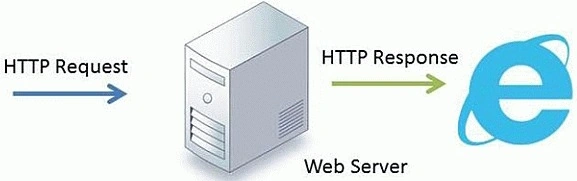
Figure 1.4 Server.Transfer method request and response
Response.Redirect can be used for both .aspx and HTML pages whereas Server.Transfer can be used only for .aspx pages and is specific to ASP and ASP.NET.
Response.Redirect can be used to redirect a user to an external websites. Server.Transfer can be used only on sites running on the same server. You cannot use Server.Transfer to redirect the user to a page running on a different server.
When you use Server.Transfer then the previous page also exists in server memory while in the Response.Redirect method the previous page is removed from server memory and loads a new page in memory. Let's see an example.
We add some items in the context of the first page "UserRegister.aspx" and thereafter the user transfers to another page "UserDetail.aspx" using Server.Transfer on a button click. The user will then be able to request data that was in the context because the previous page also exists in memory. Let's see the code.
Code of the UserRegister.aspx.cs page.
using System;
public partial class UserRegister : System.Web.UI.Page
{
    protected void btn_Detail_Click(object sender, EventArgs e)
    {
        Context.Items.Add("Name", "Sandeep Singh Shekhawat");
        Context.Items.Add("Email", "[email protected]");
        Server.Transfer("UserDetail.aspx");
    }
}
Code of the UserDetail.aspx.cs page.
using System;
public partial class UserDetail : System.Web.UI.Page
{
    protected void Page_Load(object sender, EventArgs e)
    {
        try
        {
            Response.Write(string.Format("My name is {0} and email address is {1}",
                                          Context.Items["Name"].ToString(),
                                          Context.Items["Email"].ToString()));
        }
        catch (NullReferenceException ex)
        {
            Response.Write(ex.Message);
        }
    }
}
Using the code above we can get data from the previous page to the new page by the Context. Item collection. But if you use the Response. Redirect method then you can't get context data on another page and get an exception object as null because the previous page doesn't exist in server memory.
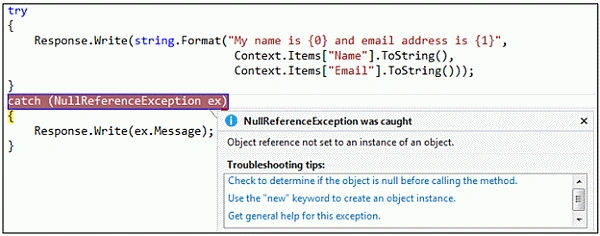
Figure 1.5 Null Exception by the Context object
Mostly the Server. Transfer method is preferable to use because of Server.Transfer is faster since there is one less roundtrip, but some people say that Server. Transfer is not recommended since the operations typically flow through several different pages causing a loss of the correct URL of the page, but again it all depends on your requirements.
It is not a complete list. I wrote the basic differences between these two. If you know more differences then please provide them in the comments.
Maddy MudasirPosted Apr 7, 2019, 10:25 AM
Sandeep Singh Shekhawat I have a query. I I send an Ienumerable<list> to populate a dropdown in my view. When I submit the form, I need to send it to the controller so that I can return it back to the view with the model in case of an exception; or when the form submits successfully, with the success message. Can you please guide me how I can do this.
John WagnerPosted May 27, 2016, 12:02 AM
Thank you very much to the writers of the content of this page- this helped a lot with my homework. And this content was super easy to find, it was the second link on google below the Microsoft Link. NICE SEO!
Former memberPosted Feb 20, 2016, 1:57 AM
Nice one
Navneeth KrishnaPosted Jul 23, 2015, 9:21 AM
nice
Former memberPosted Feb 25, 2015, 2:39 AM
Nice Explained.
Pankaj Kumar ChoudharyPosted Jan 23, 2015, 11:49 AM
In what condition we should use server.transfer instead of response.redirect
syed talhaPosted Sep 5, 2014, 3:03 PM
very well explained
Rajagopalan R VPosted Jun 17, 2014, 1:54 AM
Nice Explanation Me Too Has Same Doubt Where pratik panda Asked Above
pratik pandaPosted Nov 30, 2013, 1:12 AM
in "server.transfer" how will we go back to previous page??
pratik pandaPosted Nov 30, 2013, 1:10 AM
thanku...for ur explaination ....keep on posting more rare topics
Sandeep Singh ShekhawatPosted Nov 8, 2013, 9:42 PM
Thank you @Nagaraj S
Nagaraj SPosted Nov 8, 2013, 10:12 AM
Thanks for your effort to explain this concept in easy way of understanding.
Sandeep Singh ShekhawatPosted Oct 29, 2013, 1:55 AM
Thank You @sai bageri
Saineshwar BageriPosted Oct 29, 2013, 1:03 AM
Nice one