


There are so many discussions of the Response.Redirect and Server.Transfer methods of ASP.NET. I will show you in this article how they work programmatically or practically.
We can switch or move from one page to another page using both methods, but both methods have many differences. The differences you will see later but first I am showing you how to use both of them. I am simply creating an application for showing how to use both of them. Use the following procedure to create the sample application.
- First of all open the Visual Studio and create a new empty website.
- Now I am adding two aspx pages or ASP.NET Web Forms named "FirstPage.aspx" and "SecondPage.aspx".
To add both pages go to the Solution Explorer and right-click on the solution and click on "Add" >> "Add new Item".
Such as the following: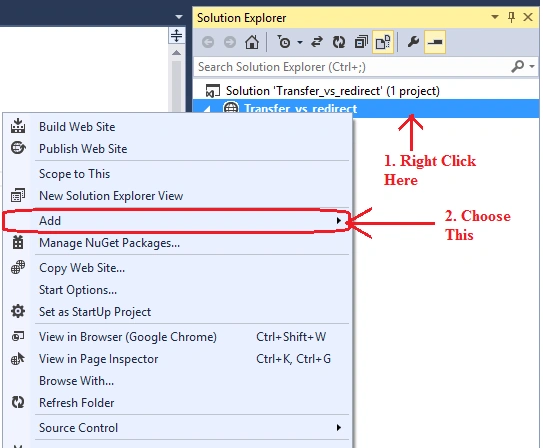
And:
And now select "Web Form" and give them a name of the page. I used the names "FirstPage.aspx" and "SecondPage.aspx." as in the following:
- Now create two buttons (one for the Server.Transfer method and another one for the Response.Redirect method) using ToolBox as shown below.

You can create a button using the following code also:- <asp:Button ID="Button1" runat="server" Text="Server.Transfer Button" />
- <asp:Button ID="Button2" runat="server" Text="Response.Redirect Button" />
- Now go to the design part and double-click on the Server.Transfer Button, use the following code for this button's click event.
- protected void Button1_Click(object sender, EventArgs e)
- {
- Server.Transfer("SecondPage.aspx");
- }
- Now also do the same for the Response.Redirect Button but use the following method for it:
- protected void Button2_Click(object sender, EventArgs e)
- {
- Response.Redirect("SecondPage.aspx");
- }
- Now build the project and run it.
After running you will see the output looks such as the following:
Now when you click on the Server.Transfer Button you will see output like:
And when you will click on the Response.Redirect button you will see output like:


सौरभ माहेश्वरीPosted Jan 6, 2016, 3:30 AM
nice...
Shaili DashoraPosted Feb 3, 2014, 2:16 AM
small things with good explanation,nice job......