In SQL Server, both TRUNCATE and DELETE are used to remove data from a table, but they differ significantly in terms of performance, logging, and their impact on the table structure. Below, we explore their differences through advanced real-world scenarios.
Deleting Specific Rows
You have a large customer database and need to delete records based on a condition, such as all customers from a specific country.
DELETE FROM Customers
WHERE Country = 'USA';
Why Use DELETE?
- DELETE allows you to remove specific rows based on a WHERE condition.
- It supports triggers, enabling additional actions like logging or cascading updates.
- Referential integrity is preserved, ensuring foreign key constraints are respected.
Note. Since DELETE logs each row individually, it can be slower for large datasets, especially when dealing with a significant number of rows.
Resetting a Table for Data Migration
During data migration, you need to clear all rows from a table, such as the Users or Orders table, before inserting new data.
TRUNCATE TABLE Users;
Why Use TRUNCATE?
- TRUNCATE quickly removes all rows from the table.
- It resets the identity column, allowing new rows to start from the seed value.
- The operation is much faster than DELETE as it does not log each row deletion.
Note. TRUNCATE cannot be used if there are foreign key constraints, even if those constraints are defined with ON DELETE CASCADE.
Managing Temporary Tables for Large Datasets
While working with large datasets, you need to clear the contents of a temporary table after processing it, such as Temp_SessionData.
TRUNCATE TABLE Temp_SessionData;
Why Use TRUNCATE?
- It efficiently clears large amounts of data from the table.
- No individual row logs are generated, making it a fast cleanup option.
- Ideal for temporary tables where data retention is unnecessary.
Note. Using TRUNCATE avoids performance bottlenecks associated with row-by-row deletions.
Deleting Data with Referential Integrity
You need to delete all records in a parent table (e.g., Customers) while ensuring that related records in child tables (e.g., Orders) are also removed.
DELETE FROM Customers WHERE Country = 'USA';
Why Use DELETE?
- DELETE respects foreign key constraints and triggers cascading deletions to dependent tables.
- Cascading deletions, defined with ON DELETE CASCADE, ensure child rows (e.g., in Orders) are automatically deleted.
Note. While DELETE is slower than TRUNCATE, it ensures referential integrity and cascading actions across related tables.
Regular Data Resets for Large Tables
You regularly refresh data in a table (e.g., SalesData) from an external system and need to reset it completely.
TRUNCATE TABLE SalesData;
Why Use TRUNCATE?
- TRUNCATE quickly wipes out all data and resets the identity column, starting new rows from the default seed value.
- It is more efficient and minimalistic compared to DELETE.
Note. Check that no foreign key dependencies exist, as these will block the use of TRUNCATE.
Partial Table Cleanup with Complex Conditions
You need to clean up a specific subset of data from a large table where conditions involve multiple columns (e.g., inactive users who haven’t logged in for a year).
DELETE FROM Users
WHERE
    LastLogin < DATEADD(YEAR, -1, GETDATE())
    AND IsActive = 0;
Why Use DELETE?
- DELETE enables precise removal of rows based on complex conditions.
- It ensures that other unaffected rows remain intact.
- Triggers can be used to log or audit the deletions.
Note. For large datasets, indexing the columns used in the WHERE clause can improve performance.
Archiving Old Data
You need to archive old transactional data from a table (e.g., Orders) into an archive table before removing it from the main table.
INSERT INTO ArchivedOrders
SELECT *
FROM Orders
WHERE OrderDate < '2023-01-01';

DELETE FROM Orders
WHERE OrderDate < '2023-01-01';
Why Use DELETE?
- DELETE allows the selective removal of old data after archiving.
- It ensures referential integrity for current data.
- Archiving can be performed in batches to avoid locking issues on the main table.
Note. Using DELETE in combination with INSERT INTO helps retain historical data while managing table size.
Clearing Audit Logs Periodically
Use Case
Your application generates a large number of audit logs, and you periodically clear logs older than a specific timeframe to maintain performance.
TRUNCATE TABLE AuditLogs;
Why Use TRUNCATE?
- Audit logs often do not require referential integrity, making TRUNCATE a fast and efficient option.
- It clears all rows quickly without logging each deletion.
- TRUNCATE minimizes the overhead on large tables with high write frequency.
Note. Check retention policies are implemented before truncating, as all data will be permanently removed.
Performance Considerations
Summary of When to Use Each
- Use DELETE when
- You need to delete specific rows based on conditions.
- You need to trigger referential integrity checks or cascading deletions.
- You need to ensure that triggers are fired.
- You don't want to reset the identity column or change the table structure.
- Use TRUNCATE when
- You need to remove all rows from a table and reset the identity column.
- There are no foreign key constraints.
- You want faster performance and minimal logging for bulk deletions.
Now Let’s walk through a stock exchange scenario where you can apply both DELETE and TRUNCATE commands in SQL Server, depending on the requirements. This covers a realistic stock trading system scenario, including market operations, account management, and transaction logs.
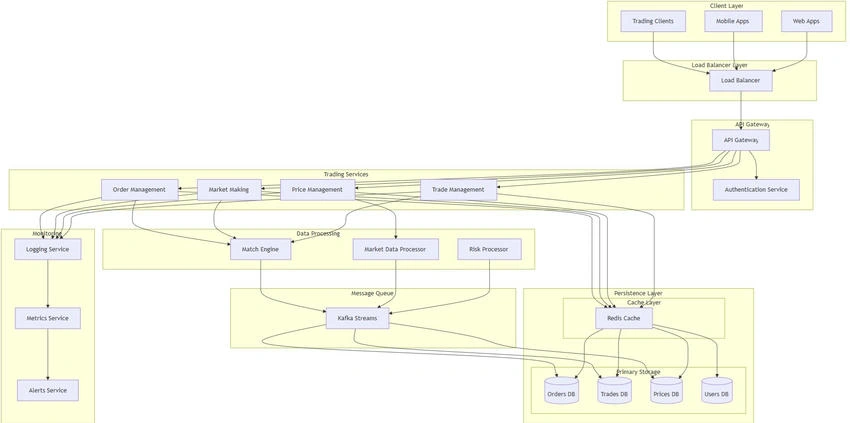
In a stock exchange system, you might have multiple tables like,
- Stocks (Information about stocks traded)
- Trades (Transaction records of stock buys and sells)
- Orders (Active orders for buying/selling stocks)
- Users (Trader accounts and details)
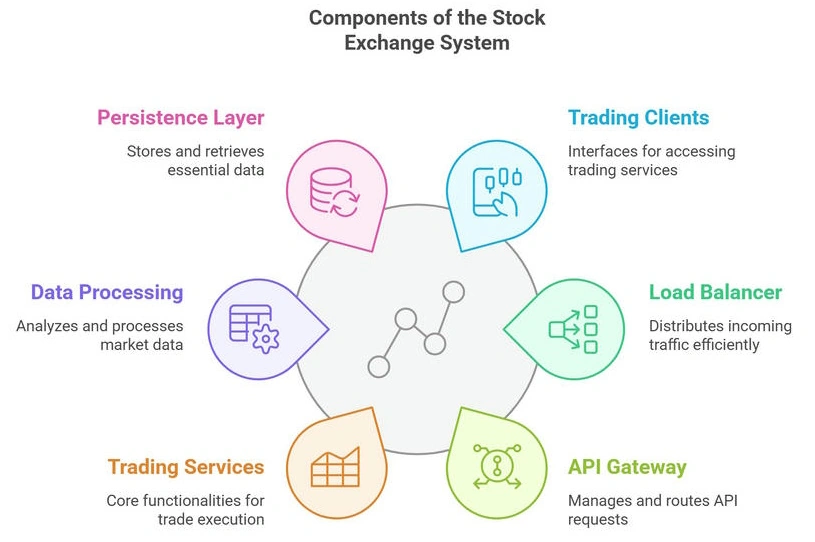
We will look at how DELETE and TRUNCATE can be used for various operations in this stock exchange system, depending on whether we need to delete specific records, reset tables, or manage large datasets efficiently.
Deleting a Specific Stock Order from the Orders Table
Let’s say a trader cancels a buy/sell order. You need to delete the specific order record from the Orders table.
- The trader places an order to buy 100 shares of the Company Jack&Jones.
- The order is still active and hasn’t been filled.
- The trader decides to cancel the order.
SQL Query
DELETE FROM Orders
WHERE OrderID = 12345;
Why use DELETE?
- You are deleting a specific row that matches the condition (based on OrderID).
- You need to ensure that any relevant foreign key constraints (e.g., relationship to Users or Stocks) are respected. If any cascades or actions need to be triggered (e.g., updating user balance or stock status), DELETE ensures that happens.
- The operation is logged for transaction tracking, allowing you to monitor exactly what was deleted.
Impact
This operation is slow compared to TRUNCATE, especially if there are a large number of active orders in the system, but it is necessary for deleting specific rows based on user actions.
Resetting All Orders for the End of the Day
At the end of each trading day, the stock exchange needs to clear all orders from the Orders table to prepare for the next trading day. The system clears all records, regardless of whether the orders are pending or executed.
- The stock exchange clears all pending orders after the market closes.
- You want to quickly remove all rows from the Orders table to start fresh.
SQL Query
TRUNCATE TABLE Orders;
Why use TRUNCATE?
- You want to remove all rows efficiently without worrying about individual row deletions.
- This operation does not log individual row deletions (it’s minimally logged), making it much faster when dealing with large datasets.
- It also resets any identity column (if there’s one for OrderID), which is useful if you want to restart the order numbering from the seed value the next day.
Consideration
Ensure that there are no foreign key constraints in place, or if there are, ensure TRUNCATE is allowed (i.e., no dependencies with cascading deletes).
Impact
- Efficient for clearing large volumes of data, but be cautious if there are foreign key constraints that prevent truncating the table.
- This is suitable for an end-of-day reset where all orders must be wiped out to prepare for the next day.
Clearing Historical Data for Trades
The exchange wants to archive the trades older than a year, as they are no longer relevant for active trading or reporting but need to be stored for historical purposes.
Trades that happened more than a year ago need to be archived into a backup system, and the records should be removed from the main Trades table.
SQL Query
DELETE FROM Trades
WHERE TradeDate < DATEADD(YEAR, -1, GETDATE());
Why use DELETE?
- You need to delete specific records based on the condition (TradeDate < DATEADD(YEAR, -1, GETDATE())), so DELETE allows for precise control.
- The operation respects foreign key constraints, ensuring that dependent data in other tables (such as order details or user information) is also managed correctly.
Consideration
If you have millions of trades, DELETE might be slow, but this is necessary if you want to keep the data that is still relevant (for example, trades made within the last year).
Impact
Deleting specific records ensures that important data (such as current trades) is not deleted by mistake, and you can archive old data efficiently.
Resetting All Stock Prices for a New Trading Day
On the stock exchange, stock prices need to be reset every morning to the opening prices of the day. You want to clear all the previous day’s data and set the new day's prices.
Scenario
- Every morning, you reset the stock price data for each traded stock.
- The previous day’s data is irrelevant for the new trading day, so it’s cleared.
SQL Query
TRUNCATE TABLE StockPrices;
Why use TRUNCATE?
- You want to quickly remove all rows without worrying about specific conditions or the individual deletion of each stock's price.
- It’s much more efficient than DELETE since it doesn’t log each row removal, which is ideal for large datasets where performance is crucial.
Consideration
If there are foreign key constraints or dependencies on the StockPrices table (e.g., historical trades), TRUNCATE may not be possible. In such cases, you would need to first delete or archive related data.
Impact
Faster performance compared to DELETE and useful for daily resets. This is a classic use of TRUNCATE when the data doesn't need to be retained across days.
Deleting Specific Trade Records Based on a Condition
Let’s say an anomaly or error occurred in the trading system where certain trades were mistakenly recorded (perhaps due to a bug or a trading error), and you need to delete them.
Scenario
- A certain group of trades (e.g., trades that involve incorrect stock symbols or trade amounts) needs to be deleted.
- These trades are identifiable based on a condition, such as a stock symbol mismatch or a trade amount exceeding a predefined limit.
SQL Query
DELETE FROM Trades
WHERE StockSymbol = 'INVALID' OR TradeAmount > 1000000;
Why use DELETE?
- The operation deletes specific rows based on certain conditions, so DELETE is appropriate for this task.
- Triggers (if any) would be fired to ensure related actions are performed (e.g., adjusting the trader's balance or reversing order statuses).
Consideration
This could be a slow operation if the trades table is very large and the condition affects a significant number of rows.
Impact
It’s essential to identify and delete only the erroneous rows based on conditions, so DELETE allows for precise control.
In stock exchange systems, TRUNCATE is usually reserved for bulk operations where all data can be removed quickly (such as resetting stock prices), while DELETE is used for more granular, specific removals or when data integrity constraints are involved (such as removing erroneous trades or orders).


Emmmanuel FIADUFEPosted Jan 23, 2025, 8:51 AM
Nice and very helpful article Mr Paul