Introduction
ASP.NET MVC has different types of Action Results. Each action result returns a different format of the output. As a programmer, we need to use different action results to get the expected output.
- ViewResult (View)
This return type is used to return a webpage from an action method.
- PartialViewResult (PartialView)
This return type is used to send a part of a view which will be rendered in another view.
- JsonResult (json)
This return type is used when we want to return a JSON message.
- JavaScriptResult (JavaScript)
This return type is used to return JavaScript code that will run in the browser.
- EmptyResult
This return type is used to return nothing (void) in the result.
- ContentResult (Content)
This return type is used to return HTTP content type like text/plain as the result of the action.
- RedirectResult (Redirect)
This return type is used to redirect to any other controller and action method depending on the URL.
- RedirectToRouteResult (RedirectToAction, RedirectToRoute)
This return type is used when we want to redirect to any other action method.
- FileResult (File)
This return type is used to send binary output in response.
What is action in MVC?
Actions are the methods in a controller class and they are responsible for returning the view or JSON data. Action will mainly have return type “ActionResult” and it will be invoked from method InvokeAction called by the controller.
What is the importance of NonActionAttribute?
All public methods of a controller class are treated as the action method; if you want to prevent this default method then you have to assign the public method with NonActionAttribute.
Step 1
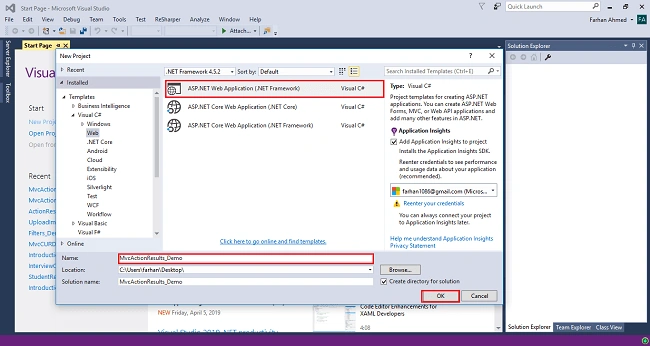
Open Visual Studio 2015 or your choice and create a new project.
Step 2
Choose web application project and give an appropriate name to your project.
Step 3
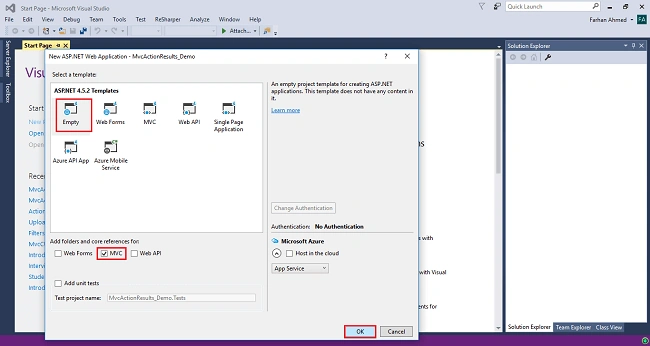
Select empty template, check on MVC checkbox below, and click OK.
Step 4
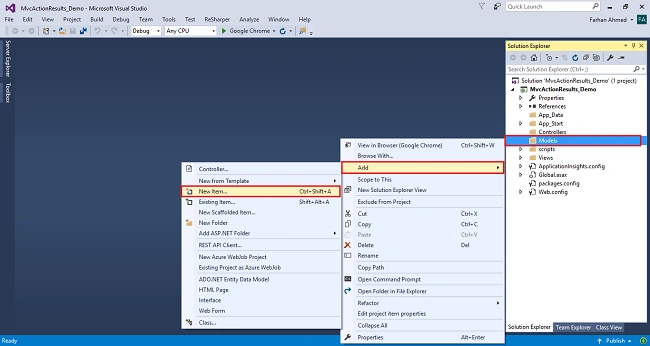
Right click on the Models folder and add the database model. Add Entity Framework now. For that, right-click on Models folder, select Add, then select New Item.
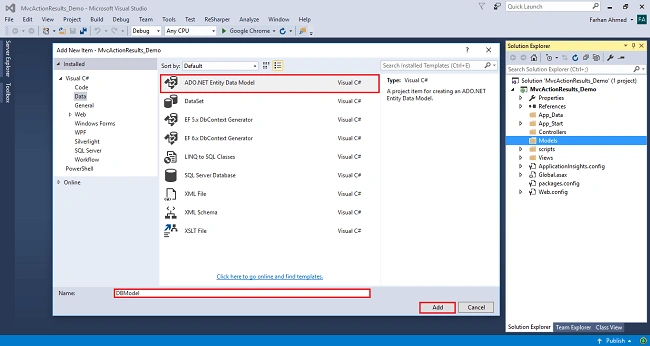
You will get a window; from there, select Data from the left panel and choose ADO.NET Entity Data Model, give it the name EmployeeModel (this name is not mandatory, you can give any name) and click "Add".
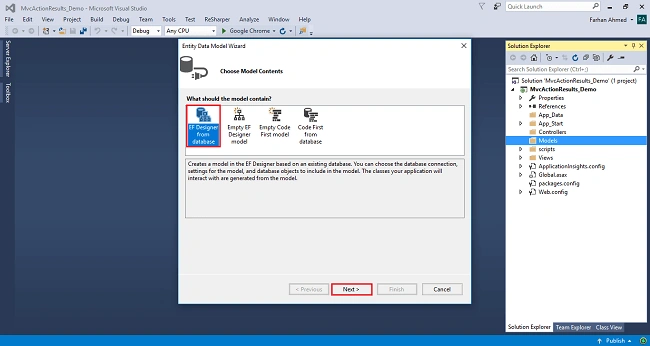
After you click on "Add a window", the wizard will open. Choose EF Designer from the database and click "Next".
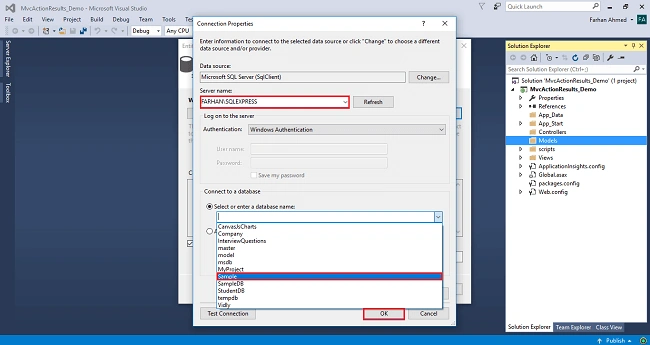
After clicking on "Next", a window will appear. Choose New Connection. Another window will appear. Add your server name - if it is local, then enter dot (.). Choose your database and click "OK".
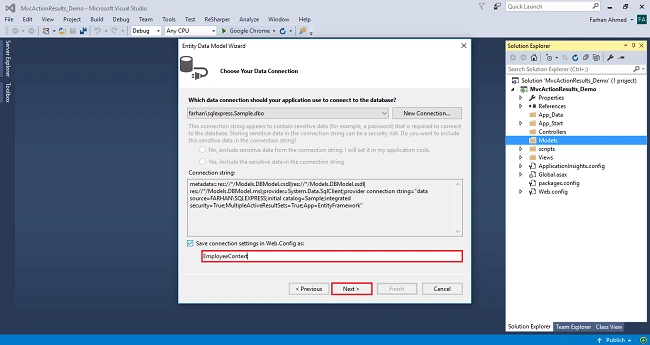
The connection will be added. If you wish, save the connection name as you want. You can change the name of your connection below. It will save the connection in the web config. Now, click "Next"
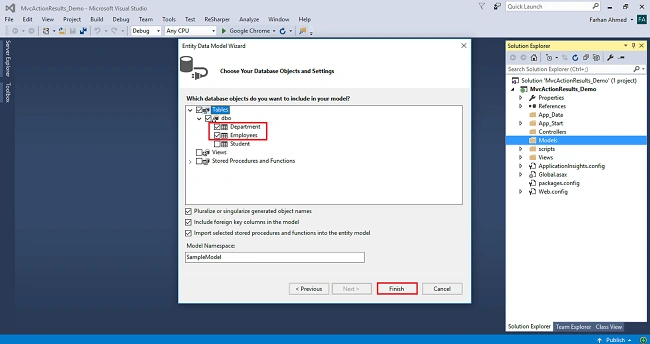
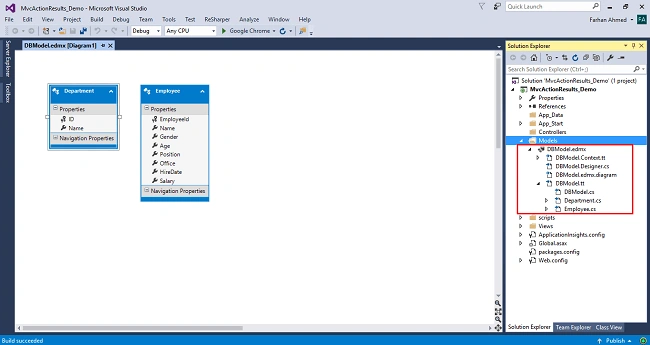
After clicking on NEXT, another window will appear. Choose the database table name as shown in the below screenshot and click "Finish".
Entity Framework gets added and the respective class gets generated under the Models folder.
Step 5
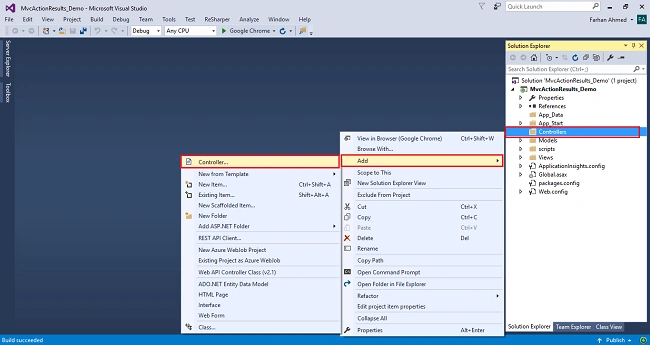
Right click on controllers folder add controller.
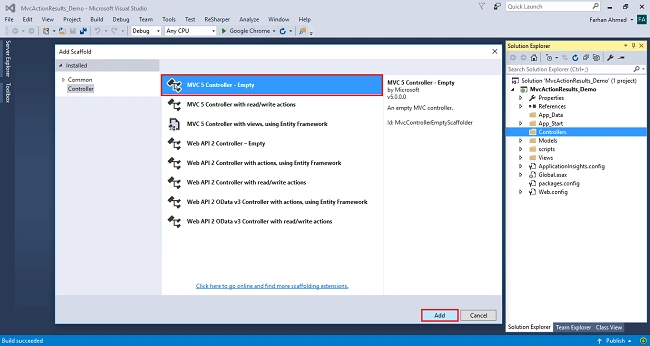
A window will appear. Choose MVC5 Controller-Empty and click "Add".
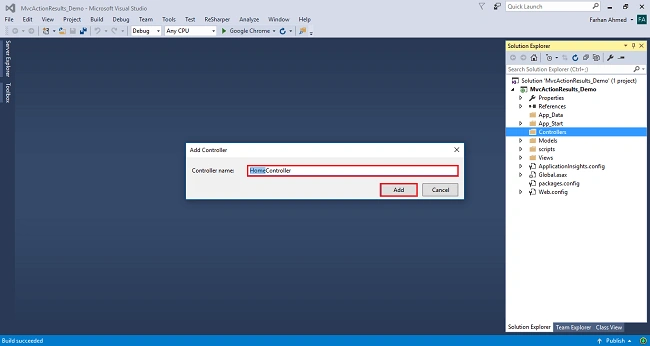
After clicking on "Add", another window will appear with DefaultController. Change the name to HomeController and click "Add". The HomeController will be added under the Controllers folder. Don’t change the Controller suffix for all controllers, change only the highlight, and instead of Default, just change Home;
Complete code for Home Controller
- using System;
- using System.Collections.Generic;
- using System.Linq;
- using System.Web;
- using System.Web.Mvc;
- using MvcActionResults_Demo.Models;
-
- namespace MvcActionResults_Demo.Controllers
- {
- public class HomeController : Controller
- {
- private readonly EmployeeContext _dbContext=new EmployeeContext();
-
- public ActionResult Index()
- {
- var employee = _dbContext.Employees.ToList();
- return View(employee);
- }
-
- public ViewResult ViewResult()
- {
- return View("Index");
- }
-
- public PartialViewResult EmployeePartial()
- {
- var employees = _dbContext.Employees.ToList();
- return PartialView("_employee", employees);
- }
-
- public JsonResult JsonEmployee()
- {
- var empData = _dbContext.Employees.ToList();
- return Json(new {data = empData}, JsonRequestBehavior.AllowGet);
- }
-
- public JavaScriptResult HelloWorld()
- {
- var message = "alert('Hollo World, Welcome to programming');";
- return JavaScript(message);
- }
-
- public ContentResult Content()
- {
- return Content("<h1>Hello, I am from Content Result</h1>");
- }
-
- public EmptyResult Empty()
- {
- return new EmptyResult();
- }
-
- public FileResult ReadFile()
- {
- return File(Url.Content("~/Uploads/MVC topics.pdf"), "MVC topics.pdf");
- }
-
- public RedirectResult MyProfile()
- {
- return Redirect(url: "https://www.c-sharpcorner.com/members/farhan-ahmed24");
- }
-
- public RedirectToRouteResult Department()
- {
- return RedirectToRoute(new {controller = "Department", action = "Index"});
- }
-
- public ActionResult Action()
- {
- return RedirectToAction("MyProfile");
- }
- }
- }
Step 6
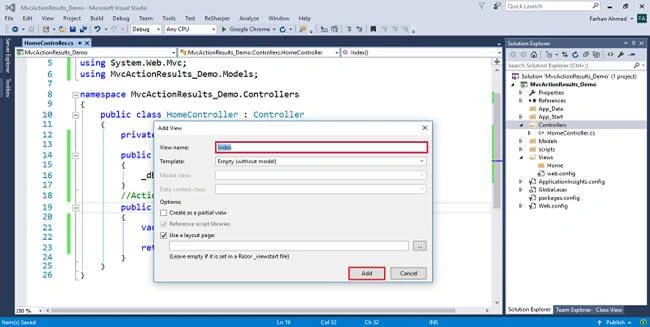
Right click on Index method in HomeController The "Add View" window will appear with default index name checked (use a Layout page), and click on "Add.
Step 7
Right click on the Shared folder under views folder add view. Name it _employee, check on create as a partial view, and click on "Add",
Code for partial view
- @model IEnumerable<MvcActionResults_Demo.Models.Employee>
-
- <table class="table">
- <thead>
- <tr>
- <th>@Html.DisplayNameFor(m=>m.Name)</th>
- <th>@Html.DisplayNameFor(m=>m.Gender)</th>
- <th>@Html.DisplayNameFor(m=>m.Age)</th>
- <th>@Html.DisplayNameFor(m=>m.Position)</th>
- <th>@Html.DisplayNameFor(m=>m.Office)</th>
- <th>@Html.DisplayNameFor(m=>m.HireDate)</th>
- <th>@Html.DisplayNameFor(m=>m.Salary)</th>
- </tr>
- </thead>
- <tbody>
- @foreach(var emp in Model)
- {
- <tr>
- <td>@emp.Name</td>
- <td>@emp.Gender</td>
- <td>@emp.Age</td>
- <td>@emp.Position</td>
- <td>@emp.Office</td>
- <td>
- @if (emp.HireDate != null)
- {
- @emp.HireDate
- }
- </td>
- <td>@emp.Salary</td>
- </tr>
- }
- </tbody>
- </table>
Step 8
Render partial view in index.
- @Html.Partial("_employee")
Step 9
Call JavaScriptResult in index
- <script type="text/javascript" src="@Url.Content("/Home/HelloWorld")"></script>
Step 10
Create a folder, Uploads, and add some pdf or any file for FileResult action to read file.
- public FileResult ReadFile()
- {
- return File(Url.Content("~/Uploads/MVC topics.pdf"), "MVC topics.pdf");
- }
Step 11
Create department controller for RedirectToRoute action.
- public RedirectToRouteResult Department()
- {
- return RedirectToRoute(new {controller = "Department", action = "Index"});
- }


IMAD AYOUBPosted Jun 17, 2020, 12:10 PM
Excellent tutorial. Thanks a lot.
Amit Kumar SinghPosted Apr 28, 2019, 11:08 PM
Thanks for sharing !!!