

Introduction
There are many ways in which we can populate a DropDownList control with data. In this article, I will demonstrate the simple ways to populate a DropDownList using ViewBag, ViewData, TempData, jQuery, Model, Database, jQuery AJAX, and hardcoding in View.
Article Flow
- Populate a DropdownList using Hardcoded data in view
- Populate a DropdownList using Viewbag
- Populate a DropdownListusing ViewData
- Populate a DropdownList using TempData
- Populate a DropdownList using Enum
- Populate a DropdownList using Database with Entity Framework
- Populate a DropdownList using Jquery Ajax with JSON Data
- Populate a DropdownList using Model
- Populate a DropdownList using Global Static Data in View
Before moving on this, Create an empty ASP.NET MVC project and whenever we create a controller it creates an empty index action. Add a view page for this index action by right clicking on Index(controller action) and adding View (Index). If you are not aware of the process to create ASP.NET MVC empty project, follow the steps 1 to 3 here.
Here, I mentioned a project name "VariousWayBindingDropDownListInMVC5" and controller name is DropDownListController. Okay! let's see one by one.
Right now, the below one is our empty Controller.
using System;
using System.Collections.Generic;
using System.Linq;
using System.Web;
using System.Web.Mvc;
namespace VariousWayBindingDropDownListInMVC5.Controllers {
    public class DropDownListController: Controller {
        //
        // GET: /DropDownList/
        public ActionResult Index() {
            return View();
        }
    }
}
Populate a DropDownList using Hardcoded data in view
We can have a DropDownList bound with some static values in View itself. Just add an Html helper for DropDownList and provide the static list of SelectListItem. Now bind the hardcoded values to DropDownList as below in view
<tr>
<td> Populating With Hardcoded Data</td>
<td>
@Html.DropDownList("MySkills", new List<SelectListItem>
{
   new SelectListItem{ Text="ASP.NET MVC", Value = "1" },
   new SelectListItem{ Text="ASP.NET WEB API", Value = "2" },
   new SelectListItem{ Text="ENTITY FRAMEWORK", Value = "3" },
   new SelectListItem{ Text="DOCUSIGN", Value = "4" },
   new SelectListItem{ Text="ORCHARD CMS", Value = "5" },
   new SelectListItem{ Text="JQUERY", Value = "6" },
   new SelectListItem{ Text="ZENDESK", Value = "7" },
   new SelectListItem{ Text="LINQ", Value = "8" },
   new SelectListItem{ Text="C#", Value = "9" },
   new SelectListItem{ Text="GOOGLE ANALYTICS", Value = "10" },
})
</td>
</tr>
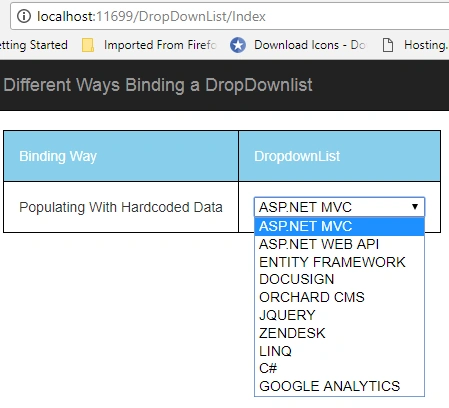
Now run your application, in below image, you can see that DropDownList has populated with hardcoded data
Populate a DropDownList using Viewbag
To populate DropDownList using Viewbag, let's create some collection list with selectListItem types and assign to the Viewbag with appropriate name
public ActionResult Index() {
    #region ViewBag
    List < SelectListItem > mySkills = new List < SelectListItem > () {
        new SelectListItem {
            Text = "ASP.NET MVC", Value = "1"
        },
        new SelectListItem {
            Text = "ASP.NET WEB API", Value = "2"
        },
        new SelectListItem {
            Text = "ENTITY FRAMEWORK", Value = "3"
        },
        new SelectListItem {
            Text = "DOCUSIGN", Value = "4"
        },
        new SelectListItem {
            Text = "ORCHARD CMS", Value = "5"
        },
        new SelectListItem {
            Text = "JQUERY", Value = "6"
        },
        new SelectListItem {
            Text = "ZENDESK", Value = "7"
        },
        new SelectListItem {
            Text = "LINQ", Value = "8"
        },
        new SelectListItem {
            Text = "C#", Value = "9"
        },
        new SelectListItem {
            Text = "GOOGLE ANALYTICS", Value = "10"
        },
    };
    ViewBag.MySkills = mySkills;
    #endregion
    return View();
}
And now bind the ViewBag.MySkills values to DropDownlist as below code in view
<tr>
    <td> Populating With ViewBag Data </td>
    <td> @Html.DropDownList("MySkills", (IEnumerable
        <SelectListItem>)ViewBag.MySkills) </td>
</tr>
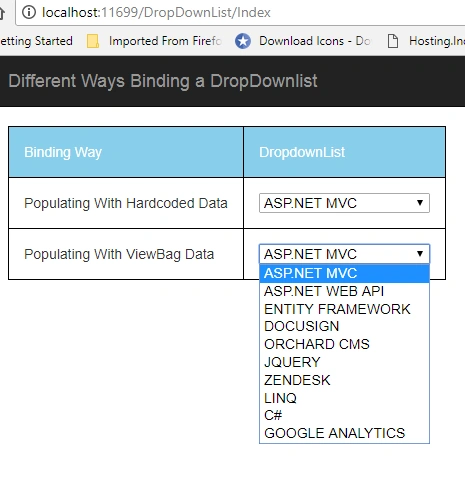
Now run your application, in below image, you can see that DropDownList populated with ViewBag values
Populate a DropDownList using ViewData
To populate DropDownList using ViewData lets create some collection list with selectListItem types and assign to the ViewData with appropriate name
public ActionResult Index() {
    #region ViewData
    List < SelectListItem > mySkills = new List < SelectListItem > () {
        new SelectListItem {
            Text = "ASP.NET MVC", Value = "1"
        },
        new SelectListItem {
            Text = "ASP.NET WEB API", Value = "2"
        },
        new SelectListItem {
            Text = "ENTITY FRAMEWORK", Value = "3"
        },
        new SelectListItem {
            Text = "DOCUSIGN", Value = "4"
        },
        new SelectListItem {
            Text = "ORCHARD CMS", Value = "5"
        },
        new SelectListItem {
            Text = "JQUERY", Value = "6"
        },
        new SelectListItem {
            Text = "ZENDESK", Value = "7"
        },
        new SelectListItem {
            Text = "LINQ", Value = "8"
        },
        new SelectListItem {
            Text = "C#", Value = "9"
        },
        new SelectListItem {
            Text = "GOOGLE ANALYTICS", Value = "10"
        },
    };
    ViewData["MySkills"] = mySkills;
    #endregion
}
And now bind the ViewData["MySkills"] values to DropDownlist as below code in View
<tr>
    <td> Populating With ViewData Data </td>
    <td> @Html.DropDownList("MySkills", (IEnumerable
        <SelectListItem>)ViewData["MySkills"]) </td>
</tr>
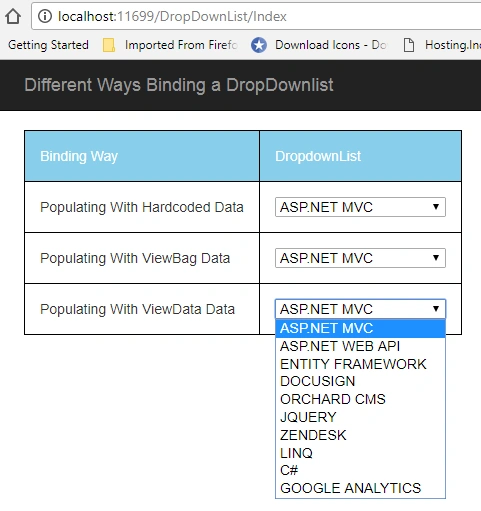
Now run your application, in below image, you can see that DropDownList populated with ViewData values
Populate a DropDownList using TempData
To populate DropDownList using TempData lets create some collection list with selectListItem type and assign to the TempData with appropriate name
#region TempData
List < SelectListItem > mySkills = new List < SelectListItem > () {
    new SelectListItem {
        Text = "ASP.NET MVC", Value = "1"
    },
    new SelectListItem {
        Text = "ASP.NET WEB API", Value = "2"
    },
    new SelectListItem {
        Text = "ENTITY FRAMEWORK", Value = "3"
    },
    new SelectListItem {
        Text = "DOCUSIGN", Value = "4"
    },
    new SelectListItem {
        Text = "ORCHARD CMS", Value = "5"
    },
    new SelectListItem {
        Text = "JQUERY", Value = "6"
    },
    new SelectListItem {
        Text = "ZENDESK", Value = "7"
    },
    new SelectListItem {
        Text = "LINQ", Value = "8"
    },
    new SelectListItem {
        Text = "C#", Value = "9"
    },
    new SelectListItem {
        Text = "GOOGLE ANALYTICS", Value = "10"
    },
};
TempData["MySkills"] = mySkills;
#endregion
And now bind the TempData["MySkills"] values to DropDownlist as below code in View
<tr>
    <td> Populating With TempData Data </td>
    <td> @Html.DropDownList("MySkills", (IEnumerable
        <SelectListItem>)TempData["MySkills"]) </td>
</tr>
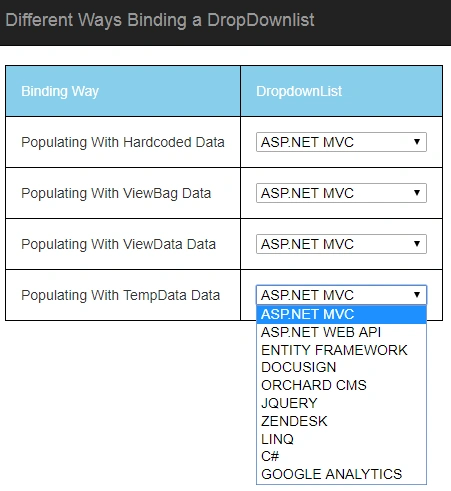
Now run your application, In below image, you can see that DropDownList populated with ViewData values
Populate a DropDownList using Enum
To populate DropDownList using Enum. Let's first create an enum say MySkills which holds my multiple skills.
public enum MySkills {
    ASPNETMVC,
    ASPNETWEPAPI,
    CSHARP,
    DOCUSIGN,
    JQUERY
}
We will create a structure which we can we use for entire application
public struct ConvertEnum {
    public int Value {
        get;
        set;
    }
    public String Text {
        get;
        set;
    }
}
Now create the list of myskill by using MySkills enum foreach, and assign to ViewBag.MySkillEnum
var myskill = new List < ConvertEnum > ();
foreach(MySkills lang in Enum.GetValues(typeof(MySkills)))
myskill.Add(new ConvertEnum {
    Value = (int) lang, Text = lang.ToString()
});
ViewBag.MySkillEnum = myskill;
In view, binding is same as earlier, and need to be mention the Columns to Populate
<tr>
    <td> Populating From Enum </td>
    <td> @Html.DropDownList("MySkills", new SelectList(ViewBag.MySkillEnum, "Value", "Text")) </td>
</tr>
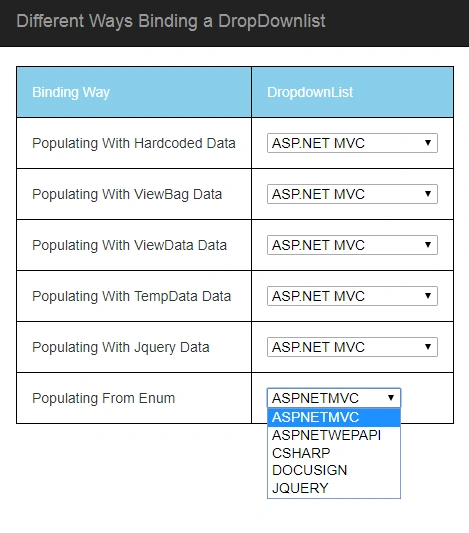
Now run your application, In below image, you can see that DropDownList is populated with enum values
Populate a DropDownList using Database with Entity Framework
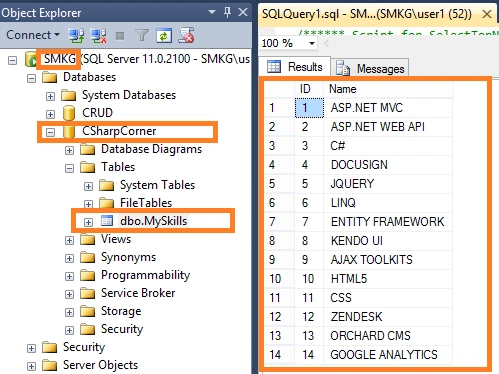
Now we will see how to bind the database value to dropdownlist using entity framework, and the database table dummy values as below
Now write the below login in your controller to bind it to the dropdownlist,
using(CSharpCornerEntities cshparpEntity = new CSharpCornerEntities()) {
    var fromDatabaseEF = new SelectList(cshparpEntity.MySkills.ToList(), "ID", "Name");
    ViewData["DBMySkills"] = fromDatabaseEF;
}
And the view will be
<tr>
    <td> Populating With Database and EF </td>
    <td> @Html.DropDownList("MySkills", (IEnumerable
        <SelectListItem>)ViewData["DBMySkills"]) </td>
</tr>
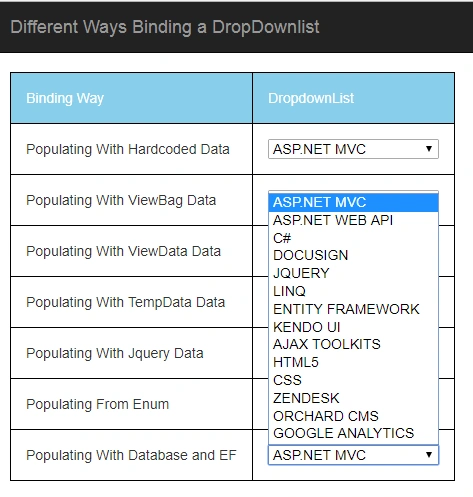
Now run your application
Populate a DropDownList using Jquery Ajax with JSON Data
We already saw the database table dummy values, so now we will write the code and load the data in controller
public JsonResult ReturnJSONDataToAJax() //It will be fired from Jquery ajax call
{
    CSharpCornerEntities cshparpEntity = new CSharpCornerEntities();
    var jsonData = cshparpEntity.MySkills.ToList();
    return Json(jsonData, JsonRequestBehavior.AllowGet);
}
Inside the document ready event handler of the jQuery, first, the MVC action "ReturnJSONDataToAJax" is called using jQuery AJAX function.Inside the Success event handler of the jQuery AJAX function, first, the ASP.Net DropDownList is referenced and a default Item (Option) is added to it.Then a jQuery each loop is executed over the JSON array and one by one each item is added as an Option element to the DropDownList.
<script type="text/javascript" src="http://ajax.googleapis.com/ajax/libs/jquery/1.8.3/jquery.min.js"></script>
<script type="text/javascript">
    $(document).ready(function() {
        $.ajax({
            url: "ReturnJSONDataToAJax",
            type: "GET",
            contentType: "application/json; charset=utf-8",
            datatype: JSON,
            success: function(result) {
                $(result).each(function() {
                    $("#FromJson").append($("<option></option>").val(this.ID).html(this.Name));
                });
            },
            error: function(data) {}
        });
    });
</script>
and now create the DropDownList controller in Razor view
<tr>
    <td> Populating With Json Data </td>
    <td> @Html.DropDownList("FromJson", new SelectList(Enumerable.Empty
        <SelectListItem>())) </td>
</tr>
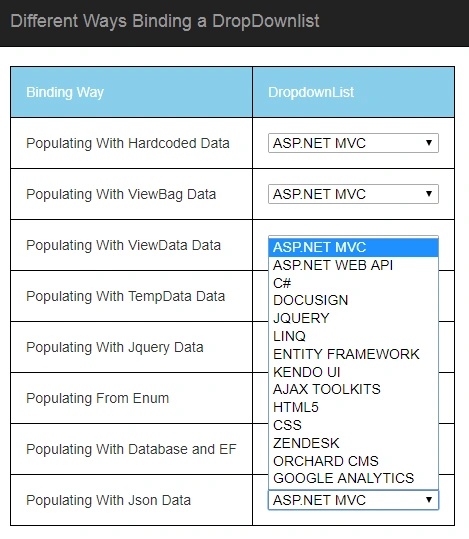
The result will be
Populate a DropDownList using Model Data
To hold the data from database and bind to the DropDownList let's create a model
using System;
using System.Collections.Generic;
using System.Linq;
using System.Web;
using System.Web.Mvc;
namespace VariousWayBindingDropDownListInMVC5.Models {
    public class MySkills {
        public int ID {
            get;
            set;
        }
        public string Name {
            get;
            set;
        }
        public IEnumerable < SelectListItem > Skills {
            get;
            set;
        }
    }
}
Now write the logic to load the data from database using entity framework
var model = new VariousWayBindingDropDownListInMVC5.Models.MySkills();
using(CSharpCornerEntities cshparpEntity = new CSharpCornerEntities()) {
    var dbData = cshparpEntity.MySkills.ToList();
    model.Skills = GetSelectListItems(dbData);
}
Here, GetSelectListItems methods totakes a list of skills and returns a list of SelectListItem objects
private IEnumerable < SelectListItem > GetSelectListItems(IEnumerable < MySkill > elements) {
    var selectList = new List < SelectListItem > ();
    foreach(var element in elements) {
        selectList.Add(new SelectListItem {
            Value = element.ID.ToString(),
                Text = element.Name
        });
    }
    return selectList;
}
And create a DropDownList in View
@model VariousWayBindingDropDownListInMVC5.Models.MySkills
<tr>
    <td> Populating With Model Data </td>
    <td> @Html.DropDownList("FromModel", Model.Skills) </td>
</tr>
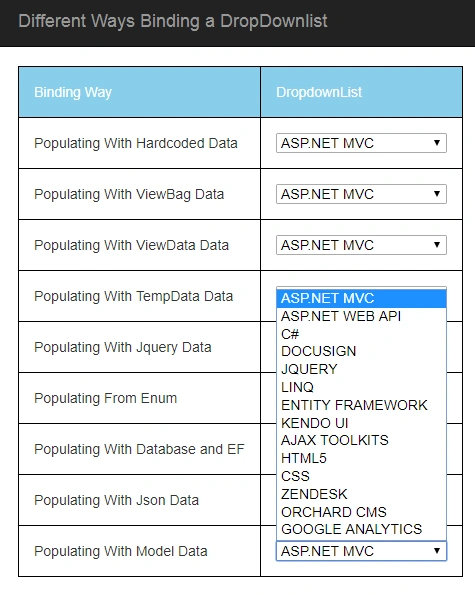
Now run your application
Populate a DropDownList using Global Static Data in View
Now just create the global static SelectListItem items in view and assign it to the DropDownList
@ {
    List < SelectListItem > listItems = new List < SelectListItem > ();
    listItems.Add(new SelectListItem {
        Text = "ASP.NET MVC",
            Value = "1"
    });
    listItems.Add(new SelectListItem {
        Text = "ASP.NET WEB API",
            Value = "2",
            Selected = true
    });
    listItems.Add(new SelectListItem {
        Text = "DOCUSIGN",
            Value = "3"
    });
    listItems.Add(new SelectListItem {
        Text = "C#",
            Value = "4"
    });
} < tr > < td > Populating With Global static Data < /td> < td > @Html.DropDownList("StaticData", listItems) < /td> < /tr>
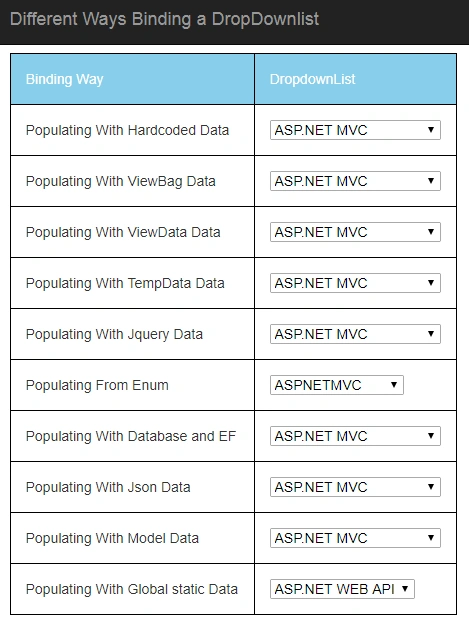
Now run your application
Controller Controller (DropDownListController.cs)
using System;
using System.Collections.Generic;
using System.Linq;
using System.Web;
using System.Web.Mvc;
using VariousWayBindingDropDownListInMVC5.Models;
namespace VariousWayBindingDropDownListInMVC5.Controllers
{
public class DropDownListController : Controller
{
//
// GET: /DropDownList/
public ActionResult Index()
{
#region ViewBag
List<SelectListItem> mySkills = new List<SelectListItem>()
{
new SelectListItem{ Text="ASP.NET MVC", Value = "1" },
new SelectListItem{ Text="ASP.NET WEB API", Value = "2" },
new SelectListItem{ Text="ENTITY FRAMEWORK", Value = "3" },
new SelectListItem{ Text="DOCUSIGN", Value = "4" },
new SelectListItem{ Text="ORCHARD CMS", Value = "5" },
new SelectListItem{ Text="JQUERY", Value = "6" },
new SelectListItem{ Text="ZENDESK", Value = "7" },
new SelectListItem{ Text="LINQ", Value = "8" },
new SelectListItem{ Text="C#", Value = "9" },
new SelectListItem{ Text="GOOGLE ANALYTICS", Value = "10" },
};
ViewBag.MySkills = mySkills;
#endregion
#region ViewData
ViewData["MySkills"] = mySkills;
#endregion
#region TempData
TempData["MySkills"] = mySkills;
#endregion
#region Enum
var myskill = new List<ConvertEnum>();
foreach (MySkills lang in Enum.GetValues(typeof(MySkills)))
myskill.Add(new ConvertEnum { Value = (int)lang, Text = lang.ToString() });
ViewBag.MySkillEnum = myskill;
#endregion
#region Database with EF
using (CSharpCornerEntities cshparpEntity = new CSharpCornerEntities())
{
var fromDatabaseEF = new SelectList(cshparpEntity.MySkills.ToList(), "ID", "Name");
ViewData["DBMySkills"] = fromDatabaseEF;
}
#endregion
#region Model
var model = new VariousWayBindingDropDownListInMVC5.Models.MySkills();
using (CSharpCornerEntities cshparpEntity = new CSharpCornerEntities())
{
var dbData = cshparpEntity.MySkills.ToList();
model.Skills = GetSelectListItems(dbData);
}
#endregion
return View(model);
}
private IEnumerable<SelectListItem> GetSelectListItems(IEnumerable<MySkill> elements)
{
var selectList = new List<SelectListItem>();
foreach (var element in elements)
{
selectList.Add(new SelectListItem
{
Value = element.ID.ToString(),
Text = element.Name
});
}
return selectList;
}
public JsonResult ReturnJSONDataToAJax() //It will be fired from Jquery ajax call
{
CSharpCornerEntities cshparpEntity = new CSharpCornerEntities();
var jsonData = cshparpEntity.MySkills.ToList();
return Json(jsonData, JsonRequestBehavior.AllowGet);
}
public enum MySkills
{
ASPNETMVC,
ASPNETWEPAPI,
CSHARP,
DOCUSIGN,
JQUERY
}
public struct ConvertEnum
{
public int Value { get; set; }
public String Text { get; set; }
}
}
}
Complete View (index.cshtml)
@model VariousWayBindingDropDownListInMVC5.Models.MySkills
@{
ViewBag.Title = "Index";
Layout = "~/Views/Shared/_Layout.cshtml";
}
<script type="text/javascript" src="http://ajax.googleapis.com/ajax/libs/jquery/1.8.3/jquery.min.js"></script>
<script type="text/javascript">
$(document).ready(function () {
$.ajax({
url: "ReturnJSONDataToAJax",
type: "GET",
contentType: "application/json; charset=utf-8",
datatype: JSON,
success: function (result) {
$(result).each(function () {
$("#FromJson").append($("<option></option>").val(this.ID).html(this.Name));
});
},
error: function (data) { }
});
});
</script>
<style>
table, th, td {
border: 1px solid black;
padding: 15px;
}
thead {
background-color: skyblue;
color: white;
}
</style>
@{
List<SelectListItem> listItems = new List<SelectListItem>();
listItems.Add(new SelectListItem
{
Text = "ASP.NET MVC",
Value = "1"
});
listItems.Add(new SelectListItem
{
Text = "ASP.NET WEB API",
Value = "2",
Selected = true
});
listItems.Add(new SelectListItem
{
Text = "DOCUSIGN",
Value = "3"
});
listItems.Add(new SelectListItem
{
Text = "C#",
Value = "4"
});
}
<table>
<thead>
<tr>
<td>Binding Way</td>
<td>DropdownList</td>
</tr>
</thead>
<tr>
<td> Populating With Hardcoded Data</td>
<td>
@Html.DropDownList("MySkills", new List<SelectListItem>
{
new SelectListItem{ Text="ASP.NET MVC", Value = "1" },
new SelectListItem{ Text="ASP.NET WEB API", Value = "2" },
new SelectListItem{ Text="ENTITY FRAMEWORK", Value = "3" },
new SelectListItem{ Text="DOCUSIGN", Value = "4" },
new SelectListItem{ Text="ORCHARD CMS", Value = "5" },
new SelectListItem{ Text="JQUERY", Value = "6" },
new SelectListItem{ Text="ZENDESK", Value = "7" },
new SelectListItem{ Text="LINQ", Value = "8" },
new SelectListItem{ Text="C#", Value = "9" },
new SelectListItem{ Text="GOOGLE ANALYTICS", Value = "10" },
})
</td>
</tr>
<tr>
<td>
Populating With ViewBag Data
</td>
<td>
@Html.DropDownList("MySkills", (IEnumerable<SelectListItem>)ViewBag.MySkills)
</td>
</tr>
<tr>
<td>
Populating With ViewData Data
</td>
<td>
@Html.DropDownList("MySkills", (IEnumerable<SelectListItem>)ViewData["MySkills"])
</td>
</tr>
<tr>
<td>
Populating With TempData Data
</td>
<td>
@Html.DropDownList("MySkills", (IEnumerable<SelectListItem>)TempData["MySkills"])
</td>
</tr>
<tr>
<td>
Populating With Jquery Data
</td>
<td>
@Html.DropDownList("MySkills", (IEnumerable<SelectListItem>)TempData["MySkills"])
</td>
</tr>
<tr>
<td>
Populating From Enum
</td>
<td>
@Html.DropDownList("MySkills", new SelectList(ViewBag.MySkillEnum, "Value", "Text"))
</td>
</tr>
<tr>
<td>
Populating With Database and EF
</td>
<td>
@Html.DropDownList("MySkills", (IEnumerable<SelectListItem>)ViewData["DBMySkills"])
</td>
</tr>
<tr>
<td>
Populating With Json Data
</td>
<td>
@Html.DropDownList("FromJson", new SelectList(Enumerable.Empty<SelectListItem>()))
</td>
</tr>
<tr>
<td>
Populating With Model Data
</td>
<td>
@Html.DropDownList("FromModel", Model.Skills)
</td>
</tr>
<tr>
<td>
Populating With Global static Data
</td>
<td>
@Html.DropDownList("StaticData", listItems)
</td>
</tr>
</table>
Model(MySkills.cs)
using System;
using System.Collections.Generic;
using System.Linq;
using System.Web;
using System.Web.Mvc;
namespace VariousWayBindingDropDownListInMVC5.Models
{
public class MySkills
{
public int ID { get; set; }
public string Name { get; set; }
public IEnumerable<SelectListItem> Skills { get; set; }
}
}
I hope you understood the different ways of DropDownList binding. I did attach the demo project without package for entity framework 6.0 due to file size exceeded more than 25MB.
Summary
In this article, you learned different ways of DropDownList binding. I hope it's helpful and your valuable feedback and comments about this article are always welcome.
auguste ohouoPosted Jun 19, 2022, 8:45 PM
Thanks you so much for the knowledge sharing...I wish you could feature how to pass a selected from the razorpage or view to the PageModel or the controller..
Raymond GPosted Mar 15, 2022, 5:12 PM
Hi Gnanavel , I have a problem with the "Populate a DropDownList using Jquery Ajax with JSON Data" the compiler gives an error The name 'Enumerable' does not exist in the current context, I am new and can't find a fix
Pranam BhatPosted Jul 2, 2021, 8:10 AM
Nice article. Useful.
Guest UserPosted Apr 3, 2021, 1:17 AM
Thank you so much sir
Vikki KumarPosted Apr 9, 2020, 2:05 AM
Nice gnanavel bro
Mark TaborPosted Dec 12, 2019, 11:29 PM
If we populate in that way using the first method which you shared and we save the id in the db , so on listing how we would show the respective text of that id field.
Ivan ArellanoPosted Nov 22, 2019, 1:43 PM
Hi there, It is a good article, but I want to ask you if you have a sample where you have to fill dropdowlists from a detail table using arrays. Here in my app I have the following tables an Order and OrderDetails But I want to be able to edit at same time the itemId into the Order details but Im not able to do this till this moment. How can I do this
Hodong LeePosted Aug 8, 2019, 3:54 AM
Thanks, it's really helpful for me what i looking for
Joshua KerseyPosted Feb 12, 2019, 1:36 PM
I found this article very helpful, especially the section on using the ViewBag. You're missing a lot of traffic because of DropDownList is not spelled correctly in the Headers, which makes the article very hard to find.
Dilip NaglePosted Jan 12, 2019, 11:36 AM
Dear Sekar, Simply superb, precise, well illustrated and comprehensive article on populating a dropdown list. Rarely, one sees such an excellent writeup. Will you also write an article on reading HTML table data in a controller and processing of each row. With Kind Regards, Dilip Nagle
Dilip NaglePosted Jan 12, 2019, 11:33 AM
Dear Sekar,
Jeff GrayPosted Dec 27, 2018, 9:23 AM
In your Populate a DropdownList using Database with Entity Framework option where is the CSharpCornerEntities coming from?
Dhana PandianPosted Nov 27, 2018, 11:12 PM
Whih one is best used in the market
Dhana PandianPosted Nov 27, 2018, 11:11 PM
Very good works.It is Fine to understand
Manas SardarPosted Oct 23, 2018, 12:07 AM
Which is the fastest way
Digit PrincePosted Sep 8, 2018, 6:55 AM
Good article, thanks
Abdul LatifPosted Aug 16, 2018, 10:38 AM
Very helpful, thank you
TaraPosted Jul 17, 2018, 5:44 AM
Very Nice article. Thanks a lot. :)
happy munozPosted May 4, 2018, 2:00 AM
Hi, How to make a validation using this approach if no selected in the dropdownlist? thanks in advance.
SHIVARAJU MPosted Apr 4, 2018, 12:02 AM
Thanks,but which approaches gives the better performance Populate a DropwonList using Jquery Ajax with JSON Data or ??
Karthick KumarPosted Nov 20, 2017, 10:39 PM
Good article, thanks for sharing
Ashok SolankiPosted Nov 14, 2017, 8:18 AM
Good jod. thanks for sharing.
Sundaram SubramanianPosted Nov 13, 2017, 11:44 PM
Good work. Thanks for sharing.