

Introduction
Are you tired of seeing all the Happy Birthday notifications on your Windows 10 Start Screen? People, you don't even know.
Disable Birthday Notifications on Windows 10
Open the Calendar app on your Windows 10. You can search (using WIN+S) and type Calendar and load the Calendar app. You will see all the many birthdays.
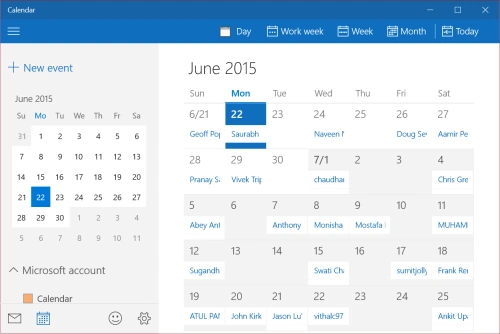
Go to the left side menu bar and look for a checkbox "Birthday calendar" and uncheck it.
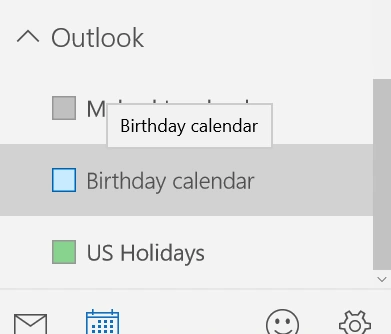
You will then see all the reminders are gone!
Summary
In this article, we learned about Disable Birthday Notifications on Windows 10.
Marcelo MarxPosted Dec 1, 2017, 12:37 PM
I have looked for this info a lot, today one type and I was lucky to find you... Anxious for tomorrow hoping wouldn't seeing this boring message box !!! Thanks !!!
Desmond ChauPosted Jul 18, 2016, 12:34 PM
Thank you for such simple yet useful tips!!!
Santhakumar MunuswamyPosted Jun 22, 2015, 2:22 PM
Thanks for information sir
Sibeesh VenuPosted Jun 22, 2015, 5:00 AM
Thanks for the information SIr.
Gopi ChandPosted Jun 22, 2015, 3:21 AM
Thank you sir for such info :)