

In this tutorial we will discuss Template helper in ASP.NET MVC. Template helper is introduced in MVC-2, and it is classified into two categories.
- Display template
- Editor Template
Display Template Helper Type
- @Html.DisplayForModel() :- This Display template helper is used with strongly typed views. It goes through the every property in the model for displaying object.
- @Html.DisplayFor(modal => modal) :- This Display template helper is used with strongly typed views , if model has properties which return complex objects then this template helper is very useful.
- @Html.Display(“StudentData”) :- This Display template helper is not a strongly typed view. If we store data in viewData then this template helper is used to get that data by key.
Editor Template Helper Type
Like Display template Editor template also has three types,
- @Html.EditorForModel()
- @Html.Editor("StudentData")
- @Html.EditorFor(model => model)
These helpes also work like display template.
@Html.DisplayForModel() And @Html.EditorForModel()
For understanding this template we will take previous example class which we have designed like following. Previous example link is,
@Html.DisplayForModel() And @Html.EditorForModel()
For understanding this template we will take previous example class which we have designed like following. Previous example link is,
- [MetadataType(typeof(StudentMetaData))]
- public partial class Student
- {
- }
- public class StudentMetaData
- {
- #region dataType attribute
- [HiddenInput(DisplayValue = false)]
- public int Id { get; set; }
- [ReadOnly(true)]
- [DataType(DataType.EmailAddress)]
- public string EmailAddress { get; set; }
- [DataType(DataType.Currency)]
- public int? WinningPrize { get; set; }
- // Generate a hyperlink
- [DataType(DataType.Url)]
- [UIHint("OpenInNewWindow")]
- public string PersonalWebSite { get; set; }
- [DataType(DataType.Date)]
- public DateTime? AdmissionDate { get; set; }
- [DisplayAttribute(Name = "Full Name")]
- public string FullName { get; set; }
- [DisplayFormat(DataFormatString = "{0:d}")]
- public DateTime? HireDate { get; set; }
- [DisplayFormat(NullDisplayText = "Gender not specified")]
- public string Gender { get; set; }
- #endregion
- }
The Detail action method code is like following,
- public ActionResult Details(int id)
- {
- MVCVariousAttributeEntities _context = new MVCVariousAttributeEntities();
- Student _studentDetail = _context.Students.Where(c => c.Id == id).SingleOrDefault();
- return View(_studentDetail);
- }
- @model MVCApplicationWithVariousAttribute.Models.Student
- @{
- ViewBag.Title = "Details";
- }
- <div style = >
- <h2>Details</h2>
- <fieldset>
- <legend>Student</legend>
- <div class="display-label">
- @Html.DisplayNameFor(model => model.FullName)
- </div>
- <div class="display-field">
- @Html.DisplayFor(model => model.FullName)
- </div>
- <div class="display-label">
- @Html.DisplayNameFor(model => model.Gender)
- </div>
- <div class="display-field">
- @Html.DisplayFor(model => model.Gender)
- </div>
- <div class="display-label">
- @Html.DisplayNameFor(model => model.EmailAddress)
- </div>
- <div class="display-field">
- @Html.DisplayFor(model => model.EmailAddress)
- </div>
- <div class="display-label">
- @Html.DisplayNameFor(model => model.PersonalWebSite)
- </div>
- <div class="display-field">
- @Html.DisplayFor(model => model.PersonalWebSite)
- </div>
- </fieldset>
- </div>
- @model MVCApplicationWithVariousAttribute.Models.Student
- @{
- ViewBag.Title = "Details";
- }
- <div style = >
- <h2>Details</h2>
- @Html.DisplayForModel()
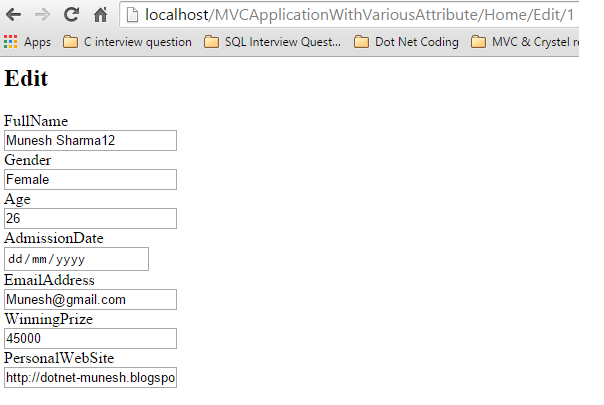
- For the edit action method we can do same
- @model MVCApplicationWithVariousAttribute.Models.Student
- @{
- ViewBag.Title = "Edit";
- }
- <h2>Edit</h2>
- <div style= Arial>
- @using (@Html.BeginForm())
- {
- @Html.EditorForModel()
- }
- </div>
This template is used when do not use scaffold template and we pass data through ViewData or ViewBeg. Code for Edit Action method will be like following,
- public ActionResult Details(int id)
- {
- MVCVariousAttributeEntities _context = new MVCVariousAttributeEntities();
- Student _studentDetail = _context.Students.Where(c => c.Id == id).SingleOrDefault();
- ViewData["StudentData"] = _studentDetail;
- return View();
- return View(_studentDetail);
- }
- @{
- ViewBag.Title = "Details";
- }
- <h2>Details</h2>
- <fieldset>
- <legend>Student</legend>
- @Html.Display("StudentData")
- </fieldset>
The edit template will be,

you can go to my blog also.
RajaPosted May 10, 2016, 8:51 AM
Great..
Bhavik PatelPosted May 10, 2016, 12:48 AM
nice