Overview
Sometimes, there is a situation when the client wishes to see all the version history for an appended multiline textbox in PowerApps. In this article, we will talk about how we can easily get the version history for appended multiline textbox within the PowerApps.
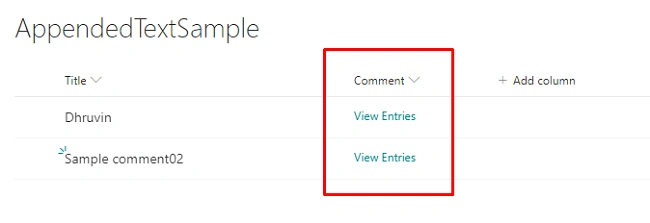
Please refer to the following list structure I have in SharePoint List.
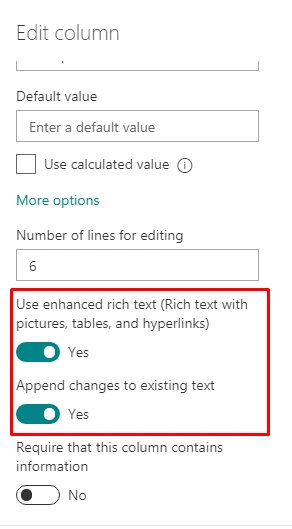
My list has a “Comments” column which has column type multiline textbox with rich text and "Append changes to existing text" enabled.
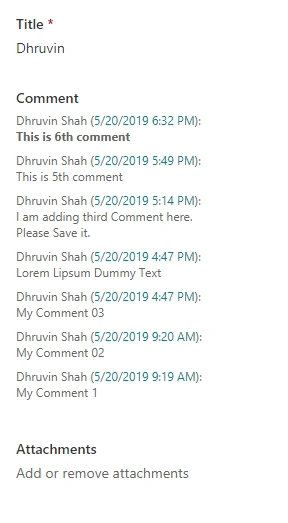
Below is the result of SharePoint item where we need to show all the comment history in PowerApps.
There is no direct way to display Appended Column Version History in PowerApps in "Out of the Box" manner. However, we can achieve this functionality using a Microsoft Flow and PowerApps combination.
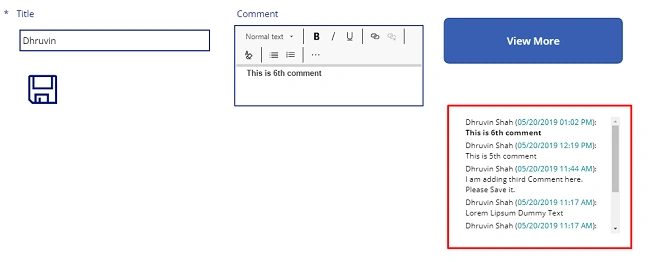
At the end of the article, you will be able to see the version history within the PowerApps something like this.
Step 1 - Create MS Flow to retrieve Append Comment History from SharePoint List
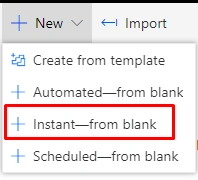
- Click on "New flow" and select “Instant – From blank”.
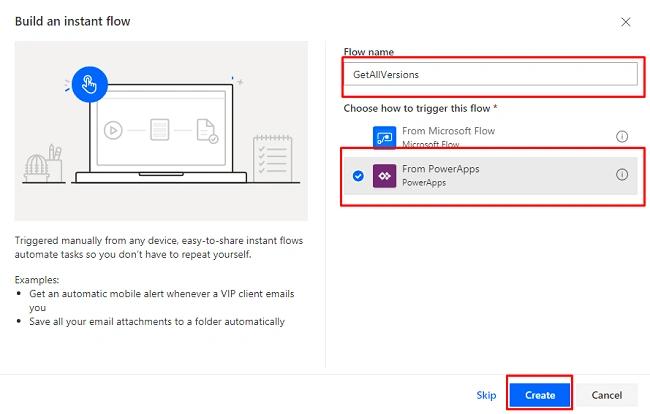
- Give the name of flow and select “PowerApps” as Triggering.
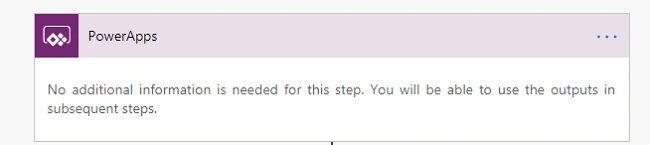
- The following step has been created.
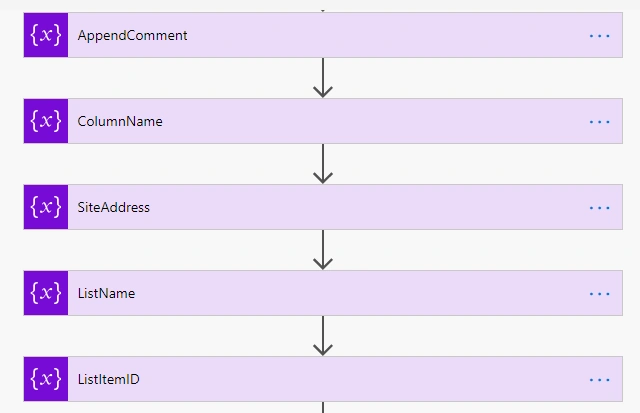
- Now, we need to initialize four variables which accept the value from PowerApps.
To create the variables, follow the below procedure.
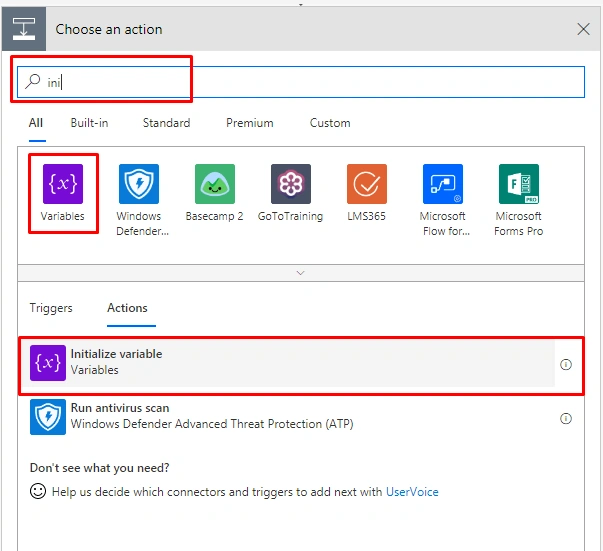
Add an action named “Initialize Variables”.
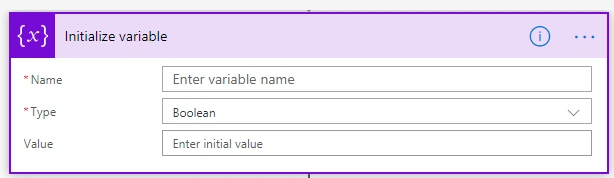
It will ask for the following information.
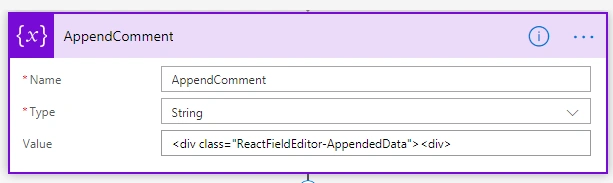
Now, let’s create the first variable named “AppendComment”.
|
Name
|
AppendComment
|
|
Type
|
String
|
|
Value
|
<div class="ReactFieldEditor-AppendedData"><div>
|
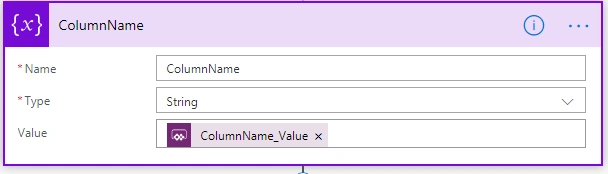
Create a variable named “Column Name”.
|
Name
|
ColumnName
|
|
Type
|
String
|
|
Value
|
Ask in PowerApps / @{triggerBody()['ColumnName_Value']}
|
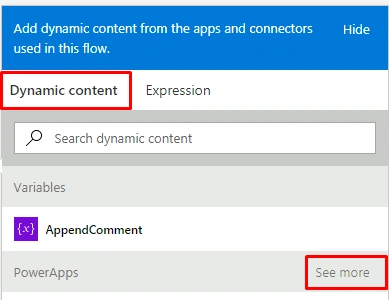
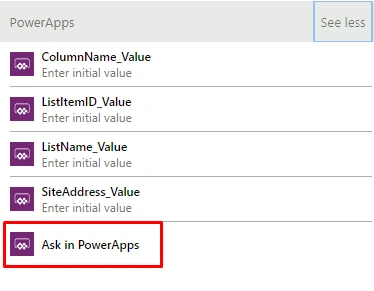
Now, here in Value, we need a parameter from PowerApps. So, when we click on the value, from the right side, select “Dynamic Content” and click on “Ask in PowerApps”. Sometimes, if PowerApps don’t show this option, then click on “See More” and select “Ask in PowerApps”.
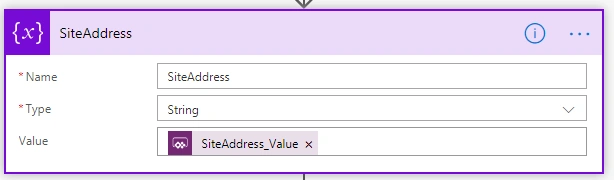
In a similar way, let’s create the third variable named “Site Address”.
|
Name
|
SiteAddress
|
|
Type
|
String
|
|
Value
|
Ask in PowerApps / @{triggerBody()['SiteAddress_Value']}
|
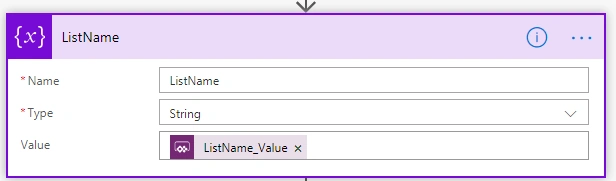
Create a variable named “ListName”.
|
Name
|
ListName
|
|
Type
|
String
|
|
Value
|
@{triggerBody()['ListName_Value']}
|
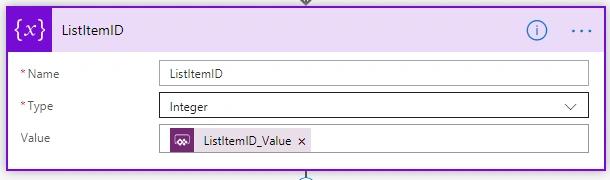
Create a variable named “ListItemID”.
|
Name
|
ListItemID
|
|
Type
|
Integer
|
|
Value
|
@{triggerBody()['ListItemID_Value']}
|
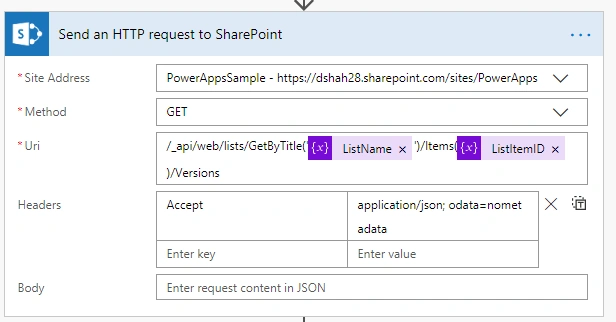
- Now, add an action for “Send an HTTP request to SharePoint”.
Add the following information.
|
SiteAddress
|
URL of SharePoint Site
|
|
Method
|
GET
|
|
Uri
|
/_api/web/lists/GetByTitle('@{variables('ListName')}')/Items(@{variables('ListItemID')})/Versions
|
|
Headers
|
Accept application/json; odata=nometadata
|
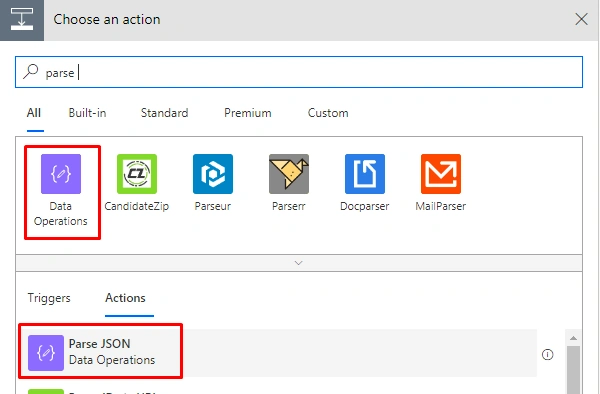
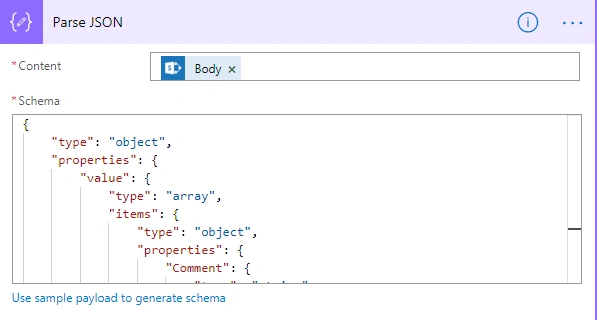
- Add an action to “Parse JSON”.
- Add Content, select Body as result there. We need to parse a comment from the value. So, we will add the following thing as schema.
- {
- "type": "object",
- "properties": {
- "value": {
- "type": "array",
- "items": {
- "type": "object",
- "properties": {
- "Comment": {
- "type": "string"
- }
- },
- "required": ["Comment"]
- }
- }
- }
- }
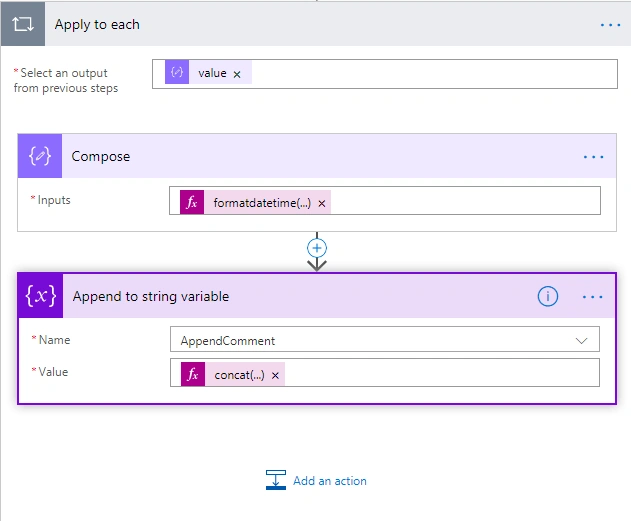
- Click an action “Compose” so that “Apply to each” will be created automatically.
- In Compose, create the below formula.
- formatdatetime(items('Apply_to_each')['Modified'],'MM/dd/yyyy hh:mm tt')
- Now, add an action “Append to string variable”.
In name, select the already created variable named “AppendComment”.
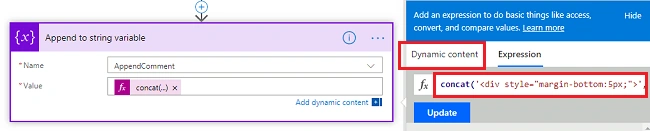
- concat('<div style="margin-bottom:5px;">',items('Apply_to_each')['Author']
- ['LookupValue'],' (<span style="color: rgb(3, 131,
- 135)">',outputs('Compose'),'</span>)',': ',items('Apply_to_each')
- [variables('ColumnName')],'</div>')
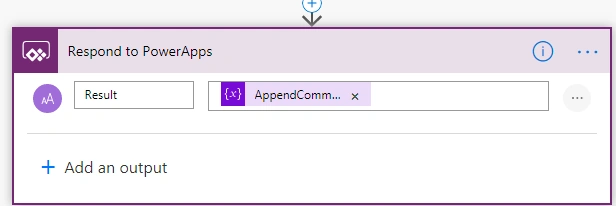
- Add an action named “Respond to PowerApps”.
- Add an output “Result” and pass “AppendComment” variable.
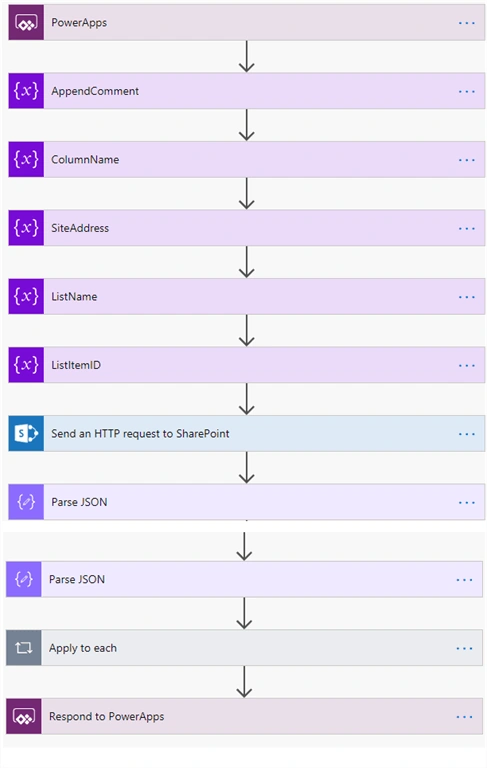
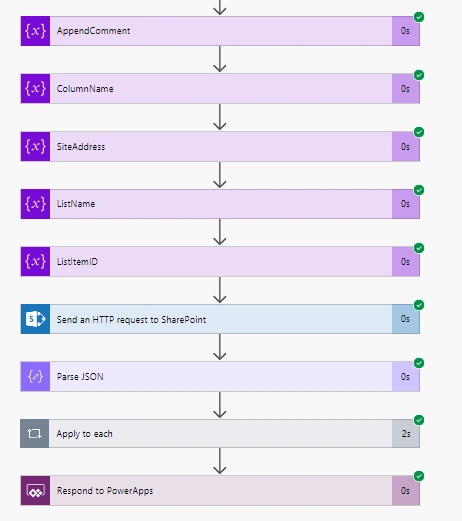
- Our Flow has been created successfully.
- The overall flow will look like the following screen.
Now, let’s trigger the MS Flow from PowerApps.
Step 2: Call MS Flow from PowerApps by Passing the Parameters
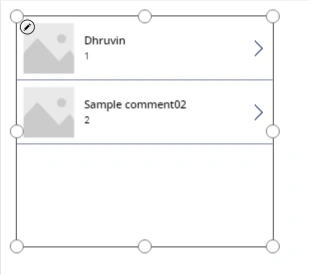
- I already have a SharePoint list shown in PowerApps.
- On the Details screen, create a button. I created a button named “View More”.
- Go to Action, select Flow. It will show our created Flow.
- Now, write the following formula in the OnSelect button.
- Set(AppendCommentsMore,GetAllversions.Run("Comment","https://xyz8.sharepoint.com/sites/PowerApps","AppendedTextSample",SPAppendText.Selected.ID))
Here, in Set function, the variable named “AppendCommentsMore” has been created. It will run our flow and pass 4 parameters as an argument.
- Columnname = Comment
- Site URL
- ListName
- ItemId
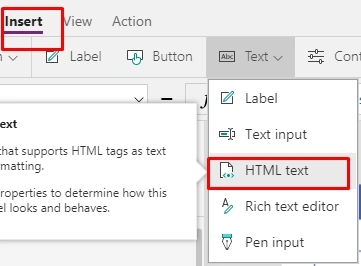
- Add an HTML Textbox to show the end result.
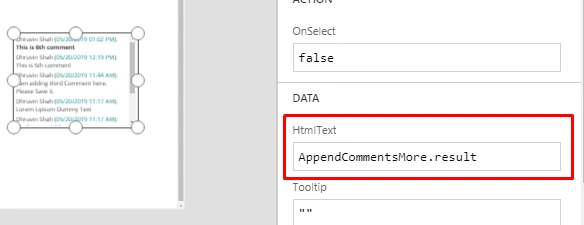
- Select HTML text and go to Advanced Property. Under Data, set HTMLtext as following.
- AppendCommentsMore.result
Step 3 - Run the PoweApps and test the Application
- Run PowerApps.
- Click on "View More".
- It will show all the comments.
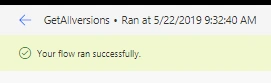
- Now, let’s check the flow history as well.
- The flow has been run successfully.
This is how we can easily get SharePoint Appended Column Version History in PowerApps.
Conclusion
I hope you love this article. If you do, don’t forget to follow me for more amazing articles on PowerApps. Stay connected with me for more articles.
Happy PowerApping !!!!!





Amanda OlivaPosted Dec 8, 2023, 9:38 PM
Thanks for this tutorial. I got everything running except that it looks like all the comments in the html field in my gallery are all the same. Am I missing something with an apply to each or extra details with getting all comments associated to each specific ID?
Simon MasonPosted Oct 18, 2023, 11:10 AM
Hey d d, I edited my JSON as suggested but still seem to be getting those nulls returned. Do you have any other pointers? I do use a button to submit form which would update the record in a SharePoint list, but not specifically the 'notes' field I'm using for appended comments.
d dPosted May 10, 2023, 3:54 PM
If you're getting null from your JSON change the type section to type": ["string" ,"null"]
MarcPosted Apr 27, 2023, 3:52 PM
Thank you for this excellent guide. I am having a bit of trouble with the formula that is used for the OnSelect property of the button in PowerApps. What is the URL that is used in the formula and where would I get the one that I need to use in mine?
Heidi FournierPosted Jan 26, 2023, 4:41 PM
For people trying to get this to work. I would recommend, also checking out this tutorial: https://www.agarwalritika.com/post/get-version-history-from-mlt-field-on-sharepoint-in-canvas-apps. That is finally how I got something to work.
Claudia CalzadillasPosted Jan 17, 2023, 10:02 PM
I was able to successfully run the flow with only one Parse JSON action, but I had to modify the schema to the following: { "type": "object", "properties": { "value": { "type": "array", "items": [ { "type": "object", "properties": { "Comments": { "type": "string" } } } ] } }, "required": [ "value" ] }
Andrew LaForgePosted Sep 28, 2022, 8:03 PM
Anyone able to get this to work? Does anyone have the missing JSON step? My flow errors at the Apply to Each step and says the first Parse JSON step is Null and can't complete. I really need to get this functionality to work
Dan ZietlowPosted Sep 20, 2022, 6:34 PM
Hi Dhruvin, Thank you for these instructions. I tried to follow the steps and get to the bottom of step 1 and get the Failed to Save error when I try to save the Flow I just created. Any ideas what might be wrong? Flow save failed with code 'InvalidTemplate' and message 'The template validation failed: 'The repetition action(s) 'Apply_to_each' referenced by 'inputs' in action 'Compose' are not defined in the template.'.'.
Pat NolPosted May 10, 2022, 2:19 PM
Do we need to adapt the PARSE JSON step ? in the section with the json code, do we need to replace the 2 mentions of "Comment" with the name of our field ? thanks
Akshay SolankiPosted Apr 26, 2022, 8:06 PM
Hey Dhruvin, I am stuck in the last step where we have to add the flow by going into the action. I get error message when I try to add your code for setting the new variable "AppendCommentsMore" as by default when I select my flow, it gives me the "Flow name.Run(" and then asks me to add 5 input variables to pass as we added in the flow.
George MaxsonPosted Mar 11, 2022, 4:51 PM
This is what I need, but still up against a final hurdle. The variable created in the App is of DataType Record and not allowing me to get the "result" when I attempt to display the value. Any new guidance would be greatly appreciated. Thanks for making this available too!
Angelica ArellanoPosted Mar 4, 2022, 7:08 PM
Amazing write up. I have searched for weeks for something that I could actually follow. I'm having trouble with the Button "On Select" formula. I'm not sure how to edit that to go with my flow. This is a crucial step since it is what is connecting my app to the flow, I think. How do I get the direct link the flow? Thanks for your help!
George TaplahPosted Feb 22, 2022, 3:02 PM
Hi Dhruvin, thanks for this article. However, I am still far from success to implement this. The OnSelect action can not compile: Set(varholdHistory,RetrieveRemarksVersionHistory.Run(Remarks,"https://today.sharepoint.com/sites/yesterday",'mobile Connectivity Request',varCurrentRequestItems.ID)). PowerApps frown that it received an invalid number of arguments, expected 5 received 4. the arguments in the run function seems to be missing AppendComment argument. Kindly review and assist.
Shaun BelcherPosted May 21, 2021, 5:05 PM
Hello, Can you explain the formula template? I believe i'm very close, but the differences between your list and app are not defined adequately to understand how to customize this statement for our implementation. I've been able to reverse engineer this so far. Set(variable,'Powerapp flow name'.Run("columname","site address","ListName", unknown.Selected.ID))
Adam HernPosted Jan 31, 2021, 12:57 PM
Did anyone find out why one of the examples showed two Parse JSON steps yet the test flow later on only showed one? I have an error when trying to create this flow, Error: Flow save failed with code 'InvalidWorkflowRunAction' and message 'The workflow run action 'Respond_to_a_PowerApp_or_flow' has type 'Response' that could not be nested under an action of type 'foreach'.'.
Frank RömerPosted Jan 30, 2021, 5:42 PM
First of all, thank you very much for this solution approach, I have followed the steps and come to the following problem: 1) I thought the same as Joe Doe, a Parse JSON step is missing from the list, but is shown in the Screeshot. 2) I only get the last comment shown, all others don't! I'm missing an append or something from the text in the Apply_to_each loop. Is there a small fix?
Mao ZenPosted Sep 1, 2020, 2:22 PM
Hi! I followed your procedure and it was a success. The only problem that I'm getting is whenever I update a filed on the form, I'm getting null value on the comments. I tried to create a condition and did some tweaking on the Parse Json, but still the same. Let me know your thoughts on this. Thanks.
Nathan YurePosted May 6, 2020, 5:49 AM
I'm having a problem in the flow on the "Apply to each" section. "ExpressionEvaluationFailed. The execution of template action 'Apply_to_each' failed: the result of the evaluation of 'foreach' expression '@body('Parse_JSON')?['properties']?['properties']?['properties']?['value']' is of type 'Null'. The result must be a valid array."I looked at the Json parse result and i saw the result that im looking for, but I can't pass the value to the string variable due this error. Do you have any ideias why i'm getting this error? Thanks. Greate job!
Carmen GarciaPosted Mar 16, 2020, 10:37 AM
Unable to process template language expressions in action 'ColumnName' inputs at line '1' and column '2205': 'The template language expression 'triggerBody()['ColumnName_Value']' cannot be evaluated because property 'ColumnName_Value' doesn't exist, available properties are 'Initializevariable2_Value
Carmen GarciaPosted Mar 16, 2020, 10:37 AM
Hi! When typing formula in OnSelect field, I get an error: "Invalid number of arguments: received 4 expected 1. Any ideas? Also, when I try to provide just 1 argument, flow doesn't work and I get an error:
Mthoo DlaminiPosted Feb 2, 2020, 3:30 AM
Good day, may you please explain OnSelect Code with what is expected within the Set()brackets because I also get the same error as Vlad Albu "errors: "Incompatible type. We can't evaluate your formula because the context variable types are incompatible with the type of values in other places in your app", "Invocation of unknown or unsuported function", "Invalid use of '.'
Vlad AlbuPosted Jan 15, 2020, 8:21 PM
Hello. I do this and when I add the Button on PowerApps I receive the following errors: "Incompatible type. We can't evaluate your formula because the context variable types are incompatible with the type of values in other places in your app", "Invocation of unknown or unsuported function", "Invalid use of '.'" I used the following formula: "Set(AppendCommentsMore,GetAllversions.Run("Tax Comments","My Website Link","Audits",SPAppendText.Selected.ID))"Can you help?
Joe DoePosted Jan 2, 2020, 4:53 PM
In the for each step you have "Value" as output from previous step. How I get that?
Diane SchluterPosted Oct 24, 2019, 10:23 AM
When I try to set up the piece in the App it tells me "invalid argument type, table was expecting text. What am I doing wrong?
Kannan KPosted Sep 23, 2019, 2:46 PM
Getting the below error. Please help... The execution of template action 'Apply_to_each' failed: the result of the evaluation of 'foreach' expression '@body('Parse_JSON')?['value']' is of type 'Null'. The result must be a valid array.
Sam MitchellPosted Sep 20, 2019, 5:47 AM
Thank you for creating this guide. It works incredibly well. One thing I would like to note. In the AppendComment HTML, you have listed "items('Apply_to_each')['Author']" to display a name on the comment/note. "Author" applies to the name of the person who created the list item, if another person updates the comment/note, their name will not be displayed. Use "items('Apply_to_each')['Editor']" to display the name of the person who updated the comment. Thank you again.
parisa kPosted Aug 22, 2019, 2:17 AM
I get this error , The execution of template action 'Apply_to_each' failed: the result of the evaluation of 'foreach' expression '@body('Parse_JSON')?['value']' is of type 'Null'. The result must be a valid array. I really appreciate any help you can provide.
ThomasPosted Aug 1, 2019, 11:42 AM
Hello, thank you for this great flow! I use it in conjunction with the Microsoft PowerApps example "Heldpdesk". However I also struggle with the empty comments that are passed along from SP when an item of SP list has been edited but not the comment field specifically. I then get ugly comment historie with a lot of empty strings inbetween. also the last proposed schema here didn't change that. Is there for ex. a condition verifying for empty content to be included into the concat function? Or else? Appriciate your help!
shashiPosted Jul 30, 2019, 8:35 AM
{ "type": "object", "properties": { "d":{ "type": "object", "properties": { "results": { "type": "array", "items": { "type": "object", "properties": { "Comments": { "type": "string" } }, "required":["Comments"] } } } } } }
shashiPosted Jul 30, 2019, 8:34 AM
Please use below schema.
TyusDurantPosted Jul 8, 2019, 9:21 AM
I am getting an error because some comments are null. The execution of template action 'Apply_to_each' failed: the result of the evaluation of 'foreach' expression '@body('Parse_JSON')?['value']' is of type 'Null'. The result must be a valid array.
Ano MepaniPosted May 22, 2019, 2:16 PM
Good series for power apps tutorial