
This article is based on the original article that was previously written using an older version of Visual Studio. You can find the original article on the below link:
Step 1: Make a database with a table in SQL Server.
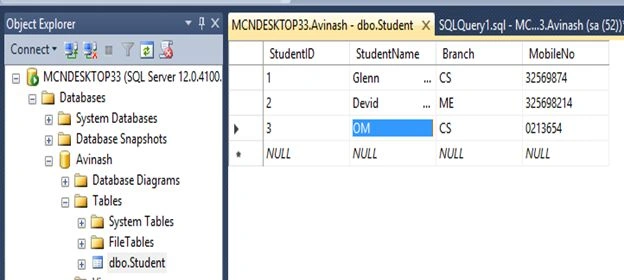 Figure 1
Step 2: Create a Windows Application and add DataGridView on the Form. Now add a DataGridView control to the form by selecting it from Toolbox and set properties according to your needs.
Figure 1
Step 2: Create a Windows Application and add DataGridView on the Form. Now add a DataGridView control to the form by selecting it from Toolbox and set properties according to your needs.
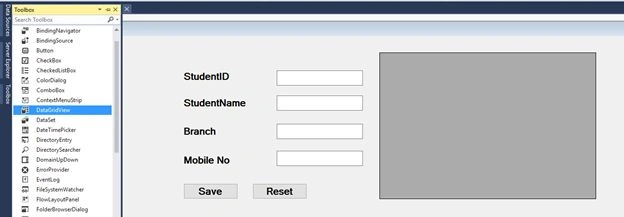
Figure 2
- private void Form1_Load(object sender, EventArgs e) {
- SqlDataAdapter da = new SqlDataAdapter("SELECT * FROM Student", "server = MCNDESKTOP33; database = Avinash; UID = sa; password = *******");
- DataSet ds = new DataSet();
- da.Fill(ds, "Student");
- dataGridView1.DataSource = ds.Tables["Student"].DefaultView;
- }
- using System;
- using System.Collections.Generic;
- using System.ComponentModel;
- using System.Data;
- using System.Drawing;
- using System.Linq;
- using System.Text;
- using System.Threading.Tasks;
- using System.Windows.Forms;
- using System.Data.SqlClient;
- namespace WindowsFormsDataGrid {
- public partial class Form1: Form {
- public Form1() {
- InitializeComponent();
- }
- private void Form1_Load(object sender, EventArgs e) {
- SqlDataAdapter da = new SqlDataAdapter("SELECT * FROM Student", "server = MCNDESKTOP33; database = Avinash; UID = sa; password = *******");
- DataSet ds = new DataSet();
- da.Fill(ds, "Student");
- dataGridView1.DataSource = ds.Tables["Student"].DefaultView;
- }
- private void button1_Click(object sender, EventArgs e) {
- SqlConnection con = new SqlConnection("server = MCNDESKTOP33; database = Avinash; UID = sa; password = *******");
- con.Open();
- string qur = "INSERT INTO Student VALUES ('" + textBox1.Text + "','" + textBox2.Text + "','" + textBox3.Text + "','" + textBox4.Text + "')";
- SqlCommand cmd = new SqlCommand(qur, con);
- cmd.ExecuteNonQuery();
- con.Close();
- MessageBox.Show("Inserted sucessfully");
- textBox1.Text = "";
- textBox2.Text = "";
- textBox3.Text = "";
- textBox4.Text = "";
- }
- private void button2_Click(object sender, EventArgs e) {
- textBox1.Text = "";
- textBox2.Text = "";
- textBox3.Text = "";
- textBox4.Text = "";
- }
- }
- }
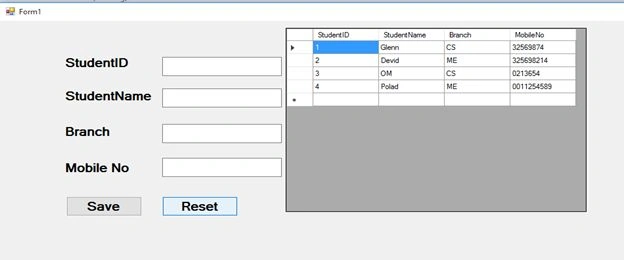
Figure 3
Chetan RajputPosted Oct 11, 2018, 10:07 AM
Nice, if i wan to show combo box in grid view for Branch column by default selected value user enter how to do it
Michael GriffithsPosted Jul 2, 2016, 9:26 AM
Nice
Venu AlgamPosted May 24, 2016, 6:58 AM
Thanks
Rahul Kumar SaxenaPosted Apr 4, 2016, 7:45 AM
Good Show
Kuppurasu NagarajPosted Apr 3, 2016, 4:30 AM
Good