
Create new Project
Go to "File" -> "New" -> "Project..." then select ASP.Net web application (with .NET Framework 4.5) then enter an Application Name then click OK then select Empty MVC Template then click OK.
Create Table 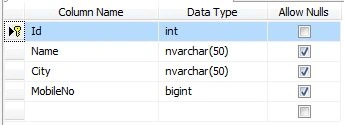
Add an Entity Data model.
In previous articles I explained how to add an entity data model.
Add a new controller
Go to Solution Explorer then right-click on the Controllers folder then Add > MVC5 Controller- Empty then enter Controller name Home then select Add.
Add a new action to your controller to display data in WebGrid.
Here I have added a "List" Action into the "Home" Controller. Provide this following code. 
Add view for the list action
Right-click on the Action Method (here right-click on form action) > Add View... 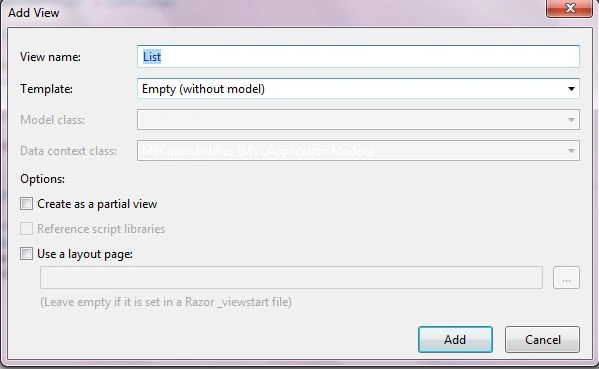
Rebuild solution before add view.
Write the following code into the List view.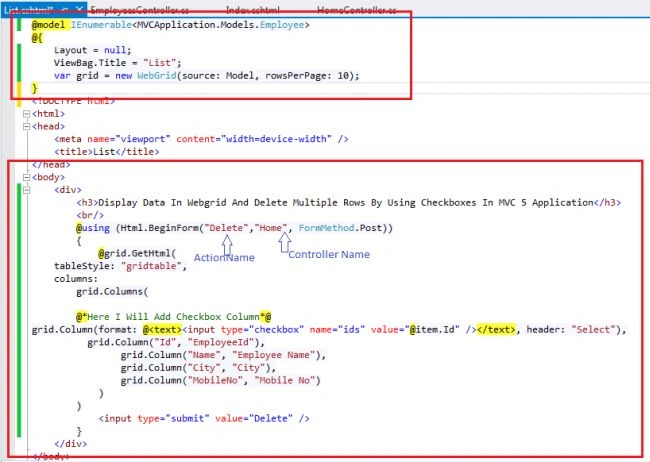
Add another action in to your controller to delete multiple rows at once.
Here I have added a "Delete" Action into the "Home" Controller.
Provide the following code.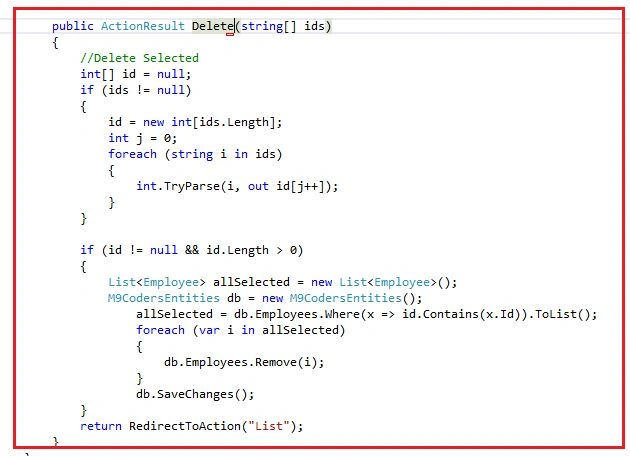
Run the application (CTTL + F5).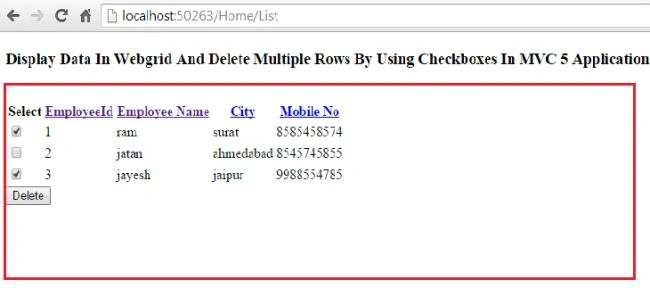

Display Data In Webgrid and Delete Multiple Rows Using Checkboxes in MVC 5 Application
Join the conversation! Your thoughts help the community grow.
Sign in to leave a comment
It is the same account you read, post and publish with — and you will come straight back to this page.
yaphethPosted Jun 9, 2017, 5:03 AM
Http://keranservices.blogspot.com/2017/05/how-to-delete-multiple-webgrid-rows-by.html