

In this article, we will learn how to display the corresponding details of a user after a successful login. In this article, we use JavaScript for validation. First, we will create a login page where the user will provide their respective credentials, username and password. After a successful login, the control moves to the details page where all the information of that user is displayed.
Table Creation
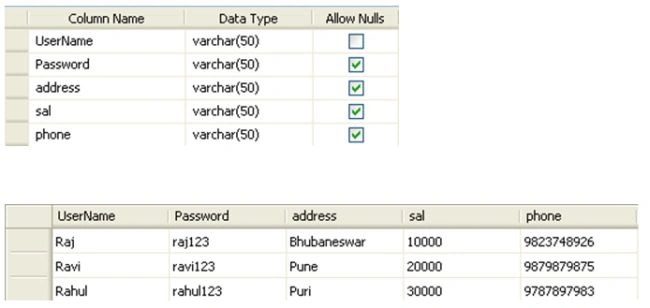
Now let's move to the code.
Login.aspx
- <%@ Page Language="C#" AutoEventWireup="true" CodeBehind="Login.aspx.cs" Inherits="Login_related_details.Login" %>
- <!DOCTYPE html PUBLIC "-//W3C//DTD XHTML 1.0 Transitional//EN" "http://www.w3.org/TR/xhtml1/DTD/xhtml1-transitional.dtd">
- <html xmlns="http://www.w3.org/1999/xhtml" >
- <head runat="server">
- <title>Untitled Page</title>
- <script type="text/javascript" language="javascript">
- function Validate()
- {
- var UName=document.getElementById('TextBox_user_name');
- var Password=document.getElementById('TextBox_password');
- if((UName.value=='') || (Password.value==''))
- {
- alert('UserName or Password should not be blank');
- return false;
- }
- else
- {
- return true;
- }
- }
- </script>
- </head>
- <body>
- <form id="form1" runat="server">
- <div>
- <asp:Label ID="lb1" runat="server" Font-Bold="True" ForeColor="#FF3300"></asp:Label><br />
- <asp:Label ID="Label1" runat="server" Text="UserName" Font-Bold="True" Width="100px" BackColor="#FFFF66" ForeColor="#FF3300"></asp:Label>
- <asp:TextBox ID="TextBox_user_name" runat="server" ForeColor="#993300" Width="100px"></asp:TextBox><br />
- <asp:Label ID="Label2" runat="server" Text="Password" Font-Bold="True" Width="100px" BackColor="#FFFF66" ForeColor="#FF3300"></asp:Label>
- <asp:TextBox ID="TextBox_password" runat="server" ForeColor="#CC6600" TextMode="Password" Width="100px"></asp:TextBox><br />
- <asp:Button ID="btn_login" runat="server" Text="Login" Font-Bold="True" BackColor="#CCFF99" OnClientClick="Validate()" onclick="btn_login_Click"/><br />
- </div>
- </form>
- </body>
- </html>
Login.aspx.cs
- using System;
- using System.Collections;
- using System.Configuration;
- using System.Data;
- using System.Linq;
- using System.Web;
- using System.Web.Security;
- using System.Web.UI;
- using System.Web.UI.HtmlControls;
- using System.Web.UI.WebControls;
- using System.Web.UI.WebControls.WebParts;
- using System.Xml.Linq;
- using System.Data.SqlClient;
- namespace Login_related_details
- {
- public partial class Login : System.Web.UI.Page
- {
- string strConnString = ConfigurationManager.ConnectionStrings["ConnectionString"].ConnectionString;
- SqlCommand com;
- SqlDataAdapter sqlda;
- string str;
- DataTable dt;
- int RowCount;
- protected void btn_login_Click(object sender, EventArgs e)
- {
- string UserName = TextBox_user_name.Text.Trim();
- string Password = TextBox_password.Text.Trim();
- SqlConnection con = new SqlConnection(strConnString);
- con.Open();
- str = "Select * from Login";
- com = new SqlCommand(str);
- sqlda = new SqlDataAdapter(com.CommandText, con);
- dt = new DataTable();
- sqlda.Fill(dt);
- RowCount = dt.Rows.Count;
- for (int i = 0; i < RowCount; i++)
- {
- UserName = dt.Rows[i]["UserName"].ToString();
- Password = dt.Rows[i]["Password"].ToString();
- if (UserName == TextBox_user_name.Text && Password == TextBox_password.Text)
- {
- Session["UserName"] = UserName;
- Response.Redirect("Details.aspx");
- }
- else
- {
- lb1.Text = "Invalid User Name or Password! Please try again!";
- }
- }
- }
- }
- }
Details.aspx
- <%@ Page Language="C#" AutoEventWireup="true" CodeBehind="Details.aspx.cs" Inherits="Login_related_details.Details" %>
- <!DOCTYPE html PUBLIC "-//W3C//DTD XHTML 1.0 Transitional//EN" "http://www.w3.org/TR/xhtml1/DTD/xhtml1-transitional.dtd">
- <html xmlns="http://www.w3.org/1999/xhtml" >
- <head runat="server">
- <title>Untitled Page</title>
- </head>
- <body>
- <form id="form1" runat="server">
- <div>
- <asp:Label ID="lb1" runat="server" Text="Label"></asp:Label>
- <h1><font color="olive">User Details</font></h1>
- <table border="1" style="border-collapse: collapse" cellspacing="1">
- <tr>
- <td width="77" height="16" align="left" ><b><font size="2" color="red">Name:</font></b></td>
- <td width="77" height="16" align="left" ><b><font size="2"> <asp:Label
- ID="lbl_UserName" runat="server" Font-Bold="True"></asp:Label><br /></font></b></td>
- </tr>
- <tr>
- <td width="77" height="16" align="left" ><b><font size="2" color="red">Address:</font></b></td>
- <td width="77" height="16" align="left" ><b><font size="2"> <asp:Label
- ID="lbl_address" runat="server" Font-Bold="True"></asp:Label><br /></font></b></td>
- </tr>
- <tr>
- <td width="77" height="16" align="left" ><b><font size="2" color="red">Salary:</font></b></td>
- <td width="77" height="16" align="left" ><b><font size="2"> <asp:Label
- ID="lbl_sal" runat="server" Font-Bold="True"></asp:Label><br /></font></b></td>
- </tr>
- <tr>
- <td width="77" height="16" align="left" ><b><font size="2" color="red">Phone:</font></b></td>
- <td width="77" height="16" align="left" ><b><font size="2"> <asp:Label
- ID="lbl_phone" runat="server" Font-Bold="True"></asp:Label><br /></font></b></td>
- </tr>
- </table>
- </div>
- </form>
- </body>
- </html>
Details.aspx.cs
- using System;
- using System.Collections;
- using System.Configuration;
- using System.Data;
- using System.Linq;
- using System.Web;
- using System.Web.Security;
- using System.Web.UI;
- using System.Web.UI.HtmlControls;
- using System.Web.UI.WebControls;
- using System.Web.UI.WebControls.WebParts;
- using System.Xml.Linq;
- using System.Data.SqlClient;
- namespace Login_related_details
- {
- public partial class Details : System.Web.UI.Page
- {
- string strConnString = ConfigurationManager.ConnectionStrings["ConnectionString"].ConnectionString;
- string str;
- SqlCommand com;
- protected void Page_Load(object sender, EventArgs e)
- {
- lb1.Text = "<b><font color=Brown>" + "WELLCOME:: " + "</font>" + "<b><font color=red>" + Session["UserName"] + "</font>";
- SqlConnection con = new SqlConnection(strConnString);
- con.Open();
- str = "select * from Login where UserName='" + Session["UserName"] + "'";
- com = new SqlCommand(str, con);
- SqlDataAdapter da = new SqlDataAdapter(com);
- DataSet ds = new DataSet();
- da.Fill(ds);
- lbl_UserName.Text = ds.Tables[0].Rows[0]["UserName"].ToString();
- lbl_address.Text = ds.Tables[0].Rows[0]["address"].ToString();
- lbl_sal.Text = ds.Tables[0].Rows[0]["sal"].ToString();
- lbl_phone.Text = ds.Tables[0].Rows[0]["phone"].ToString();
- }
- }
- }
Output
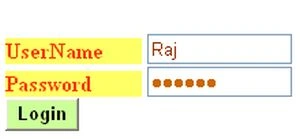
After providing the correct credentials:

harshita virwaniPosted Apr 29, 2018, 6:20 AM
It's not working.....
Michelle CarthyPosted Jan 30, 2018, 2:34 PM
Hi, thank you for this solution.. I was wondering is it possible to edit these details of the particular user that is logged in? Thanks
Raj SharmaPosted May 10, 2017, 9:08 AM
Its working... This code is very helpful....... Thank you!!!
Harsh TukadiyaPosted Apr 17, 2017, 1:58 AM
A error is there is no row at position 0
Anser AbbasPosted Mar 25, 2017, 7:22 AM
Exception Details: System.IndexOutOfRangeException: There is no row at position 0. How I can fix it?
saidulu challagundlaPosted Mar 14, 2017, 8:55 AM
Good Work.............................
Tk MahantaPosted Mar 13, 2017, 4:27 AM
Very Very Good Example for All People
Anu VPosted Jul 21, 2016, 5:51 AM
Nice
Prashant VermaPosted Mar 10, 2016, 3:20 AM
this code is very helpful
Prashant VermaPosted Mar 10, 2016, 3:20 AM
Nice
An QiPosted Jul 28, 2015, 10:37 PM
Hi, would like to ask is it possible to show how to check username availability?
SharadPosted Jul 22, 2015, 12:32 AM
good one...
yogi NamdevPosted Jul 6, 2015, 3:30 AM
Thank you very much................ this code really working
mazhar khanPosted Apr 10, 2013, 11:46 AM
nice article.. thank u.. sir i need two role permision in my login like one is admin and another is general like employees.. please sir if there any source code for this... [email protected]