

Introduction
In this article we will learn some basics of ASP.Net MVC applications. In my last
article you read a lot about ASP.Net MVC. You can read those articles from the links given below.
After reading the previous articles I think
you are now aware of ASP.Net MVC. So let's see some basic structures of ASP.Net
MVC applications. In this article we will see how to start an ASP.Net MVC
application. What are the prerequisites? And Simple Graph in ASP.Net MVC?
Prerequisites
As you know ASP.Net MVC is available in various versions like MVC1, MVC2, and
MVC3 etc. In this article we are using MVC3. So download the MVC3 from here.
Starting an ASP.Net MVC Application
After installing ASP.Net MVC3 we can create our new ASP.Net MVC3 application so
let's open your Visual Studio and select ASP.NET MVC3 Web Application from the
new project dialog as shown in the following screenshot.
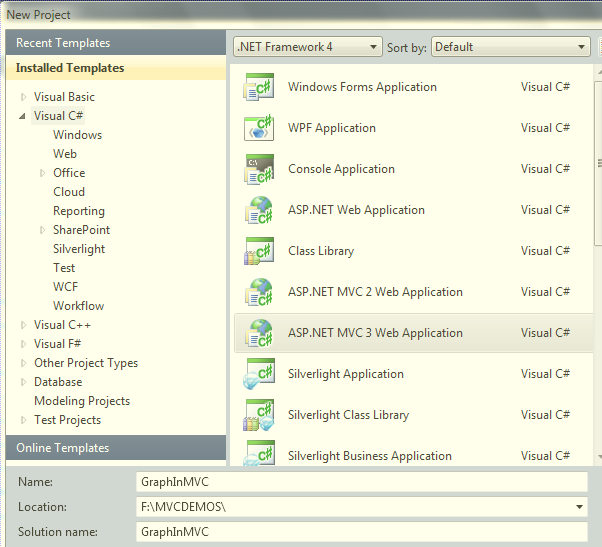
After selecting ASP.NET MVC3 Web Application it will display one more screen to
select your view engine and type of application like empty website, Internet and
Intranet so in this screen select Empty and in the view engine select aspx view
engine; here we have one more view engine i.e. razor as well as we have one more
advanced support to use HTML5 as markup language.
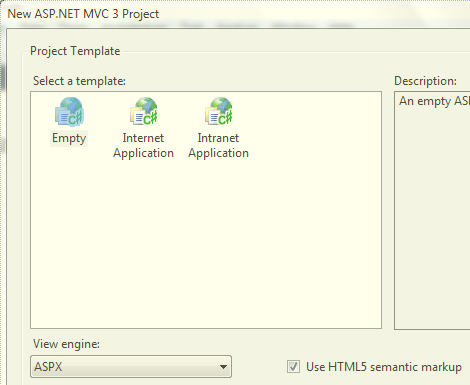
From the above screen we have to select Empty application and ASPX as our view
engine as well check the chechbox to use HTML5 semantic markup. After this
selection our application is created and the one predefined structure is
available; just open the Solution Explorer and see the structure.
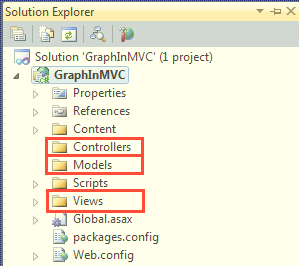
In the above screen you can see already some folders are created with
Controllers, Models and Views. Now our task is create first one controller so
let's create it by right-click and select add controller option which will ask
the name of controller like shown in the following screen.

Here it's MVC standard for controller name. You can see I've added
GraphController as the name for the controller you can change it as you want but
keep in mind your controller name must be postfixed with the controller word. After
adding this controller you can see the Default Index method is available in
the controller and this GraphController is extended from the base Controller class.
public
class GraphController :
Controller
{
//
// GET: /Graph/
public
ActionResult Index()
{
return View();
}
}
From the above steps now you know how to create MVC applications and add
the controller to the application. Next we have to add a view related to the methods
present in the controller. So add one view for the index method to show on startup
which will contain one ActionLink to display the graph. To add a view right-click
in Method and select Add View as shown below.
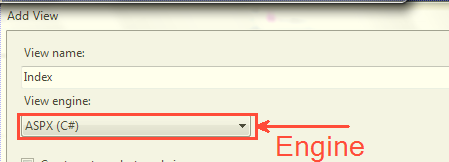
From the above screen you see how to add a view to an ASP.NET MVC application.
Now whenever we call any method then the respective view will be rendered in
the client browser. You can keep the actionlink in the Index.aspx using the following line
of code.
<%=Html.ActionLink("View
Graph", "Graph")%>
In the above line you can see we have created a Html.ActionLink which takes View Graph
and Graph as arguments; here View Graph is the text given to display and Graph is
the action name in the controller. Next we will see how to prepare the graph; for
this task we must add one more method in GraphController with the name
Graph so copy and paste this method in GraphController.
public
ActionResult Graph()
{
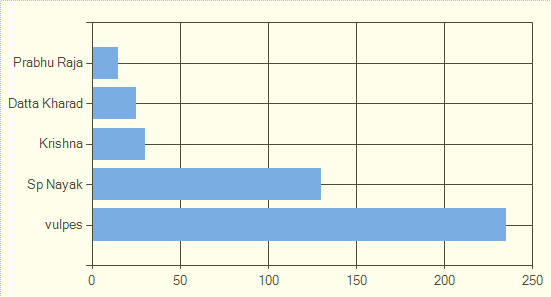
string[] _xval = {
"vulpes", "Sp
Nayak", "Krishna","Datta
Kharad","Prabhu Raja" };
string[] _yval = {
"235", "130",
"30","25","15"
};
//here the chart is going on
var bytes =
new Chart(width:
600, height: 300)
.AddSeries(
chartType: "Column",legend:"Mindcracker
Current Month Runner up",
xValue: _xval,
yValues: _yval)
.GetBytes("png");
return File(bytes,
"image/png");
}
Before adding this method to the controller we need to add one using statement to
System.Web.Helpers which contains the Chart. In the above method you can see we have
created a string[] which is nothing but the data for our graph and we have
created a chart which will take some arguments like charttype, legend and the
values to display on the graph and this method will return File of bytes.
Configure Routing
When we create any MVC application our default routing is configured like
bellow.
public
static void RegisterRoutes(RouteCollection
routes)
{
routes.IgnoreRoute("{resource}.axd/{*pathInfo}");
routes.MapRoute(
"Default",
// Route name
"{controller}/{action}/{id}",
// URL with parameters
new { controller =
"Home", action =
"Index", id = UrlParameter.Optional }
// Parameter defaults
);
}
Here it will consider the default controller as Home but since this is an empty
application we don't have a Home controller in our application so we need to
change this default Home controller with our Graph controller so just change
Home to Graph like below.
public
static void RegisterRoutes(RouteCollection
routes)
{
routes.IgnoreRoute("{resource}.axd/{*pathInfo}");
routes.MapRoute(
"Default",
// Route name
"{controller}/{action}/{id}",
// URL with parameters
new { controller =
"Graph", action =
"Index", id = UrlParameter.Optional }
// Parameter defaults
);
}
Output
The output will look like the followong screen.
Conclusion
In this way we can start working on ASP.Net MVC and easily prepare the Graph
for a MVC application.
lila lilaPosted Apr 15, 2015, 11:00 AM
thank you
Balaji SelvarajanPosted Sep 23, 2013, 2:19 AM
Good Artticle
Abhi KumarPosted Jan 18, 2012, 11:30 PM
Nicely explained.
Sonakshi SinghPosted Jan 18, 2012, 11:17 PM
understandable........thank you very much for sharing....
Daisy KrausePosted Jan 18, 2012, 11:02 PM
Very nicely presented article.
Aaron CronjePosted Jan 18, 2012, 10:45 PM
Good Work..... Why are you take var in byte form like : var bytes = new Chart(width: 600, height: 300)