

Introduction
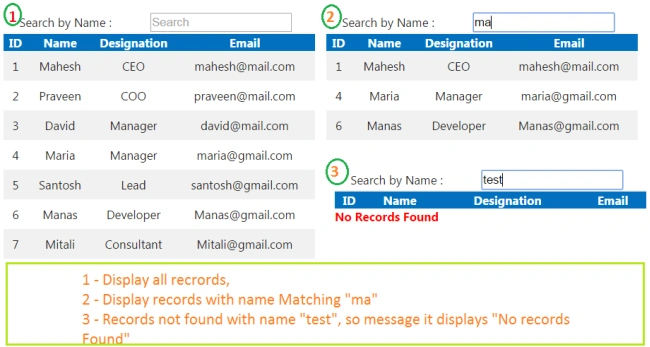
In most of the Web Applications, we display the records in a grid but sometimes a user wants to search the record based on the attribute value, which means a user wants to search all the records, based on the name. The fact is, if the record is not present in the current page, it needs to display "No records found". To implement it, we are going to use AngularJS filter concept to search the records in ASP.NET MVC.
Using Code
To implement filter functionality in AngularJS in ASP.NET MVC, below are steps:
- Design a table which holds Employee information.
- Create a model class.
- Create an action which retrieves the data from an Employee table.
- In view, design table will render the employee records and search the fields.
- Send AJAX request to the Server to get the employees records and bind to the scope variable.
Database Design
Let's design a table which keeps information about an employee. The SQL query, given below, is used to create table(tblEmployee) with the required columns ID like FirstName, LastName, Designation, Email and ReportID etc.
- CREATE TABLE [dbo].[tblEmployee](
- [Id] [int] IDENTITY(1,1) NOT NULL,
- [FirstName] [varchar](50) NULL,
- [LastName] [varchar](50) NULL,
- [Designation] [varchar](50) NULL,
- [Email] [varchar](50) NULL,
- [Address] [varchar](max) NULL,
- [ReportID] [int] NULL,
- [IsActive] [bit] NULL,
- CONSTRAINT [PK_tblEmployee] PRIMARY KEY CLUSTERED
- (
- [Id] ASC
- )WITH (PAD_INDEX = OFF, STATISTICS_NORECOMPUTE = OFF, IGNORE_DUP_KEY = OFF,
- ALLOW_ROW_LOCKS = ON, ALLOW_PAGE_LOCKS = ON) ON [PRIMARY]
- ) ON [PRIMARY]
Model
Add model(Employee.cs) is given below in Model folder with properties ID, first name, last, designation, Email, report ID etc.
- public class Employee
- {
- public int Id { get; set; }
- public string FirstName { get; set; }
- public string LastName { get; set; }
- public string Designation { get; set; }
- public string Email { get; set; }
- public bool IsActive { get; set; }
- }
Controller
In Controller, add an action which retrieves the Employee records and returns the data in JSON format. Here, I have used simple ADO.NET to get the data. You can use EntityFramework, if you want.
- [HttpGet]
- public JsonResult GetEmployees()
- {
- List<Employee> empChartList = new List<Employee>();
- string query = "SELECT Id, FirstName + ' ' + ISNULL(LastName, '') AS Name, Designation, Email, ReportID";
- query += " FROM tblEmployee";
- // Get it from Web.config
- string connetionString = "Data Source=Test-PC\\SQLEXPRESS;Initial Catalog=AllTest;Integrated Security=True;";
- using (SqlConnection con = new SqlConnection(connetionString))
- {
- using (SqlCommand cmd = new SqlCommand(query))
- {
- cmd.CommandType = CommandType.Text;
- cmd.Connection = con;
- con.Open();
- using (SqlDataReader dr = cmd.ExecuteReader())
- {
- while (dr.Read())
- {
- empChartList.Add(new Employee()
- {
- Id = dr.GetInt32(0),
- FirstName = dr.GetString(1),
- Designation = dr.GetString(2),
- Email = dr.GetString(3),
- ReportID = dr.IsDBNull(4) ? 0 : dr.GetInt32(4)
- });
- }
- }
- con.Close();
- }
- }
- return Json(empChartList, JsonRequestBehavior.AllowGet);
- }
View
It's time to design the View page to render the employee records and search fields. In the code given below, there is a DIV which helps to display the loading image when an AJAX request is sent to the Server. It contains another DIV, which holds search field and an employee table. In Employee grid table, it uses ng-repeat to loop over the records and creates new rows to display. It also implements AngularJS filter functionality, which means, when a user types name in the textbox, it displays the records with the matching name.
There is another DIV with ID notFoundDiv, which helps to display the message "Records not found", when there is no record from the Server or doesn't match with the search criteria.
Abijith AjayanPosted Sep 12, 2018, 12:52 AM
Its work like a charm....
Amit Kumar SinghPosted Sep 1, 2016, 1:14 AM
Nice Share Sir