

Introduction
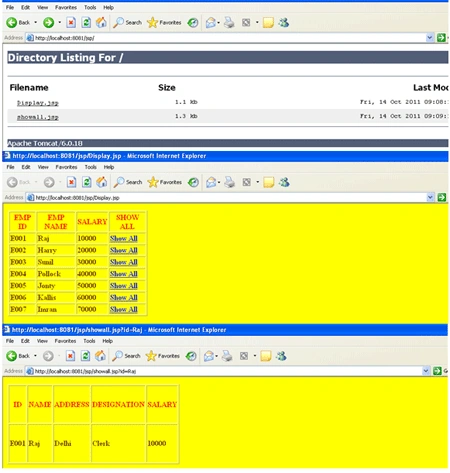
Here we produce two JSP pages, in first the first (Display.jsp)
it contains some data with a show all link. When the user clicks on that link, all
related data of that link will be displayed in the second JSP page (showall.jsp).
Creation of a context file
Create any folder in any drive as (E:\Jsp). Inside that folder store your .jsp
files. Give the Context pathname as JSP and docBase as E:\Jsp, here docBase
means the total path where we are storing our .jsp files. These changes are done
in the server.xml file, which is present in (E:\Program Files\Apache Software
Foundation\Tomcat 6.0\conf) directory.
Server.xml file
- <?xml version='1.0' encoding='utf-8'?>
- <!--
- Licensed to the Apache Software Foundation (ASF) under one or more
- contributor license agreements. See the NOTICE file distributed with
- this work for additional information regarding copyright ownership.
- The ASF licenses this file to You under the Apache License, Version 2.0
- (the "License"); you may not use this file except in compliance with the License. You may obtain a copy of the License at
- http://www.apache.org/licenses/LICENSE-2.0
- Unless required by applicable law or agreed to in writing, software
- distributed under the License is distributed on an "AS IS" BASIS,
- WITHOUT WARRANTIES OR CONDITIONS OF ANY KIND, either express or implied.
- See the License for the specific language governing permissions and
- limitations under the License.
- -->
- <!-- Note: A "Server" is not itself a "Container", so you may not
- define subcomponents such as "Valves" at this level. Documentation at /docs/config/server.html
- -->
- <?xml version='1.0' encoding='utf-8'?>
- <!--
- Licensed to the Apache Software Foundation (ASF) under one or more
- contributor license agreements. See the NOTICE file distributed with
- this work for additional information regarding copyright ownership. The ASF licenses this file to You under the Apache License, Version 2.0 (the "License"); you may not use this file except in compliance with the License. You may obtain a copy of the License at
- http://www.apache.org/licenses/LICENSE-2.0
- Unless required by applicable law or agreed to in writing, software
- distributed under the License is distributed on an "AS IS" BASIS,
- WITHOUT WARRANTIES OR CONDITIONS OF ANY KIND, either express or implied.
- See the License for the specific language governing permissions and
- limitations under the License.
- -->
- <!-- Note: A "Server" is not itself a "Container", so you may not
- define subcomponents such as "Valves" at this level.
- Documentation at /docs/config/server.html
- -->
- <Server port="8005" shutdown="SHUTDOWN">
- <!--APR library loader. Documentation at /docs/apr.html -->
- <Listener className="org.apache.catalina.core.AprLifecycleListener" SSLEngine="on" />
- <!--Initialize Jasper prior to webapps are loaded. Documentation at /docs/jasper-howto.html -->
- <Listener className="org.apache.catalina.core.JasperListener" />
- <!-- JMX Support for the Tomcat server. Documentation at /docs/non-existent.html -->
- <Listener className="org.apache.catalina.mbeans.ServerLifecycleListener" />
- <Listener className="org.apache.catalina.mbeans.GlobalResourcesLifecycleListener" />
- <!-- Global JNDI resources
- Documentation at /docs/jndi-resources-howto.html
- -->
- <GlobalNamingResources>
- <!-- Editable user database that can also be used by
- UserDatabaseRealm to authenticate users
- -->
- <Resource name="UserDatabase" auth="Container"
- type="org.apache.catalina.UserDatabase"
- description="User database that can be updated and saved"
- factory="org.apache.catalina.users.MemoryUserDatabaseFactory"
- pathname="conf/tomcat-users.xml" />
- </GlobalNamingResources>
- <!-- A "Service" is a collection of one or more "Connectors" that share
- a single "Container" Note: A "Service" is not itself a "Container",
- so you may not define subcomponents such as "Valves" at this level.
- Documentation at /docs/config/service.html
- -->
- <Service name="Catalina">
- <!--The connectors can use a shared executor, you can define one or more named thread pools-->
- <!--
- <Executor name="tomcatThreadPool" namePrefix="catalina-exec-"
- maxThreads="150" minSpareThreads="4"/>
- -->
- <!-- A "Connector" represents an endpoint by which requests are received
- and responses are returned. Documentation at :
- Java HTTP Connector: /docs/config/http.html (blocking & non-blocking)
- Java AJP Connector: /docs/config/ajp.html
- APR (HTTP/AJP) Connector: /docs/apr.html
- Define a non-SSL HTTP/1.1 Connector on port 8080
- -->
- <Connector port="8081" protocol="HTTP/1.1"
- connectionTimeout="20000"
- redirectPort="8443" />
- <!-- A "Connector" using the shared thread pool-->
- <!--
- <Connector executor="tomcatThreadPool"
- port="8080" protocol="HTTP/1.1"
- connectionTimeout="20000"
- redirectPort="8443" />
- -->
- <!-- Define a SSL HTTP/1.1 Connector on port 8443
- This connector uses the JSSE configuration, when using APR, the
- connector should be using the OpenSSL style configuration
- described in the APR documentation -->
- <!--
- <Connector port="8443" protocol="HTTP/1.1" SSLEnabled="true"
- maxThreads="150" scheme="https" secure="true"
- clientAuth="false" sslProtocol="TLS" />
- -->
- <!-- Define an AJP 1.3 Connector on port 8009 -->
- <Connector port="8009" protocol="AJP/1.3" redirectPort="8443" />
- <!-- An Engine represents the entry point (within Catalina) that processes
- every request. The Engine implementation for Tomcat stand alone
- analyzes the HTTP headers included with the request, and passes them
- on to the appropriate Host (virtual host).
- Documentation at /docs/config/engine.html -->
- <!-- You should set jvmRoute to support load-balancing via AJP ie :
- <Engine name="Standalone" defaultHost="localhost" jvmRoute="jvm1">
- -->
- <Engine name="Catalina" defaultHost="localhost">
- <!--For clustering, please take a look at documentation at:
- /docs/cluster-howto.html (simple how to)
- /docs/config/cluster.html (reference documentation) -->
- <!--
- <Cluster className="org.apache.catalina.ha.tcp.SimpleTcpCluster"/>
- -->
- <!-- The request dumper valve dumps useful debugging information about
- the request and response data received and sent by Tomcat.
- Documentation at: /docs/config/valve.html -->
- <!--
- <Valve className="org.apache.catalina.valves.RequestDumperValve"/>
- -->
- <!-- This Realm uses the UserDatabase configured in the global JNDI
- resources under the key "UserDatabase". Any edits
- that are performed against this UserDatabase are immediately
- available for use by the Realm. -->
- <Realm className="org.apache.catalina.realm.UserDatabaseRealm"
- resourceName="UserDatabase"/>
- <!-- Define the default virtual host
- Note: XML Schema validation will not work with Xerces 2.2.
- -->
- <Host name="localhost" appBase="webapps"
- xmlValidation="false" xmlNamespaceAware="false">
- <!-- SingleSignOn valve, share authentication between web applications
- Documentation at: /docs/config/valve.html -->
- <!--
- <Valve className="org.apache.catalina.authenticator.SingleSignOn" />
- -->
- <!-- Access log processes all example.
- Documentation at: /docs/config/valve.html -->
- <!--
- <Valve className="org.apache.catalina.valves.AccessLogValve" directory="logs"
- prefix="localhost_access_log." suffix=".txt" pattern="common" resolveHosts="false"/>
- <Context path="/jsp" docBase="E:\Jsp" reloadable="true" debug="0" />
- </Host>
- </Engine>
- </Service>
- </Server>
Join the conversation! Your thoughts help the community grow.