

In my previous article, Introduction to Crystal Reports in .NET, I discussed Standard Report Expert briefly. However, Standard Report Expert wizard offers a lot more than and sorting capability is one of them. Sorting on columns is done through the Group tab of Standard Report Expert. As you can see from the following figure, you select some fields from Report Fields node and add to Group By list using the Add button.
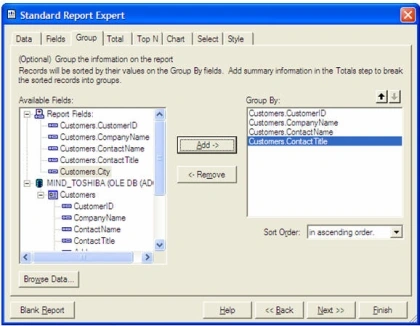
There is a Sort Order drop down control available at the bottom of the page. From this drop down, you can see there are following options are available:
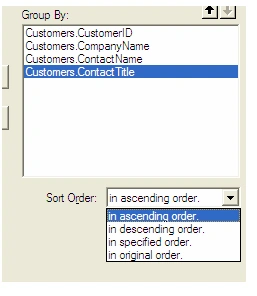
You can sort a column in ascending, descending, original, or in a specified order.
Conclusion
In this article, you saw how to sort a report data based on a column. In my next article, I will explore Crystal Report Viewer and grouping options.
Kaneshapillai SathulanPosted Apr 23, 2013, 10:45 PM
hi dude i wanna how do i create crystal report using c#.net and ms sql 2008
Ravi PrakashPosted Jul 12, 2011, 8:06 AM
all instruction with essay instructional my email Id [email protected]
dollsweetnimmi AgrawalPosted Jan 27, 2011, 2:36 AM
I need coding of sorting with crystal report at runtime.
rohan rautPosted Jul 7, 2009, 2:35 PM
please i am new for asp.net and i require it urgently
Vinitha RajanPosted Jun 23, 2009, 6:42 AM
Can the records be sorted dynamically based on user request and then generate the crystal report?
satheesh kumarPosted Jan 21, 2008, 11:56 PM
how to deploye the vb.net
satheesh kumarPosted Jan 21, 2008, 11:54 PM
i need sourcu code for crystal report in vb.net
satheesh kumarPosted Jan 21, 2008, 11:51 PM
ineed source code for vb.net