

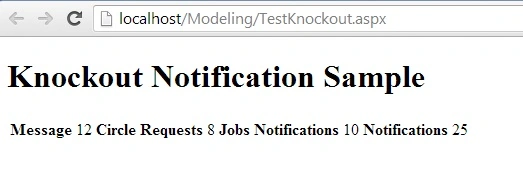
This article explains how to fetch and display data from SQL Server using Knockout in ASP.Net.
Knockout is a JavaScript library that helps you to create rich, responsive displays and editor user interfaces with a clean underlying data model. Read more here knockoutjs.
You can download the latest knockoutjs from this website.
Getting Started
- Start Visual Studio
- Create a new website
- Provide the name and location of the website
- Click "Next"
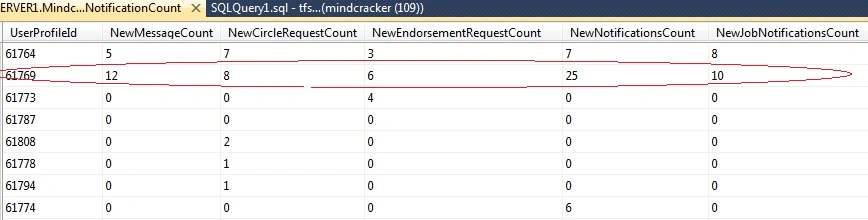
This is database table data.
Web. config.
<connectionStrings>
    <clear />
    <add name="ConnectionString" connectionString="Data Source=SERVER NAME;Initial Catalog=DATABASE NAME;User ID=USERID;Password=PASSWORD" providerName="System.Data.SqlClient" />
</connectionStrings>
Stored procedure
CREATE PROCEDURE [dbo].[GetNotifications] (
    @Userprofileid BIGINT
)
AS
BEGIN
    SELECT UserProfileId, NewMessageCount, NewCircleRequestCount,
           NewEndorsementRequestCount, NewNotificationsCount,
           NewJobNotificationsCount, FromProfileId, Subject, IsNew
    FROM [dbo].[NotificationTable]
    WHERE UserProfileId = @Userprofileid
END
DAL
public DataTable GetNotifications(Int64 UserProfileID)
{
    objDB = new SqlDatabase(strConnectionString);
    DataSet ds = new DataSet();
    DataTable dt = new DataTable();

    using (DbCommand objCMD = objDB.GetStoredProcCommand("GetNotifications"))
    {
        try
        {
            objDB.AddInParameter(objCMD, "@UserProfileId", DbType.Int64, UserProfileID);
            ds = objDB.ExecuteDataSet(objCMD);
            dt = ds.Tables[0];
        }
        catch (Exception ex)
        {
            ds = null;
            dt = null;
            EventLog objLog = new EventLog();
            objLog.LogError(ex);
            throw;
        }
    }

    return dt;
}
BAL
public DataTable GetNotifications(Int64 UserProfileID)
{
    UserActivityDAL _objUserMessage = new UserActivityDAL();

    try
    {
        DataTable dtRecord = _objUserMessage.GetNotifications(UserProfileID);
        return dtRecord;
    }
    catch (Exception)
    {
        _objUserMessage = null;
        throw;
    }
}
Bhuvanesh MohankumarPosted May 3, 2016, 12:42 PM
Good one..
Bhuvanesh MohankumarPosted May 3, 2016, 12:42 PM
Nice
Vithal WadjePosted Sep 26, 2014, 2:13 PM
super...