

DockPanel in Silverlight
If you have used docking Windows in previous versions of .NET, the DockPanel is used to provide that functionality in WPF and Silverlight. The DockPanel is not a part of Silverlight 2. It is a part of Silverlight Toolkit but I am sure it will be a part of the next version of Silverlight.
The DockPanel control is a layout control that acts as a container for child controls. The DockPanel allows child controls to dock in left, right, top, or bottom sides of the panel.
Note: The DockPanel control is a part of Silverlight Toolkit. This article is written by using the Silverlight Toolkit November 2008 that you can download from here: Silverlight Toolkit - Release: Silverlight Toolkit November 2008. This control may be a part of Silverlight in near future versions.
Adding Silverlight Toolkit Reference
Before you can use a DockPanel control, you must download the Silverlight Toolkit. After that you need to add a reference to an assembly.
To add a reference, right click the References folder of your project in Solution Explorer and select Add Reference. This action will open the Add Reference dialog as you can in the following Figure 1. On this dialog, select Browse option and browse the Microsoft.Windows.Controls.dll assembly from the folder where you installed the Silverlight Toolkit. This assembly resides in the Binaries folder.
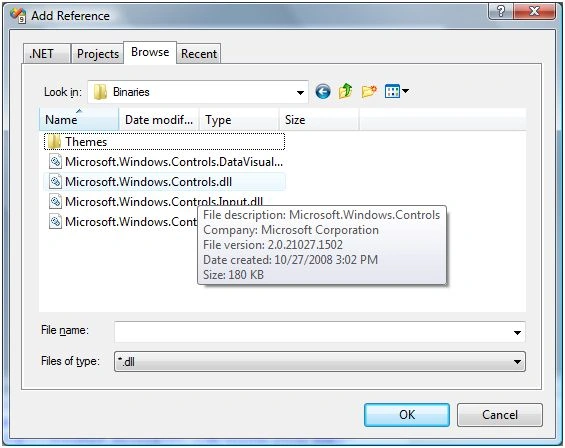
Figure 1
Once you add the reference, you will see the Microsoft.Windows.Controls added to your References dialog as you see in Figure 2.
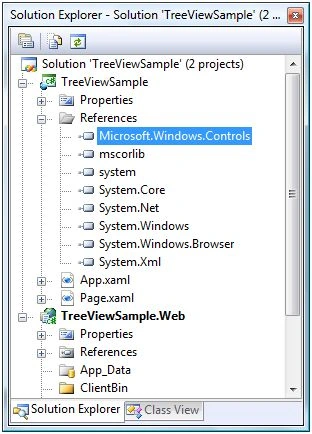
Figure 2
Now, the next step is to import the Microsoft.Windows.Controls namespace to the page. Once you type xmlns= in your page, you will see Microsoft.Windows.Controls listing in Intellisense. Select it as shown in Figure 3.
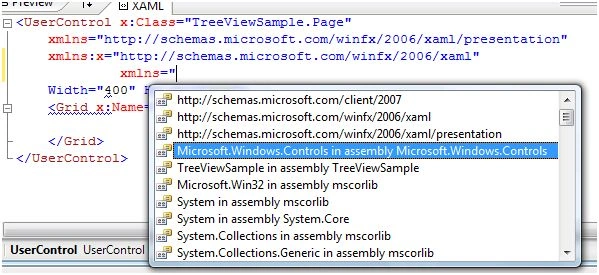
Figure 3
The final reference added to the page looks like following. As you can see here, I added name of this reference to ToolkitRef.
xmlns:ToolkitRef="clr-namespace:Microsoft.Windows.Controls;assembly=Microsoft.Windows.Controls"
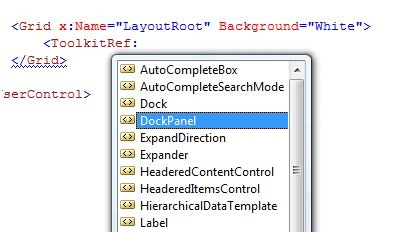
Now you will see ToolkitRef in your page and once you select it, you will notice DockPanel added to the Intellisense. To add the DockPanel control to your page, just select it as you can see in Figure 4.

Code AdrenalinPosted Feb 14, 2011, 8:32 PM
Hi, I am developing a user control using Silverlight 4.0 and Visual Studio 2010 that contains some child panels within it. Here are the following requirements: 1.slide feature(primary)-I need to hide such a panel and display only when the user hovers the mouse. 2.dock feature(optional)-I need to always display a panel as a window in the UI. 3.hide feature(optional)-I need to hide such a panel for the rest of the session. If you are familiar with the Visual studio IDE, I am referring to the Docking panels that we see all the time to hold the Solution Explorer,Class Explorer,Server Explorer, the Controls Toolbox, etc. Firstly, I would like to explore the solution within Silverlight 4.0 and only later the external ones. In any case, please show me the best possible approach to be taken/the controls to be used and the constraints if any with this option. Kindly provide me a code sample as well for me to use. thanks Codrenalin.