As a business owner or web developer, you want to create an application that users will love and keep coming back to. One key component to achieving this is the onboarding process. Onboarding refers to the initial experience users have with your application and is critical to creating a positive user experience. However, designing a seamless onboarding experience can be challenging, especially with the increasing number of web and mobile applications available today.
Onboarding is an important aspect of the registration/sign-up experience for many websites and applications. It can also be used to introduce new features or something the user has recently enabled. For businesses, onboarding can be used to introduce employees to line of business applications or to help new or existing employees with new features or updates. In any case, a well-designed onboarding experience can make all the difference, leading to increased user engagement, positive reviews, and ultimately, higher revenue.

The team I am working with has been building some new onboarding experiences in both new and existing websites and applications. These are many of the ideas and concepts we learned as part of that process.
We will explore the best practices for designing a great onboarding experience for your web application. We've reviewed top articles and combined the points they make with our expertise in user experience and copywriting to bring you a comprehensive guide. Our focus will be on designing a simple, clear, and engaging onboarding process that will set the tone for a positive user experience. So whether you're a business decision-maker or a web developer, this article is for you. Let's get started!
The Benefits of Great Onboarding
You never get a second chance to make a first impression, and the onboarding experience is no exception. It's the user's first interaction with your application and sets the tone for their entire experience. A well-designed onboarding process can make all the difference, leading to increased user engagement, positive reviews, and ultimately, higher revenue.
But the benefits of great onboarding don't stop there. By setting clear expectations and guiding users through the application's features, onboarding can reduce churn rates and increase user retention. Users who understand how to use an application are more likely to stick around and become loyal customers.
Take Dropbox, for example. Dropbox's onboarding process is simple and engaging, introducing users to its key features and benefits in an easy-to-understand way. As a result, Dropbox has achieved a retention rate of over 90% for users who complete its onboarding process.

By investing time and effort into designing a great onboarding experience, you can set your application apart from the competition and create a loyal user base. In the next section, we'll discuss how to understand your users and design an onboarding process that meets their needs.
Understanding Your Users
To create a successful onboarding experience, you must first understand your users' goals and motivations. By gaining insights into their needs and desires, you can design an onboarding process that is tailored to their specific needs, leading to higher user engagement and retention rates.
User research is the key to understanding your users. By conducting surveys, interviews, and user testing, you can gain insights into how users interact with your application and what they expect from the onboarding experience. This information can then be used to inform your onboarding strategy and design.
For example, Airbnb conducted extensive user research to understand what their users valued most about their platform. They found that users valued trust and transparency above all else, leading them to redesign their onboarding process to focus on these values. As a result, Airbnb's user engagement and retention rates increased, and the company grew into a multibillion-dollar business.
By investing in user research, you can gain valuable insights into your users' needs and design an onboarding process that meets their expectations. In the next section, we'll discuss the best practices for designing an onboarding experience that is simple, clear, and engaging.
If you're a new application/site or adding a new feature, designing an effective onboarding UX is critical to the success of your product. Here are some ideas on how to design an onboarding UX that meets the needs of your users:
-
Identify the user's primary goals: Before designing an onboarding experience, it's essential to understand the primary goals of your users. What are they hoping to achieve with your product or feature? What are their pain points? By understanding these things, you can create an onboarding experience that speaks directly to their needs.
-
Use clear language and visuals: When designing an onboarding experience, it's important to use clear, simple language that is easy to understand. Use visuals to help illustrate your points and guide users through the process.
-
Focus on the most important features: Rather than overwhelming users with information, focus on the most important features of your product or feature. This will help users understand what your product does and how it can benefit them.
-
Provide interactive tutorials: Interactive tutorials can help users learn how to use your product or feature in a fun and engaging way. Consider incorporating interactive tutorials into your onboarding experience to help users get started.
-
Test and iterate: Once you've designed your onboarding experience, it's important to test and iterate. Collect feedback from users and use this feedback to improve the onboarding experience over time.
By following these tips, you can design an effective onboarding experience that meets the needs of your users and sets your product up for success.
Best Practices for Onboarding
When designing an onboarding experience for your application, simplicity and clarity should be your top priorities. Users want to understand how to use an application quickly and easily, without feeling overwhelmed or confused.
Visual cues, such as icons and animations, can be used to guide users through the onboarding process and help them understand the application's features. Progressive disclosure, which reveals information as users need it, can also be used to simplify the onboarding process and prevent information overload. Interactive tutorials can further engage users and help them learn how to use the application.
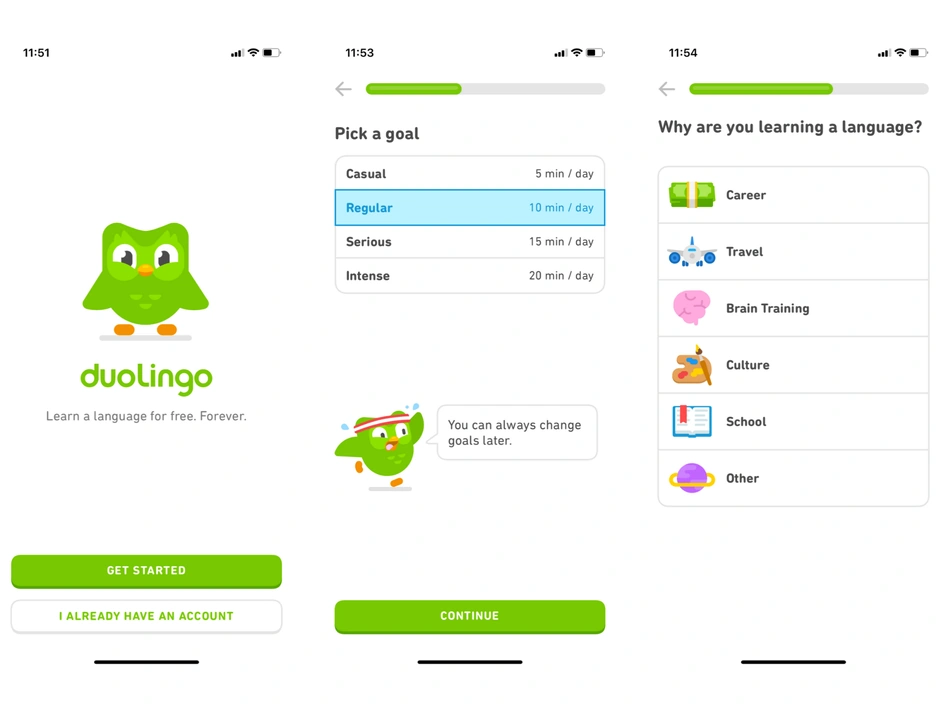
For example, Duolingo's onboarding process is simple and engaging, using visual cues and interactive tutorials to teach users how to use the application. By breaking down the learning process into small, manageable steps, Duolingo has created an onboarding experience that is both engaging and easy to understand.
By following these best practices and designing an onboarding experience that is simple, clear, and engaging, you can create a positive user experience that will lead to increased user engagement and retention. In the next section, we'll discuss how to optimize your onboarding experience for mobile devices, including progressive web apps.
Designing Onboarding UI/UX for Web Applications
Designing a seamless onboarding experience for web applications is crucial to creating a positive user experience. When users visit your web application for the first time, they should feel welcomed and guided through the onboarding process.
To incorporate best practices for onboarding UI/UX design into web applications, you should consider the following:
-
Keep it simple and clear: Use clear language and visuals to guide users through the onboarding process. Avoid overwhelming users with too much information at once.
-
Use visual cues to guide users: Visual cues, such as icons and animations, can help guide users through the onboarding process and understand the application's features. In this screenshot, Slack uses a common search icon to look for an existing workspace and a plus icon to create a new workspace.
-
Incorporate interactive tutorials: Interactive tutorials can help users learn how to use your application in a fun and engaging way.
-
Optimize for mobile devices: Many users will access your web application on a mobile device, so it's important to optimize the onboarding experience for mobile devices.
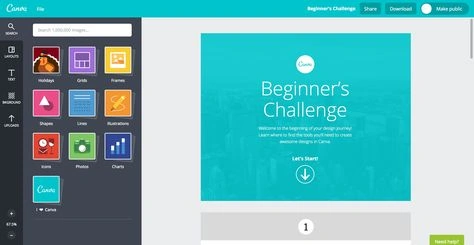
Some examples of successful web application onboarding designs that incorporate these best practices include Asana, Trello, and Canva. Asana's onboarding experience is simple and clear, guiding users through the process step-by-step. Trello's onboarding experience uses visual cues to help users understand the application's features. Canva's onboarding experience incorporates interactive tutorials to teach users how to use the application.
By incorporating these best practices into your web application's onboarding experience, you can create a positive user experience that will lead to increased user engagement and retention. In the next section, we'll discuss how to measure the success of your onboarding efforts and make ongoing improvements.
Keep it Simple and Clear
When designing an onboarding experience for your web application, it's important to keep the process simple and easy to understand for users. Users want to quickly learn how to use your application without feeling overwhelmed or frustrated.
To create a clear and simple onboarding experience, consider using the following design elements:
-
Use clear language: Use language that is easy to understand and free of technical jargon. Avoid confusing users with complex terms or concepts.
-
Use visuals: Use visuals, such as icons and graphics, to help guide users through the onboarding process. Visuals can make the experience more engaging and easier to understand.
-
Use user-friendly layouts: Use a clean and simple layout that makes it easy for users to navigate through the onboarding process. Avoid cluttered or confusing designs that can make users feel overwhelmed.
Some examples of successful web application onboarding designs that incorporate clear and simple design elements include Dropbox, LinkedIn, and Facebook. Dropbox's onboarding process is clean and simple, guiding users through the process step-by-step using visuals and clear language. LinkedIn's onboarding process is similarly straightforward, using clear language and a user-friendly layout to guide users through the process. Facebook's onboarding process is engaging and interactive, using visuals and animations to make the process more engaging and fun.
By incorporating these design elements into your onboarding experience, you can create a clear and simple experience that makes it easy for users to learn how to use your web application. This will lead to increased user engagement and retention, ultimately driving the success of your product.
Use Visual Cues to Guide Users
Visual cues, such as icons and animations, can be extremely effective in guiding users through the onboarding process and helping them understand the features of your web application. When users are presented with a clear visual path to follow, they're more likely to complete the onboarding process and become engaged users.
To use visual cues effectively in your onboarding experience, consider the following design elements:
-
Use icons: Icons are a great way to visually represent features or concepts in your web application. By using icons in your onboarding process, you can make it easier for users to understand what they need to do and where they need to go.
-
Use animations: Animations can be a great way to draw attention to important features or actions in your web application. By animating key elements of your onboarding process, you can make it more engaging and interactive for users.
-
Use progressive disclosure: Progressive disclosure is a design technique that involves revealing information to users gradually, rather than all at once. By using progressive disclosure in your onboarding process, you can guide users through the process step-by-step, making it less overwhelming and easier to understand.
Some examples of successful web application onboarding designs that incorporate visual cues include Airbnb, Slack, and Instagram. Airbnb's onboarding process uses icons and animations to guide users through the process of searching for and booking a property. Slack's onboarding process uses icons and progressive disclosure to guide users through the process of setting up their team. Instagram's onboarding process uses animations and visual cues to guide users through the process of uploading their first photo.
By incorporating these design elements into your onboarding experience, you can create a clear and engaging experience that makes it easy for users to learn how to use your web application. This will lead to increased user engagement and retention, ultimately driving the success of your product.
Incorporate Interactive Tutorials
Interactive tutorials are a great way to help users learn how to use your web application and its features in a fun and engaging way. By providing interactive guidance during the onboarding process, you can help users become familiar with your product and increase their engagement.
I will add this personal thought, this is probably the most difficult thing to code. It combines some heavy thought into the user psyche and often some advanced design coding. It certainly leads to some spirited discussions between the business stakeholders and the design/development teams.
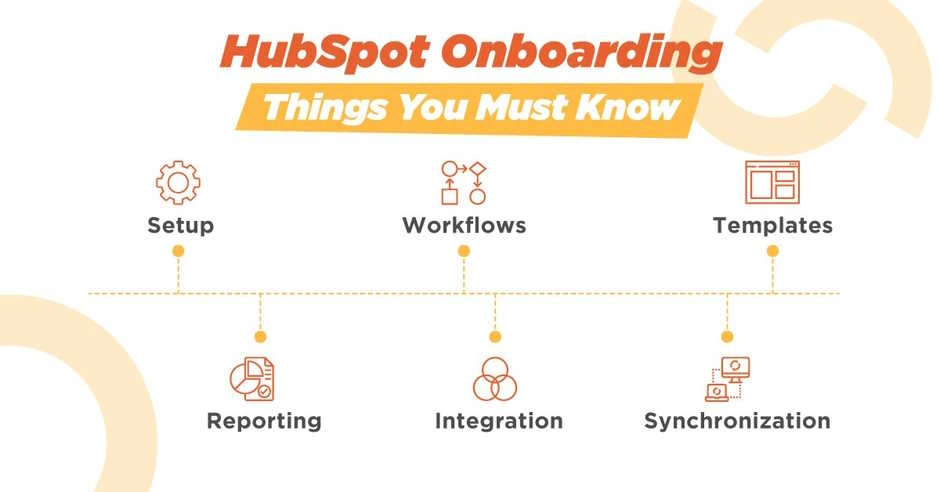
Some examples of successful web application onboarding designs that incorporate interactive tutorials include HubSpot, Trello, and Duolingo. HubSpot's onboarding process uses interactive elements such as quizzes and surveys to help users become familiar with their marketing automation platform. Trello's onboarding process uses interactive tutorials to teach users how to use their Kanban-style project management tool. Duolingo's onboarding process uses interactive tutorials to teach users a new language, using games and interactive exercises to make the learning process more engaging.
By incorporating interactive tutorials into your onboarding experience, you can create a fun and engaging experience that helps users become familiar with your web application and its features. This will lead to increased user engagement and retention, ultimately driving the success of your product.
Optimize for Mobile Devices
Designing web applications that are optimized for mobile devices is crucial in today's mobile-first world. With more users accessing the internet through mobile devices than ever before, it's important to ensure that your onboarding experience is seamless across different devices.
To optimize your onboarding experience for mobile devices, consider the following design elements:
-
Use responsive design: Use responsive design techniques to ensure that your web application looks great and works well on different screen sizes. This can include using fluid grids, responsive images (the img srcset or picture elements), and media queries to adapt the layout of your web application to different devices.
-
Use clear language and visuals: Use clear language and visuals that are easy to understand on small screens. Avoid using small fonts or complex graphics that can be difficult to see on mobile devices. Also, try to be concise in your instructions. No one wants to read a long set of paragraphs on how to do something 'simple'.
-
Use simplified navigation: Use simplified navigation that is easy to use on a touch screen. This can include using large buttons, clear icons, and intuitive gestures to help users navigate through your web application.
Some examples of successful web application onboarding designs that are optimized for mobile devices include Airbnb, Dropbox, and Asana. Airbnb's onboarding process is optimized for mobile devices, using a simplified layout and large buttons to make it easy for users to complete the process on their phones. Dropbox's onboarding process is similarly optimized for mobile devices, using clear language and visuals to guide users through the process on small screens. Asana's onboarding process uses responsive design techniques to ensure that the experience is seamless across different devices.
By optimizing your onboarding experience for mobile devices, you can ensure that your product is accessible and user-friendly for all users, regardless of the device they're using. This will lead to increased user engagement and retention, ultimately driving the success of your product.
Measure the Success of Onboarding Design
Measuring the success of your onboarding design efforts for web applications is crucial to understanding how your product is being received by users. By tracking user engagement and gathering feedback, you can identify areas for improvement and refine your onboarding experience over time.
To measure the success of your onboarding design efforts, consider the following metrics:
-
Completion rates: Track the percentage of users who complete the onboarding process to get a sense of how engaging and effective your onboarding experience is.
-
Time to completion: Measure the average time it takes users to complete the onboarding process to identify any areas where users may be getting stuck or experiencing frustration.
-
User feedback: Gather feedback from users about their experience with your onboarding process to identify areas for improvement and make informed decisions about future updates.
Some examples of successful web application onboarding designs that have been refined based on user feedback include Evernote, Slack, and Dropbox. Evernote's onboarding process was refined over time based on user feedback, leading to improvements in the overall user experience. Slack's onboarding process was similarly refined based on user feedback, resulting in a more engaging and user-friendly experience. Dropbox's onboarding process was refined based on user feedback, resulting in a simpler and more effective experience that improved user engagement and retention.
There are several application architecture/coding practices that can be used to track metrics for onboarding design. Here are a few examples:
-
Query parameters: You can use query parameters to track users' progress through the onboarding process. For example, you could add a query parameter to the URL when a user completes a step in the onboarding process, and then track that parameter in your analytics tools.
-
Event tracking: You can use event tracking to track specific actions that users take during the onboarding process. For example, you could track when users click on a specific button or complete a specific form field.
-
API calls: You can use API calls to track user behavior and progress through the onboarding process. For example, you could make an API call each time a user completes a step in the onboarding process, and then track that data in your analytics tools.
-
User surveys: You can use user surveys to gather feedback from users about their experience with the onboarding process. For example, you could ask users to rate the onboarding experience on a scale of 1-10, or ask them to provide specific feedback about what they liked and didn't like about the process.
By measuring the success of your onboarding design efforts and gathering feedback from users, you can identify areas for improvement and refine your onboarding experience over time. This will lead to increased user engagement and retention, ultimately driving the success of your product.
Conclusion
In conclusion, creating a great onboarding experience is crucial to the success of any web application. By setting clear expectations and guiding users through the process, you can reduce churn rates, increase user engagement, and ultimately drive the success of your product.
Throughout this article, we've discussed the importance of understanding your users, keeping the onboarding process simple and clear, using visual cues and interactive tutorials, optimizing for mobile devices, and measuring the success of your onboarding design efforts. By incorporating these best practices into your onboarding experience, you can create a user-friendly and engaging experience that keeps users coming back for more.
We encourage readers to take the best practices discussed in this article and apply them to their own onboarding experiences. By incorporating user feedback and analytics data, you can make informed decisions about future updates and improvements that will drive user engagement and retention.
So, whether you're a web developer or a business decision-maker, take the time to invest in your onboarding experience and create a great first impression for your users. With the right design elements and a focus on user experience, you can set your web application apart from the competition and drive its success.
To stay up-to-date on the latest trends and insights in user experience and onboarding design, sign up for our newsletter or try out our product today. Thank you for reading, and happy designing!
FAQ
Q: How long should the onboarding process be? A: The onboarding process should be as short as possible while still providing users with the information they need to get started. In general, aim for no more than 3-5 steps.
Q: How can I measure the success of my onboarding process? A: You can measure the success of your onboarding process by tracking completion rates, time to completion, and user feedback. By analyzing this data, you can identify areas for improvement and make informed decisions about future updates and improvements.
Q: Should I use visuals or text to guide users through the onboarding process? A: A combination of visuals and text is often the most effective way to guide users through the onboarding process. Use visuals to highlight key features and text to provide more detailed information.
Q: How often should I update my onboarding process? A: Your onboarding process should be updated regularly based on user feedback and analytics data. Aim to make updates at least once every 6-12 months to ensure that your onboarding experience is always up-to-date and effective.
Q: How can I optimize my onboarding process for mobile devices? A: To optimize your onboarding process for mobile devices, use responsive design techniques to ensure that your web application looks and works well on different screen sizes. Use clear language and visuals that are easy to understand on small screens, and use simplified navigation that is easy to use on a touch screen.


Prathap ReddyPosted May 8, 2023, 9:37 AM
IT WAS SIMPLY AWESOME CHRIS