

Before starting this article please go through my previous article DotNetNuke Module Development, where I have explained how to do HTTP GET requests using Kendo Grid in DNN CMS Module development.
Now I will explain how to do a Web API HTTP POST request using a Kendo form in DotNetNuke CMS Module Development.
In this module, I have a Kendo Grid and Kendo form. So, whatever the input is given in the Kendo form is bound into the Kendo Grid as well as it should be inserted into the respective Microsoft DB (DataBase) table that is done using the WEB API in the DNN CMS platform.
We will start with the back-end Microsoft SQL DB.
I have created a simple table with two columns, CategoryID and CategoryName.
Here is my SQL Query:
- CREATE TABLE [dbo].[dropdownkendo]
- (
- [CategoryID] [int] IDENTITY(1, 1) NOT NULL,
- [CategoryName] [nvarchar](50) NULL,
- CONSTRAINT [Pk_Category_ID] PRIMARY KEY CLUSTERED ([CategoryID] ASC) WITH (
- PAD_INDEX = OFF, STATISTICS_NORECOMPUTE = OFF,
- IGNORE_DUP_KEY = OFF, ALLOW_ROW_LOCKS = ON,
- ALLOW_PAGE_LOCKS = ON
- ) ON [PRIMARY]
- ) ON [PRIMARY] GO Then the store procedure to insert a
- values
- in table Create procedure [dbo].[Sp_Insert_Kendo]
- (
- @CategoryName nvarchar(50)
- ) as begin insert into dropdownkendo(CategoryName)
- values
- (@CategoryName) end
The next step is to open the class library project that I showed in my previous article.
Here I am using LINQ to SQL to access my Microsoft SQL DB, you can use whatever data access method that is convenient to you.
My DBML file
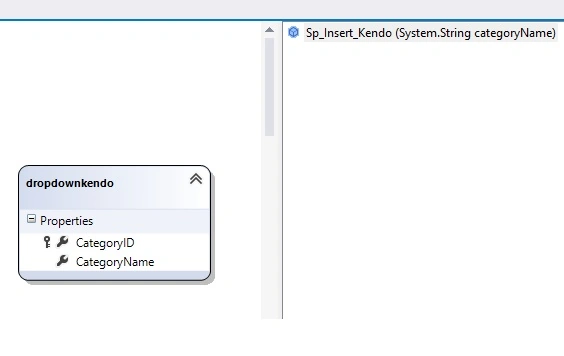
Here is my API controller with Http Post request:
- public class InsertCategoryController: DnnApiController
- {
- TestTableDataContext db = new TestTableDataContext();
- [HttpPost]
- [AllowAnonymous]
- public IEnumerable < dropdownkendo > Insert(dropdownkendo drop)
- {
- db.Sp_Insert_Kendo(drop.CategoryName);
- return db.dropdownkendos;
- }
- }
- public class RouteMapper: IServiceRouteMapper
- {
- public void RegisterRoutes(IMapRoute mapRouteManager)
- {
- mapRouteManager.MapHttpRoute("ServicePoint", "default", "{controller}/{action}", new[] {
- "ServicePoint"
- });
- }
- }
Here is the code to bind the table in the Kendo Grid, Note that I am reading a value from the DB to display in the Kendo Grid and that's why I am using an HTTP GET request for this action.
- public class DropDataController: DnnApiController
- {
- TestTableDataContext db = new TestTableDataContext();
- [HttpGet]
- [AllowAnonymous]
- public IEnumerable < dropdownkendo > Drop()
- {
- return db.dropdownkendos;
- }
- }
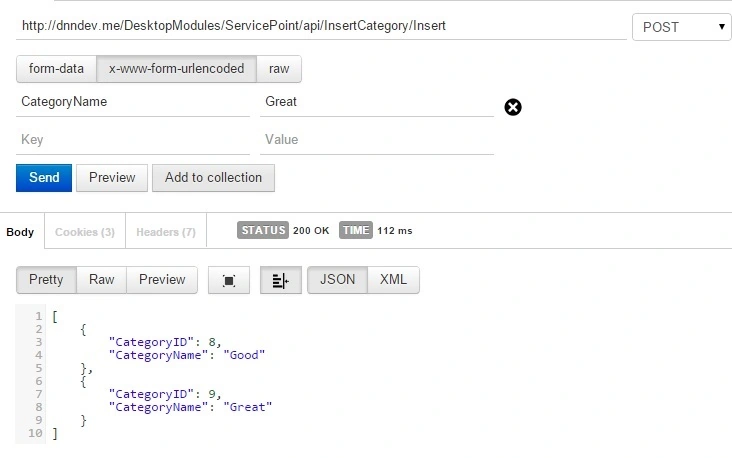
Yes, now it is time to check your API in POSTMAN/Fiddler.
Here I am using POSTMAN.
First POST request
Next GET request
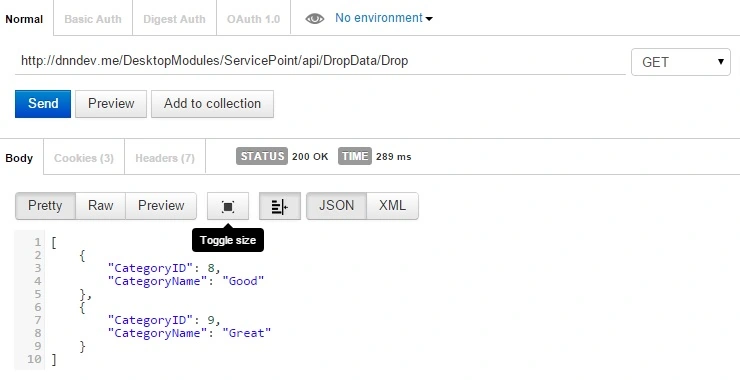
Yes! Got it.
Now to consume the service.
Come to your web form to consume the service.
Here is the code:
- <link href="DesktopModules/Registration_Module/Content/kendo/2014.2.716/kendo.common.min.css" rel="stylesheet" />
- <link href="DesktopModules/Registration_Module/Content/kendo/2014.2.716/kendo.dataviz.min.css" rel="stylesheet" />
- <link href="DesktopModules/Registration_Module/Content/kendo/2014.2.716/kendo.default.min.css" rel="stylesheet" />
- <link href="DesktopModules/Registration_Module/Content/kendo/2014.2.716/kendo.dataviz.default.min.css" rel="stylesheet" />
- <script src="DesktopModules/Registration_Module/Scripts/kendo/2014.2.716/kendo.all.min.js"></script>
- <script src="DesktopModules/Registration_Module/Scripts/kendo/2014.2.716/kendo.web.min.js"></script>
- <!—Simple form -->
- <label>CategoryName:
- <input data-bind="value: CategoryName" id="CategoryName" />
- </label>
- <button id="submit_btn" onclick="RegisterUser()" class="k-button">Submit</button>
- <!-- Script to consume the API HTTPPOST Request -->
- <script>
- function RegisterUser() {
- // alert("hai");
- $.ajax({
- cache: false,
- async: false,
- type: "POST",
- url: "http://dnndev.me/DesktopModules/ServicePoint/api/InsertCategory/Insert",
- data: {
- CategoryName: $("#CategoryName").val()
- },
- success: function(data) {
- alert(data);
- },
- });
- };
- </script>
- <!--kendo Grid to show the table detail -->
- <div class="main-content">
- <div id="grid1"></div>
- </div>
- <!-- Script to consume the API HTTP GET Request-->
- <script>
- $(document).ready(function() {
- $("#grid1").kendoGrid({
- editable: "inline",
- columns: [{
- field: "CategoryID",
- title: "number",
- editable: false
- },
- {
- field: "CategoryName",
- title: "Name"
- },
- {
- command: ["edit",
- {
- name: "destroy",
- text: "remove",
- }
- ],
- }
- ],
- dataSource: {
- transport: {
- read: {
- url: "http://dnndev.me:80/DesktopModules/ServicePoint/api/DropData/Drop",
- dataType: "json",
- },
- },
- schema: {
- model: {
- id: "CategoryID"
- }
- }
- },
- });
- });
- </script>
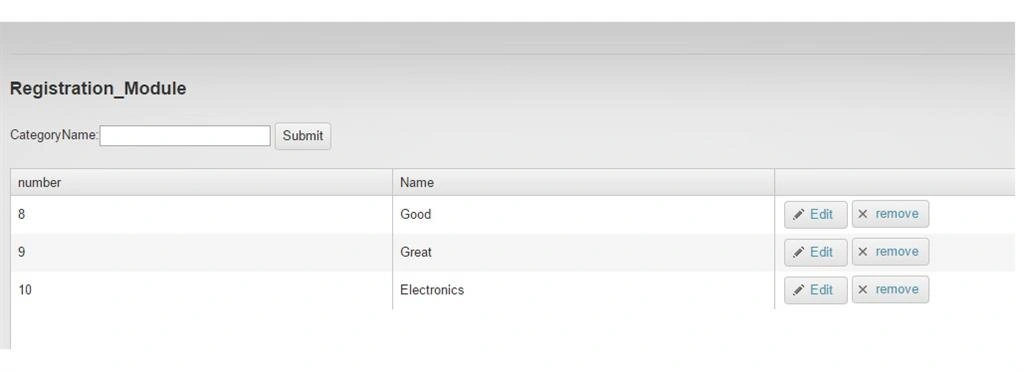
Run the Web form and the UI shows up as in the following:
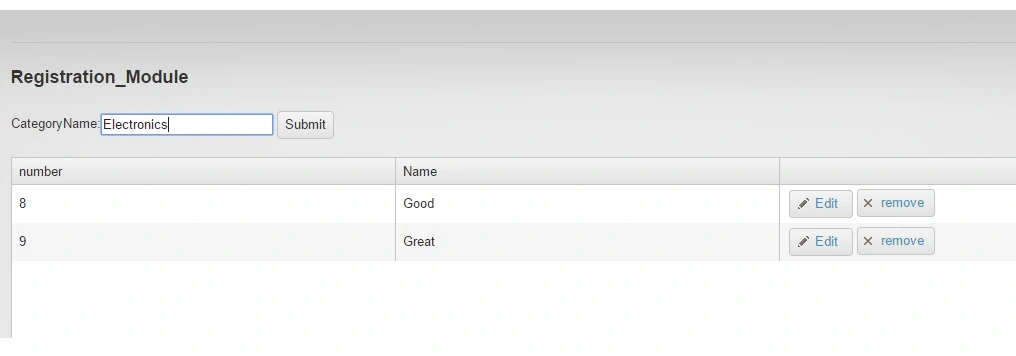 Figure 4 Registration Module
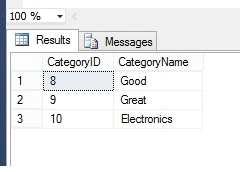
After inserting the value:
That's it, mission accomplished; enjoy coding!
I have attached my DNN module source code for your reference.
Arul RPosted Oct 28, 2015, 5:58 AM
Nice share!!!
Manoj BhoirPosted May 23, 2015, 9:58 AM
Nice one
Gowtham KPosted May 23, 2015, 9:54 AM
Thanks a lot Nitin
NitinPosted May 23, 2015, 8:49 AM
good one
Abhishek JaiswalPosted May 22, 2015, 3:55 PM
That's very interesting!! :)
Santhakumar MunuswamyPosted May 22, 2015, 2:42 PM
Thanks for sharing