
I think several people asked where to download the HoloLens emulator. I decide to post this brief article for now that will later be extended.
So you want to build holographic apps using Visual Studio and UWP framework? Ideally, you will need a HoloLens device to test the apps. Not everyone has $3000 to spend on device. But here is a good news. Microsoft just announced the HoloLens emulator for Visual Studio 2015.
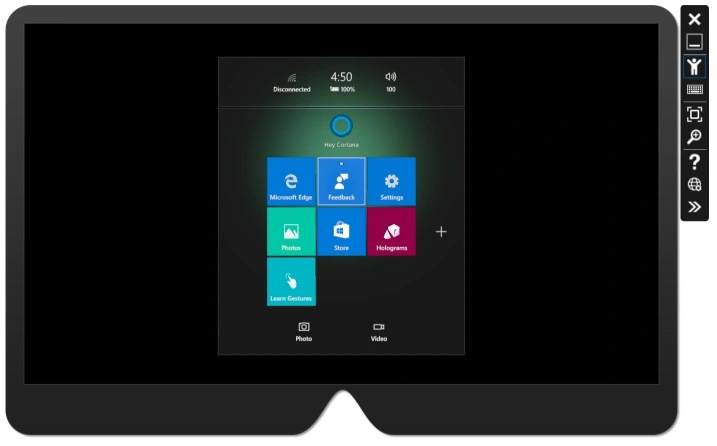
You don’t need HoloLens device to build, debug, and test HoloLens apps. Microsoft provides a HoloLens emulator that can be used to build and test HoloLens targeted apps on your PC without a physical HoloLens and comes with the HoloLens development toolset. The emulator uses a Hyper-V virtual machine. The human and environmental inputs that would usually be read by the sensors on the HoloLens are instead simulated using your keyboard, mouse, or Xbox controller. Apps don't need to be modified to run on the emulator and don't know that they aren't running on a real HoloLens.
The above download will install the Emulator and App Templates for Visual Studio and it requires 2.4 GB space on your computer.

Note
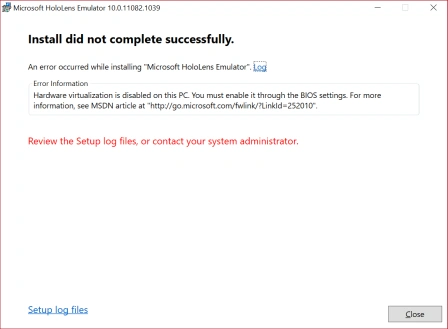
The HoloLens Emulator needs the Virtualization enabled on your PC. If you're getting the following error, you must enable Virtualization on your PC by going to BIOS and find processor virtualization settings and Enable it.
If you've any problems and/or solutions, please share here.
Good luck!
kalu singh raoPosted Jul 4, 2016, 2:14 AM
Nice...
Vignesh ManiPosted Mar 31, 2016, 8:54 AM
Good one
Ibrahim ErsoyPosted Mar 31, 2016, 6:21 AM
Thanks Mahesh,VS 2015 Update 2 broke Nuget for me.Any ideas how to fix? Reinstalling didnt help.
Gopi ChandPosted Mar 31, 2016, 4:20 AM
Thanks a lot sir for this worthy info :)
Shaili DashoraPosted Mar 31, 2016, 4:02 AM
Thanks for Sharing sir..
Mohammed IbrahimPosted Mar 31, 2016, 3:43 AM
nice
Sibeesh VenuPosted Mar 31, 2016, 2:28 AM
Thanks for the information Sir
Amatya AgyeyPosted Mar 31, 2016, 1:14 AM
It will work on Visual Studio 2012 Express and VS 2012 Proffessional?