

Introduction
This article shows how to download an image and store it in the SD card of your Android phone.
We will be using the Universal Image Loader for displaying a list of images. The user will be able to download the image by clicking on the image in the image list displayed.
Refer to Universal Image Loader article for writing the universal image loader part.
Step 1
A small change is required in "listOfImages.java", Start the activity "Download" (created later) to load it when any item of the list is clicked.
- package com.chhavi.downloadimage;
- import java.util.Collections;
- import java.util.LinkedList;
- import java.util.List;
- import android.app.Activity;
- import android.content.Context;
- import android.content.Intent;
- import android.os.Bundle;
- import android.view.View;
- import android.view.ViewGroup;
- import android.widget.AbsListView;
- import android.widget.AdapterView;
- import android.widget.BaseAdapter;
- import android.widget.ImageView;
- import android.widget.ListView;
- import android.widget.TextView;
- import com.nostra13.universalimageloader.core.DisplayImageOptions;
- import com.nostra13.universalimageloader.core.ImageLoader;
- import com.nostra13.universalimageloader.core.assist.ImageLoadingListener;
- import com.nostra13.universalimageloader.core.assist.SimpleImageLoadingListener;
- import com.nostra13.universalimageloader.core.display.RoundedBitmapDisplayer;
- public class ListOfImages extends Activity {
- protected AbsListView list;
- protected ImageLoader loader = ImageLoader.getInstance();
- final Context context=this;
- DisplayImageOptions op;
- String [] images={"http://t2.gstatic.com/images?q=tbn:ANd9GcSZrajzoEXNlRWjMGE9L3kqI1EsFN9P5HCNhMo4xaqLkWuhAixo","http://t0.gstatic.com/images?q=tbn:ANd9GcQH7hisM_szjOKlVdQvq6m_J4lETkWxQOlAk3SMWs051TFFnmWMCA","http://3.bp.blogspot.com/-kAhN0HX-MBk/T_5bApfhbJI/AAAAAAAAAuI/lUww8xT9yV8/s1600/smileys_001_01.png"};
- @Override
- public void onCreate(Bundle savedInstanceState) {
- super.onCreate(savedInstanceState);
- setContentView(R.layout.image_listview_layout);
- op = new DisplayImageOptions.Builder()
- .showStubImage(R.drawable.ic_stub)
- .showImageForEmptyUri(R.drawable.ic_empty)
- .cacheInMemory()
- .cacheOnDisc()
- .displayer(new RoundedBitmapDisplayer(20))
- .build();
- list = (ListView) findViewById(android.R.id.list);
- ((ListView) list).setAdapter(new ItemAdapter());
- list.setOnItemClickListener(new AdapterView.OnItemClickListener() {
- @Override
- public void onItemClick(AdapterView<?> parent, View view, int position, long id) {
- Intent i=new Intent(context,Download.class);
- i.putExtra("pos",position+"");
- startActivity(i);
- }
- });
- }
- @Override
- public void onBackPressed() {
- super.onBackPressed();
- }
- class ItemAdapter extends BaseAdapter {
- private class ViewHolder {
- public TextView text;
- public ImageView image;
- }
- @Override
- public int getCount() {
- return images.length;
- }
- @Override
- public Object getItem(int position) {
- return position;
- }
- @Override
- public long getItemId(int position) {
- return position;
- }
- @Override
- public View getView(final int position, View convertView, ViewGroup parent) {
- View v = convertView;
- final ViewHolder holder;
- if (convertView == null) {
- v = getLayoutInflater().inflate(R.layout.image_list_layout, parent, false);
- holder = new ViewHolder();
- holder.text = (TextView) v.findViewById(R.id.text);
- holder.image = (ImageView) v.findViewById(R.id.image);
- v.setTag(holder);
- } else {
- holder = (ViewHolder) v.getTag();
- }
- holder.text.setText("Image " + (position + 1));
- loader.displayImage(images[position], holder.image, op, null);
- return v;
- }
- }
- }
This is the same old code as you saw in the "Universal Image Loader" article. The only change is the starting of the activity "Download" on item click.
Step 2
Make a new layout file and name it as "progress_dialog_layout.xml" and add the following code to it:
- <LinearLayout xmlns:android="http://schemas.android.com/apk/res/android"
- android:id="@+id/layout_root"
- android:orientation="vertical"
- android:layout_width="fill_parent"
- android:layout_height="fill_parent"
- android:padding="10dp">
- <TextView
- android:id="@+id/downloadingFrom"
- android:layout_width="wrap_content"
- android:layout_height="wrap_content"
- android:textColor="#FFF"
- android:text="hello"
- android:textStyle="bold"/>
- <TextView
- android:id="@+id/startDownload"
- android:layout_width="wrap_content"
- android:layout_height="wrap_content"
- android:textColor="#b22f2f"
- android:text="hello"
- android:layout_marginTop="5dp"
- android:textStyle="bold|italic" />
- <ProgressBar
- android:id="@+id/progress_bar"
- android:layout_width="fill_parent"
- android:layout_height="wrap_content"
- android:progress="0"
- android:layout_marginTop="5dp"
- android:layout_marginBottom="10dp"
- style="?android:attr/progressBarStyleHorizontal"
- android:maxHeight="10dip"
- android:minHeight="10dip"
- />
- </LinearLayout>
Step 3
Make a new drawable resource file. Name it "show_progress_slider.xml" and add the following code to it:
- <layer-list xmlns:android="http://schemas.android.com/apk/res/android">
- <item android:id="@android:id/background">
- <shape>
- <corners android:radius="5dip" />
- <gradient
- android:startColor="#ff9d9e9d"
- android:centerColor="#ff5a5d5a"
- android:centerY="0.75"
- android:endColor="#ff747674"
- android:angle="270" />
- </shape>
- </item>
- <item
- android:id="@android:id/progress">
- <clip>
- <shape>
- <corners
- android:radius="5dip" />
- <gradient
- android:startColor="#ff8e8e"
- android:centerColor="#ff5656"
- android:centerY="0.75"
- android:endColor="#ffa1a1"
- android:angle="270"
- />
- </shape>
- </clip>
- </item>
- </layer-list>
Step 4
- package com.chhavi.downloadimage;
- import android.os.Bundle;
- import android.app.Activity;
- import android.util.Log;
- import android.view.Menu;
- import java.io.File;
- import java.io.FileOutputStream;
- import java.io.IOException;
- import java.io.InputStream;
- import java.net.HttpURLConnection;
- import java.net.MalformedURLException;
- import java.net.URL;
- import android.app.Activity;
- import android.app.Dialog;
- import android.content.Intent;
- import android.os.Bundle;
- import android.os.Environment;
- import android.view.View;
- import android.view.Window;
- import android.view.View.OnClickListener;
- import android.widget.Button;
- import android.widget.ProgressBar;
- import android.widget.TextView;
- import android.widget.Toast;
- public class Download extends Activity {
- String [] images={"http://t2.gstatic.com/images?q=tbn:ANd9GcSZrajzoEXNlRWjMGE9L3kqI1EsFN9P5HCNhMo4xaqLkWuhAixo","http://t0.gstatic.com/images?q=tbn:ANd9GcQH7hisM_szjOKlVdQvq6m_J4lETkWxQOlAk3SMWs051TFFnmWMCA","http://3.bp.blogspot.com/-kAhN0HX-MBk/T_5bApfhbJI/AAAAAAAAAuI/lUww8xT9yV8/s1600/smileys_001_01.png"};
- ProgressBar progress;
- Dialog dialog;
- int downloadedSize = 0;
- int totalSize = 0;
- TextView showProgressInText;
- String path = "null";
- int pos=-1;
- @Override
- public void onCreate(Bundle savedInstanceState) {
- super.onCreate(savedInstanceState);
- setContentView(R.layout.activity_main);
- Intent i=getIntent();
- pos=Integer.parseInt(i.getStringExtra("pos"));
- path=images[pos];
- Log.i("url of image being downloaded...*************........",path);
- progressBarShow(path);
- new Thread(new Runnable() {
- public void run() {
- downloadImage();
- }
- }).start();
- }
- void downloadImage(){
- try {
- URL url = new URL(path);
- HttpURLConnection con = (HttpURLConnection) url.openConnection();
- con.setRequestMethod("GET");
- con.setDoOutput(true);
- con.connect();
- File sdcardPath = Environment.getExternalStorageDirectory();
- Log.i("saving path....*******...",""+Environment.getExternalStorageDirectory() );
- File file = new File(sdcardPath,"downloaded_imagex"+pos+".png");
- FileOutputStream output = new FileOutputStream(file);
- InputStream input = con.getInputStream();
- totalSize = con.getContentLength();
- runOnUiThread(new Runnable() {
- public void run() {
- progress.setMax(totalSize);
- }
- });
- byte[] buffer = new byte[1024];
- int bufferLength = 0;
- while ( (bufferLength = input.read(buffer)) > 0 ) {
- output.write(buffer, 0, bufferLength);
- downloadedSize += bufferLength;
- runOnUiThread(new Runnable() {
- public void run() {
- progress.setProgress(downloadedSize);
- float per = ((float)downloadedSize/totalSize) * 100;
- showProgressInText.setText("Downloaded " + downloadedSize + "KB / " + totalSize + "KB (" + (int)per + "%)" );
- }
- });
- }
- output.close();
- runOnUiThread(new Runnable() {
- public void run() {
- }
- });
- }
- catch (final Exception e) {
- showError("Connection error...... " + e);
- }
- }
- void showError(final String err){
- runOnUiThread(new Runnable() {
- public void run() {
- Toast.makeText(Download.this, err, Toast.LENGTH_LONG).show();
- }
- });
- }
- void progressBarShow(String file_path){
- dialog = new Dialog(Download.this);
- dialog.requestWindowFeature(Window.FEATURE_NO_TITLE);
- dialog.setContentView(R.layout.progress_dialog_layout);
- dialog.setTitle("Downloading......");
- TextView text = (TextView) dialog.findViewById(R.id.downloadingFrom);
- text.setText("Downloading file from ... " + file_path);
- showProgressInText = (TextView) dialog.findViewById(R.id.startDownload);
- showProgressInText.setText("Starting download...");
- dialog.show();
- progress = (ProgressBar)dialog.findViewById(R.id.progress_bar);
- progress.setProgress(0);
- progress.setProgressDrawable(getResources().getDrawable(R.drawable.show_progress_slider));
- }
- }
The HttpURLConnection class helps in sending and receiving the data over the web.
"sdCardPath" is the path where the downloaded image will be stored to.
The image file is being transferred by converting it into a File stream.
Step 5
Do the following changes in "AndroidManifest":
- <?xml version="1.0" encoding="utf-8"?>
- <manifest xmlns:android="http://schemas.android.com/apk/res/android"
- package="com.chhavi.downloadimage"
- android:versionCode="1"
- android:versionName="1.0" >
- <uses-permission android:name="android.permission.INTERNET" />
- <uses-permission android:name="android.permission.WRITE_EXTERNAL_STORAGE" />
- <uses-sdk
- android:minSdkVersion="8"
- android:targetSdkVersion="17" />
- <application
- android:name=".App"
- android:allowBackup="true"
- android:icon="@drawable/ic_launcher"
- android:label="@string/app_name"
- android:theme="@style/AppTheme" >
- <activity
- android:name=".MainActivity"
- android:label="@string/app_name" >
- <intent-filter>
- <action android:name="android.intent.action.MAIN" />
- <category android:name="android.intent.category.LAUNCHER" />
- </intent-filter>
- </activity>
- <activity
- android:name=".ListOfImages"
- android:label="Image list" />
- <activity
- android:name=".Download"
- android:label="Download Image" />
- </application>
- </manifest>
Output snapshots:

Clicking on "Clik here":
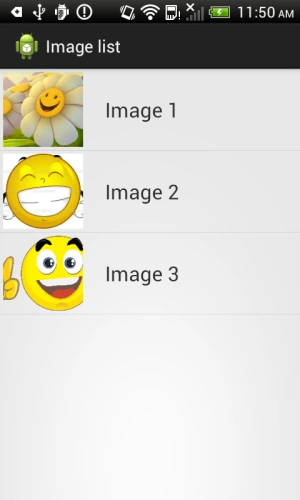
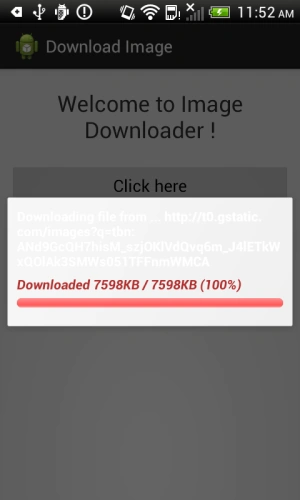
Clicking on any item of the list will download the image to the SD card of the connected phone.
Thank you
Join the conversation! Your thoughts help the community grow.