

Introduction
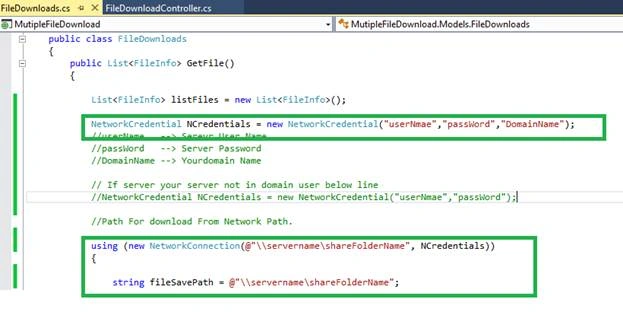
This article explains how to download the files from external Server network path, using Server credentials in ASP.NET MVC. We cannot download the files from the external Server network path with our Server credential.
Read the article's link, given below, before reading this article because the following link helps you to learn the basics of the file download.
We can download the files from the external Server, using credentials. Normally, we deploy our Application in the Web server but our files or documents are stored in the file Server. If need arises, connect the Web Server to the file Server, using credentials to download the files or documents through the Application because our files are stored in the file Server. If the files are stored in the external Server without credentials, we cannot download any files.
Important Class for Connecting External server
There are many classes which are important to connect the external Server, using credentials. One of the main classes is “NetworkCredential” Class. It provides the credentials for the password-based authentication schemes such as basic, digest, NTLM, and Kerberos authentication.
Name space for “NetworkCredential” Class is “System.Net” and assembly is “System (in System.dll)”. This class has many constructors but we are using two constructors mainly, which are-
- NetworkCredential(String, SecureString)
- NetworkCredential(String, SecureString, String)
NetworkCredential (String, SecureString) Initializes a new instance of the NetworkCredential class with the specified user name and the password.
NetworkCredential (String, SecureString, String) initializes a new instance of the NetworkCredential class with the specified user name, password, and the domain.
This class has many properties. These properties are given below-
- Domain
- Password
- SecurePassword
- UserName
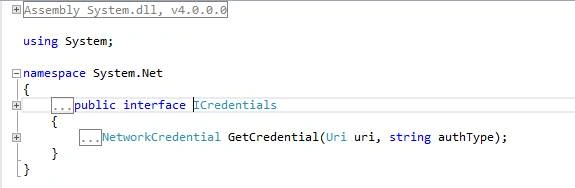
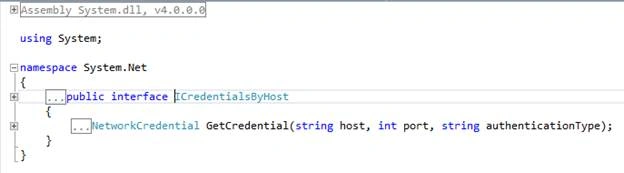
The screenshots, given below, explain about the constructor and the properties.

Two inheritances are inheritances, which are inherited in NetworkCredential class. “ICredentials” and “ICredentialsByHost” are the two inheritances.
Important Function for Connecting External server
There are the two important functions, which are used to connect and disconnect the Server or the external Server.
- WNetAddConnection2
- WNetCancelConnection2
WNetAddConnection2
The WNetAddConnection2 function makes a connection to a network resource and can redirect a local device to the network resource.
- [DllImport("mpr.dll")]
- private static extern int WNetAddConnection2(NetResource netResource,
- string password, string username, int flags);
The WNetCancelConnection2 function cancels an existing network connection. You can also call the function to remove the remembered network connections,which are not currently connected.
- [DllImport("mpr.dll")]
- private static extern int WNetAddConnection2(NetResource netResource,
- string password, string username, int flags);
The previous part of this article explains the basics of the file download, step by step. Here, small parts of the step are only different while the other steps are the same. Please find the below link for the previous part of this article.
- using System.Linq;
- using System.Web;
- using System.Web.Mvc;
- namespace MutipleFileDownload.Controllers
- {
- public class FileDownloadController : Controller
- {
- // GET: FileDownload
- public ActionResult FileHome()
- {
- return View();
- }
- }
- }
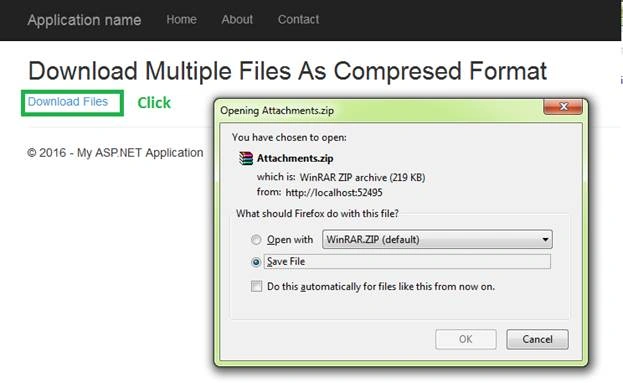
Step 2 - Right click on the specified action result, add view and add the code, given below, for simple view page design-
- @{
- ViewBag.Title = "FileHome";
- }
- <h2>Download Multiple Files As Compresed Format</h2>
- @Html.ActionLink("Download Files","Download")
- using System;
- using System.Collections.Generic;
- using System.Linq;
- using System.Web;
- using MutipleFileDownload;
- using System.IO;
- using System.Runtime.InteropServices;
- using System.Net;
- namespace MutipleFileDownload.Models
- {
- public class NetworkConnection : IDisposable
- {
- string _networkName;
- public NetworkConnection(string networkName,
- NetworkCredential credentials)
- {
- _networkName = networkName;
- var netResource = new NetResource()
- {
- Scope = ResourceScope.GlobalNetwork,
- ResourceType = ResourceType.Disk,
- DisplayType = ResourceDisplaytype.Share,
- RemoteName = networkName
- };
- var userName = string.IsNullOrEmpty(credentials.Domain)
- ? credentials.UserName
- : string.Format(@"{0}\{1}", credentials.Domain, credentials.UserName);
- var result = WNetAddConnection2(
- netResource,
- credentials.Password,
- userName,
- 0);
- if (result != 0)
- {
- throw new System.ComponentModel.Win32Exception(result, "Error connecting to remote share" + credentials.Password.ToString() + "--" + credentials.Domain + credentials.UserName);
- }
- }
- ~NetworkConnection()
- {
- Dispose(false);
- }
- public void Dispose()
- {
- Dispose(true);
- GC.SuppressFinalize(this);
- }
- protected virtual void Dispose(bool disposing)
- {
- WNetCancelConnection2(_networkName, 0, true);
- }
- [DllImport("mpr.dll")]
- private static extern int WNetAddConnection2(NetResource netResource,
- string password, string username, int flags);
- [DllImport("mpr.dll")]
- private static extern int WNetCancelConnection2(string name, int flags,
- bool force);
- }
- [StructLayout(LayoutKind.Sequential)]
- public class NetResource
- {
- public ResourceScope Scope;
- public ResourceType ResourceType;
- public ResourceDisplaytype DisplayType;
- public int Usage;
- public string LocalName;
- public string RemoteName;
- public string Comment;
- public string Provider;
- }
- public enum ResourceScope : int
- {
- Connected = 1,
- GlobalNetwork,
- Remembered,
- Recent,
- Context
- };
- public enum ResourceType : int
- {
- Any = 0,
- Disk = 1,
- Print = 2,
- Reserved = 8,
- }
- public enum ResourceDisplaytype : int
- {
- Generic = 0x0,
- Domain = 0x01,
- Server = 0x02,
- Share = 0x03,
- File = 0x04,
- Group = 0x05,
- Network = 0x06,
- Root = 0x07,
- Shareadmin = 0x08,
- Directory = 0x09,
- Tree = 0x0a,
- Ndscontainer = 0x0b
- }
- public class FileDownloads
- {
- }
- }
Cezary ZiemniewiczPosted May 8, 2020, 5:02 AM
It would be nice to mention the stackoverflow answer which is the source of the NetworkConnection class. Here's the link: https://stackoverflow.com/a/1197430/12334753
Anirudha BagPosted Oct 31, 2019, 9:50 AM
Hi Sir, I have an error (Multiple connections to a server or shared resource by the same user) post debugging this piece of code, i have used 'net use' and deleted all the existing network mapping entries for that network location, but still the error code of 1219 throws. what should i do to fix this, any suggestion or related article will be greatly appreciated.
Karam MahdiPosted Oct 5, 2019, 5:50 PM
Working good in local machine but not working after deploy , why ?
Chander ManiPosted Sep 17, 2019, 11:21 AM
Hi sir I just need simple page in which I can view specific pdf file by entering file name from network storage where I have more than 1000 files.Can u help me....I need it urgently..I have simple C# web application..
Chander ManiPosted Sep 14, 2019, 6:29 AM
I want to view specific pdf file from many pdf files stored on nas server and show in webpage using parameter. need source code for same....can you provide source code for same
Manishkumar ChaudhariPosted May 7, 2018, 2:15 AM
Hi Vignesh, Do you have same code for asp.net with out MVC ? Please let me know the link if you have already posted..
fahad khalidPosted Oct 4, 2017, 5:33 AM
Thank you so much to deeply guide us of everything. Great keep it up
Yogesh NaikPosted Apr 10, 2017, 7:46 AM
Will it work in firefox and chrome
Anu VPosted Sep 20, 2016, 12:03 AM
Nice...