

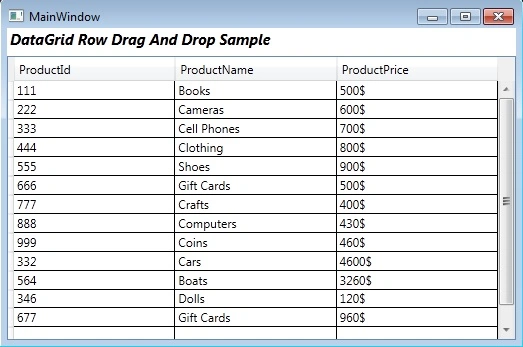
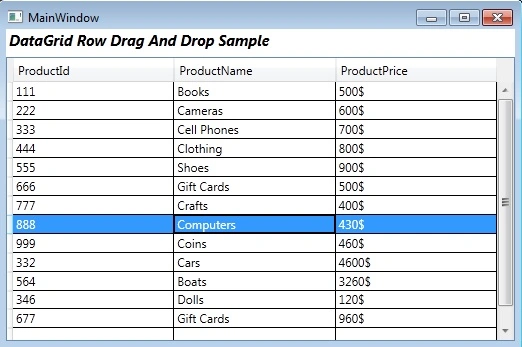
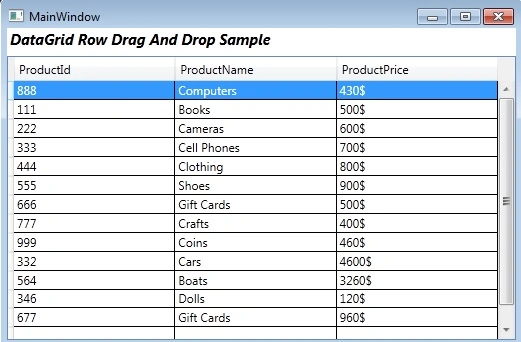
This article explains how to drag and drop selected DataGrid row in WPF.
Getting Started:
Creating WPF Project. Open Visual Studio 2010.
Go to File => New => Project
Select Window in installed templates
Select WPF Application
Enter the Name and choose the location.
Click OK
First of all add a new class using add new item tab and rename that class name.
using
System.Collections.ObjectModel;
public
class Product
{
public int
ProductId { get; set;
}
public string
ProductName { get; set;
}
public string
ProductPrice { get; set;
}
}
public class
ProductCollection : ObservableCollection<Product>
{
public ProductCollection()
{
Add(new
Product() { ProductId = 111, ProductName =
"Books", ProductPrice = "500$" });
Add(new
Product() { ProductId = 222, ProductName =
"Cameras", ProductPrice = "600$" });
Add(new
Product() { ProductId = 333, ProductName =
"Cell Phones", ProductPrice = "700$"
});
Add(new
Product() { ProductId = 444, ProductName =
"Clothing", ProductPrice = "800$" });
Add(new
Product() { ProductId = 555, ProductName =
"Shoes", ProductPrice = "900$" });
Add(new
Product() { ProductId = 666, ProductName =
"Gift Cards", ProductPrice = "500$"
});
Add(new
Product() { ProductId = 777, ProductName =
"Crafts", ProductPrice = "400$" });
Add(new
Product() { ProductId = 888, ProductName =
"Computers", ProductPrice = "430$" });
Add(new
Product() { ProductId = 999, ProductName =
"Coins", ProductPrice = "460$" });
Add(new
Product() { ProductId = 332, ProductName =
"Cars", ProductPrice = "4600$" });
Add(new
Product() { ProductId = 564, ProductName =
"Boats", ProductPrice = "3260$" });
Add(new
Product() { ProductId = 346, ProductName =
"Dolls", ProductPrice = "120$" });
Add(new
Product() { ProductId = 677, ProductName =
"Gift Cards", ProductPrice = "960$"
});
}
}
MainPage.xaml
<Window
xmlns="http://schemas.microsoft.com/winfx/2006/xaml/presentation"
xmlns:x="http://schemas.microsoft.com/winfx/2006/xaml"
xmlns:local="clr-namespace:WpfRowDragDropSample"
xmlns:d="http://schemas.microsoft.com/expression/blend/2008"
xmlns:mc="http://schemas.openxmlformats.org/markup-compatibility/2006"
mc:Ignorable="d"
x:Class="WpfRowDragDropSample.MainWindow"
Title="MainWindow"
Height="350"
Width="525">
<Window.Resources>
<local:ProductCollection
x:Key="ProductList"/>
</Window.Resources>
<Grid
DataContext="{Binding
Source={StaticResource
ProductList}}">
<DataGrid
d:LayoutOverrides="Width"
Margin="0,28,0,0"
Name="productsDataGrid"
AutoGenerateColumns="False"
ItemsSource="{Binding}"
SelectionMode="Extended"
ColumnWidth="*"
AllowDrop="True" >
<DataGrid.Columns>
<DataGridTextColumn
Binding="{Binding
ProductId}"
Header="ProductId"></DataGridTextColumn>
<DataGridTextColumn
Binding="{Binding
ProductName}"
Header="ProductName"></DataGridTextColumn>
<DataGridTextColumn
Binding="{Binding
ProductPrice}"
Header="ProductPrice"></DataGridTextColumn>
</DataGrid.Columns>
</DataGrid>
<TextBlock
TextWrapping="Wrap"
Text="DataGrid
Row Drag And Drop Sample"
VerticalAlignment="Top"
Margin="3,1,0,0"
Height="24"
HorizontalAlignment="Left"
Width="268"
FontSize="14.667"
FontWeight="Bold"
FontStyle="Italic"/>
</Grid>
</Window>
MainPage.xaml.cs
using
System.Windows.Controls.Primitives;
public
delegate Point
GetPosition(IInputElement
element);
int rowIndex = -1;
public MainWindow()
{
InitializeComponent();
productsDataGrid.PreviewMouseLeftButtonDown +=
new
MouseButtonEventHandler(productsDataGrid_PreviewMouseLeftButtonDown);
productsDataGrid.Drop += new
DragEventHandler(productsDataGrid_Drop);
}
Sujoy MullickPosted Dec 18, 2019, 11:09 PM
Can any one translet it to vb.net
Amol KumbhkarnaPosted Apr 15, 2019, 5:11 AM
This works perfect for demo , But for my requirement I am taking data from DB , how it will achieved any help will be appreciated. Thanks Amol
Karanjeet SinghPosted Apr 4, 2019, 8:04 AM
Works perfect except Control + Click to select multiple rows is not working. Any change in the code suggested?
Naresh KPosted May 13, 2016, 8:55 AM
Hi, how do i drag cell instead of row
PauloPosted Feb 23, 2015, 9:44 AM
I found a solution here: http://www.hardcodet.net/2009/03/moving-data-grid-rows-using-drag-and-drop var row = UIHelpers.TryFindFromPoint<DataGridRow>((UIElement)sender, e.GetPosition(dgTableOfContents)); if (row == null || row.IsEditing) return;
PauloPosted Feb 18, 2015, 9:03 AM
works just fine, except if the datagrid allowed to edit cells, now it is not allowing me to do this anymore, any workaround? thanks
Former memberPosted Dec 11, 2014, 6:04 AM
Nice ...
KhushPosted Sep 18, 2014, 7:30 AM
thanks a lot..!!!!It worked..this is what i wanted... :)