

Introduction
In this article, we draw an Ellipse in HTML.
First, we download the file in the following attachment:
-
Kinectic_beta.js
These files are added to the project then use the following procedure.
Step 1
Open Visual Studio 2010 and click "File" -> "New" -> "Website...". A window is opened. In this window give the name of your application as "Draw_Ellipse" and then click "Ok".
Step 2
Add a "kinetic_beta.js" file. The project will then have been created; a new window is opened on the right side. This window is called the Solution Explorer. The Solution Explorer contains the js file and HTML file.

Coding
Draw_Ellipse.html
- <!DOCTYPE html PUBLIC "-//W3C//DTD XHTML 1.0 Transitional//EN" "http://www.w3.org/TR/xhtml1/DTD/xhtml1-transitional.dtd">
- <html xmlns="http://www.w3.org/1999/xhtml">
- <head>
- <title></title>
- </head>
- <body>
- <h3> Draw Ellipse in HTML5 </h3>
- <div id="container"></div>
- <script src="Kinetic_beta.js" type="text/javascript"></script>
- <script>
- var stage = new Kinetic.Stage({
- container: 'container',
- width: 308,
- height: 200
- });
- var layer = new Kinetic.Layer();
- var ellipse = new Kinetic.Ellipse({
- x: stage.getWidth() / 2,
- y: stage.getHeight() / 2,
- radius: {
- x: 120,
- y: 70
- },
- fill: 'blue',
- stroke: 'black',
- strokeWidth: 4
- });
- // add the shape to the layer
- layer.add(ellipse);
- // add the layer to the stage
- stage.add(layer);
- </script>
- </body>
- </html>
Output
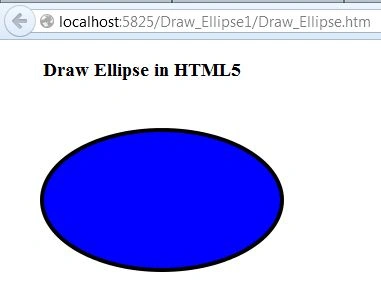
For more information, download the attached sample application.
Join the conversation! Your thoughts help the community grow.