
The lack of XOR Drawing feature in GDI+ was not certainly welcome in the programmer's community. I guess it will be hard to survive with this handicap.
In spite of this, I would like to show how we can draw rubber-band lines and shapes in GDI+ with just a few lines of code.
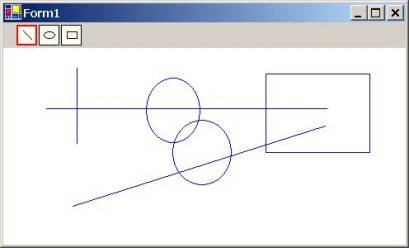
Private Sub Form1_Load(ByVal sender As Object, ByVal e As System.EventArgs)
Dim size As Size
= SystemInformation.PrimaryMonitorMaximizedWindowSize
bitmap = New Bitmap(size.Width,
size.Height)
gB = Graphics.FromImage(bitmap)
Dim bckColor As Color
= Me.BackColor
gB.Clear(bckColor)
End Sub
Private Sub Form1_MouseDown(ByVal sender As Object, ByVal e AsSystem.Windows.Forms.MouseEventArgs)
Dim p As Point
= New Point(e.X,
e.Y)
x0 = p.X
y0 = p.Y
drag = True
End Sub
Private Sub Form1_MouseMove(ByVal sender As Object, ByVal e AsSystem.Windows.Forms.MouseEventArgs)
Dim p As Point
= New Point(e.X,
e.Y)
x= p.X
y = p.Y
Dim cx As Integer =
x - x0
Dim cy As Integer =
y - y0
If drag Then
Dim gx As Graphics
= CreateGraphics()
gx.DrawImage(bitmap, 0, 0)
gx.Dispose()
Dim g As Graphics
= CreateGraphics()
Dim pen As Pen
= New Pen(Color.Blue)
Select Case DrawMode
Case 1
g.DrawLine(pen, x0, y0, x, y)
Exit Select
Case 2
g.DrawEllipse(pen, x0, y0, cx, cy)
Exit Select
Case 3
g.DrawRectangle(pen, x0, y0, cx, cy)
Exit Select
End Select
g.Dispose()
pen.Dispose()
End If
End Sub
Private Sub Form1_MouseUp(ByVal sender As Object, ByVal e AsSystem.Windows.Forms.MouseEventArgs)
Dim cx As Integer =
x - x0
Dim cy As Integer =
y - y0
Dim pen As Pen
= New Pen(Color.Blue)
Select Case DrawMode
Case 1
gB.DrawLine(pen, x0, y0, x, y)
Exit Select
Case 2
gB.DrawEllipse(pen, x0, y0, cx, cy)
Exit Select
Case 3
gB.DrawRectangle(pen, x0, y0, cx, cy)
Exit Select
End Select
drag = False
pen.Dispose()
End Sub
Private Sub Form1_Paint(ByVal sender As Object, ByVal e AsSystem.Windows.Forms.PaintEventArgs)
Dim gx As Graphics
= CreateGraphics()
gx.DrawImage(bitmap, 0, 0)
gx.Dispose()
End Sub
Private Sub button1_Click(ByVal sender As Object, ByVal e As System.EventArgs)button1.ForeColor
= Color.Red
button2.ForeColor = Color.Black
button3.ForeColor = Color.Black
DrawMode = 1
End Sub
Private Sub button2_Click(ByVal sender As Object, ByVal e As System.EventArgs)
button2.ForeColor = Color.Red
button1.ForeColor = Color.Black
button3.ForeColor = Color.Black
DrawMode = 2
End Sub
Private Sub button3_Click(ByVal sender As Object, ByVal e As System.EventArgs)
button3.ForeColor = Color.Red
button1.ForeColor = Color.Black
button2.ForeColor = Color.Black
DrawMode = 3
End Sub
Private Sub panel1_Paint(ByVal sender As Object, ByVal e AsSystem.Windows.Forms.PaintEventArgs)
button1.ForeColor = Color.Red
button1.Focus()
End Sub
Join the conversation! Your thoughts help the community grow.