Introduction
In this article, I am going to explain about how to bind the value to dropdown from the database and how to implement dropdown multiselect with checkboxlist, using jQuery multiselect plugin.
Knowledge Required
- Basic knowledge of MVC.
- Basic knowledge of jQuery.
- Basic knowledge of Entity Framework.
- Basic knowledge of LINQ.
Article Flows
- Create database table with the values.
- Integrate Entity Framework.
- Create Controller, View and enable Multiselect plugin with dropdown.
- Bind the value to dropdown.
- Display selected value of dropdown.
- Create database table with the values.
Create a table, as shown below.

To create table given above, excute the query given below.
- CREATE TABLE [dbo].[Dropdown](
- [Id] [int] IDENTITY(1,1) NOT NULL,
- [Skill] [nvarchar](100) NULL,
- CONSTRAINT [PK_Dropdown] PRIMARY KEY CLUSTERED
- (
- [Id] ASC
- )WITH (PAD_INDEX = OFF, STATISTICS_NORECOMPUTE = OFF, IGNORE_DUP_KEY = OFF, ALLOW_ROW_LOCKS = ON, ALLOW_PAGE_LOCKS = ON) ON [PRIMARY]
- ) ON [PRIMARY]
- GO
I have inserted the value, as shown below.
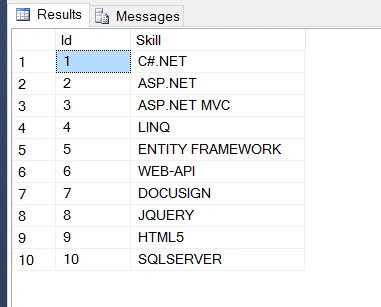
To insert tabove values, execute SQL script given below.
- SET IDENTITY_INSERT [dbo].[Dropdown] ON
- GO
- INSERT [dbo].[Dropdown] ([Id], [Skill]) VALUES (1, N'C#.NET')
- GO
- INSERT [dbo].[Dropdown] ([Id], [Skill]) VALUES (2, N'ASP.NET')
- GO
- INSERT [dbo].[Dropdown] ([Id], [Skill]) VALUES (3, N'ASP.NET MVC')
- GO
- INSERT [dbo].[Dropdown] ([Id], [Skill]) VALUES (4, N'LINQ')
- GO
- INSERT [dbo].[Dropdown] ([Id], [Skill]) VALUES (5, N'ENTITY FRAMEWORK')
- GO
- INSERT [dbo].[Dropdown] ([Id], [Skill]) VALUES (6, N'WEB-API')
- GO
- INSERT [dbo].[Dropdown] ([Id], [Skill]) VALUES (7, N'DOCUSIGN')
- GO
- INSERT [dbo].[Dropdown] ([Id], [Skill]) VALUES (8, N'JQUERY')
- GO
- INSERT [dbo].[Dropdown] ([Id], [Skill]) VALUES (9, N'HTML5')
- GO
- INSERT [dbo].[Dropdown] ([Id], [Skill]) VALUES (10, N'SQLSERVER')
- GO
- SET IDENTITY_INSERT [dbo].[Dropdown] OFF
- GO
Integrate EntityFramework
I already discussed in a previous article about how to integrate Entity Framework with MVC. For this, refer to the two links given below.
- http://www.c-sharpcorner.com/blogs/implement-database-first-approach-with-entity-framework
- http://www.c-sharpcorner.com/article/asynchronous-file-upload-using-kendo-ui-asynchronous-upload-with-mvc-and-entityf/ --visit step 2
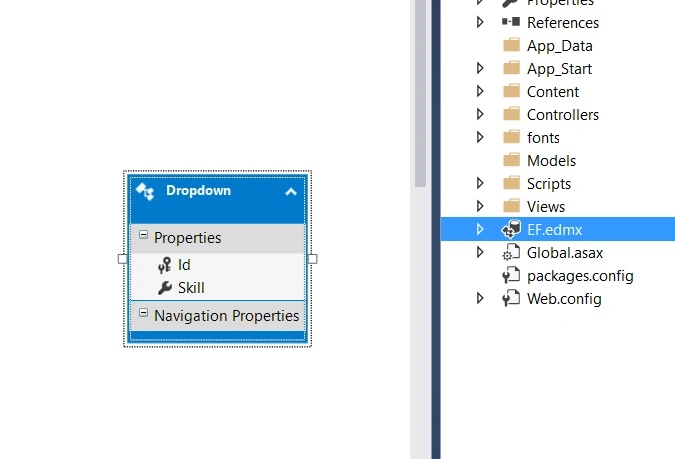
Once you integrate the Entity Framework with your MVC Application, you will get the screenshot, as shown below.
 Create Controller, View and enable Multiselect plugin with dropdown
I have created the Controller in the name of DropdownController under controller folder.
- using System;
- using System.Collections.Generic;
- using System.Linq;
- using System.Web;
- using System.Web.Mvc;
- namespace DropdownMulitSelectCheckbox.Controllers {
- public class DropdownController: Controller {
-
- public ActionResult Index() {
- return View();
- }
- }
- }
To enable Multiselect plugin, we need to refer the script given below and CSS to our Application
- <script src="http://code.jquery.com/jquery-1.12.4.min.js"></script>
- <link href="http://cdn.rawgit.com/davidstutz/bootstrap-multiselect/master/dist/css/bootstrap-multiselect.css"
- rel="stylesheet" type="text/css" />
- <script src="http://cdn.rawgit.com/davidstutz/bootstrap-multiselect/master/dist/js/bootstrap-multiselect.js"></script>
- <link href="http://cdnjs.cloudflare.com/ajax/libs/twitter-bootstrap/3.0.3/css/bootstrap.min.css"
- rel="stylesheet" type="text/css" />
- <script src="http://cdnjs.cloudflare.com/ajax/libs/twitter-bootstrap/3.0.3/js/bootstrap.min.js"></script>
Add HTML/ Razor control to creating dropdown. Here, I have created HTML. Select to create multiselect dropdown.
- <div> <select id="mySkills" multiple="multiple" required name="mySkillsName">
- @if (ViewBag.mySkills != null)
- {
- foreach (var item in ViewBag.mySkills)
- {
- if (item.Text != null)
- {
- <option value="@item.Value">
- @item.Text
- </option>
- }
- }
- }
- </select> </div>
Add the script given below to enable multiselect plugin to the respective control.
- <script type="text/javascript">
- $(function() {
- $('#mySkills').multiselect({
- includeSelectAllOption: true
- });
- });
- </script>
Finally, the View will be, as shown below.
- @ {
- ViewBag.Title = "Index";
- } < script src = "http://code.jquery.com/jquery-1.12.4.min.js" > < /script> < link href = "http://cdn.rawgit.com/davidstutz/bootstrap-multiselect/master/dist/css/bootstrap-multiselect.css"
- rel = "stylesheet"
- type = "text/css" / > < script src = "http://cdn.rawgit.com/davidstutz/bootstrap-multiselect/master/dist/js/bootstrap-multiselect.js" > < /script> < link href = "http://cdnjs.cloudflare.com/ajax/libs/twitter-bootstrap/3.0.3/css/bootstrap.min.css"
- rel = "stylesheet"
- type = "text/css" / > < script src = "http://cdnjs.cloudflare.com/ajax/libs/twitter-bootstrap/3.0.3/js/bootstrap.min.js" > < /script> < script type = "text/javascript" > $(function() {
- $('#mySkills').multiselect({
- includeSelectAllOption: true
- });
- }); < /script> < h2 > Multiselect Dropdown with Checkbox < /h2> < div > < select id = "mySkills"
- multiple = "multiple"
- required name = "mySkillsName" > @if(ViewBag.mySkills != null) {
- foreach(var item in ViewBag.mySkills) {
- if (item.Text != null) { < option value = "@item.Value" > @item.Text < /option>
- }
- }
- } < /select> < /div>
Bind the value to dropdown
To bind the value to the dropdown, we need to get the value from the database and assign the value to the dropdown.
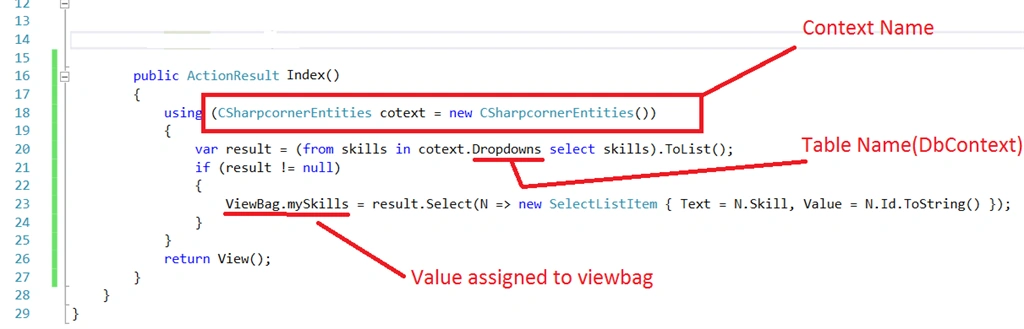
Get the value from the database, using an Entity Framework context
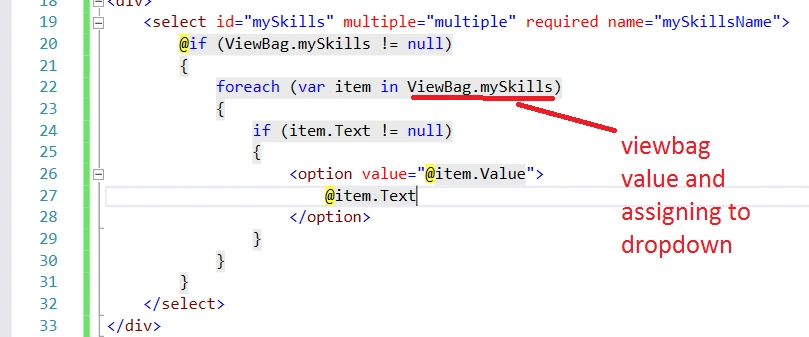
This ViewBag.mySkills value will be assigned to select (dropdown) Controller in View, as shown below. Check the database to see if it has the value or not. If there is no value in the database, it means that it will throw the null reference exception for which I checked the null condition.
Now, run the Application.
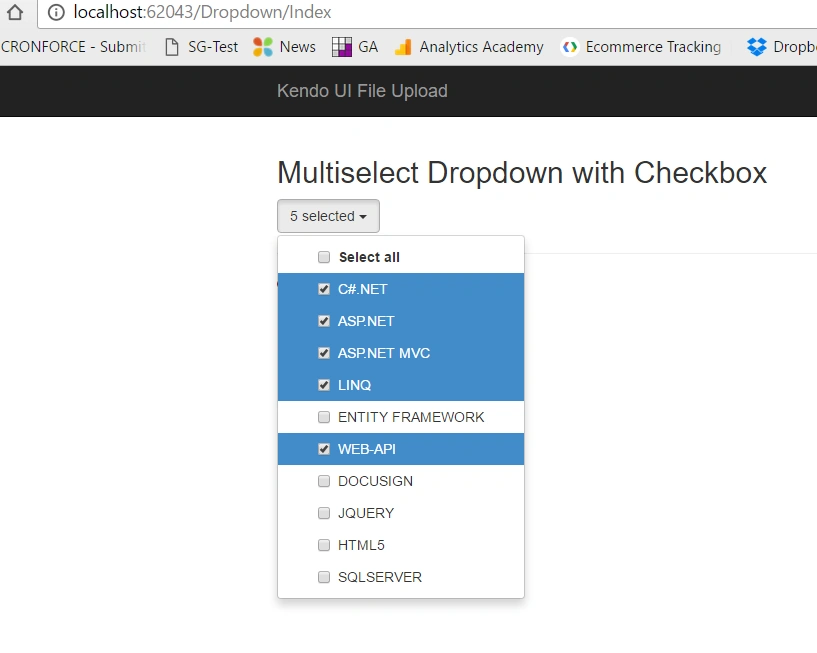 Display selected value of dropdown
To get the selected value from the dropdown, I am going to add one button and display the selected value on button click event in jQuery.
- <input type="button" id="btnGetSkills" value="Click me to Get Selected Skill(s)" />
Proceed with the button click event in jQuery, as shown below.
- $("#btnGetSkills").click(function() {
- alert($("#mySkills").val());
- });
Now, run your Application and click button by selecting skills.
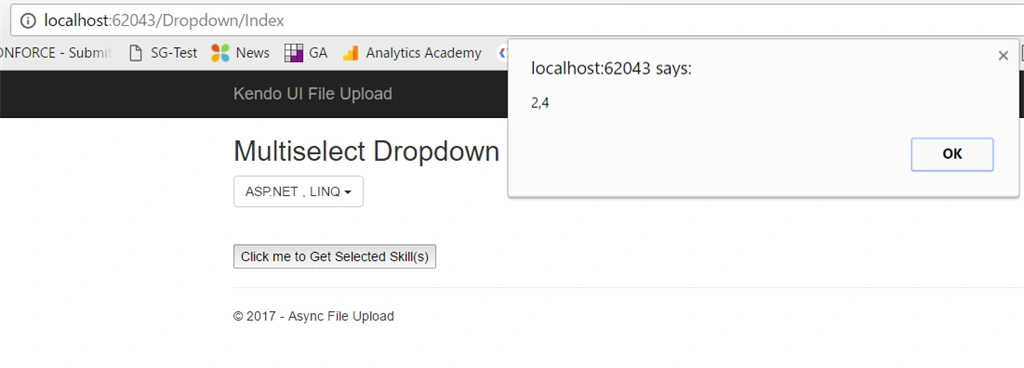
If you want to get the selected text change in View, write the code, as shown below.
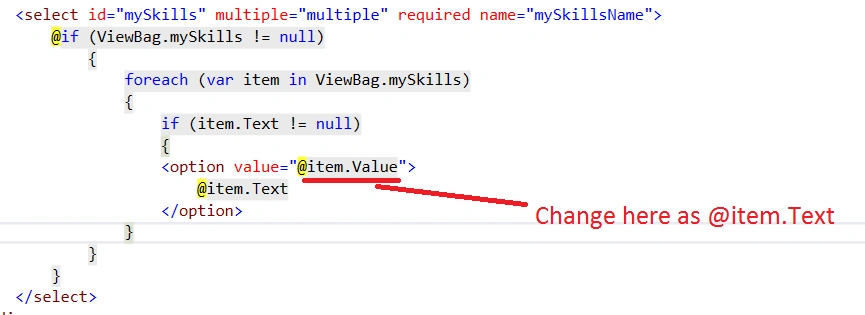
Finally, it will be displayed, as shown below.
- @ {
- ViewBag.Title = "Index";
- } < script src = "http://code.jquery.com/jquery-1.12.4.min.js" > < /script> < link href = "http://cdn.rawgit.com/davidstutz/bootstrap-multiselect/master/dist/css/bootstrap-multiselect.css"
- rel = "stylesheet"
- type = "text/css" / > < script src = "http://cdn.rawgit.com/davidstutz/bootstrap-multiselect/master/dist/js/bootstrap-multiselect.js" > < /script> < link href = "http://cdnjs.cloudflare.com/ajax/libs/twitter-bootstrap/3.0.3/css/bootstrap.min.css"
- rel = "stylesheet"
- type = "text/css" / > < script src = "http://cdnjs.cloudflare.com/ajax/libs/twitter-bootstrap/3.0.3/js/bootstrap.min.js" > < /script> < script type = "text/javascript" > $(document).ready(function() {
- $(function() {
- $('#mySkills').multiselect({
- includeSelectAllOption: true
- });
- });
- $("#btnGetSkills").click(function() {
- alert($("#mySkills").val());
- });
- }); < /script> < h2 > Multiselect Dropdown with Checkbox < /h2> < div > < select id = "mySkills"
- multiple = "multiple"
- required name = "mySkillsName" > @if(ViewBag.mySkills != null) {
- foreach(var item in ViewBag.mySkills) {
- if (item.Text != null) { < option value = "@item.Value" > @item.Text < /option>
- }
- }
- } < /select> < /div> < br / > < br / > < input type = "button"
- id = "btnGetSkills"
- value = "Click me to Get Selected Skill(s)" / >
Summary
In this article, we learned how to implement dropdown with mulit select checkbox and get the selected checkbox value.
I hope it's helpful.


Gitreef AkramPosted Feb 28, 2022, 7:12 AM
Hi its UI is not flexible it changes with multiple elements selected
adam powPosted Nov 14, 2019, 12:35 AM
Hi Gnanavel, great article. But I see only a "None selected" dropdown button. When I click on it, I don't get/see a list of items?
shilpa kasthalaPosted Sep 18, 2019, 12:49 PM
Hi Gnanavel, Thank you for sharing the article , I am not seeing checkbox in the dropdownlist can you please help
Nagarajan PPosted Oct 4, 2018, 6:54 AM
Hi Gnanavel , thanks for your article for us very use full. I have one more doubt , which ever your mentioned in the index page for boostrap link & jquery link . I download & try to use local is not working . if use CND links it's working fine . how to over come in local . could please guide me.
Sandeep RaturiPosted Sep 15, 2018, 11:54 PM
Thanks but checkbox not coming inside dropdownlist.
RahulPosted Jan 16, 2018, 12:48 PM
Hi Gnanavel, Nice article. I have one question "How can we clear previously filled items in a multi-select with checkbox control on changing the value of its parent multi-select with checkbox control?" like I am using two controls one is parent and another one is child and i am trying to fill child control dynamically on value change of parent control. How can i achieve that?
Sachin SPosted Sep 18, 2017, 4:42 AM
Hi, how can we check options when page loads ? and how can we limit number of records to be displayed as text on the button ?
Sundaram SubramanianPosted Jun 13, 2017, 8:10 AM
Gnanavel Sekar, Thanks for sharing :).
Saravanakumar SekaranPosted May 5, 2017, 10:25 PM
Simply super article with nice explanation
thenna sPosted May 5, 2017, 3:31 AM
Awesome Article....helped me lot....Thanks