

Introduction
In this article, I describe how to drop all the Stored Procedures in a particular database. Several times in our project we needed to drop all Stored Procedures. If there is a large number of Stored Procedures then it is very tedious to drop all of them. Here I explain how to drop all Stored Procedures in a database automatically.
I assume you have a basic knowledge of Stored Procedures and cursors; for more help, you can visit:
First of all we create a table.
Creation of Table
- create table emp(empId int, empName varchar(15))
- go
- insert into emp
- select 1,'Deepak'union all
- select 2,'Arora'
- go
- select * from emp
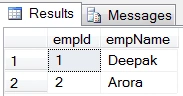
Now we create two Stored Procedures.
Creation of the first Stored Procedure
- create proc usp_select
- as
- select * from emp
- go
- exec usp_select
Creation of the second Stored Procedure
- create proc usp_insert(@id int, @name varchar(15))
- as
- insert into emp values (@id, @name)
- go
- exec usp_insert 3,'Daljeet singh'
- go
- exec usp_select
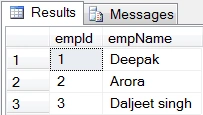
Now we create a Cursor
- declare cur_dropProc cursor
- scroll for
- select [name] from sysobjects where xtype='p'
- open cur_dropProc
- go
- Declare @procName varchar(500)
- fetch first from cur_dropProc into @procName
- while @@fetch_status=0
- begin
- Exec('drop procedure ' + @procName)
- fetch next from cur_dropProc into @procName
- end
- go
- close cur_dropProc
- go
- deallocate cur_dropProc
Now see the Stored Procedure in the Database
- select [name] from sysobjects where xtype='p'
Output
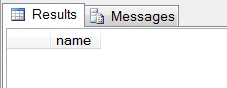
Summary
In this article, I described how to drop all the Stored Procedures in a database in SQL Server. I hope this article has helped you to understand this topic. Please share if you know more about this. Your feedback and constructive contributions are welcome.
Join the conversation! Your thoughts help the community grow.