Introduction
The article is about attributes. You'll see how to define attributes on various items within your program. We shall also discuss the most innovative feature that the .NET framework has to offer, custom attributes, a mechanism that allows you to associate custom metadata with program elements. This metadata is created at compile-time and embedded into an assembly. You can then scrutinize the metadata at runtime using reflection. The article also explains the use of reflection in custom attributes.
Attributes
As illustrated in earlier articles, the .NET compiler generates metadata descriptions for all defined and reference types. However, the developer can integrate additional metadata into an assembly using attributes. So attributes are like adjectives for metadata annotation similar to a COM IDL that can be applied to a given type, assembly, modules, methods, and so on. The .NET framework provides two types of attribute implementations, Predefined Attributes, and Custom Attributes.
Attributes are types derived from the System.Attribute class. This is an abstract class defining the required services of any attribute. The following is the syntax of an attribute:
[
type: attributeName(parameter1, parameter2,………n)]
The attribute name is the class name of the attribute. Attributes can have zero or more parameters. The following code sample states the implementation of the attribute in which we are declaring a method as deprecated using the obsolete attribute:
- using System;
-
- namespace attributes
- {
- class Program
- {
- static void Main(string[] args)
- {
- Console.WriteLine("Attributes sample");
- TestMethod();
- Console.ReadKey();
- }
- [Obsolete("Deprecated Method",false)]
- public static void TestMethod()
- {
- Console.WriteLine("Hello world");
- }
- }
- }
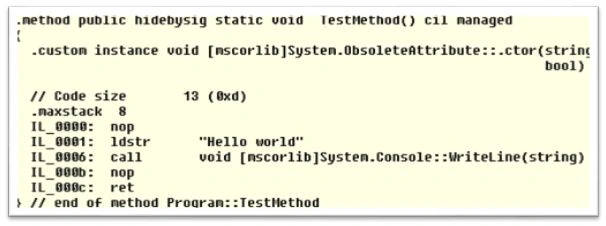
The following figure shows the MSIL code of the TestMethod method as displayed in ILDASM. Notice the custom directive that defines the Obsolete attribute.
Role of Attributes
Attributes might be useful for documentation purposes. They fulfill many roles, including describing serialization, indicating conditional compilation, specifying import linkage, and setting a class blueprint. Attributes allow information to be defined and applied to nearly any metadata table entry. This extensible metadata information can be queried at run time to dynamically alter the way code executes.
The C# compiler itself has been programmed to discover the presence of numerous attributes during the compilation process. For example, if the csc.exe compiler discovers an item being annotated with the [obsolete] attribute, it will display a compiler warning in the IDE error list.
Predefined Attributes
The predefined attributes have been defined by Microsoft as a part of the .NET FCL and many of them receive special support from the C# compiler. Which implies that for those specific attributes, the compiler could customize the compilation process in a specific way.
The System.Attribute base class library provides a number of attributes in various namespaces. The following table gives a snapshot of some predefined attributes.
|
|
|
|
[Serialization]
|
By marking these attributes, a class is able to persist its current state into the stream.
|
|
[NonSerialization]
|
It specifies that a given class or field should not be persisted during the serialization process.
|
|
[Obsolete]
|
It is used to mark a member or type as deprecated. If they are attempted to be used somewhere else then compiler issues a warning message.
|
|
[DllImport]
|
This allows .NET code to make calls to an unmanaged C or C++ library.
|
|
[WebMethod]
|
This is used to build XML web services and the marked method is being invoked by an HTTP request.
|
|
[CLSCompliant]
|
Enforce the annotated items to conform to the semantics of CLS.
|
Attributes Description
To illustrate the predefined attributes in action, let's create a console based application to apply the implementation of them.
[Serialization] and [NonSerialization]
Here, assume that you have built a test class that can be persisted in a binary format using the [Serialization] attribute.
- [Serializable]
- public class test
- {
- public test() { }
-
- string name;
- string coutnry;
- [NonSerialized]
- int salary;
- }
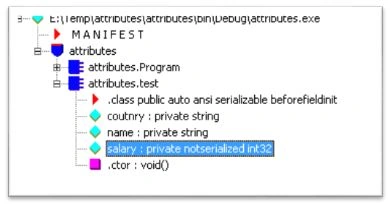
Once the class has been compiled, you can view the extra metadata using the ildasm.exe utility. You can notice the Red triangle, where these attributes are recorded using the serializable token, and the salary filed is tokenized using the nonserilaized attribute as in the following.
[WebMethod]
The following example depicts the implementation of XML web services. Here, the UtilityWebService class is annotated with [WebService] attributes. This class defines two methods that are marked with [WebMethod] attributes.
- [WebService(Namespace = "http://tempuri.org/")]
- [WebServiceBinding(ConformsTo = WsiProfiles.BasicProfile1_1)]
-
-
- public class UtilityWebService : System.Web.Services.WebService {
-
- public UtilityWebService () {
-
-
-
- }
-
- [WebMethod]
- public string HelloWorld() {
- return "Hello World";
- }
-
- [WebMethod]
- public int addition(int a,int b)
- {
- return a+b;
- }
-
- }
[DLLImport]
The following code plays around the unmanaged assembly user32.dll to utilize its existing method using the [DLLImport] attributes as in the following:
- using System;
- using System.Runtime.InteropServices;
- namespace attributes
- {
- public class test
- {
- [DllImport("user32.dll", EntryPoint = "MessageBox")]
- public static extern int ShowMessageBox(int hWnd,string text, string caption,uint type);
- }
- class Program
- {
- static void Main(string[] args)
- {
- string caption = "Hello World";
- string text = "Sample Article on DLLImport Attribute";
- test.ShowMessageBox(0, text, caption, 0);
- Console.ReadKey();
- }
-
- }
- }
Note: a member can be assigned more than one attribute and can be applied multiple times itself.
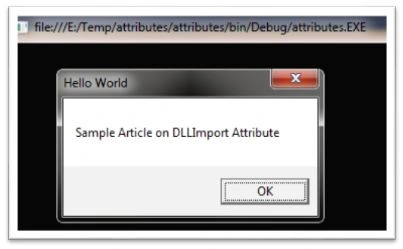
Once this code is compiled successfully, it produces the following output as in the following:
[CLSCompliant]
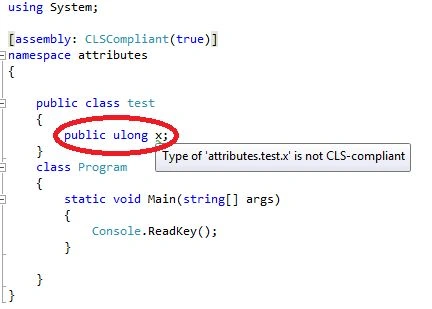
If you annotate this attribute at an assembly or module level and you try to use the following non-CLR compliant code, then the compiler issues a warning message.
Custom Attributes
We can create custom attributes for private usage or to be published in a library for others. The following procedure is the definitive procedure for creating custom attributes:
- The custom attribute class should be derived from System.Attribute.
- The Attribute name should have the Attribute suffix.
- Set the probable targets with the AttributeUsage attribute.
- Implement the class constructor and write-accessible properties.
The first step in building a custom attribute is to create a new class FunWith with an Attribute suffix that is derived from the System.Attribute class. Then define the class constructor and write an accessible property, Company.
- [AttributeUsage(AttributeTargets.Class)]
- public class FunwithAttribute : Attribute
- {
- public FunwithAttribute(string s)
- {
- this.Company = s;
- }
- public string Company { get; set; }
- }
Now, it is time to apply a custom attribute class on another class. So we are creating another class, test, that has a FunWith attribute annotation in which we are passing the company name information.
- [Funwith("HCL Technology")]
- public class test
- {
- public test(string name, string country)
- {
- this.EmpName = name;
- this.Country = country;
- }
- public string FullDetails()
- {
- string str = EmpName + "-" + Country;
- return str;
- }
-
- private string EmpName;
- private string Country;
- }
- class Program
- {
- static void Main(string[] args)
- {
- test obj = new test("Ajay","India");
- Console.WriteLine("Result:{0}",obj.FullDetails());
- Console.ReadKey();
- }
- }
After compiling this program, it yields the following output.
Output
Result: Ajay - India
Well, as you can see, the custom attribute does not impose any impact on the final output. But we can reveal the annotation done using attributes at the metadata level using ildasm.exe as in the following:
Custom defined attributes are sometimes valuable simply as information. However, the real power lies in associating with an attribute. You can read custom attributes with reflection using Attribute.GetCustomAttribute and Type.
The following code states of accessing the custom attribute values at runtime using reflection. Here, we are storing the custom attributes members in an array of object types, then iterating through it to get the property value:
- static void Main(string[] args)
- {
- MemberInfo info = typeof(test);
- object[] attrib = info.GetCustomAttributes(typeof(FunwithAttribute), false);
- foreach (Object attribute in attrib)
- {
- FunwithAttribute a = (FunwithAttribute)attribute;
- Console.WriteLine("Company: {0}", a.Company);
-
- }
- }
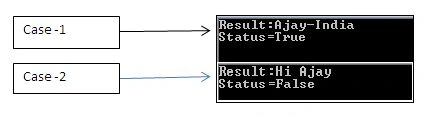
For a better understanding, the following code shows the actual utilization of custom attribute values. Here, we are displaying a string value based on the custom attribute Boolean value. The output varies on the status True or False values.
- using System;
- using System.Reflection;
-
- public class CheckStatus : Attribute
- {
- private bool Val = false;
- public bool status
- {
- get { return Val; }
- }
- public CheckStatus(bool val)
- {
- Val = val;
- }
- }
Now we are annotating the Custom Attribute in the Test class. Here, we need to configure the CheckStatus value to true to false manually. In the FullDetails() method, we are accessing the custom attributes members using a foreach loop construct and later we check whether the status value is true or false.
- [CheckStatus(false)]
- public class test
- {
-
- private string EmpName;
- private string Country;
-
- public test(string name, string country)
- {
- this.EmpName = name;
- this.Country = country;
- }
- public string FullDetails()
- {
- string str = null;
- Type type = this.GetType();
-
- CheckStatus[] attrib = (CheckStatus[])type.GetCustomAttributes(typeof(CheckStatus), false);
-
- if (attrib[0].status == true)
- {
- str = EmpName + "-" + Country;
- }
- else
- {
- str = "Hi " + EmpName;
- }
-
- return str;
- }
- }
- class Program
- {
- static void Main(string[] args)
- {
- test obj = new test("Ajay","India");
- Console.WriteLine("Result:{0}",obj.FullDetails());
- Console.ReadKey();
- }
- }
After successfully compiling this code, the following figure shows the output in both of the cases:
It is also possible to apply attributes on all types within a given module or assembly. To do so, simply add the attributes at assembly level in the AssemblyInfo.cs file. This file is a handy place to put attributes that are to be applied at the assembly level.
- using System.Reflection;
- using System.Runtime.CompilerServices;
- using System.Runtime.InteropServices;
-
- [assembly: AssemblyTitle("CustomAttribute")]
- [assembly: AssemblyDescription("")]
- [assembly: AssemblyConfiguration("")]
- [assembly: AssemblyCompany("")]
- [assembly: AssemblyProduct("CustomAttribute")]
- [assembly: AssemblyCopyright("Copyright © 2013")]
- [assembly: AssemblyTrademark("")]
- [assembly: AssemblyCulture("")]
- [assembly: ComVisible(false)]
- [assembly: Guid("ce5fc30b-e670-4115-aa64-4be10e7b6ea9")]
- [assembly: AssemblyVersion("1.0.0.0")]
- [assembly: AssemblyFileVersion("1.0.0.0")]
Summary
This article examines the role and importance of attributes that is an identical aspect of dynamic programming. When you adorn your types with attributes, the result is the expansion of the underlying assembly metadata. We also explored the various types of attributes as well as got an understanding of programmatically implementing a Predefined attribute such as [WebMethod], [Serialization] and so on. The prime objective of this article is to teach the readers how to create your own custom attributes depending on the programming needs. After going through this article, we have a full understanding of how to apply both predefined and custom attributes over types.



Anil KumarPosted Feb 11, 2015, 11:50 PM
Hey, you made me your fond of :) I do eagerly wait for your articles! Keep rocking man!