

Introduction
We know that we have two kind of validations; one is client side and another one is at Server side.Here, we will discuss the client side validation, using Jquery, but we will do it dynamically. Now, what do we mean by dynamically? Why we are using this word? Dynamically means that we don't write any specific ID of the control to validate it. We will write a script or a function, using jQuery, which will find the controls within a form and will validate it. Thus, let's swing the bowl.
We know that we have two kind of validations; one is client side and another one is at Server side.Here, we will discuss the client side validation, using Jquery, but we will do it dynamically. Now, what do we mean by dynamically? Why we are using this word? Dynamically means that we don't write any specific ID of the control to validate it. We will write a script or a function, using jQuery, which will find the controls within a form and will validate it. Thus, let's swing the bowl.
Suppose, you have a form like the image given below and you want to validate this form dynamically. How can you do it? Let's see the form fields first:
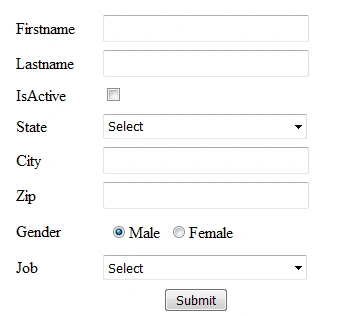
I have a form like the image shown above (you can create your own according to your requirement). Thus, we need to validate this form , using client side validation. Thus, let's start doing this.
I have a form like the image shown above (you can create your own according to your requirement). Thus, we need to validate this form , using client side validation. Thus, let's start doing this.
First, give a reference of JavaScript library on your page so that we can write jQuery scripting code in own our page.
JavaScript
JavaScript
- <script type="text/javascript" src="http://code.jquery.com/jquery.min.js"></script>
- <script>
- function ValidateForm()
- {
- var isFormValid = true;
- $("#tbldynamicform input,select").each(function () {
- var FieldId = "span_" + $(this).attr("id");
- if ($.trim($(this).val()).length == 0 || $.trim($(this).val())==0) {
- $(this).addClass("highlight");
- //Show required message along with the field
- if ($("#" + FieldId).length == 0) {
- $("<span class='error' id='" + FieldId + "'>Required</span>").insertAfter(this);
- }
- //If you fill and again make the field empty in that case again show the message
- if ($("#" + FieldId).css('display') == 'none')
- {
- $("#" + FieldId).fadeIn(500);
- }
- //$(this).focus();
- isFormValid = false;
- }
- else{
- $(this).removeClass("highlight");
- if ($("#" + FieldId).length > 0) {
- // Hide the message with the fade out effect
- $("#" + FieldId).fadeOut(1000);
- }
- }
- });
- return isFormValid;
- }
- </script>
After finding the control we made a check for length in that control, which means if the text length is greater then zero, we have the text in that input box else we will apply a class over that control and to make it more attractive. I gave the fade in fade out effect on that error message, you can skip this if you don't want to do it or you can apply for jQquery functions to make it more attractive. Now, the function is ready. We just need to call it on submit button, click and we will see the output like the image, given below, if we don't fill in the fields:
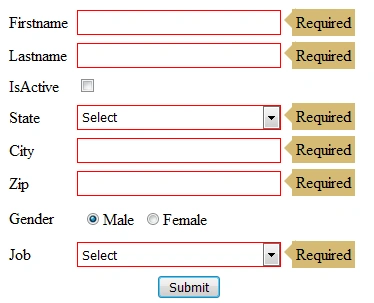
That's it, it looks nice doesn't it? Thus, we apply the class over control and in these classes, you can define CSS rules to make it more attractive. If you have good knowledge of CSS, you can apply for amazing styles over it. I just apply following CSS over this.
CSS
- <style>
- td{padding: 3px;}
- .highlight{border: 1px solid red !important;}
- .error {position: relative;background: #d5bb73;border: 4px solid #d5bb73;margin:11px;}
- .error:after, .error:before {right: 100%;top: 50%;border: solid transparent;content: " ";height: 0;width: 0;position: absolute;pointer-events: none;}
- .error:after {border-color: rgba(213, 66, 30, 0);border-right-color: #d5bb73;border-width: 12px;margin-top: -14px;}
- input[type="text"]{width:200px; height:21px;}
- select{width:204px; height:25px;}
- </style>
Anandu G NathPosted Jan 29, 2024, 3:44 AM
Nice...Article
Rohan RaoPosted Jun 4, 2019, 2:19 AM
Nice share thank you so much!
Prasanna MuraliPosted Aug 4, 2016, 10:56 AM
Nice share..
Vignesh ManiPosted Aug 4, 2016, 7:29 AM
Nice
Anu VPosted Aug 4, 2016, 6:23 AM
Nice
Humayun Kabir MamunPosted Aug 3, 2016, 11:44 PM
Nice...