

The FormView control is used to display a single record at a time from a data source. When you use the FormView control, you create templates to display and edit data-bound values. The templates contain controls, binding expressions, and formatting that define the look and functionality of the form. In this article, I will demonstrate how to dynamically bind FormView control in ASP.NET from the database.
Step 1 - Create database table in SQL server 2014
- CREATE TABLE [dbo].[StudentsResult](
- [RollNumber] [int] IDENTITY(10000,1) NOT NULL,
- [StudentName] [nvarchar](50) NULL,
- [Hindi] [int] NULL,
- [English] [int] NULL,
- [Physics] [int] NULL,
- [Chemistry] [int] NULL,
- [Biology] [int] NULL,
- [Mathematics] [int] NULL,
- [Total_Marks] [int] NULL,
- [Percentage] [float] NULL,
- CONSTRAINT [PK_StudentsResult] PRIMARY KEY CLUSTERED
- (
- [RollNumber] ASC
- )WITH (PAD_INDEX = OFF, STATISTICS_NORECOMPUTE = OFF, IGNORE_DUP_KEY = OFF, ALLOW_ROW_LOCKS = ON, ALLOW_PAGE_LOCKS = ON) ON [PRIMARY]
- ) ON [PRIMARY]
- GO
- CREATE PROCEDURE [dbo].[spGetStudentResult]
- AS
- BEGIN
- SELECT*FROM [dbo].[StudentsResult]
- END
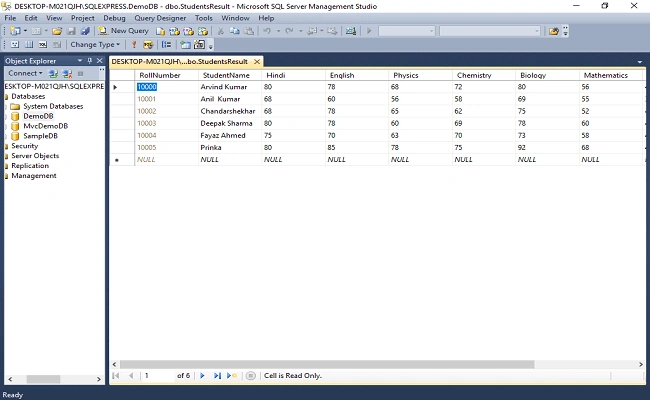
Screenshot database table
Step 2
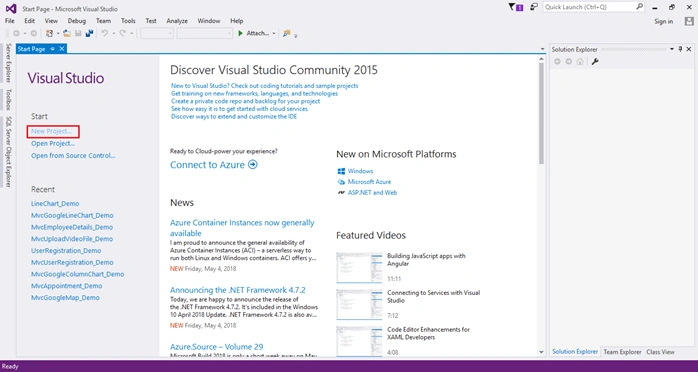
Open Visual Studio 2015 click on New Project and create an empty web application project.
Screenshot for creating new project 1
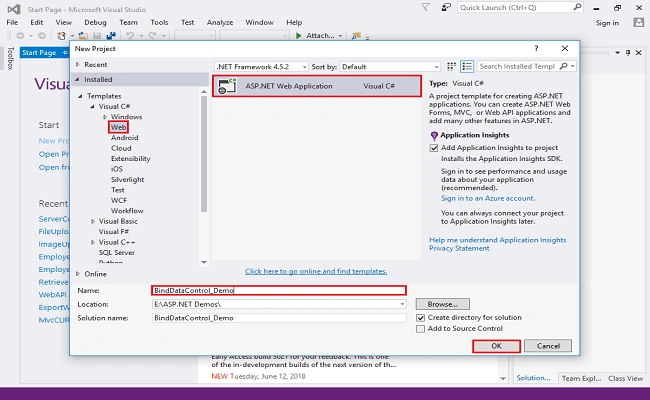
After clicking on New Project one window will appear select Web from left panel choose ASP.NET Web Application to give a meaningful name of your project then click on OK. As shown in below screenshot.
Screenshot for creating new project 2
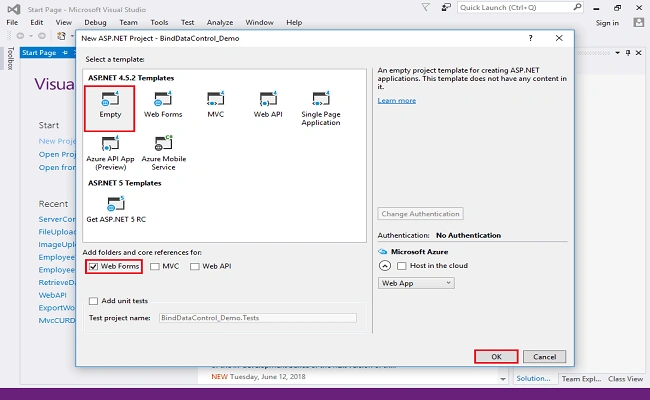
After clicking on OK one more window will appear to choose Empty check on Web Forms checkbox and click on OK. As shown below screenshot.
Screenshot for creating new project 3
Double click on webconfig file and database connections. Write the following line of code.
- <connectionStrings>
- <add name="DBCS" connectionString="data source=DESKTOP-M021QJH\SQLEXPRESS; database=DemoDB; integrated security=true;"/>
- </connectionStrings>
Step 4 - Add web form in your project
Right click on project, select add, choose Web Form and click on it.
Screenshot adding web form 1
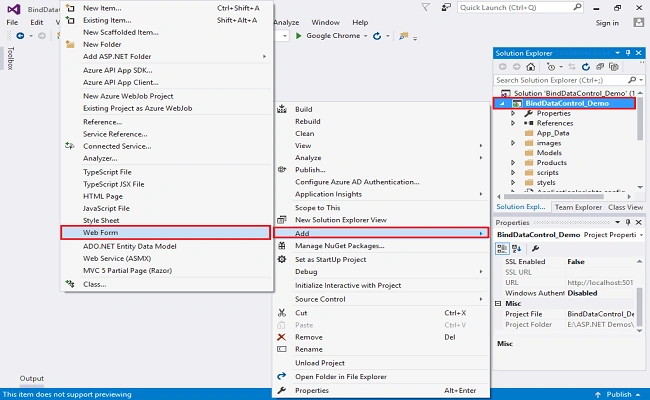
After clicking on the web form a window will appear. Assign a name to web form, such as FormView, or any meaningful name. Click OK, the web form will be added in the project.
Screenshot adding web form-2
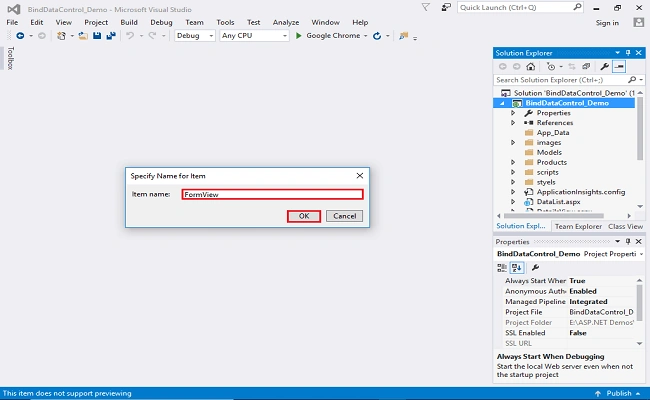
Step 5
Add script and styles of bootstrap in the head section of the web form.
- <link rel="stylesheet" href="https://maxcdn.bootstrapcdn.com/bootstrap/4.1.0/css/bootstrap.min.css">
- <script src="https://ajax.googleapis.com/ajax/libs/jquery/3.3.1/jquery.min.js"></script>
- <script src="https://maxcdn.bootstrapcdn.com/bootstrap/4.1.0/js/bootstrap.min.js"></script>
Step 6
Drag and drop a FormView control on the web form. Design FormView control.
- <body>
- <form id="form1" runat="server">
- <div class="container py-4">
- <h5 class="text-center text-uppercase">FormView control in asp.net</h5>
- <asp:FormView CssClass="container" ID="FormView1" AllowPaging="true" OnPageIndexChanging="FormView1_PageIndexChanging" runat="server">
- <ItemTemplate>
- <table class="table table-bordered table-striped">
- <tr>
- <td>Roll Number</td>
- <td><%#Eval("RollNumber") %></td>
- </tr>
- <tr>
- <td>Student Name</td>
- <td><%#Eval("StudentName") %></td>
- </tr>
- <tr>
- <td>Hindi</td>
- <td><%#Eval("Hindi") %></td>
- </tr>
- <tr>
- <td>English</td>
- <td><%#Eval("English") %></td>
- </tr>
- <tr>
- <td>Physics</td>
- <td><%#Eval("Physics") %></td>
- </tr>
- <tr>
- <td>Chemistry</td>
- <td><%#Eval("Chemistry") %></td>
- </tr>
- <tr>
- <td>Biology</td>
- <td><%#Eval("Biology") %></td>
- </tr>
- <tr>
- <td>Mathematics</td>
- <td><%#Eval("Mathematics") %></td>
- </tr>
- <tr>
- <td>Total Marks</td>
- <td><%#Eval("Total_Marks") %></td>
- </tr>
- <tr>
- <td>Percentage</td>
- <td><%#Eval("Percentage")%></td>
- </tr>
- </table>
- </ItemTemplate>
- </asp:FormView>
- </div>
- </form>
- </body>
Complete web form code
- <!DOCTYPE html>
- <html>
- <head runat="server">
- <title>FormView</title>
- <link rel="stylesheet" href="https://maxcdn.bootstrapcdn.com/bootstrap/4.1.0/css/bootstrap.min.css">
- <script src="https://ajax.googleapis.com/ajax/libs/jquery/3.3.1/jquery.min.js"></script>
- <script src="https://maxcdn.bootstrapcdn.com/bootstrap/4.1.0/js/bootstrap.min.js"></script>
- </head>
- <body>
- <form id="form1" runat="server">
- <div class="container py-4">
- <h5 class="text-center text-uppercase">FormView control in asp.net</h5>
- <asp:FormView CssClass="container" ID="FormView1" AllowPaging="true" OnPageIndexChanging="FormView1_PageIndexChanging" runat="server">
- <ItemTemplate>
- <table class="table table-bordered table-striped">
- <tr>
- <td>Roll Number</td>
- <td><%#Eval("RollNumber") %></td>
- </tr>
- <tr>
- <td>Student Name</td>
- <td><%#Eval("StudentName") %></td>
- </tr>
- <tr>
- <td>Hindi</td>
- <td><%#Eval("Hindi") %></td>
- </tr>
- <tr>
- <td>English</td>
- <td><%#Eval("English") %></td>
- </tr>
- <tr>
- <td>Physics</td>
- <td><%#Eval("Physics") %></td>
- </tr>
- <tr>
- <td>Chemistry</td>
- <td><%#Eval("Chemistry") %></td>
- </tr>
- <tr>
- <td>Biology</td>
- <td><%#Eval("Biology") %></td>
- </tr>
- <tr>
- <td>Mathematics</td>
- <td><%#Eval("Mathematics") %></td>
- </tr>
- <tr>
- <td>Total Marks</td>
- <td><%#Eval("Total_Marks") %></td>
- </tr>
- <tr>
- <td>Percentage</td>
- <td><%#Eval("Percentage")%></td>
- </tr>
- </table>
- </ItemTemplate>
- </asp:FormView>
- </div>
- </form>
- </body>
- </html>
Step 7
Right click and view web form code. Write the following code.
- using System;
- using System.Configuration;
- using System.Data;
- using System.Data.SqlClient;
- namespace BindDataControl_Demo
- {
- public partial class FormView : System.Web.UI.Page
- {
- protected void Page_Load(object sender, EventArgs e)
- {
- if (!IsPostBack)
- {
- BindFormView();
- }
- }
- private void BindFormView()
- {
- string CS = ConfigurationManager.ConnectionStrings["DBCS"].ConnectionString;
- using (SqlConnection con = new SqlConnection(CS))
- {
- SqlCommand cmd = new SqlCommand("spGetStudentResult", con);
- cmd.CommandType = CommandType.StoredProcedure;
- SqlDataAdapter sda = new SqlDataAdapter(cmd);
- con.Open();
- DataTable dt = new DataTable();
- sda.Fill(dt);
- FormView1.DataSource = dt;
- FormView1.DataBind();
- }
- }
- protected void FormView1_PageIndexChanging(object sender, System.Web.UI.WebControls.FormViewPageEventArgs e)
- {
- FormView1.PageIndex = e.NewPageIndex;
- this.BindFormView();
- }
- }
- }
Step 8
Run the project ctrl+F5
Screenshot
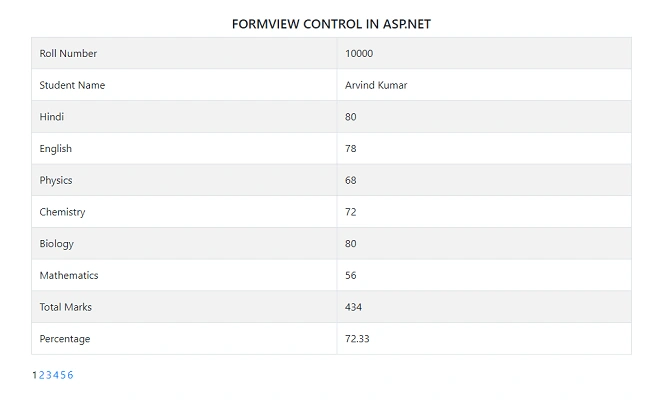
Conclusion
In this article, I have explained how to dynamically bind FormView control from the database step by step. Hope it will help you.
Jay YadavPosted Oct 12, 2018, 1:48 AM
Solve the problem. next button and previous button is click on radio button is display client activity
Jay YadavPosted Oct 12, 2018, 1:46 AM
<table class="table table-bordered"> <tr> <td colspan="2"> <asp:Label ID="L1" runat="server" Text='<%# Eval("Question") %>'></asp:Label> <br /> <asp:RadioButton ID="R1" runat="server" GroupName="trn" Text='<%# Eval("Ans1") %>' /> <br /> <asp:RadioButton ID="R2" runat="server" GroupName="trn" Text='<%# Eval("Ans2") %>' /> <br /> <asp:RadioButton ID="R3" runat="server" GroupName="trn" Text='<%# Eval("Ans3") %>' /> <br /> <asp:RadioButton ID="R4" runat="server" GroupName="trn" Text='<%# Eval("Ans4") %>' /> </td> </tr> </table>
Jay YadavPosted Oct 12, 2018, 1:46 AM
Hello sir, this my code for binding on radio button ,