I am going to create two tables. Suppose there is a client having more than one site, so we will create one table for the client information and another table with Foreign Key relationship to store the multiple site information because one client can contribute or write articles on the multiple portals.
Step 1 - Create tables, using the scripts, given below-
- CREATE TABLE [dbo].[ClientDetails](
- [Id] [int] IDENTITY(1,1) NOT NULL,
- [Name] [varchar](150) NULL,
- [Website] [varchar](50) NULL,
- [Phone] [nvarchar](50) NULL,
- [Mobile] [nvarchar](50) NULL,
- [Address] [varchar](200) NULL
- CONSTRAINT [PK_ClientDetails] PRIMARY KEY CLUSTERED
- (
- [Id] ASC
- )WITH (PAD_INDEX = OFF, STATISTICS_NORECOMPUTE = OFF, IGNORE_DUP_KEY = OFF, ALLOW_ROW_LOCKS = ON, ALLOW_PAGE_LOCKS = ON) ON [PRIMARY]
- ) ON [PRIMARY]
-
-
- CREATE TABLE [dbo].[ClientSiteDetails](
- [Id] [int] IDENTITY(1,1) NOT NULL,
- [ClientId] [int] NOT NULL,
- [SiteName] [nvarchar](200) NULL,
- [SiteAddress] [nvarchar](500) NULL
- CONSTRAINT [PK_ClientSiteDetails] PRIMARY KEY CLUSTERED
- (
- [Id] ASC
- )WITH (PAD_INDEX = OFF, STATISTICS_NORECOMPUTE = OFF, IGNORE_DUP_KEY = OFF, ALLOW_ROW_LOCKS = ON, ALLOW_PAGE_LOCKS = ON) ON [PRIMARY]
- ) ON [PRIMARY]
-
- GO
-
- ALTER TABLE [dbo].[ClientSiteDetails] WITH CHECK ADD CONSTRAINT [FK_ClientSiteDetails_ClientDetails] FOREIGN KEY([ClientId])
- REFERENCES [dbo].[ClientDetails] ([Id])
- GO
-
- ALTER TABLE [dbo].[ClientSiteDetails] CHECK CONSTRAINT [FK_ClientSiteDetails_ClientDetails]
- GO
Create new MVC Empty project, using VS 2013. Here, we are going to use ViewModel and will declare the properties in IndexViewModel, given below-
- public class IndexViewModel
- {
- public IndexViewModel() { }
- public List<Infrastructure.ClientDetail> clientDetail { get; set; }
- public List<Infrastructure.ClientSiteDetail> clientSiteDetail { get; set; }
-
- public IndexViewModel(Infrastructure.ClientDetail client)
- {
- Id = client.Id;
- Name = client.Name;
- Website = client.Website;
- Phone = client.Phone;
- Mobile = client.Mobile;
- Address = client.Address;
- }
-
- public IndexViewModel(ClientSiteDetail site)
- {
- SiteId = site.Id;
- SiteName = site.SiteName;
- CurrentClientName = site.ClientDetail.Name;
- SiteAddress = site.SiteAddress;
- }
-
-
-
-
-
- public int Id { get; set; }
- [Required(ErrorMessage = "Enter Name")]
- public string Name { get; set; }
- [Required(ErrorMessage = "Enter Website")]
- public string Website { get; set; }
- [DataType(DataType.PhoneNumber)]
- public string Phone { get; set; }
- public string Mobile { get; set; }
- public string Address { get; set; }
-
-
-
-
- public int SiteId { get; set; }
- public int ClientFKId { get; set; }
- [Required(ErrorMessage = "Enter Name")]
- public string SiteName { get; set; }
- [Required(ErrorMessage = "Enter Address")]
- public string SiteAddress { get; set; }
-
-
-
-
- public int ClientId { get; set; }
- public int ClientName { get; set; }
- [Required(ErrorMessage = "Please Select Client Name")]
- public string CurrentClientName { get; set; }
- }
Now, add one controller to controller folder. Add the code, given below, to insert client details and site details into the database. Here, I am going to Generic repository unit of work pattern. Refer my old article for more information, use the link, given below-
- public class ClientDetailsController : Controller
- {
- protected UnitOfWork UnitoffWork { get; private set; }
- public ClientDetailsController()
- {
- UnitoffWork = new UnitOfWork();
- }
- public ActionResult Index()
- {
- var client = UnitoffWork.ClientDetailsRepository.GetAll().Select(c =>
-
- new IndexViewModel(c));
- return View(client);
- }
- public ActionResult Add()
- {
- IndexViewModel obj = new IndexViewModel();
- return PartialView("_Add", obj);
- }
-
- [HttpPost]
- public ActionResult Create(IndexViewModel client)
- {
- ClientDetail objClient = new ClientDetail();
- if (client.Name != null)
- {
- var count = UnitoffWork.ClientDetailsRepository.GetAll().Where(a =>
-
- a.Name == client.Name).Count();
- if (count == 0)
- {
- objClient.Name = client.Name.ToString();
- objClient.Website = client.Website.ToString();
- objClient.Phone = client.Phone.ToString();
- objClient.Mobile = client.Mobile.ToString();
- objClient.Address = client.Address.ToString();
- UnitoffWork.ClientDetailsRepository.Insert(objClient);
- UnitoffWork.ClientDetailsRepository.Save();
- }
- }
- return RedirectToAction("Index");
- }
-
- [HttpGet]
- public ActionResult List()
- {
- var client = UnitoffWork.ClientDetailsRepository.GetAll().Select(c =>
-
- new IndexViewModel(c));
- return PartialView("_List", client);
- }
-
-
- public ActionResult ClientSite()
- {
- var clientSites = UnitoffWork.ClientSiteDetailsRepository.GetAll
-
- (navigationPropeties: np => np.ClientDetail).Select(x => new IndexViewModel(x));
- return View("ClientSiteDetails", clientSites);
- }
-
- public ActionResult AddClientSite()
- {
- IndexViewModel obj = new IndexViewModel();
- IEnumerable<ClientDetail> listClients =
-
- UnitoffWork.ClientDetailsRepository.GetAll();
- var listToClient = listClients.Select(p => new { p.Name, p.Id
-
- }).ToList();
- var items = listToClient.Select(i => new SelectListItem { Text =
-
- i.Name, Value = i.Id.ToString() });
- ViewBag.ClientListNames = items;
-
- return PartialView("_AddClientSite");
- }
-
- public ActionResult CreateClientSite(IndexViewModel clientSite)
- {
- if (clientSite != null)
- {
- ClientSiteDetail objSites = new ClientSiteDetail();
- objSites.ClientId = Convert.ToInt32(clientSite.ClientName);
- objSites.SiteName = clientSite.SiteName.ToString();
- objSites.SiteAddress = clientSite.SiteAddress;
- UnitoffWork.ClientSiteDetailsRepository.Insert(objSites);
- UnitoffWork.ClientSiteDetailsRepository.Save();
- }
- return RedirectToAction("ClientSite");
- }
- }
Create Partial View _Add for Add action method as,
- @model WebApp.ViewModel.Client.IndexViewModel
-
- @{
- Layout = "~/Views/Shared/_LayoutMenu.cshtml";
- }
-
- <title>Add Client</title>
- <script src="~/Scripts/External/jquery.min.js"></script>
- <script src="~/Scripts/External/jquery.validate.min.js"></script>
- <script src="~/Scripts/External/jquery.validate.unobtrusive.min.js"></script>
-
- @using (Html.BeginForm("Create", "ClientDetails", FormMethod.Post))
- {
- @Html.AntiForgeryToken()
- <div class="form-horizontal">
- <h4>Add Client</h4>
- <hr />
- @Html.ValidationSummary(true)
- <div class="form-group">
- @Html.Label("Name", new { @class = "control-label col-sm-2" })
- <div class="col-sm-8">
- @Html.EditorFor(model => model.Name)
- @Html.ValidationMessageFor(model => model.Name)
- </div>
- </div>
- <br />
- <div class="form-group">
- @Html.Label("Website", new { @class = "control-label col-sm-2" })
- <div class="col-sm-8">
- @Html.EditorFor(model => model.Website)
- </div>
- </div>
- <br />
- <div class="form-group">
- @Html.Label("Phone", new { @class = "control-label col-sm-2" })
- <div class="col-sm-8">
- @Html.EditorFor(model => model.Phone)
- @Html.ValidationMessageFor(model => model.Phone)
- </div>
- </div>
- <br />
- <div class="form-group">
- @Html.Label("Mobile", new { @class = "control-label col-sm-2" })
- <div class="col-sm-8">
- @Html.EditorFor(model => model.Mobile)
- @Html.ValidationMessageFor(model => model.Mobile)
- </div>
- </div>
- <br />
- <div class="form-group">
- @Html.Label("Office Address", new { @class = "control-label col-sm-2" })
- <div class="col-sm-8">
- @Html.TextAreaFor(model => model.Address)
- @Html.ValidationMessageFor(model => model.Address)
- </div>
- </div>
- <div class="form-group">
- <div class="col-md-offset-2 col-md-10">
- <input type="submit" value="Add" class="btn btn-default" />
- </div>
- </div>
- </div>
- }
-
- <br />
- <a href="@Url.Action("Index", "ClientDetails")" id="">Back To List</a>
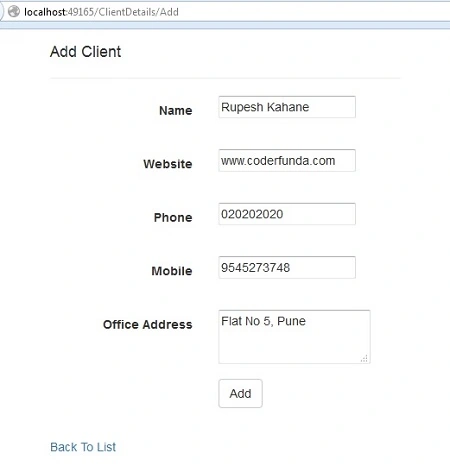 Step 5 -
 Create Partial View _List to show the list of the client names.
- @model IEnumerable<WebApp.ViewModel.Client.IndexViewModel>
- <div>
- <table style="border:1px solid; width:100%">
- <thead>
- <tr>
- <th width="15%" style="text-align:center">Name</th>
- <th width="15%" style="text-align:center">Website</th>
- <th width="10%" style="text-align:center">Phone</th>
- <th width="10%" style="text-align:center">Mobile</th>
- <th width="30%" style="text-align:center">Office Address</th>
- </tr>
- </thead>
- <tbody style="border:1px solid;">
- @if (Model != null)
- {
- foreach (var item in Model)
- {
- <tr>
- <td style="text-align:center">
- @item.Name
- </td>
- <td style="text-align:center">
- @item.Website
- </td>
- <td style="text-align:center">
- @item.Phone
- </td>
- <td style="text-align:center">
- @item.Mobile
- </td>
- <td style="text-align:center">
- @item.Address
- </td>
- </tr>
- }
- }
- </tbody>
- </table>
- </div>
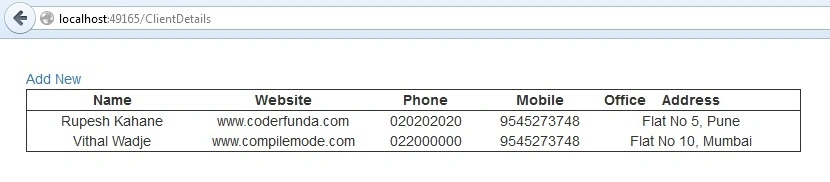
I am going to call this partial view, shown above, on Index view to show a list of all the clients, given below-
- @model IEnumerable<WebApp.ViewModel.Client.IndexViewModel>
- @{
- ViewBag.Title = "Add Client";
- Layout = "~/Views/Shared/_LayoutMenu.cshtml";
- }
-
- <a href="@Url.Action("Add", "ClientDetails")" id="addNew">Add New</a>
-
- @{ Html.RenderPartial("~/Views/ClientDetails/_List.cshtml"); }
Step 6 - Create Partial View __AddClientSite to add the site details of each client.
- @model WebApp.ViewModel.Client.IndexViewModel
- @{
- ViewBag.Title = "Add Client Site";
- Layout = "~/Views/Shared/_LayoutMenu.cshtml";
- }
-
- <a href="@Url.Action("Add", "ClientDetails")" id="addNew">Add New</a>
-
- @{ Html.RenderPartial("~/Views/ClientDetails/_List.cshtml"); }
-
- <title>Add Site Details</title>
- <script src="~/Scripts/External/jquery.min.js"></script>
- <script src="~/Scripts/External/jquery.validate.min.js"></script>
- <script src="~/Scripts/External/jquery.validate.unobtrusive.min.js"></script>
-
- @using (Html.BeginForm("CreateClientSite", "ClientDetails", FormMethod.Post))
- {
- @Html.AntiForgeryToken()
- <div class="form-horizontal">
- <h4>Add Site Details</h4>
- <hr />
- @Html.ValidationSummary(true)
- <div class="form-group">
- @Html.Label("Client Name", new { @class = "control-label col-sm-2" })
- <div class="col-sm-4">
- @Html.DropDownList("CurrentClientName", ViewBag.ClientListNames as
-
- IEnumerable<SelectListItem>, "-Select-", new { @id = "ClientId", @class = "form-
-
- control" })
- @Html.HiddenFor(m => m.ClientName)
- @Html.ValidationMessageFor(model => model.CurrentClientName)
- </div>
- </div>
-
- <br />
- <div class="form-group">
- @Html.Label("Site Name", new { @class = "control-label col-sm-2" })
- <div class="col-sm-8">
- @Html.EditorFor(model => model.SiteName)
- @Html.ValidationMessageFor(model => model.SiteName)
- </div>
- </div>
-
- <br />
- <div class="form-group">
- @Html.Label("Site Address", new { @class = "control-label col-sm-2" })
- <div class="col-sm-8">
- @Html.TextAreaFor(model => model.SiteAddress)
- @Html.ValidationMessageFor(model => model.SiteAddress)
- </div>
- </div>
-
- <div class="form-group">
- <div class="col-md-offset-2 col-md-10">
- <input type="submit" value="Add" class="btn btn-default" />
- </div>
- </div>
- </div>
- }
-
- <br />
- <a href="@Url.Action("ClientSite", "ClientDetails")" id="">Back To List</a>
- <script>
- $("#ClientId").change(function () {
- var cID = $("#ClientId").val();
- $("input[id='ClientName']").val(cID);
- });
- </script>
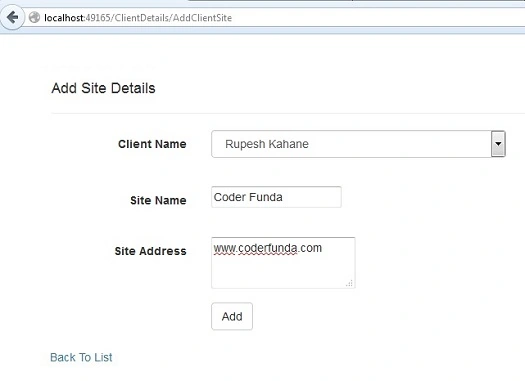
Step 7 - Create partial view __ListClientSites to show a list of all the client sites, given below-
- @model IEnumerable<WebApp.ViewModel.Client.IndexViewModel>
- <div>
- <table style="border:1px solid; width:100%">
- <thead>
- <tr>
- <th width="25%" style="text-align:center">Client Name</th>
- <th width="20%" style="text-align:center">Site Name</th>
- <th width="30%" style="text-align:center">Site Address</th>
- </tr>
- </thead>
- <tbody style="border:1px solid;">
- @if (Model != null)
- {
- foreach (var item in Model)
- {
- <tr>
- <td style="text-align:center">
- @item.CurrentClientName
- </td>
- <td style="text-align:center">
- @item.SiteName
- </td>
- <td style="text-align:center">
- @item.SiteAddress
- </td>
- </tr>
- }
- }
- </tbody>
- </table>
- </div>
I am going to call partial view, shown above, on main view i.e. ClientSiteDetails to show all the lists.
- @model IEnumerable<WebApp.ViewModel.Client.IndexViewModel>
- @{
- ViewBag.Title = "Client Sites";
- Layout = "~/Views/Shared/_LayoutMenu.cshtml";
- }
-
- <a href="@Url.Action("AddClientSite", "ClientDetails")" id="addNew">Add New</a>
-
- @{ Html.RenderPartial("~/Views/ClientDetails/_ListClientSites.cshtml"); }
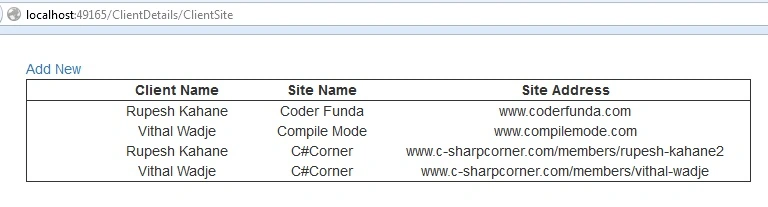 Step 8 -
 Now, create another controller and action method. Here, I am going to show three dopdownlists Select client names, another two will automatically bind the office address and site addresses in it, given below-
- public ActionResult Index()
- {
- List<SelectListItem> li = new List<SelectListItem>();
- ViewBag.DdlSiteAddress = li;
- ViewBag.AddressList = li;
- return View();
- }
- [HttpPost]
- public ActionResult BindAddress(string clientNo)
- {
- int id = Convert.ToInt32(clientNo);
- IEnumerable<ClientDetail> lst =
-
- UnitoffWork.ClientDetailsRepository.GetAll().Where(s => s.Id == Convert.ToInt32
-
- (clientNo));
- var listAdd = lst.Select(a => new { a.Address, a.Id }).ToList();
- var addressList = listAdd.Select(i => new SelectListItem { Text =
-
- i.Address, Value = i.Id.ToString() });
-
- IEnumerable<ClientSiteDetail> l =
-
- UnitoffWork.ClientSiteDetailsRepository.GetAll(s => s.ClientId == id);
- var lstSiteAdd = l.Select(a => new { a.SiteAddress, a.Id }).ToList();
- var siteList = lstSiteAdd.Select(i => new SelectListItem { Text =
-
- i.SiteAddress, Value = i.Id.ToString() });
-
- var bindingAddresses = new
- {
- OffAdd = addressList,
- siteAdd = siteList
- };
- return Json(new { bindingAddresses, JsonRequestBehavior.AllowGet });
- }
Create View for Index action, shown above, method as-
- @using (Html.BeginForm("Create", "Demo", FormMethod.Post))
- {
- @Html.AntiForgeryToken()
- <div class="form-horizontal">
- <hr />
- @Html.ValidationSummary(true)
-
- <div class="form-group">
- @Html.Label("Client Name", new { @class = "control-label col-sm-2" })
- <div class="col-sm-2">
- @Html.DropDownList("CurrentClientName", ViewBag.ClientList as
-
- IEnumerable<SelectListItem>, "-Select-", new { @id = "ClientId", @class = "form-
-
- control" })
- @Html.HiddenFor(m => m.ClientName)
- @Html.ValidationMessageFor(model => model.CurrentClientName)
- </div>
- </div>
-
- <div class="form-group">
- @Html.Label("Office Address", new { @class = "control-label col-sm-2"
-
- })
- <div class="col-sm-4">
- @Html.DropDownList("OfficeAddress", ViewBag.AddressList as
-
- IEnumerable<SelectListItem>, "-Select-", new { @id = "OfficeId", @class = "form-
-
- control" })
- @Html.HiddenFor(m => m.OfficeName)
- @Html.ValidationMessageFor(model => model.OfficeAddress)
- </div>
- </div>
-
- <div class="form-group">
- @Html.Label("Site Address", new { @class = "control-label col-sm-2" })
- <div class="col-sm-4">
- @Html.DropDownList("DdlSiteAddress", ViewBag.DdlSiteAddress as
-
- IEnumerable<SelectListItem>, "-Select-", new { @id = "SiteId", @class = "form-
-
- control" })
- @Html.HiddenFor(m => m.DdlSiteAddress)
- @Html.ValidationMessageFor(model => model.DdlSiteAddress)
- </div>
- </div>
-
- <div class="form-group">
- <div class="col-md-offset-2 col-md-10">
- <input type="submit" value="Add" class="btn btn-default" />
- </div>
- </div>
- </div>
- }
JavaScript code, given below, will bind the values in office address and site address dynamically on the selection of the client name from the dropdownlist.
- <script>
- $("#ClientId").change(function () {
- var clientNo = $("#ClientId").val();
- if (clientNo == null || clientNo == "") {
- alert("Please Select Client");
- return;
- }
- $("input[id='ClientName']").val(clientNo);
- if (clientNo != null || clientNo != "") {
- $.ajax({
- url: "/Demo/BindAddress",
- type: "POST",
- data: JSON.stringify({ 'clientNo': clientNo }),
- dataType: "json",
- traditional: true,
- contentType: "application/json; charset=utf-8",
- success: function (result) {
-
- var listItems = "";
- var list = "";
- var a = result.bindingAddresses.OffAdd;
- var s = result.bindingAddresses.siteAdd;
- for (i in a) {
- listItems += "<option value='" + a[i].Value + "'>" + a[i].Text
-
- + "</option>";
- }
- $("#OfficeId").html(listItems);
-
- for (j in s) {
- list += "<option value='" + s[j].Value + "'>" + s[j].Text +
-
- "</option>";
- }
- $("#SiteId").html(list);
- },
- error: function () {
- alert("An error has occured!!!");
- }
- });
- }
- });
- </script>
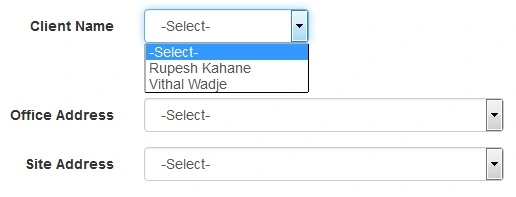
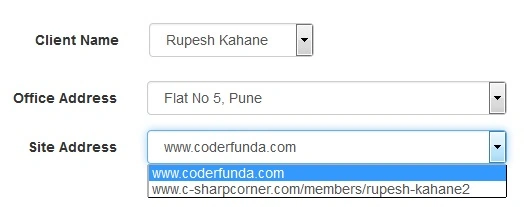
Suppose, if I select a client name as Rupesh Kahane, other two dropdownlists are dynamically bound, given bellow-
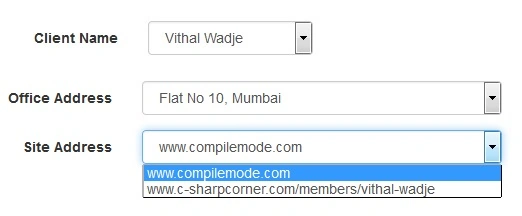
Suppose, if I select the client name as Vithal Wadje, other two dropdownlists are dynamically bound, given bellow-
 Summary
 - This article will help the fresher candidates learn how to dynamically bind the dropdownlist on the change event.


Sarmad YousifPosted Aug 15, 2019, 8:51 AM
It feels like you are missing a lot of details. This article is more for advanced programmers. I followed your steps and had a lot of errors and things that I don't know how to do.
Shabbir HusainPosted Feb 2, 2018, 4:42 AM
Can u upload this project files as well?
Ali GhaffariPosted Dec 3, 2016, 12:20 PM
How to retrieve data from database when i select one id in database then how to show other data of selected id
Rupesh KahanePosted Oct 3, 2016, 2:23 AM
Thanks Manav Pandya and Humayun Kabir Mamun also
Humayun Kabir MamunPosted Oct 1, 2016, 11:53 PM
Nice...
Manav PandyaPosted Oct 1, 2016, 12:53 PM
Unique post . thanks