Introduction
Since we are all working with client-side programming technologies, we may need to load JavaScript files dynamically sometimes. So we will learn how to do that in this article.
Using the code
First of all, we will just create two buttons for testing as follows.
- <input type="button" id="loadjs" value="Load Js" onclick="load()" />
- <input type="button" id="chk" value="Check Load Js" onclick="checkLoad()" />
Once that is added, now it is the time to load the script.
Please note that you must include that script file to your solution. Here I am adding the jquery-1.7.2.min.js.
Now call the load function.
Load function
- function load() {
- var dynaScript = document.createElement("script");
- dynaScript.id = "dynaJS";
- dynaScript.language = "javascript";
- dynaScript.type = "text/javascript";
- dynaScript.src = "jquery-1.7.2.min.js";
- document.getElementById("myHead").appendChild(dynaScript);
- }
Now we can check whether it is loaded or not.
checkLoad() function
- function checkLoad() {
- if (!window.jQuery)
- alert("Not loaded");
- else
- alert("Loaded");
- }
Complete HTML
- <!DOCTYPE html>
- <html xmlns="http://www.w3.org/1999/xhtml">
- <head id="myHead">
- <title>Load JS Files with script tag</title>
- <script>
- function load() {
-
- var dynaScript = document.createElement("script");
- dynaScript.id = "dynaJS";
- dynaScript.language = "javascript";
- dynaScript.type = "text/javascript";
- dynaScript.src = "jquery-1.7.2.min.js";
-
- document.getElementById("myHead").appendChild(dynaScript);
-
- }
- function checkLoad() {
- if (!window.jQuery)
- alert("Not loaded");
- else
- alert("Loaded");
- }
- </script>
- </head>
- <body>
- Sibeesh Passion (www.sibeeshpassion.com)
- <input type="button" id="loadjs" value="Load Js" onclick="load()" />
- <input type="button" id="chk" value="Check Load Js" onclick="checkLoad()" />
- </body>
- </html>
Output
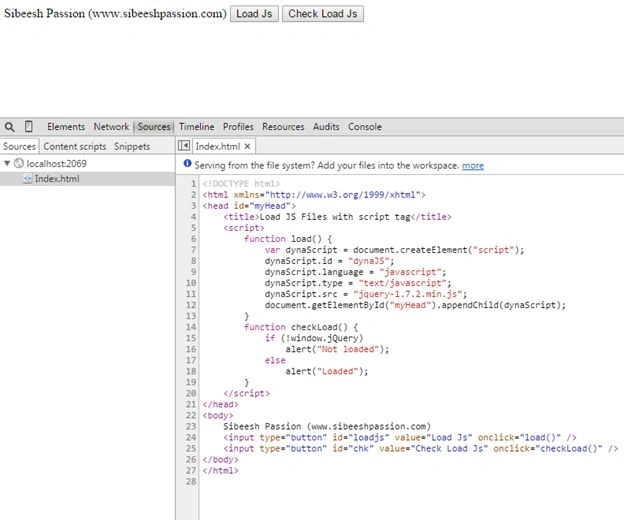
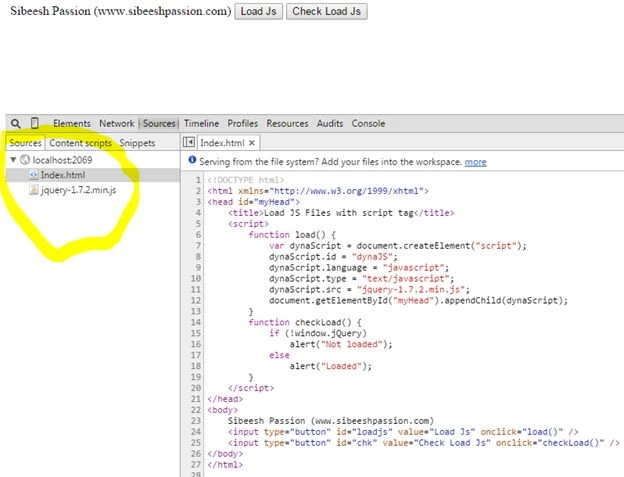
Now we will run the application and see the output. I have included the output as in the images below.
Figure: Browser console before loads JavaScript
Figure: After loads JavaScript
When you click the Check Load button, you will get an alert saying that jQuery has been loaded.
Conclusion
Please provide your valuable suggestions and comments. Thanks in advance.
Kindest Regards,


Sibeesh VenuPosted Sep 9, 2015, 4:03 AM
Amol Sarkate Thank you
Sibeesh VenuPosted Sep 9, 2015, 4:03 AM
Gopi Chand Thank you
Sibeesh VenuPosted Sep 9, 2015, 4:03 AM
Rakesh Chavda Thank you
Amol SarkatePosted Sep 9, 2015, 3:26 AM
nice
Gopi ChandPosted Jul 21, 2015, 2:47 PM
Nice
RakeshPosted Jul 21, 2015, 1:14 PM
Good one
Sibeesh VenuPosted Jul 21, 2015, 9:33 AM
Nilesh Jadav Thank you
Nilesh JadavPosted Jul 21, 2015, 9:02 AM
Nice one sir
Sibeesh VenuPosted May 8, 2015, 4:30 AM
Amit Tripathi Thank you
Amit TripathiPosted May 8, 2015, 2:50 AM
nice..
Sibeesh VenuPosted Feb 24, 2015, 11:57 PM
Rahul Saxena Thanks Bro...
Sibeesh VenuPosted Feb 24, 2015, 11:57 PM
Suraj Sahoo Thanks a lot buddy.
Rahul Kumar SaxenaPosted Feb 24, 2015, 11:41 PM
Helpful Bro...
Suraj SahooPosted Feb 24, 2015, 10:27 PM
Good one buddy nice and simple.:)