

Introduction
Today most of the websites
uses different Master Pages dynamically with a content page depending upon the
request. This is very-very useful in two situations as given below.
- We can enable the users of our website to
customize the appearance of the website by loading different Master Pages.
We can display a menu of Master Pages, and allow our users to pick their
favorite layout.
- Another one situation in which loading
Master Pages dynamically is useful concerns co-branding or even saydifferent
users from different geographical area. Imagine that our company needs to
make its website look like a partner website. When users link to our website
from the partner website, we don't want users to know that they are
traveling to a new website. We can maintain this illusion by dynamically
loading different Master Pages based on a query string passed from a partner
website.
Master Page is merged with a content page very early in the page execution life-cycle. This means that we cannot dynamically load a Master Page during the Page_Load() event. The only event during which we can load a Master Page is during the Page PreInit() event that is Pre-Initialization. This is the first event that is raised during the page execution life cycle.
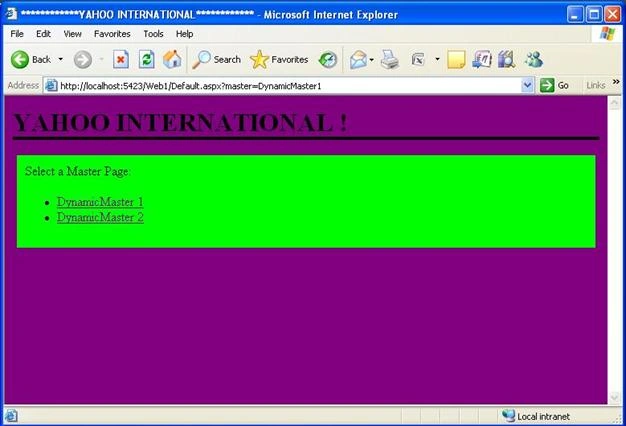
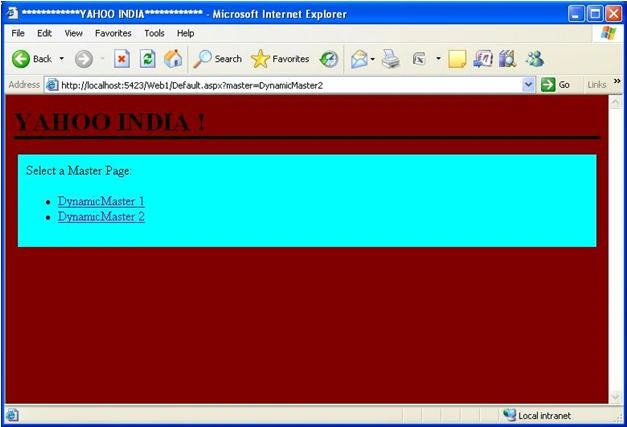
For example, the given below dynamically loads one of two Master Pages named DynamicMaster1.master and DynamicMaster2.master, here it is.
Code of Default.aspx Page
<%@
Page Title=""
Language="VB"
MasterPageFile="~/DynamicMaster1.master"
%>
<script
runat="server">
Protected
Sub Page_PreInit(ByVal
sender As Object,
ByVal e As
EventArgs)
If
Not Request("master")
Is Nothing
Then
Select
Case Request("master")
Case
"DynamicMaster1"
Profile.MasterPageFile =
"DynamicMaster1.master"
Case
"DynamicMaster2"
Profile.MasterPageFile =
"DynamicMaster2.master"
End
Select
End
If
MasterPageFile =
Profile.MasterPageFile
End
Sub
</script>
<asp:Content
ID="Content1"
ContentPlaceHolderID="ContentPlaceHolder1"
Runat="Server">
Select a Master Page:
<ul
class="selectMaster">
<li>
<a
href="Default.aspx?master=DynamicMaster1">DynamicMaster
1</a>
</li>
<li>
<a
href="Default.aspx?master=DynamicMaster2">DynamicMaster
2</a>
</li>
</ul>
</asp:Content>
Code of DynamicMaster1.master Page
<%@
Master Language="VB"
%>
<!DOCTYPE html PUBLIC "-//W3C//DTD XHTML 1.0 Transitional//EN" "http://www.w3.org/TR/xhtml1/DTD/xhtml1-transitional.dtd">
<script runat="server">
</script>
<html
xmlns="http://www.w3.org/1999/xhtml">
<head
runat="server">
<style
type="text/css">
html
{
background-color:Purple;
}
.content
{
margin:auto;
width:700px;
background-color:Lime;
padding:10px;
}
h1
{
border-bottom:solid
4px black;
}
</style>
<title>************YAHOO
INTERNATIONAL************</title>
</head>
<body>
<form
id="form1"
runat="server">
<h1>YAHOO
INTERNATIONAL !</h1>
<div
id="dynamicms1"
class="content">
<asp:ContentPlaceHolder
id="ContentPlaceHolder1"
runat="server">
</asp:ContentPlaceHolder>
Nagarjuna MPosted Jan 16, 2018, 2:43 AM
The code is not working attached document.