

In .NET, you can dynamically support different versions of TLS (Transport Layer Security) by configuring ServicePointManager.SecurityProtocol or using SslProtocols in modern implementations. The approach depends on whether you're working with .NET Framework or .NET Core/.NET 5+.
.NET Framework (4.6+ and above)
For applications running on .NET Framework, you can dynamically determine the highest TLS version supported by the system using.
ServicePointManager.SecurityProtocol = SecurityProtocolType.SystemDefault;
If you need to set specific TLS versions, use.
ServicePointManager.SecurityProtocol = SecurityProtocolType.Tls12 | SecurityProtocolType.Tls13;
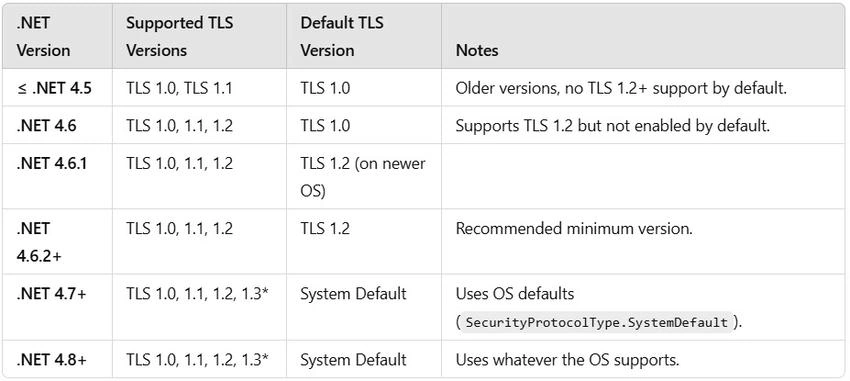
- .NET Framework 4.5 does not support TLS 1.3.
- SecurityProtocolType.SystemDefault (introduced in .NET 4.7) allows using whatever the OS supports.
.NET Core / .NET 5+
For HttpClient in .NET Core and later versions, you should use SslProtocols when configuring an HttpClientHandler.
using System;
using System.Net.Http;
using System.Security.Authentication;

var handler = new HttpClientHandler
{
    SslProtocols = SslProtocols.Tls12 | SslProtocols.Tls13
};

var client = new HttpClient(handler);

Alternatively, if you're using SocketsHttpHandler (default in .NET Core 2.1+ and .NET 5+):

var handler = new SocketsHttpHandler
{
    SslOptions = { EnabledSslProtocols = SslProtocols.Tls12 | SslProtocols.Tls13 }
};

var client = new HttpClient(handler);
Dynamically Detect Available TLS Versions
If you want to detect dynamically and use the highest available TLS version at runtime.
SslProtocols GetHighestTlsVersion()
{
    if (Enum.IsDefined(typeof(SslProtocols), (int)SslProtocols.Tls13))
        return SslProtocols.Tls13;
    if (Enum.IsDefined(typeof(SslProtocols), (int)SslProtocols.Tls12))
        return SslProtocols.Tls12;
    return SslProtocols.Tls11; // Fallback
}

// Usage:
var handler = new HttpClientHandler
{
    SslProtocols = GetHighestTlsVersion()
};

var client = new HttpClient(handler);
TLS support by the .NET versions.
Key Takeaways
- Use ServicePointManager.SecurityProtocol for .NET Framework (4.6+).
- Use SslProtocols with HttpClientHandler or SocketsHttpHandler in .NET Core/.NET 5+.
- Let the system decide (SecurityProtocolType.SystemDefault) if running .NET Framework 4.7+.
- TLS 1.3 support depends on OS & .NET version (Windows 10+, .NET Core 3.1+).
It will help the developer to understand TLS setup.
Join the conversation! Your thoughts help the community grow.