

Chatbots
A chatbot acts as a virtual agent with users. It is trained by using Artificial Intelligence (AI) software to stimulate conversations with users in a natural language through telephones, websites, messages, and mobile apps. It saves time and money and improves the customer experience, reducing the need for human intervention for any business in all messaging channels. A chatbot responds based on the input from a user to any messaging channel, these are smart chatbots that answer questions. They receive the questions, process them by understanding the question using cognitive services (LUIS.AI, IBM Watson, etc), and then deliver the answer that the user needs through the messaging channel. Chatbots are more useful for giving quick support to customers (Users) without any resource (employment) dependencies, we can utilize these chatbots by engaging customers at the Enterprise level as virtual assistants. A chatbot is able to speak, listen, and understand your users with native integration to Azure Cognitive Services.
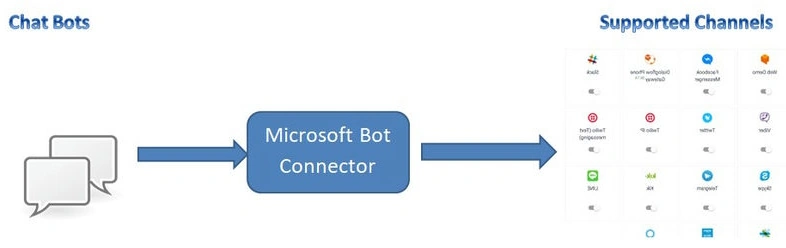
Chatbots Benefits
- To automate a business process,
- For 24/7 Customer support,
- Supports multiple messaging platforms like Skype, Teams, webchat on the website, Facebook Messenger, WhatsApp, telegram, etc,
- Connecting with cross-platform services,
- Proactive interaction with customers or users.
- Serverless and PAY-AS-YOU-GO services (Cost-efficient).
Now we start with creating Azure resource group & web app bot services (PAAS) services for echo bot in the Facebook messaging channel, Go to http://portal.azure.com/ and log in with your Azure credentials. Now create a new resource group to maintain all our app services in a single resource group.
Steps
- Login to your http://portal.azure.com/
- Go to Resource Group and click new to create a new resource group.
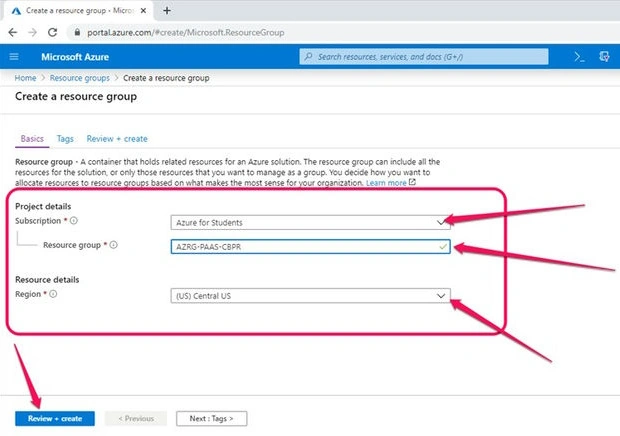
Click on the Review + Create button and it will validate with subscription details, naming for the new resource group name and Selected region to deploy our resources in selected datacenter regions.
- Subscription: You can select your subscription details(one ID has multiple subscription details, as of now I'm showing with Azure for students subscription for demo).
- Resource Group: AZRG-PAAS-CBPR (Follow some coding standards to maintain multiple resource groups for your organization. Here I'm following simple naming standards like AZRG(Azure Resource Group)-PAAS(Platform as a Service)-and CBPR(Chatbot Program Review)).
- Resource Details: We need to choose resource-deployed regions(choosing data center regions to deploy our resource group).
These details are very important to maintain in the documentation for the developer's future use, we can get quick customer support from Microsoft by using the above details in the resource recovery time period.
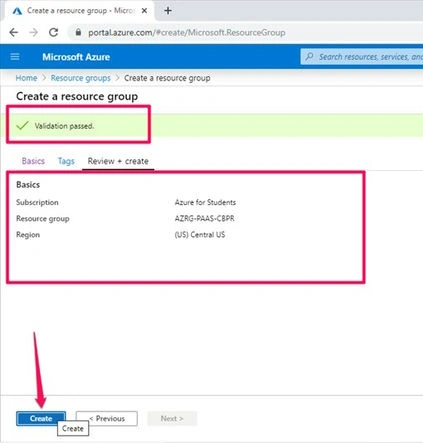
Once validation is passed, please click on the create button to create a new resource group.
Now go to home and click on resource group to validate whether new resource groups are created or not. Open the resource group and click on the Add button shown in the below figure.
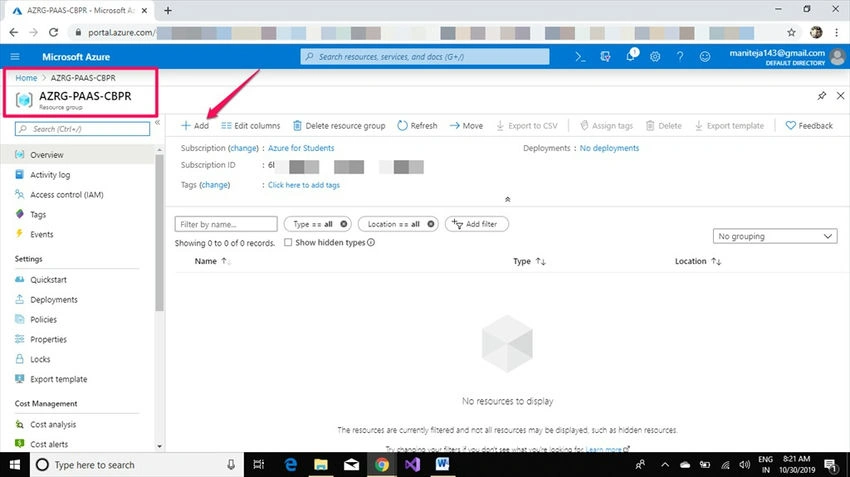
Click on the +Add button to add apps to the resource group.
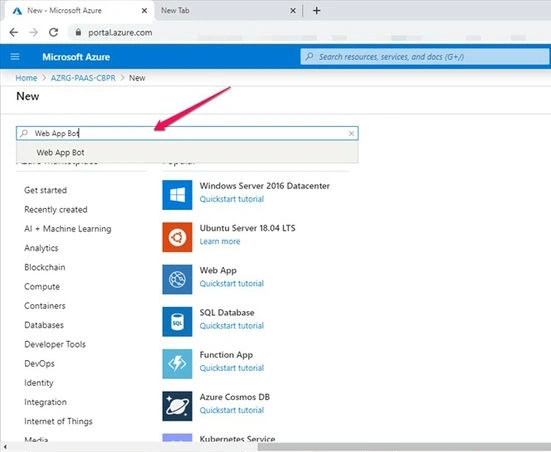
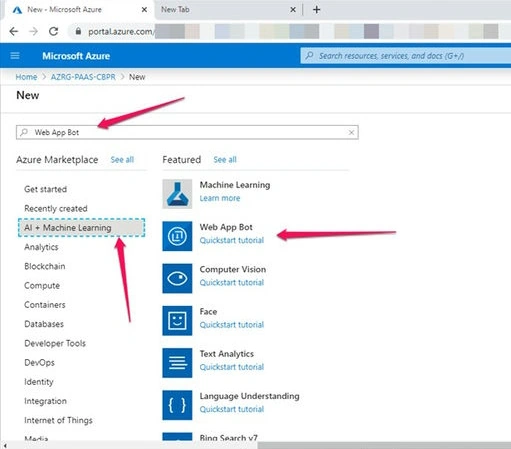
Type Web app bot in search for quick results or else you can click on AI+ Machine learning. In this category, we have an option to Web App Bot.
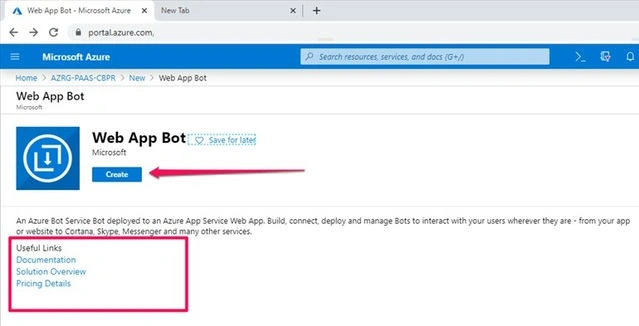
Click on the Create button and fill in the details as shown in the below figures.
We need to fill Bot Handle(Bot app service name), Subscription details, Resource group, Location, Pricing tier, App Name(Default generated), Bot Template with C#.Net, App service plan, and Application insights & its location. These fields are mandatory to onboard a new chatbot.
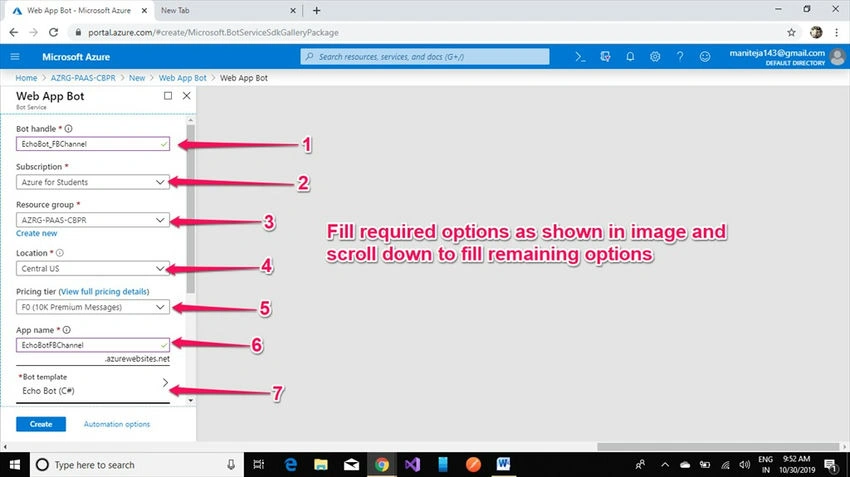
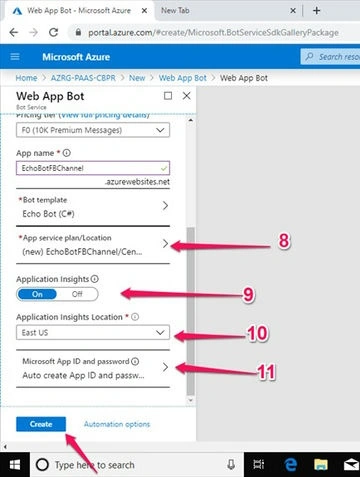
Click on the Create button to create web app bot services.
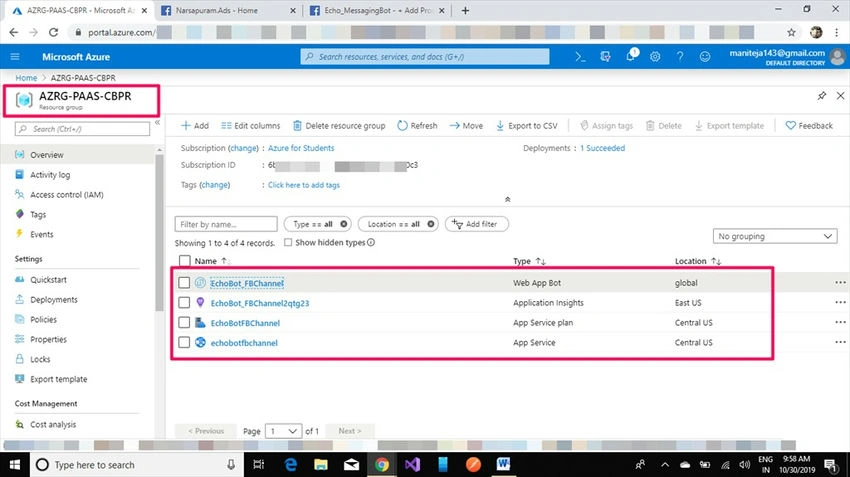
Once the deployment is done, we get below four services.
- Web App Bot
- Application Insights
- App Service plan
- App Service
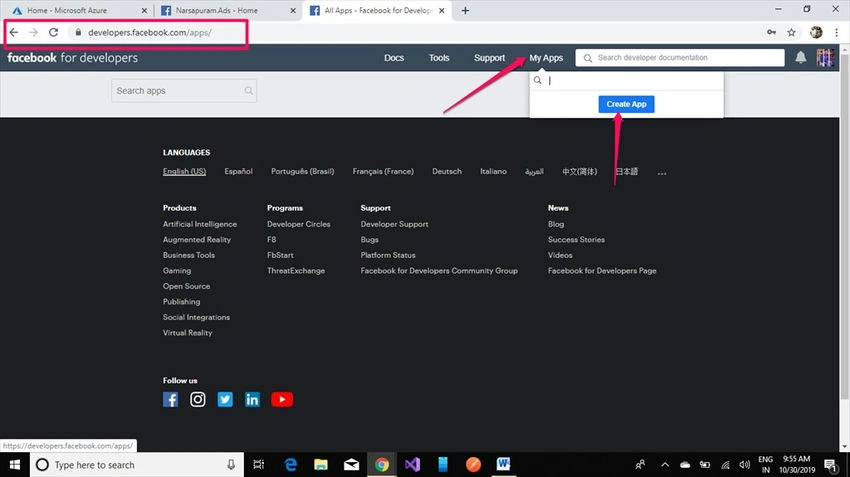
Register an account at http://developers.facebook.com/ and create a new app for our Facebook page messenger channel.
Creating a new App with a valid name and contact email ID is mandatory. In the future, if we’re going with any app review for accessing all webhook services from Facebook, they’ll communicate with a registered email ID based on the app ID.
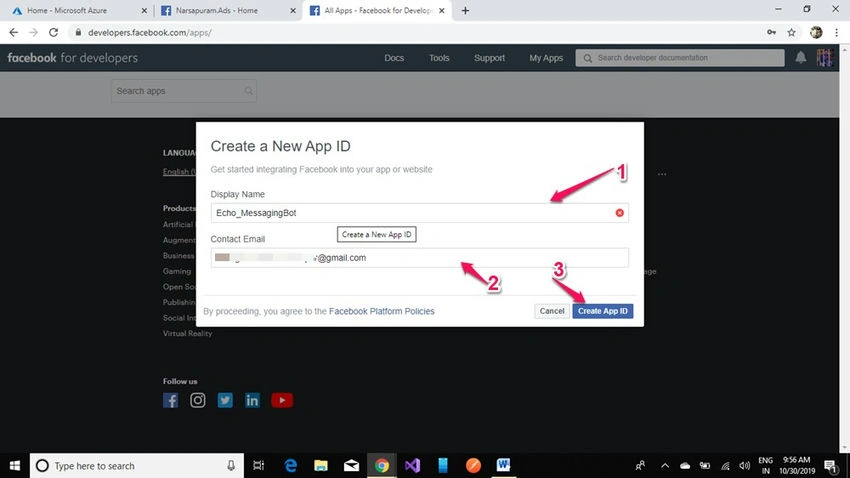
- Display Name (Facebook Developer App Name),
- Contact Email (Email ID is mandatory to communicate for Facebook app review),
- Click on the Create App ID button to create a Facebook developer app.
Once you click on to Create an app ID button, it will be redirected to the security check to complete, and Click on Submit.
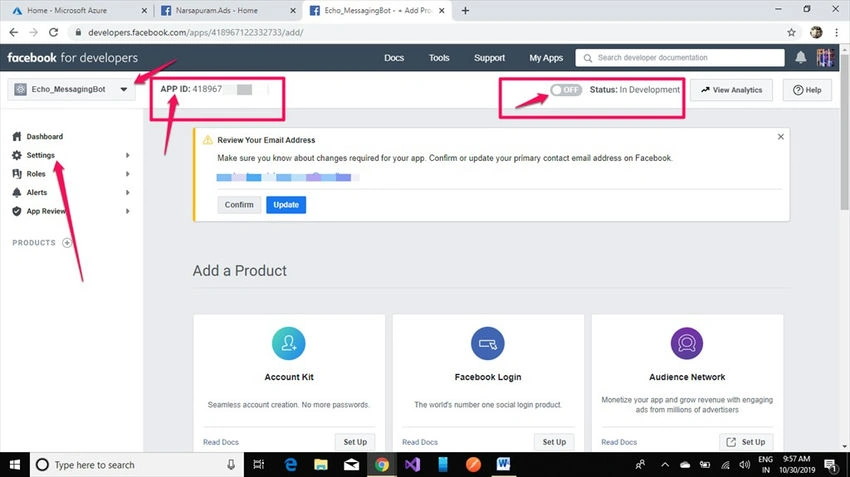
Now a new Facebook app is created and we need to collect information like App ID and App Password as shown in the below screenshot, click on Advanced options under settings to allow API access to app settings.
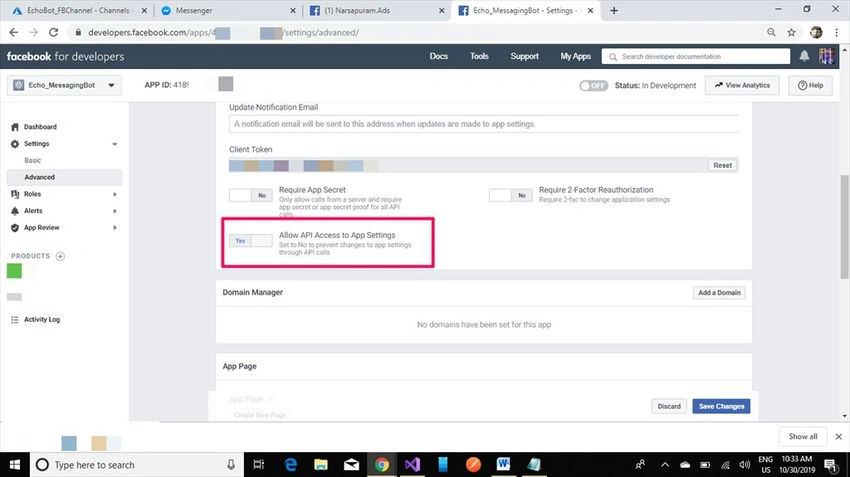
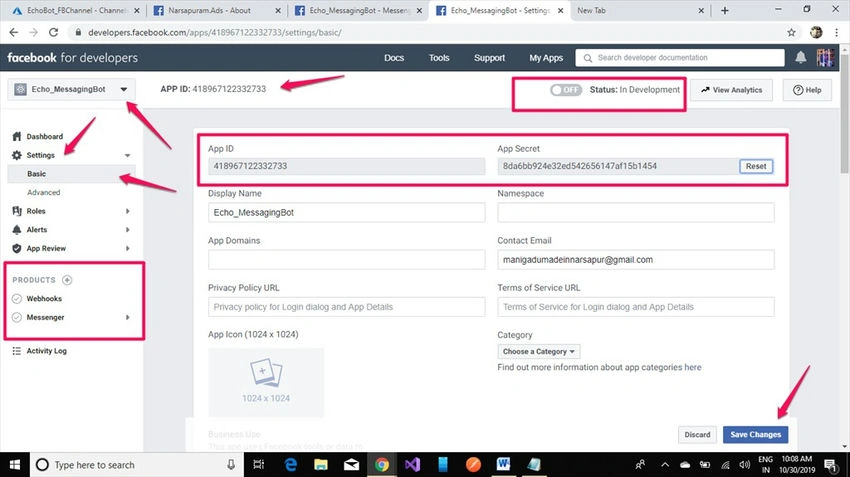
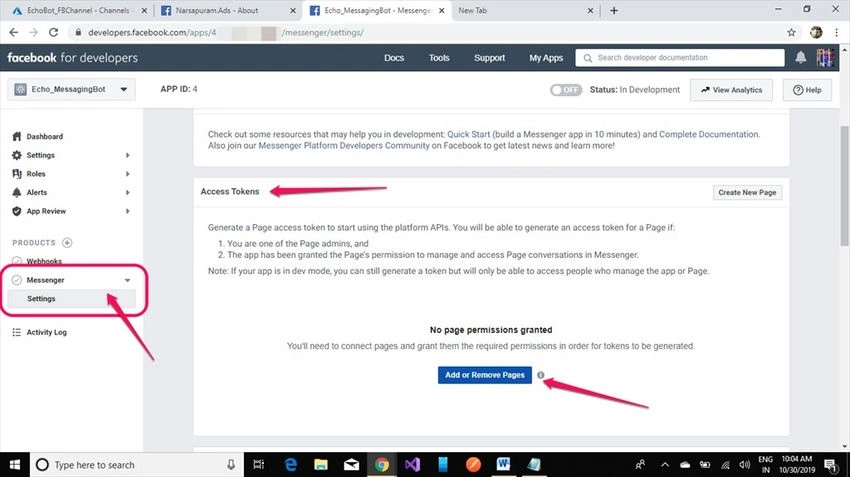
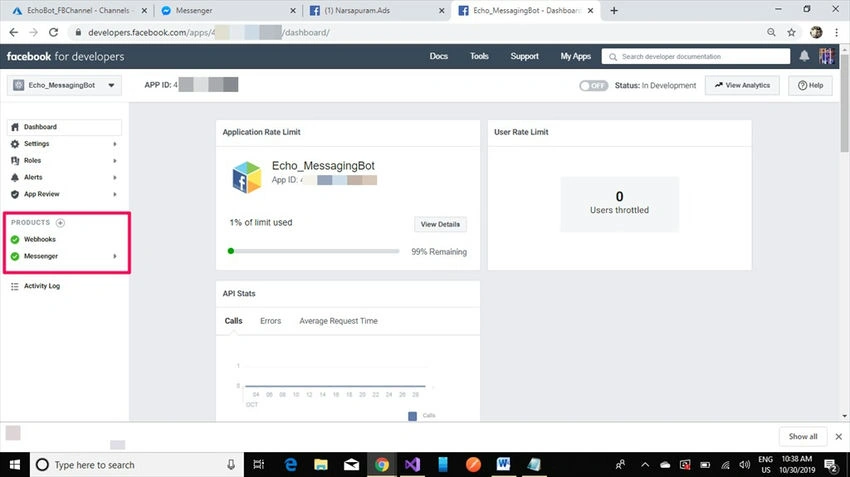
You need to add webhooks and messenger products to activate the messaging channel. Now go to settings under Messenger and generate a page access token, for newly created Facebook page has admin rights to generate a page access key. I’ll click on add an existing page to generate a page access token.
It will check with permission to continue the activity, click on Continue as {Name of the Facebook developer app admin and Admin of the page} example shown in the below figure.
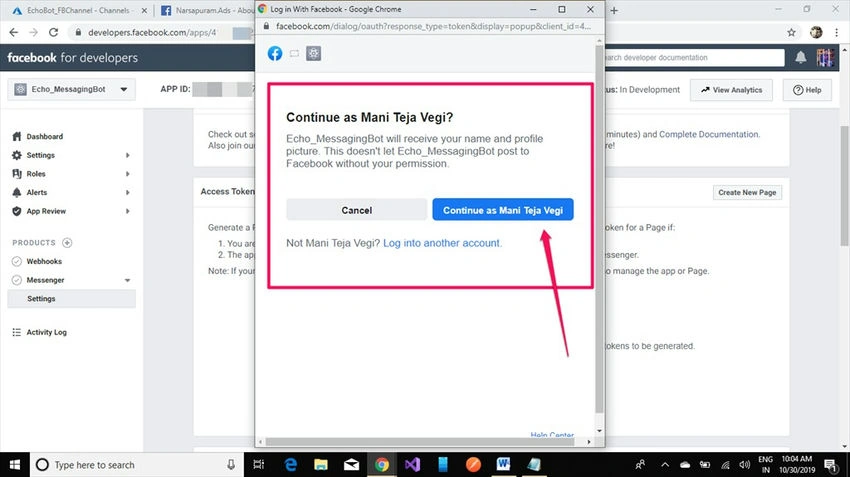
Select our Facebook page to generate the page access token key, make sure to select a proper Facebook page in which we have admin rights, and click on Next.
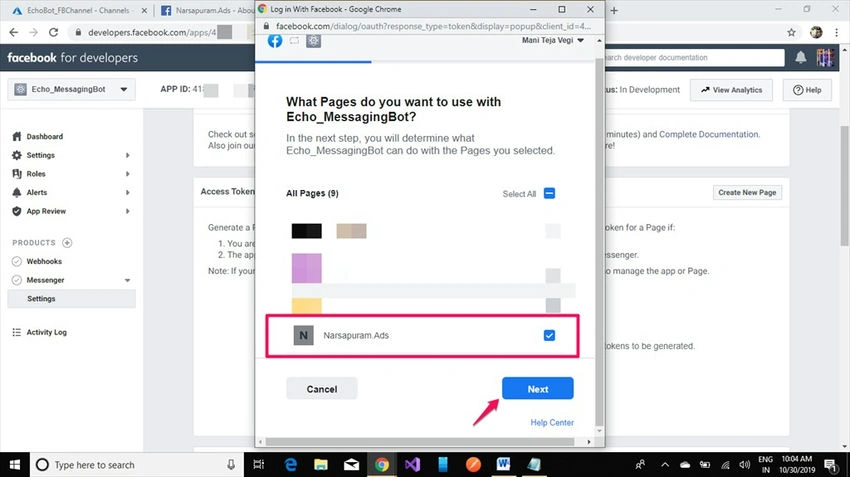
Click on Next.
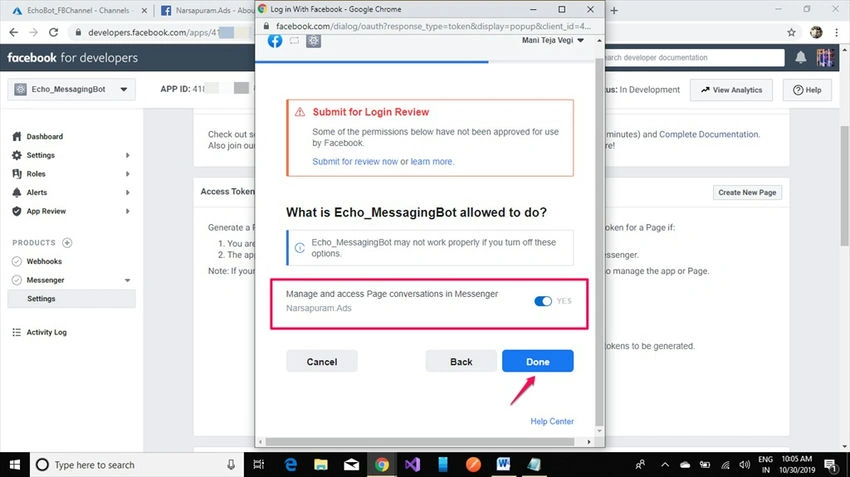
Click on Done. Now we linked the Facebook page and Facebook developer app, we can do limited business integrations with this Facebook developer app. For every business requirement, we need to get approval from Facebook by providing our page and app details to review the app.
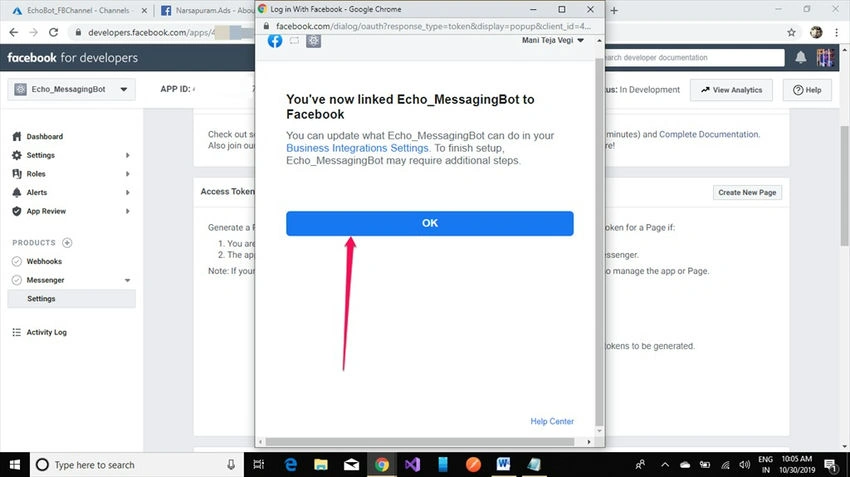
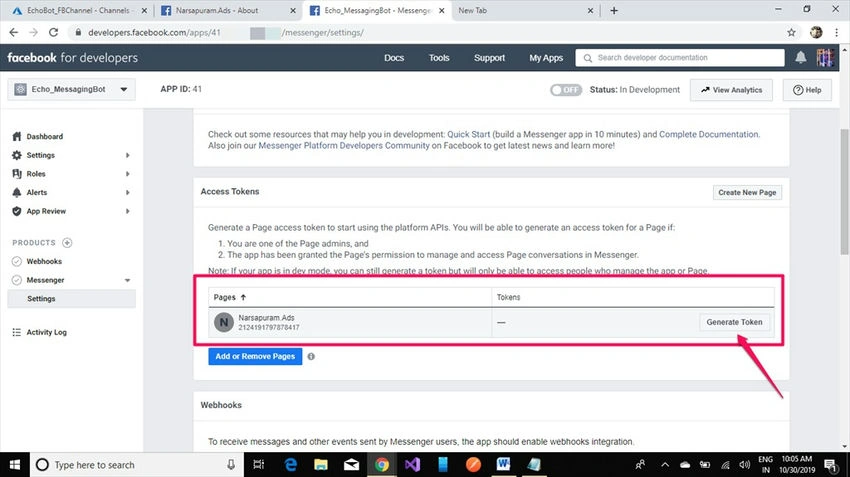
See in below screenshot, our page is added in this developer app but the token key is not generated. Click on Generate token for a new key and make sure to please maintain it in a separate notepad or sticky notes as per your convenience.
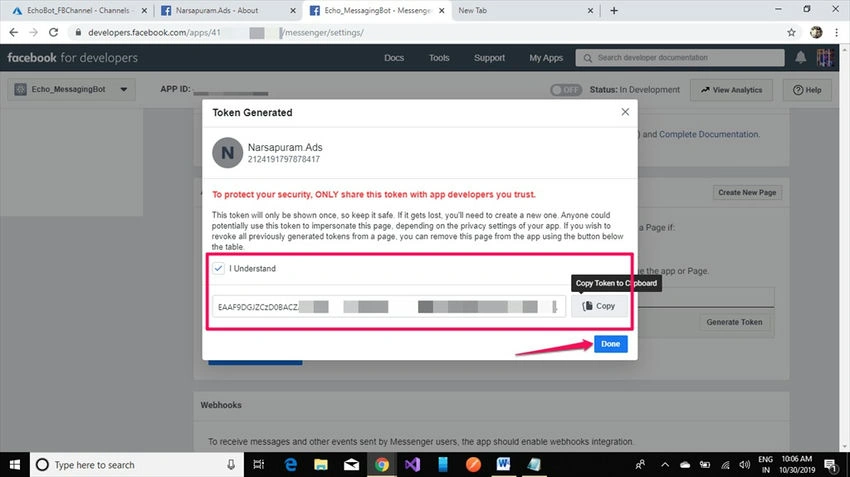
Check on I understand Copy the token and keep it for safety.
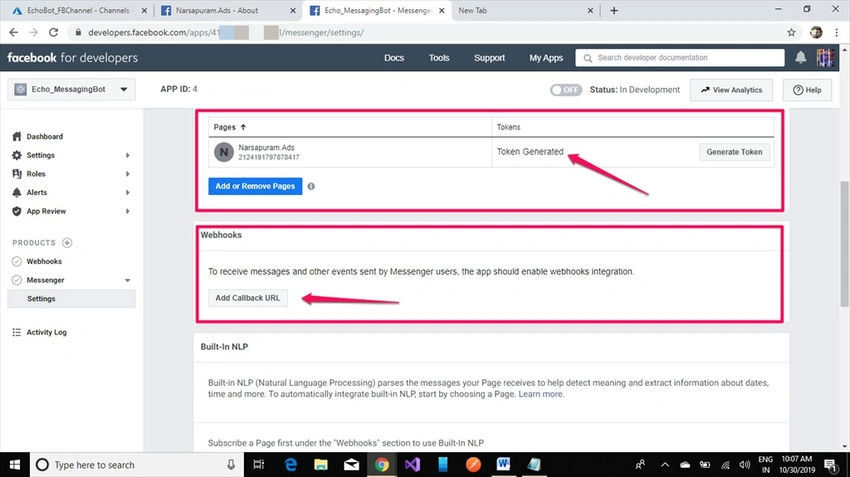
Still, our products are not enabled and we can check that empty status is generated. Click on Add Callback Url and go to Azure resources now to enable webhooks integration.
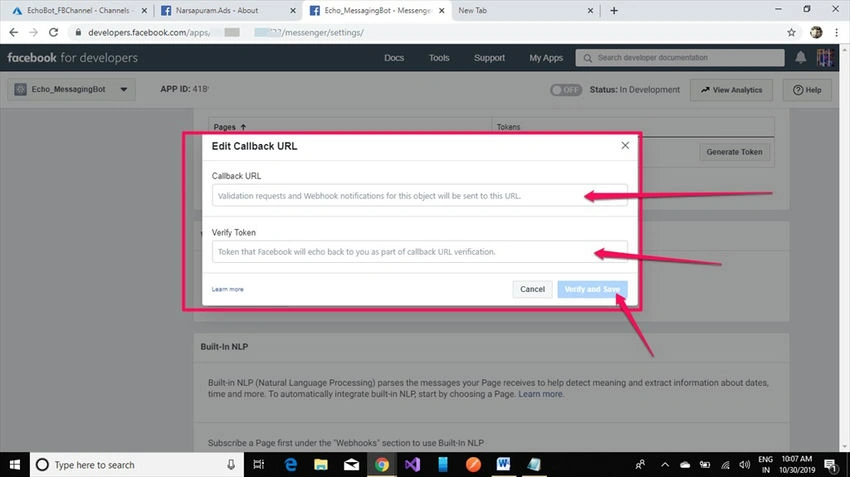
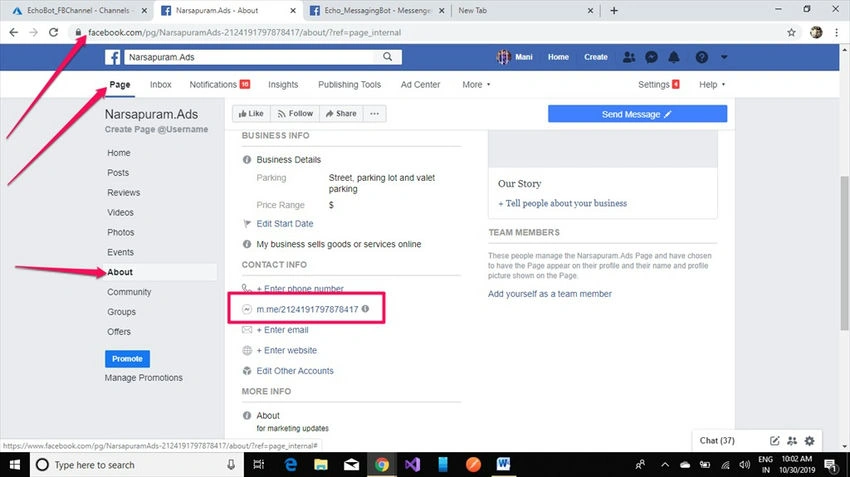
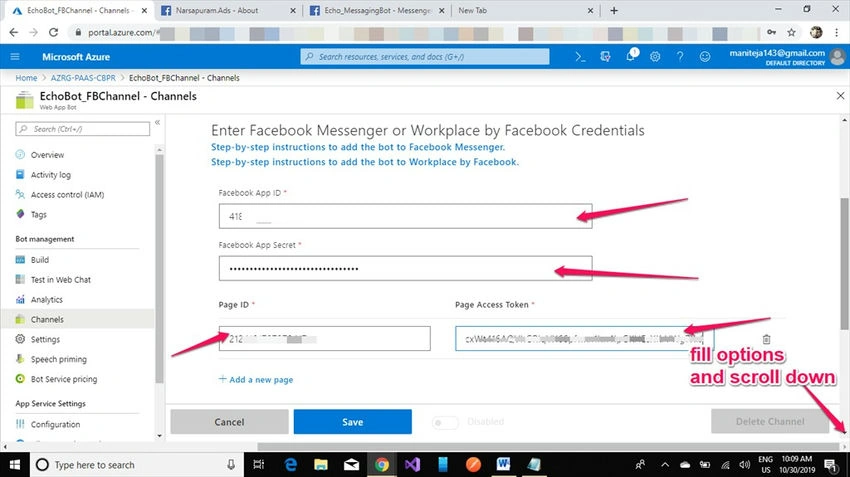
Now we have AppID and App Password from a Facebook developer app, a page access token key from a messenger product, and a Page ID from the Facebook page.
- App ID: 41XXXXXX2XXXX33,
- App Password: 8XXXXXXXXXXXXXXXXXXXXX
- Page Access Token: EAXXXXXXXXXXXXXXXXXXXXXXXXXXXXXXXXXXXXXXXXXXXXXXXXXXXXXXXXXXXXXXXXXXXXXXXXXXXXXXXXXXXXXXXXXXXXXX9XXXXXXXXXXXXXXXXXXXXXXXXXXXXXXXXXXXXXXXXXXXXXXXXXXXsXKrVWg7XrJ
- Facebook Page ID: 2124191797878417.
Switch to your Azure portal and open the web app bot service, select channels. In the channel, you need to choose the Facebook messaging channel to add this webhook URL as shown in the below figure.
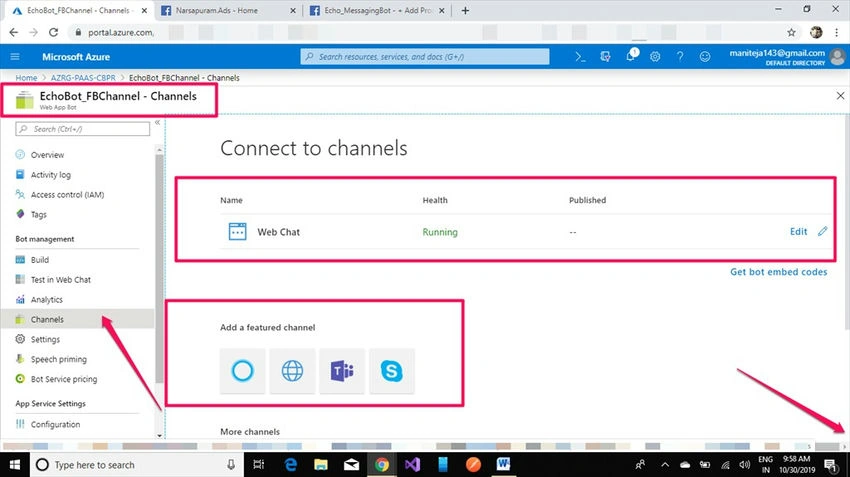
Fill in the details provided above for the Facebook messaging channel to enable the Facebook messenger channel on your page.
Copy the call back URL token and paste it into the Facebook messenger webhooks URL to link the app.
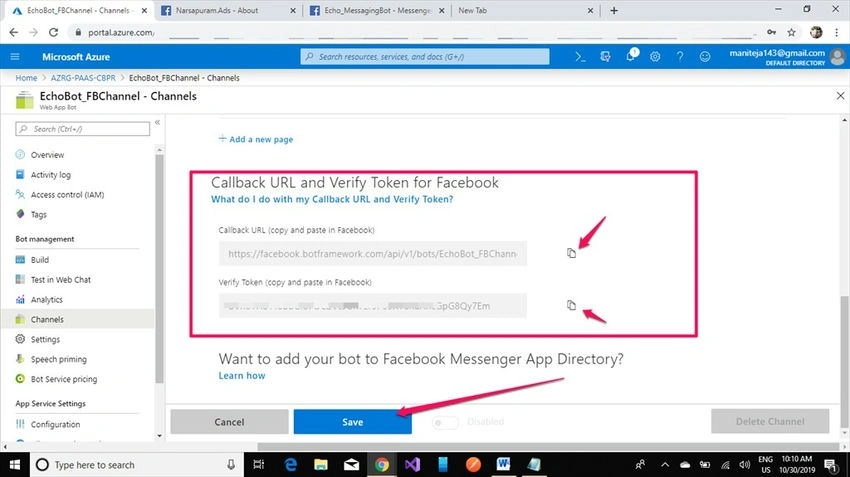
Click on the Save button.
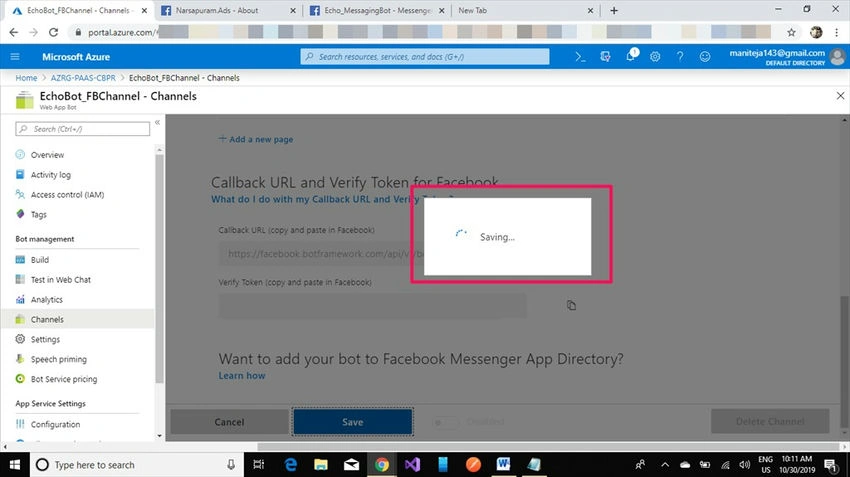
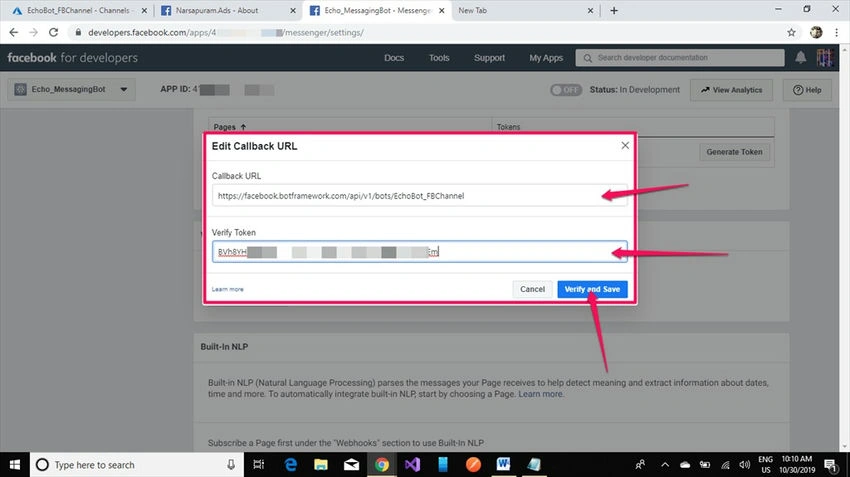
Again switch to the Facebook developer app and add call-back URLs from the Azure Facebook messaging channel to the Facebook developer app to enable webhooks.
Click on the Verify and Save button (make sure your app ID, app password, Facebook page ID, and the page access token are given as shown in the above screenshot).
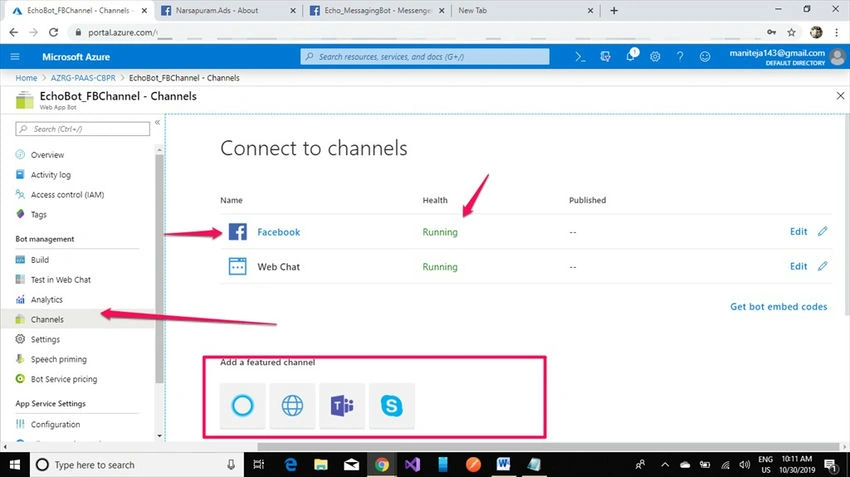
Now webhooks are enabled and the Facebook channel is enabled but we need to activate Messenger for messaging.
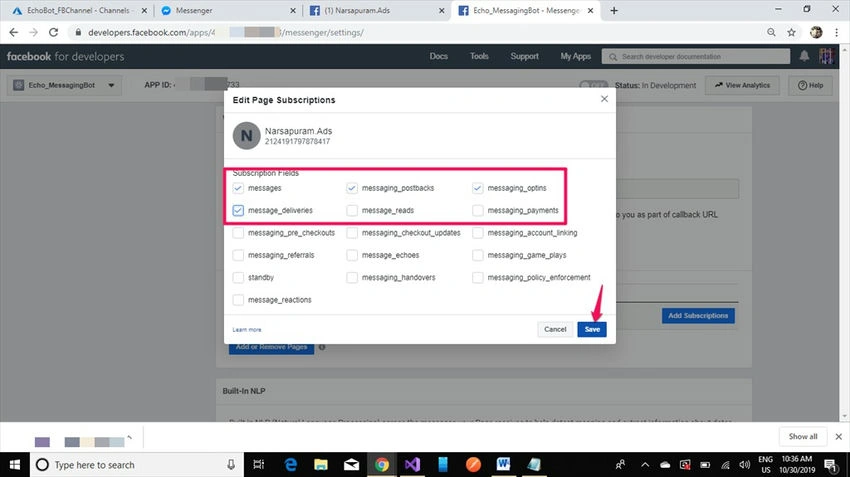
Now webhooks are enabled as shown in the below figure. Click on the Add Subscriptions button to enable messaging services.
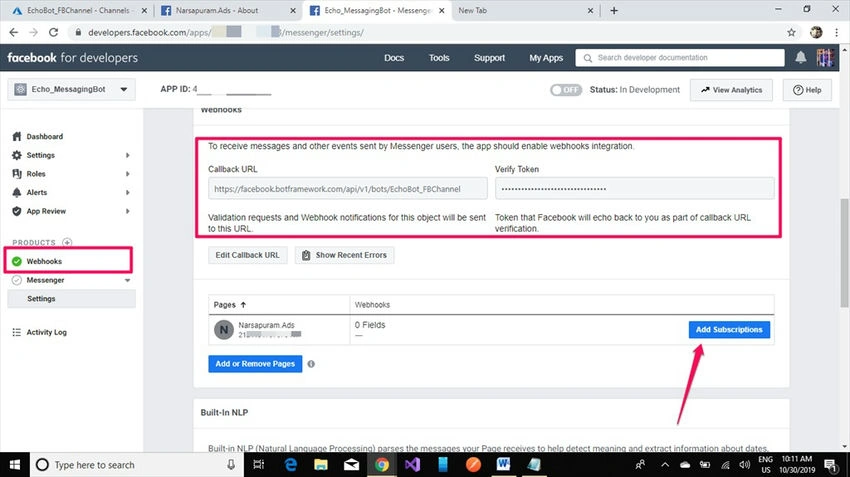
Select messages, messaging _postbacs, messaging options, message_deliveries, and click on the save button.
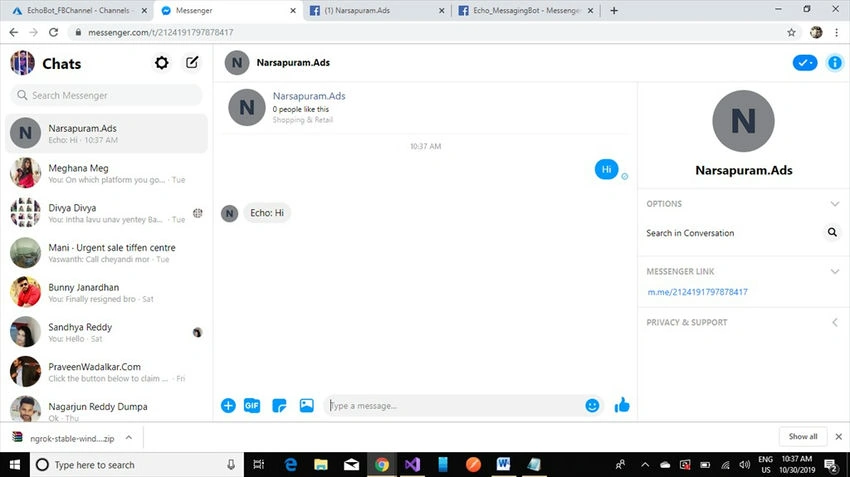
Now go to the messenger open your Facebook page messenger and send any message to activate the messenger product in the Facebook developer app.
Sourav Kumar DasPosted Nov 13, 2019, 4:01 AM
Nice and well explained article.
Raj KumarPosted Nov 12, 2019, 10:13 AM
Nice and well explained article, i will surely create some chat bots once get some time. Thanks for sharing...