
A ListBox is a read-only list of items. But let us suppose your application needs to edit an item in a listbox at runtime. This example will demonstrate a simple approach to create an editable listbox, i. e., to change ListBox items on the fly.
To edit an item in a listbox, all you need is a simple editbox that overlays on a listbox item. The idea is to create a TextBox control and keep it hidden and show it whenever required.
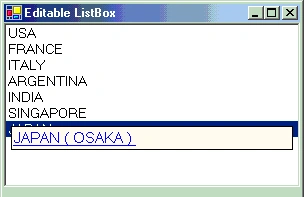
- private System.Windows.Forms.TextBox editBox ;
- private void Form1_Load(object sender, System.EventArgs e)
- {
- editBox = new System.Windows.Forms.TextBox();
- editBox.Location = new System.Drawing.Point(0,0);
- editBox.Size = new System.Drawing.Size(0,0);
- editBox.Hide();
- listBox1.Controls.AddRange(new System.Windows.Forms.Control[ {this.editBox});
- editBox.Text = "";
- editBox.BackColor = Color.Beige;
- editBox.Font = new Font("Varanda" , 15 , FontStyle.Regular | FontStyle.Underline ,GraphicsUnit.Pixel);
- editBox.ForeColor = Color.Blue;
- editBox.BorderStyle = BorderStyle.FixedSingle;
- }
KeyPress event to check if the enter key is pressed when the user has finished editing the item.
LostFocus event in case the user edits the item and instead of using the enter key to indicate the end of editing, the user clicks some other item in the list box.
- editBox.KeyPress += new System.Windows.Forms.KeyPressEventHandler(this.EditOver);
- editBox.LostFocus +=new System.EventHandler(this.FocusOver);
- private void listBox1_KeyPress(object sender, System.Windows.Forms.KeyPressEventArgs e)
- {
- if (e.KeyChar == 13)
- CreateEditBox(sender);
- }
- private void listBox1_DoubleClick(object sender, System.EventArgs e)
- {
- CreateEditBox(sender);
- }
- private void listBox1_KeyDown(object sender, System.Windows.Forms.KeyEventArgs e)
- {
- if (e.KeyData == Keys.F2)
- CreateEditBox(sender);
- }
- private void CreateEditBox(object sender)
- {
- listBox1 = (ListBox)sender;
- itemSelected = listBox1.SelectedIndex;
- Rectangle r = listBox1.GetItemRectangle(itemSelected);
- string itemText = (string)listBox1.Items[itemSelected];
- editBox.Location = new System.Drawing.Point(r.X + delta, r.Y + delta);
- editBox.Size = new System.Drawing.Size(r.Width - 10, r.Height - delta);
- editBox.Show();
- listBox1.Controls.AddRange(new System.Windows.Forms.Control[] { this.editBox });
- editBox.Text = itemText;
- editBox.Focus();
- editBox.SelectAll();
- editBox.KeyPress += new System.Windows.Forms.KeyPressEventHandler(this.EditOver);
- editBox.LostFocus += new System.EventHandler(this.FocusOver);
- }
- private void FocusOver(object sender, System.EventArgs e)
- {
- listBox1.Items[itemSelected] = editBox.Text;
- editBox.Hide();
- }
- private void EditOver(object sender, System.Windows.Forms.KeyPressEventArgs e)
- {
- if (e.KeyChar == 13)
- {
- listBox1.Items[itemSelected] = editBox.Text;
- editBox.Hide();
- }
- }
talasu hemantkumarPosted Sep 25, 2014, 6:51 AM
thanks dude
kalpana reddyPosted Apr 1, 2009, 9:23 AM
thank U its nice one