
Add Excel Web Access Web Part
Create a sample Excel file as in the following and upload it to a Document Library.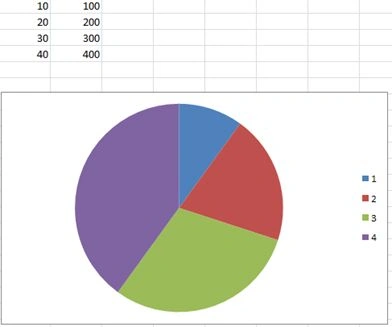
Create a new page and add the Excel Web Access web part to it.
Then select the Excel file.
In the shown tool pane select the Excel work that was uploaded to a Document Library.
Change the following property of the web part. This is the important step.
Typing and formula entry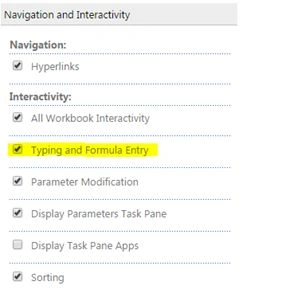
Once the property is changed, save the web part to see the Excel view as shown below. You can try typing in the cells and the view will accept the changes.
Note: The changes can be downloaded using the File > Download command.
Summary
In this article we explored how to enable editing in an Excel web access web part.

Editing an Excel File Using Excel Web Access Web Part
Join the conversation! Your thoughts help the community grow.
Sign in to leave a comment
It is the same account you read, post and publish with — and you will come straight back to this page.
Jean PaulPosted Feb 4, 2015, 2:05 PM
Thank you Vithal for the good words.
Vithal WadjePosted Feb 4, 2015, 1:19 PM
again nice contribution keep it up